Email automation software with optimized personalization to drive engagement.
N/A
Autoklose
Score 8.6 out of 10
Small Businesses (1-50 employees)
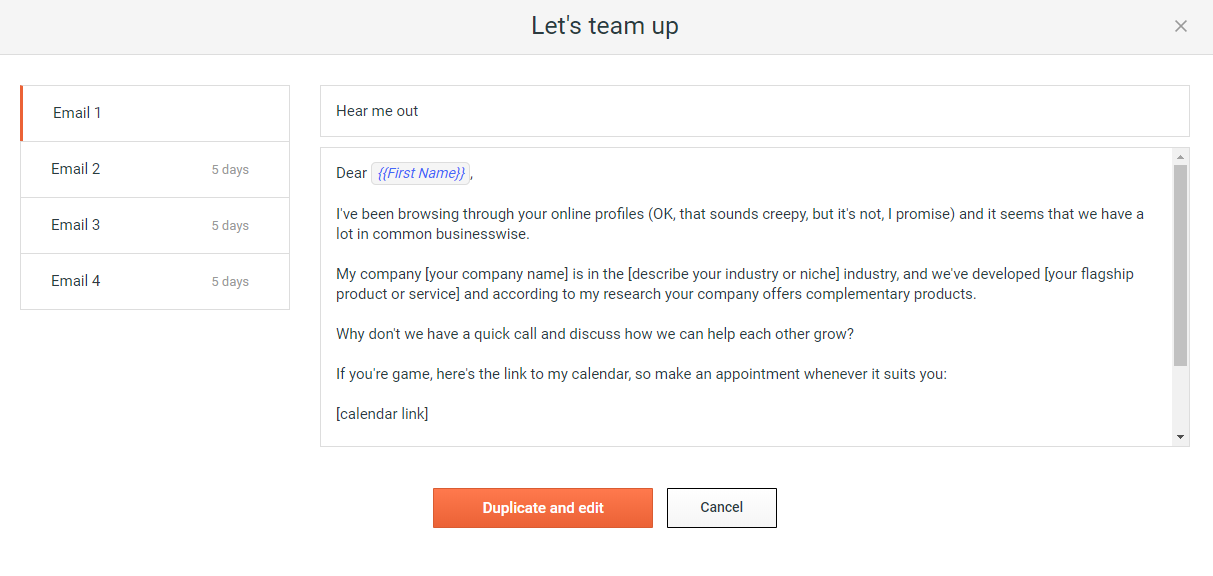
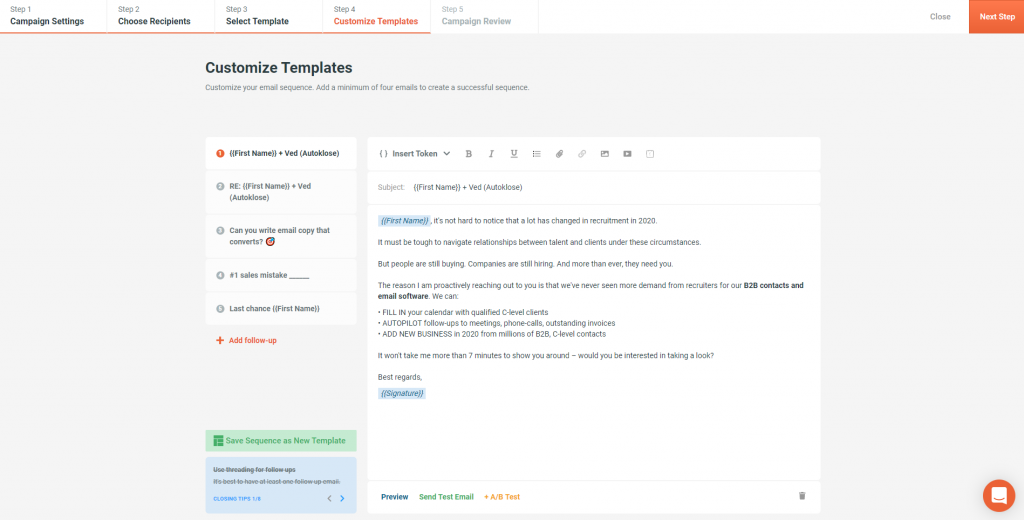
Autoklose, a VanillaSoft brand, is an SEP solution, presenting a combined package of sales email automation and tracking, contact and email campaign management with sequence templates and optimization.
For medium and large sized businesses, Adestra competes well with dotMailer. While many of the functions are available through either provider, creating campaigns, managing lists and reviewing metrics are somewhat different.
As of this writing, dotMailer's drag-and-drop editor …
Most closely is SalesFlare and they directly pull in information for me and have a pipeline so it has been my go to for more important colder sequences as it has more end to end tracking
Autoklose was very reasonably priced compared to the three competitors that I reviewed, but the features were far less robust than Outreach, so I ultimately decided to leave Autoklose after some time. And I went with Outreach, but I still had a great experience with Autoklose, …
Compared to Outreach, Autoklose is similar in the best ways. Both allow you to create email sequences that naturally appear to forward the previous message. Outreach is really intended for Salesforce users, so many of the features seem useless unless you use salesforce. …
Autoklose categorizes information on the display, it is easy to navigate through dashboards and features. In case something is unclear, the Support team always helps to figure it out quickly and clearly.
For me, the most important "why" I selected Autoklose against other platforms is because it had a cheaper price, a very professional team, and it has everything I needed in order to be productive, keep in touch with my team, and use my personal email. And one very important …
Autoklose allows for much more personal emails rather than the typical "mass" email format used by Mailchimp and others. The emails from Autoklose truly look like one you would receive from any person and we have had much higher engagement from these rather than the standard …
Autoklose was the first product of its kind that we tested out. Compared to mass emailing with Outlook Autoklose did wonders for our organization. It solved a problem that no other prospective person could do.
Mailshake is more complicated because it's a direct email sender, but it gives you its opinion on the type of messages you may send. The advantage Autoklose takes is the data base and it's more of a lead gen system. LeadFuze is on course with Autokloze. It seems LeadFuze has …
I haven't used any other actual products similar to Autoklose. I would do things manually, which took forever and often would fall to the bottom of my to-do list.
It's quite similar to Yesware. Both have the great basic functionality of email outreach and simple data tracking. I believe Mixmax had already provided more functionality lately, so I'd tier it a step above. Outreach is on a different level and one of the industry leaders.
I think that I have already said it, Autoklose has much better support and is really quick to set up and use compared with any of the other systems that I have used over the years.
Autoklose provided a different set of tools that focused solely on ensuring accurate emails get sent. The other products were more focused on the CRM part or were significantly more expensive.
Autoklose combines all the necessary resources for sending a campaign to a targeted (and clean) list of prospects. It sequences for me and is smart about removing leads from the process when they engage or respond. They give me easy-to-understand and act on reports of what …
The ones I have used in the past were parts or pieces of the flow. Something goes wrong it's back and worth, this has to talk to that, I don't have the patience or the time. Now I can use one tool for a greater part of the client life cycle from lead to partner.
Small businesses with even smaller marketing budgets and no email marketing experience would be better off selecting a lower-end email marketing provider. However, Adestra will provide a growing company with every email marketing tool along the way.
I would recommend Autoklose to smaller teams that do not have the tools and processes in place for conducting sales outreach or business development activities. I would also recommend it to Sales development reps who are relying on manually managing their sales outreach without the benefits of automation. I'd also recommend it if they are trying to do the above while using a CRM like Pipedrive, as Autoklose works well with some CRMs.
Adestra's "dynamic" list allows users to consolidate multiple lists in combination with data filters and exclusion lists. This implements segmentation and is a powerful marketing tool.
Adestra's MessageFocus API integration provides developer-tools for list, campaign or transactional automated requirements.
Campaigns can be sorted into project folders. This allows marketers to group campaigns together for management or reporting requirements. Moving or copying campaigns from one project to another is a simple process.
Data downloads via Reporting is available at every level, from overview to individual KPI.
Creating "core" tables helps marketers develop lists with similar attributes. Whether a list has many fields or simply the one required email address field, a "core" table helps to quickly map data labels from spreadsheet to online database. Creating data labels on the fly is a simple process, as well. The "core" table also groups similar contacts into one core database.
Any list can be quickly "emptied" for to manage refreshed data. The contacts within the "emptied" list would still be members of the "core" table and so the process does not negatively impact reporting.
Unsubscribes can be managed in one list (as a default) or individual lists. Creating individual unsubscribe lists -- dependent on business requirements -- would allow for a preference center, whereby recipients could be given a choice as to which campaigns they receive.
The Form tool creates signup forms, simple surveys and landing pages. These can be hosted via Adestra or otherwise on the web. The tool provides for branding and proprietary cascading stylesheets, with a number of actions available through a drag-and-drop interface.
As of this writing, there are at least 3 different editors available (a drag-and-drop, a WYSIWYG and HTML). However, only a small template library is available if requested through support. Those expecting to find ready-built templates for re-branding would find them through the third-party EDM Designer drag-and-drop editor.
The system is not designed to send out hundreds of emails within the hour. Thus if you have timely information, and you have a large list, it will generally take many hours to execute.
Related to the above, timing of email delivery does jot exist nor can it be customized by timezone.
I have been self-trained on different ESPs for over 10 years, so my experience isn't comparable to most users. However, I've trained people on various email marketing platforms, and with some training, clients have a positive user-experience with Adestra.
It is well set out from a user interface perspective and once you understand how it works you understand the power and the logic of how it is done. Like any software it helps to be a frequent user, but Autoklose lets you set up campaigns in the shortest possible time based on experience with other systems that I have used.
I have had campaign related issues solved very quickly. When there are technical issues, that involve more than one departmental, it may involve a longer turn-around and management.
Our Autoklose rep is amazing! Jelena has always gotten back to us within 24 hours, despite living on a different continent. She is completely proficient with the tool and is usually able to answer our questions with a brief email or short virtual meeting.
For medium and large sized businesses, Adestra competes well with dotMailer. While many of the functions are available through either provider, creating campaigns, managing lists and reviewing metrics are somewhat different. As of this writing, dotMailer's drag-and-drop editor dominates that platform and performs well for low-end users with little-to-no HTML experience. Even high-end users will appreciate how quickly campaigns can be built via the drag-and-drop editor. While Adestra utilizes the EDM Designer drag-and-drop, the third-party functionality is not completely cohesive and lack of a template library gives dotMailer a bit of an advantage.
Autoklose was very reasonably priced compared to the three competitors that I reviewed, but the features were far less robust than Outreach, so I ultimately decided to leave Autoklose after some time. And I went with Outreach, but I still had a great experience with Autoklose, and I'm able to give them great scores for their product and their service. Salesloft was less robust, and Mailshake wasn't sophisticated enough for my needs.