Adobe Express vs. Podbean

Overview
ProductRatingMost Used ByProduct SummaryStarting Price
Adobe Express
Score 8.8 out of 10
N/A
Adobe Creative Cloud Express (formerly Adobe Spark) is a task-based, web and mobile product used to create and share rich multimedia content – from social media posts and stories to invitations to marketing materials like logos, flyers and banners.
$0
Podbean
Score 8.2 out of 10
N/A
Podbean is presented as an easy but powerful platform for podcast hosting and monetization, from the company of the same name in New York. Additionally, the Podbean Pro edition is for business enterprises, supporting internal communications by enabling users to create, publish, manage and measure corporate audio and video podcasts at scale, to meet enterprise podcast needs.
$14
per month
Pricing
Adobe ExpressPodbean
Editions & Modules
Free
$0.00
Premium
$9.99 / $99.99
per month
Teams
$9.99
per month per user
Unlimited Audio
$14
per month
Unlimited Plus
$39
per month
Business
$129
per month
Offerings
Pricing Offerings
Adobe ExpressPodbean
Free Trial
YesYes
Free/Freemium Version
YesYes
Premium Consulting/Integration Services
NoNo
Entry-level Setup FeeNo setup feeNo setup fee
Additional DetailsContact Adobe directly for Enterprise pricing plan details.
More Pricing Information
Community Pulse
Adobe ExpressPodbean
Considered Both Products
Adobe Express
Chose Adobe Express
Adobe Express is a unique offering

Chose Adobe Express
Well, they were using Canvas and I just knocked it out. We use After Effects too, but again, if you go into After Effects or Premier, you have to do a lot of addition. It's a lot more complex and Adobe Express for doing simple things. And I don't mean simple by diminishing …
Chose Adobe Express
I started on Adobe Spark / Adobe Express before ever trying Figma nad Canva. I tried them after being told how great the were by colleagues and honestly felt like they were cheesy and less adult. The final product didn't feel as polished and the user experience was lackluster. …
Chose Adobe Express
Adobe Express is a lot more user friendly for people who aren't graphic designers that still want to create content
Chose Adobe Express
Express and Canva are very similar but backed by the power of Adobe; Express is the better option. Its feature set is greater, and the recent addition of Firefly is a game changer, making it leaps and bounds better than Canva. Certain features in Express that Canva doesn't have …
Chose Adobe Express
Adobe Express seems to be slightly inferior design wise, but has greater integrations with the Adobe ecosystem
Chose Adobe Express
Express needs to continue with their AI improvements such as for professional profiles in photo editing.
Chose Adobe Express
Simplicity and more functional
Chose Adobe Express
Canva is a little more expensive and the usability of it for creation or quick changes are not there like Adobe Express has.
Chose Adobe Express
Adobe Express has stronger branding features. For example, it's much easier to save custom logos and styles and I feel like the end-products are more polished.
Chose Adobe Express
I used Canva for a long time, but since we already had the Adobe Creative Suite and Adobe Creative Cloud Express was included, I went ahead and started using Adobe Creative Cloud Express, as it was more cost-effective. Unfortunately, Adobe Creative Cloud Express doesn't offer …
Chose Adobe Express
Adobe Creative Cloud Express uses layers which is closer to the very widely used Adobe PhotoShop. Its integration with Adobe PhotoShop made it more familiar to use. But overall [in my opinion], Canva has more options of elements and effects.
Chose Adobe Express
I prefer Adobe Creative Cloud Express to Canva for the back-end interface. To me, Adobe Creative Cloud Express is more user-friendly and provides greater options. You really do get what you pay for. I was also able to learn how to use Adobe Creative Cloud Express with little to …
Chose Adobe Express
Adobe Creative Cloud Express offers greater versatility in creating, including video, images, and pages. Access to Adobe content will take your creativity to new levels and this alone makes Adobe Creative Cloud Express stand out and above the rest. Finally, the apps are …
Chose Adobe Express
I think the main benefit of Adobe Creative Cloud Express over PicMonkey is simply the ease of use for the App. PicMonkey did have a better web interface, but it's also meant for users who have experience with graphics, whereas Adobe Creative Cloud Express is the most …
Chose Adobe Express
I have not used any other products like Adobe Creative Cloud Express. Adobe Creative Cloud Express has been the best thing for me and my work. I have no need to use any other products that are remotely close to Adobe Creative Cloud Express. I will probably not look for any …
Chose Adobe Express
They both have great ease of use. More recently, Adobe changed something in its interface that created a small but consistently aggravating inconvenience, so Canva may be better in that aspect. The platform for Canva has great UX in my opinion. Adobe Creative Cloud Express …
Chose Adobe Express
While I think Adobe Creative Cloud Express and Canva are actually pretty similar, I find that kids tend to see Adobe Creative Cloud Express as a little more manageable and less overwhelming. Graphic design can be a little scary, and I think Adobe Creative Cloud Express does a …
Chose Adobe Express
Adobe Creative Cloud Express was chosen for us by somebody else in the organization, but I still really like it. Though I do like Canva, I'm so used to Adobe Creative Cloud Express now I'd never go back. We used to use Animoto (free version) and I do miss some of the …
Chose Adobe Express
Adobe Creative Cloud Express is easier to use than almost every other graphics program I’ve used. Those that are as simple, or simpler, do not produce creations with as professional and creative looks as Adobe Creative Cloud Express does.
Chose Adobe Express
We use Adobe Creative Cloud Express in addition to all of the above, depending on the project. It stacks up extremely well against all other products, except Premiere Pro on the video side (obviously). In the area that we use it most - for the on the fly social media - it is …
Chose Adobe Express
Canva has more free templates than Adobe Creative Cloud Express. The content planner option in Canva makes it different from Adobe Creative Cloud Express. Canva has a more easy-to-understand interface. We can use Canva on any device but Adobe Creative Cloud Express Post is only …
Podbean
Chose Podbean
Podbean is a different software model to this software and I believe it runs better. iTunes is a tough competitor however, PodBean has the advantage as it is not strictly for IOS and has a desktop version that is more seamless. I believe this makes it better software for …
Chose Podbean
We looked at hosting it entirely ourselves on our website, but the hosting space adds up and Podbean is purpose-built for this purpose. It's reliable and fits our needs much better than hosting via our website. Podbean also fits better into our workflow, since the website …
Chose Podbean
For a personal podcast, I host on WordPress with a plugin called Seriously Simple Podcasting. This solution is a bare bones solution, good if you know how to manage a WordPress website and are able to submit your podcasts manually to different apps and services. If you can …
Best Alternatives
Adobe ExpressPodbean
Small Businesses
Pexels
Pexels
Score 10.0 out of 10
Pexels
Pexels
Score 10.0 out of 10
Medium-sized Companies
Pexels
Pexels
Score 10.0 out of 10
Pexels
Pexels
Score 10.0 out of 10
Enterprises
Pexels
Pexels
Score 10.0 out of 10
Pexels
Pexels
Score 10.0 out of 10
All AlternativesView all alternativesView all alternatives
User Ratings
Adobe ExpressPodbean
Likelihood to Recommend
8.8
(0 ratings)
8.8
(0 ratings)
Usability
9.4
(0 ratings)
-
(0 ratings)
Support Rating
7.9
(0 ratings)
-
(0 ratings)
User Testimonials
Adobe ExpressPodbean
Likelihood to Recommend
I needed to create quarterly safety training posters. In the past, I have used Canva. But in Canva's free version, your options are limited. So off to AE I went. I was able to find four templates to help me create my four posters. I found templates that looked like a movie poster, and the results were so professional looking. It was easy to add my own pictures from my computer to further personalize the posters. I loved them so much I made them into movie poster size printouts, sprayed some liquid glue on a styroboard, and hung them up around our offices. Our employees loved them too, and it drummed up more people to attend my sessions.
Read full review
Great for working and gathering information about the food industry. I use it regularly. I do not use the video function too often as it's not appropriate for my job role however, it's incredibly easy to use and seamless. The picture and sound quality are also very reliable and sharp.
Read full review
Pros
  • Out-of-the-box templates save a lot of time and effort for designers and new users.
  • Collaboration to share resources and monitor task status centrally.
  • Great design elements bring a wow factor to digital content.
  • Single design tool for all types of content design.
Read full review
  • It's easy to navigate and doesn't take long to find what you need.
  • The process for uploading video and audio podcasts is intuitive and hassle-free.
  • Configuration is intuitive and straightforward, which is appreciated.
  • Access to multiple Podcasting streams.
Read full review
Cons
  • Canva has a better interface, in my opinion... I like that this one is friendly to Adobe users, but I would likely recommend Canva to someone who's never used design software for a complete beginner.
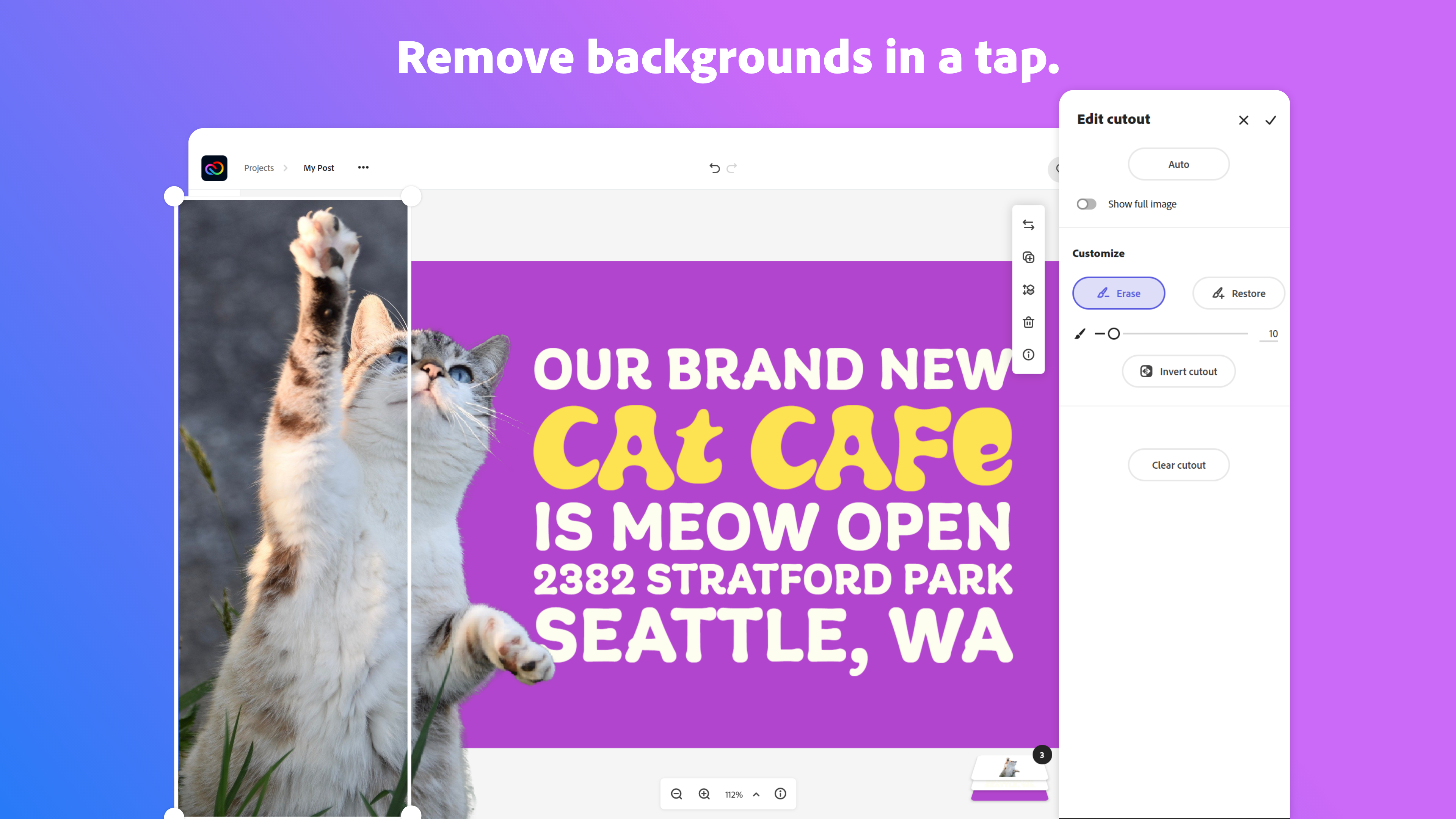
  • Removing the background from images doesn't always work well. I almost always need to switch to Photoshop for this.
  • The touch screen interface could be better; graphics on mobile apps are tough in general but specifically, the iPad interface could use some improvement.
Read full review
  • Better analytics data. I would like to know what players people are using most.
  • More obvious limitations of number of podcasts allowed in each pricing tier. Saying Business has unlimited number of podcasts is misleading if that is for unlimited private podcasts and only 2 public.
Read full review
Likelihood to Renew
I use it daily for almost all my marketing needs. So far it is the program that has the most and best to offer for what I need and is the easiest to use
Read full review
No answers on this topic
Usability
The overall usability of the software was strong. The application, especially relative to other Adobe services like Photoshop that can demand a lot of knowledge and skill, was highly easy to use. At the same time, that also speaks to the somewhat limited amount of customization opportunities that allow content designers to truly create content that is dynamic, engaging, and different than the standard stuff that floods our vision every day.
Read full review
No answers on this topic
Support Rating
Because adobe is so widespread the community support is amazing. I have never actually used adobe support short of their website, but I go to youtube a lot to get my questions answered. You can google any problem you have and not have any issues finding an answer. In my opinion, community support is much more meaningful and helpful than support directly from the company
Read full review
No answers on this topic
Alternatives Considered
For users already in the Adobe ecosystem, Adobe Express is a great tool to consider for it's modern, professional templates, impressive stock image library and the easy drag-and-drop tools. I mostly do most of my work on desktop, but I know Canva is generally better for mobile usability and its got more third-party integrations that may be important to some users.
Read full review
For a personal podcast, I host on WordPress with a plugin called Seriously Simple Podcasting. This solution is a bare bones solution, good if you know how to manage a WordPress website and are able to submit your podcasts manually to different apps and services. If you can afford Podbean I would suggest using it because the WordPress route takes a lot more time and technical knowledge. Podbean takes so much of the hassle and work away from the process.
Read full review
Return on Investment
  • It has allowed us to complete more demos and projects in less time by being so flexible.
  • It has positively impacted our efficiency in delivering creatives such as YouTube thumbnails, event poster designs, Instagram story posts, etc to clients in a timely manner no matter where work takes us.
  • I would say the ROI has been seeing more projects completed and invoiced per month. I would estimate overall a 20% increase in volume on deliverables.
Read full review
  • Great ROI because we don't have to use another service or change our process for posting
  • The only negative impact was on my time when I had to manually post when the WordPress plugin was broken.
  • We have things automated now, so it's a great positive impact
Read full review
ScreenShots

Adobe Express Screenshots

Screenshot of Screenshot of Screenshot of Screenshot of Screenshot of Screenshot of