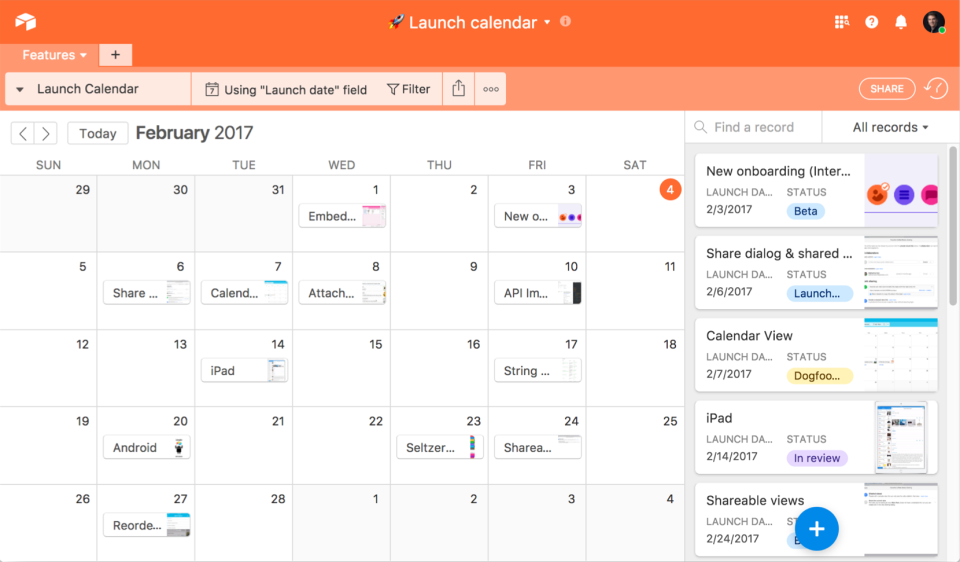
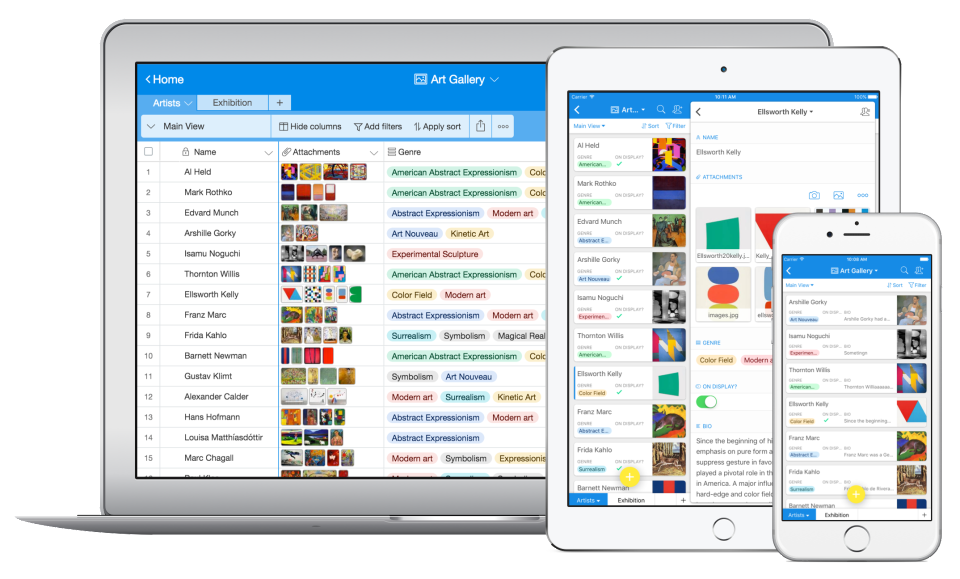
Airtable is a project management and collaboration platform designed to enable content pipelines, product management, events planning, user research, and more. It combines spreadsheet,database, calendar, and kanban functionality within one platform.
$24
per month per user
Google Sheets
Score 8.8 out of 10
N/A
Google Sheets is the spreadsheet app available on Google Workspace, or standalone, with a free plan for personal use and accessible via mobile apps for iOS and Android.
Airtable is the best for structuring, automating and interacting with data, but only for internal use. For public-facing needs, other apps are required for their support of custom domains and styling.
Airtable is far more sophisticated than Sheets or Excel in terms of its functions. The interface is also much easier on the eyes. People are less familiar with it and there is a bit of a learning curve, but overall, Airtable empowers us to do more and to better understand our …
Airtable is the most user-friendly and adaptive. It's UX/UI is the most aesthetically pleasing (which matters a lot if its what you're staring at every day), and the customizability of having different views and perspectives of the same record is extremely helpful.
It is not comparable because we use it as a bridge those tools and our platform. So, in our use case, Airtable works more as a connector between the different tools we use and as a complement to eliminate repeated tasks trough automation. We are also exploring the possibility …
AirTable does a great job at Project Management. You can easily create tasks and set up reminders, including automated reminder emails, when deadlines draw near. You can group the tasks and can also group tasks in a variety of ways (not started, pending, completed or …
Airtable was a really good fit for this specific use case as it provided a huge number of collaboration features in an intuitive and pleasant-to-use interface. The free tier worked initially with our work, and the upgrade pathway was fair and made sense for us.
There's a saying that spreadsheets were never meant to be databases, and Airtable provides the missing piece for nontechnical users who need to hear that saying. It's more performant and provides more custom view options, for example, than Excel or Google Sheets.
Airtable is as powerful, if not more than these competitors. It has a simple interface like Asana or Trello but has robust data functions and tracking of Jira or ShotGrid (now called Flow). While I haven't found it as profoundly integrated as Jira, Airtable feels much more …
While a very capable tool, Smartsheet ultimately didn't provide the ease of use we required for our scenario. Monday was a great tool that felt very similar to Airtable, except its mobile app actually lead to some mismatched information and difficult use in time-sensitive …
I have tried Trello, Monday.com, Meister Task, and even Google Sheets. They are all great and solid applications. Some even have really nice user interfaces. However, none of them have met my primary need of being able to view my current projects and associated deadlines at a …
Airtable exceeds all competitors I’ve seen. The feature set is full and only growing. The UI is intuitive for non-tech employees. Any competitors that match Airtable are really operating in a different space. Airtable is the industry leader in this category. Period.
Asana is a great piece of software but it ultimately had too many features and offerings. Our main focus was having a 'smartsheet' that easily allowed for collaboration at a very affordable price. Airtable was the best fit for what we were looking for at the time. If we ever …
We have tried to use smart-sheet before but it is nowhere as good as Airtable. The user interface with Airtable is much better and it also has much more functionality.
The only similar thing that I have used is Google Sheets, and Airtable is much better than this as it provides way more abilities and creation of automation.
Google Sheets is better than smartsheets and excel when it comes to integrating into different applications for automation as well as for team collaboration. While excel is better for analysis and higher level formulas/Marcos when working in a team environment or involving …
My organization uses Google Sheets instead of Microsoft Excel because we are a Google shop. Sheets permissions are especially easy via existing Google Workspace groups. We're a very collaborative company that values easy browser-based simultaneous document editing and …
From my experience, Google sheets doesn't compare to excel. It suffices for basic spreadsheet needs but does not compare in terms of functionality. An organizational change led me to the opportunity to use Excel and I'm happy to have made the switch and have not looked back. …
Microsoft Excel is very similar, I don't have much to say in comparison. I have not tried using formulas in Google Sheets. OneDrive is also very similar but it autosaves so you don't have to worry about saving information or forgetting to save and losing data. It is also …
In my opinion, based on my own experience, I believe that Google Sheets stands in the second position in my list of spreadsheet software largely because of things such as ease to share and access data, multiple edits simultaneously and keep a track of the real-time changes, …
Microsoft Excel might be good for large-scale local work, but Google Sheets is so fast and clean. I have also used other systems like Air Table, and Excel online, but honestly Google Sheets is so ubiquitous and easy to use I always start there first. Other software products I …
Google Sheets is newest of all and is easy to understand. It has better UI or display then rest all. Minimal design helps to focus more on work. In built chat features is one that makes it stand out of league then rest of all. Unlike MS Excel and LibreOffice it is available …
Microsoft Excel is much more functional and has more functions/capabilities than Google Sheets. It is also faster compared to Google Sheets. On the other side, Google Sheets is better for collaboration and saves you a lot of time. As I usually do not work with big files I …
We selected it for it's nearly universal integration capabilities to pull data from all the programs in our tech stack for deeper analysis in Tableau. It integrates with Tableau, which is the number one reason we decided to use it. It's a lot more user friendly than Excel, even …
Microsoft Excel has more in-depth formulas you can use, but overall it can get quite confusing and overwhelming. Google Sheets is more approachable, and easier to learn and collaborate with.
clearly a win-win situation by using Google sheets, [especially] for remote work and teamwork! Microsoft Excel does not allow any of that unless you have a pay version of it.
I find Google Sheets much simpler and easier to use than Microsoft Excel. It is free which can make a huge difference if you are on a budget. It is also entirely web-based which makes sharing and collaborating much easier as well as ensuring that there is only one version of …
Google sheets has a clear advantage. It is more simple to use for daily applications, allows for easier collaboration, and has portability (offline working). It allows for easy sharing and integration with other Google online programs such as Gmail, Google Drive, Google Docs, …
I enjoy the ease of access and sharing information with anyone, google sheets is great for that. You can easily send a link in an email or text message which makes it easier than other programs because you have to purchase separately if their software doesn't come included at …
We originally selected Google Sheets for its easy to use interface and seamless connection throughout using Google for all of our business. We love how all the different google apps connect and make it easy to share things with the team.
Google Sheets allows for all of the capabilities of Microsoft Excel, but with real-time edits that can create a collaborative experience across teams. By being able to access people's changes in real-time, it makes for an easier work experience, especially in the remote world …
Google Sheets is very good in performance and can be accessed from anywhere being a cloud application. That is the major differentiator for it. Sharing of documents is not a difficult task anymore and no need to use space from our personal devices. It is very simple to access …
On Microsoft, we can't edit the documents at the same time with our friends and co-workers, we need to save everything on the computer memory. I find Google Sheets to be a lot superior, by allowing us to save everything up in the cloud, to read, share and edit whatever document …
The biggest kicker here is that Google Sheets is free. On top of that, it is way easier to share the file with other users who are not within our company, with easy controls over how they can access and what exactly they can do with the file. Also, being able to see who all has …
I feel Google Sheets is better compared to the many available competitors thanks to its many features and also easy integration with Google products. It is also easy to use and is available online.
Microsoft Excel and Numbers on Mac. Used the first reiteration of the Windows 365 and was terrible.
It stacks up well against excel due to power of two other Google products 1) Google search and 2) YouTube. If you cannot find an article or video to help you might be …
The major reason I use Google Sheets over Microsoft Excel and Apple Numbers is for its ability to allow multiple users to access and work on the same spreadsheet at once. This is incredibly more efficient and effective than updating and sending copies upon copies of the same …
Airtable is well suited for cross-functional teams who all have an interest in data site - it's democratizing who owns data. Especially if there will be a need to add input on a cell-level basis view comment functionality with the expectation of @mentioned parties respond. Airtable is less suited for teams who need to run functions, jobs, and macros across a data set; they're best suited for Excel.
Google Sheets is a great tool mostly for people in the finance department such as accountants who have to analyze hundreds of transactions. The software makes it easy to organize data and handle some analysis. Also, when it comes to data presentation, Google Sheets offers some of the best features. However, this is not to sat people outside the finance docket cannot benefit from this software. It is a great tool to have when handling data.
Airtable has capabilities commonly found in spreadsheet applications, but also has some of the features found in databases.
The ability to filter fields. I set up a filter on the status field, so when a project is marked, complete, on hold, or canceled, that record is hidden from my current projects table view. If it is marked complete, the record is moved to the completed projects table view. In this way I can easily access a record of past projects
Being able to duplicate tables and create alternate views
Collapse and expand records. When I collapse the rows, I can easily scan current projects, next steps, project status, and due dates. When I expand the row, or field, I can see more detailed information about that field or record very easily. I can also expand or open the entire record. This is is helpful, when I am entering a lot of information to multiple fields in that record.
Airtable does not integrate with collaboration services with which it is possible to review live changes within each spreadsheet (in the case of keeping them closed).
Does not automate analysis traffic.
It does not include any section where it is possible to communicate with the other editors.
Shifting to Sheets after years and years of Excel is like learning to crawl after I've been running for years. Some sort of translator document. Such as if you use XYZ in Excel, the same function can be found here in Sheets
Functionality shuts down after 5K or so lines are used. I work in finance. We have hundreds of thousands of transactions we need to analyze.
If Big Query is the answer to large amounts of data, it needs to be as easy to use as Sheets is.
We love Airtable for how we use it and we know there are probably tons of other ways we can implement it for other departments. We just haven't gotten there yet (due to bandwith) Customer Support is also super helpful and overall ease of use is fantastic
I am not involved in the purchase/selection process, but my organization is a Google shop, and Sheets meets most of our spreadsheet needs and works seamlessly with our other tools. I don't anticipate our switching anytime soon.
Airtable is a simple and intuitive tool. However, when you first set it up, you need someone who is curious and able to design a system that works for your organisation's use case. This takes some time, but it can be intuitive once it's set up.
Overall the formula functions could improve but there's workarounds for them. Utilzing different formulas or approaches for building out accounting schedules. While collebrating with multiple team members and different departments being able to go in and see where others are on the sheets is helpful. Google Sheets overall is a great product
I have rarely experience downtime, compared to other tools, and given how much time we spend on the tool. Even if there were to be, their updates on it are very timely, and our support team are able to provide any questions regarding
Like most Google products, Google Sheets rarely has outages or slowness, and when it does, connection is always momentarily restored. I can't recall a time when I've been unable to access Google Sheets but able to access other sites just fine. That said, errors aren't uncommon when handling large data volume. You know what they say about using spreadsheets as databases, but sometimes it's just the most convenient option, especially for smaller or one-off projects, and not being able to store large amounts of data hampers our ability to move quickly with scrappy prototypes or full solutions. It would be great if we could better integrate our data manipulation (Apps Script) with big data in the sheet.
I never had any issues with load time, even with the integrations that we use today (google sheets) However, I'm curious if adding additional layers of integrations would slow down performance. We do carry quite a bit of data in Airtable, but, again, no impact on overall performance
Again, Google Sheets is no exception to Google's general high speed and reliability, but load times can be slow for larger amounts of data. I've used Sheets with Zapier and have used the Python API, and speed has never been an issue.
Airtable has great support. They have a variety of support features to answer any questions. They have great self teaching instructions for templates and product tours. They also have support for teams and project management. They also have a fantastic customer help line. They are able and willing to answer customer questions and never have customers waiting long
I have never contacted Google Sheets support, but Google Sheets makes it very easy to report an issue or suggest a feature from Sheets itself (Help > Help Sheets improve), and I've had mostly good experiences with support for other Google products.
Recorded trainings were provided by the Airtable team. Great as an evergreen resources to new team members and for anyone that wants to refresh their Airtable knowledge
Training all users was an important part of the implementation, which did take considerable time and effort. At first glance without training, the content calendar can be overwhelming because of the amount of data. The features within Airtable seem to be endless but our team was able to identify the most important to be successful.
Airtable is the most user-friendly and adaptive. It's UX/UI is the most aesthetically pleasing (which matters a lot if its what you're staring at every day), and the customizability of having different views and perspectives of the same record is extremely helpful. It's also a great cloud-based storage place for marketing materials, as it goes beyond simple storage - you can group together, make notes, connect, and comment on assets.
Microsoft Excel and Numbers on Mac. Used the first reiteration of the Windows 365 and was terrible. It stacks up well against excel due to power of two other Google products 1) Google search and 2) YouTube. If you cannot find an article or video to help you might be disappointed but keep looking.
There are TONS of opportunity to scale, but I think it's a matter if you have the time and resources to do so because the initial setup can be fairly time consuming and prioritized dedication
Google Sheets works very well with multiple users. It's convenient to see in real-time who is collaborating in a sheet, down to the specific cell that they're viewing/editing. Linking Sheets across departments is convenient with the IMPORTRANGE function.
Through this platform, I always have the idea bout which of my team member is working on which particular part of the project, I can easily track their progress, and also I can easily correct them where it is required by adding sticky notes, by sending the attachments and URLs.