Chose Alteryx Platform
I prefer Alteryx Platform to all the above products. In my opinion, the Microsoft products (Excel, Power BI) are inferior, cheaper alternatives to Alteryx Platform.

| Product | Rating | Most Used By | Product Summary | Starting Price |
|---|---|---|---|---|
 Alteryx Platform | N/A | The Alteryx AI Platform gives organization automated data preparation, AI-powered analytics, and machine learning with embedded governance and security. Its self-service functionality, with self-service data prep, machine learning, and AI-generated insights, gives enterprise teams with a simplified user experience allowing everyone to create analytic solutions that improve productivity, efficiency, and the bottom line. Alteryx Designer can be used to automate every analytics step… | $4,950 per year per user (minimum of 3 users) | |
 Anaconda | N/A | Anaconda provides access to the foundational open-source Python and R packages used in modern AI, data science, and machine learning. These enterprise-grade solutions enable corporate, research, and academic institutions around the world to harness open-source for competitive advantage and research. Anaconda also provides enterprise-grade security to open-source software through the Premium Repository. | $0 per month |
| Alteryx Platform | Anaconda | |||||||||||||||
|---|---|---|---|---|---|---|---|---|---|---|---|---|---|---|---|---|
| Editions & Modules |
|
| ||||||||||||||
| Offerings |
| |||||||||||||||
| Entry-level Setup Fee | No setup fee | No setup fee | ||||||||||||||
| Additional Details | — | — | ||||||||||||||
| More Pricing Information | ||||||||||||||||
| Alteryx Platform | Anaconda | |
|---|---|---|
| Considered Both Products |  Alteryx Platform  Danielle Zimmerman, CPA, CMA Senior lead tax solutions analyst Chose Alteryx Platform Alteryx can handle more complex scenarios. However, Microsoft Power BI is a lot cheaper  Dhruv Sharma Global Supply Chain Analyst Chose Alteryx Platform Alteryx is by far the most powerful tool to carry out complex and customized calculations with ease and highly reproducible while the other tools often face memory issues and 10x more time to carry ou similar calculations  Andrew Edwards Business Analyst II Chose Alteryx Platform I still use SQL, Python, and Excel when I have to - but alteryx has largely replaced all three of these. Every operation I need to do in any of these I can do in alteryx and see what I'm doing each step of the way - so problem solving is also easier.  Altan Atabarut Digital Transformation & Innovation Lead, Middle East Africa (MEA), Turkey & Central Asia Chose Alteryx Platform IBM is old school, deployment capabilites and automation capabilities lack compared to many market players... Also opensource integrations were limited. Alteryx is good on both deployment and opensource integrations. New versions, IBM WatsonX, is expected to be better the but …  Prateek Naharia IST Analyst Chose Alteryx Platform The Flaws could be the reason  Lauren Susoeff Data Analytics and Reporting Consultant V Chose Alteryx Platform Alteryx is MUCH more user friendly. both provide the ability to code within them, but Alteryx has much nicer interface. The formula tools have a more simple language that is easier to learn than formulae in SSIS. Alteryx is easy to read with multi colored tools identifying what …  Chris Broussard Analytics Team Lead Chose Alteryx Platform Alteryx low-code/no-code workflow development, and the ability to view my data at every step, immediately improved my development time by at least 60%. Highbond (formerly Galvanize / ACL) relies on a proprietary ACL script coding language, which can be time-consuming to …  Kamesh Pandrangi Cyber Security Engineer Chose Alteryx Platform Datastage we have used in similar lines but mostly towards ETL implementation  Gottfried Mathurin Internal Audit Data Analytics Chose Alteryx Platform Knime is open source and free. It also positions itself a little on machine learning. But the user experience and the features available are far less powerful than Alteryx. I was a former user of Lavastorm (ancestor of Infogix Data360) and got acquainted with the low-code …  Brandon Culver Senior Data Analyst Chose Alteryx Platform Previous to Alteryx aquiring Trifacta, we looked at it as a possible compliment/replacement. WIth the aquistion, we are looking to the roadmap on full integration and are very excited. Trifacta brings a cloud native solution but currently lacks many of the features/functions … |  Anaconda  Ammar Aboalrub Freelancer Chose Anaconda There are several reasons why Anaconda is better to use for me including that it is much easier to use than Baycharm. Also, the user interface is not as complicated as that of Baycharm. Even Anaconda does not slow down my device, using PaySharm slowed down my device in an …  Zayed Rais Program Analyst Chose Anaconda In Anaconda, [it is easy] to find and install the required libraries. Here, we can work on multiple projects with different sets of the environment. [It is] easy to create the notebook for developing the ML model and deployment. Right now, it is the best data science version …  Jay Thakkar Student Chose Anaconda I have used many other tools for coding purposes. But for python programming, the best fit tool is Anaconda. Memory management is best in Anaconda.  Gabriel Krahn Analista de Suporte de Sistemas Chose Anaconda It is almost dishonest to compare Anaconda with PyCharm as they do different things in their basic forms unless you spend a lot of time configuring plugins on your PyCharm environment. Anaconda has a lot of things ready and you just need to install your libs and dependencies.  Dilip Jain Senior Database Administrator Chose Anaconda On top of all the software that I have used, Anaconda is the best because in Anaconda we have built-in packages that provide no headache to install packages and we can design a separate environment for different projects. Anaconda has versions made for special use cases. …  Fernanda Ministerio Specialist Chose Anaconda Some analyzed tools, such as Pycharm and Spyder, are simpler to use but still do not have all the libraries needed for those starting out in data science--or in institutions that need to grow in that direction. Anaconda is more robust but stable, more complete, and the …  Tigran Petrosyan Risk Management Specialist Chose Anaconda I know that Pycharm is a IDE and Anaconda is a distribution. However I use Anaconda largely due to Jupyter Notebook, which more or less does the same job as Pycharm. 1 year ago I decided to use Anaconda (Jupiyer Notebook) as it is easier to use it as a beginner(at least my …  Juande Santander-Vela Software Development Lead / Product Manager at Solution Level Chose Anaconda Anaconda has 64-bit support in the community edition, and package management is more in line with the way we think.  Ryan McGarry Vice President of Research, Neuroscientist Chose Anaconda MATLAB is more of a pay-as-you-go alternative, which not only does not use Python but is also more bloated and costly. MATLAB takes longer to install, setup, and configure for new users who may require specific packages - such as the Classification Learner (machine learning), …  Xiaotong Song Business Analyst Chose Anaconda Compare Anaconda to Unix coding system. You can use PIP to install and create requirement.txt to replace environment.yml to avoid using Anaconda. However, Anaconda is such an excellent tool to maintain your environment and check the version of your package and update the …  Matthew Deakyne Academic Services Manager Chose Anaconda I prefer Anaconda due to the control I have at every level over the data and the visualizations. Power BI does a better job at guessing what graphics to use, but these usually aren't the most helpful. Anaconda and the slew of Python extensions that add incredible functionality, … |
| Alteryx Platform | Anaconda | |||||||||||||||
|---|---|---|---|---|---|---|---|---|---|---|---|---|---|---|---|---|
| Platform Connectivity |
| |||||||||||||||
| Data Exploration |
| |||||||||||||||
| Data Preparation |
| |||||||||||||||
| Platform Data Modeling |
| |||||||||||||||
| Model Deployment |
|
| Alteryx Platform | Anaconda | |
|---|---|---|
| Small Businesses |  IBM SPSS Statistics Score 7.8 out of 10 |  Jupyter Notebook Score 9.4 out of 10 |
| Medium-sized Companies |  JMP Score 9.2 out of 10 |  Posit Score 10.0 out of 10 |
| Enterprises |  Dataiku Score 7.6 out of 10 | Posit Score 10.0 out of 10 |
| All Alternatives | View all alternatives | View all alternatives |
| Alteryx Platform | Anaconda | |
|---|---|---|
| Likelihood to Recommend | 8.8 (0 ratings) | 10.0 (0 ratings) |
| Likelihood to Renew | 8.9 (0 ratings) | 7.0 (0 ratings) |
| Usability | 9.1 (0 ratings) | 9.0 (0 ratings) |
| Availability | 7.3 (0 ratings) | - (0 ratings) |
| Performance | 8.6 (0 ratings) | - (0 ratings) |
| Support Rating | 9.2 (0 ratings) | 8.9 (0 ratings) |
| In-Person Training | 7.0 (0 ratings) | - (0 ratings) |
| Online Training | 8.5 (0 ratings) | - (0 ratings) |
| Implementation Rating | 8.0 (0 ratings) | - (0 ratings) |
| Configurability | 7.3 (0 ratings) | - (0 ratings) |
| Ease of integration | 8.2 (0 ratings) | - (0 ratings) |
| Product Scalability | 7.3 (0 ratings) | - (0 ratings) |
| Vendor post-sale | 8.2 (0 ratings) | - (0 ratings) |
| Vendor pre-sale | 7.3 (0 ratings) | - (0 ratings) |
| Alteryx Platform | Anaconda | |
|---|---|---|
| Likelihood to Recommend |
|
|
| Pros |
|
 Maike Holthuijzen Ph.D student |
| Cons |
Prateek Naharia IST Analyst |
|
| Likelihood to Renew |
 Mark Frisch Director, Technology Services |
Matthew Deakyne Academic Services Manager |
| Usability |
|
|
| Reliability and Availability |
 Dan Chapman Manager, Market & Competitive Insights | No answers on this topic |
| Performance |
 Dylan Dowrick Data Solutions Manager | No answers on this topic |
| Support Rating |
|
Ryan McGarry Vice President of Research, Neuroscientist |
| In-Person Training |
Altan Atabarut Digital Transformation & Innovation Lead, Middle East Africa (MEA), Turkey & Central Asia | No answers on this topic |
| Online Training |
Altan Atabarut Digital Transformation & Innovation Lead, Middle East Africa (MEA), Turkey & Central Asia | No answers on this topic |
| Implementation Rating |
Dan Chapman Manager, Market & Competitive Insights | No answers on this topic |
| Alternatives Considered |
|
|
| Scalability |
Chris Broussard Analytics Team Lead | No answers on this topic |
| Return on Investment |
|
|
| ScreenShots | Alteryx Platform Screenshots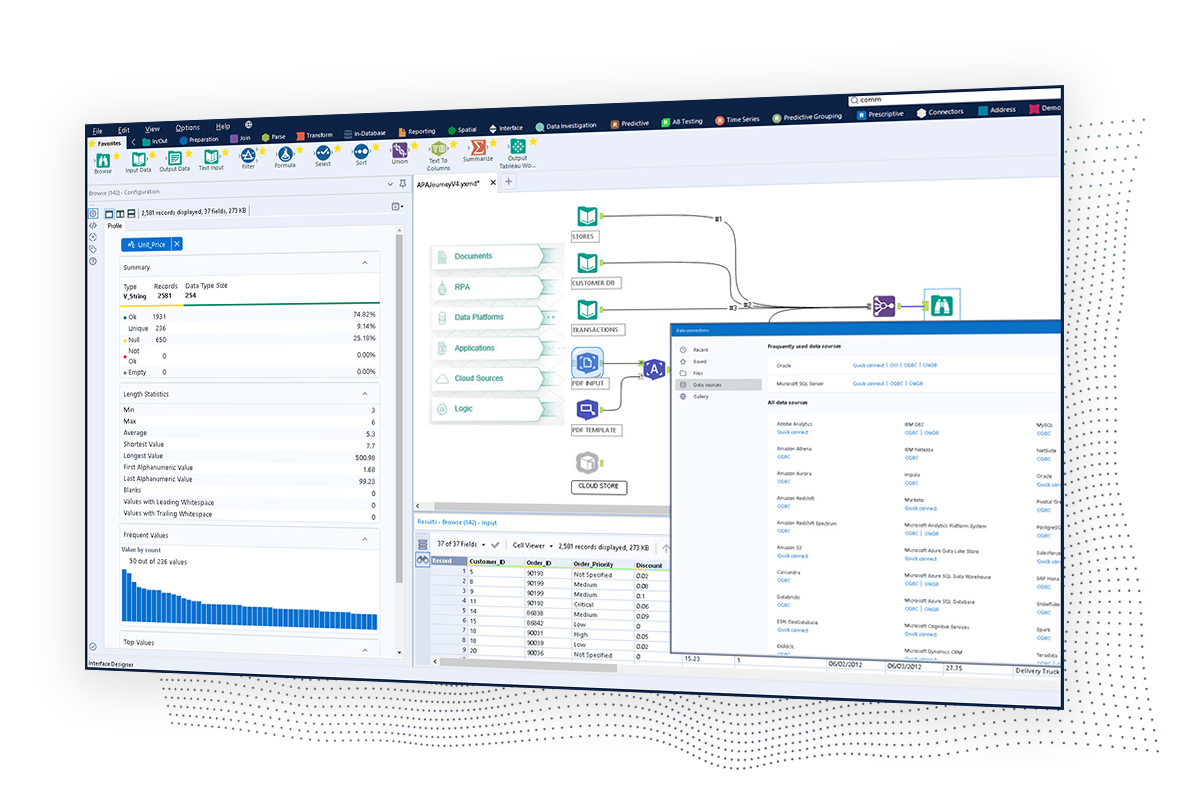   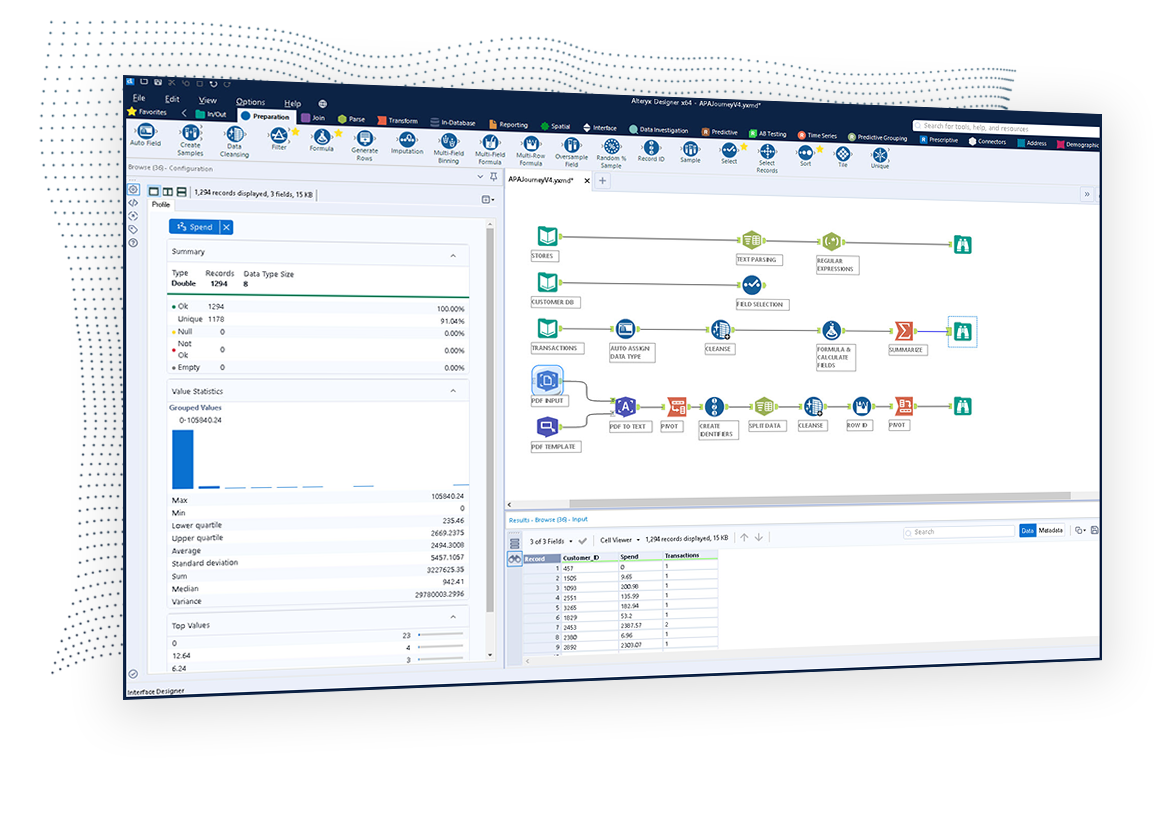  |