Amazon Elastic Compute Cloud (Amazon EC2) is a web service that provides secure, resizable compute capacity in the cloud. Users can launch instances with a variety of OSs, load them with custom application environments, manage network access permissions, and run images on multiple systems.
$0.01
per IP address with a running instance per hour on a pro rata basis
AWS CloudFormation
Score 8.8 out of 10
N/A
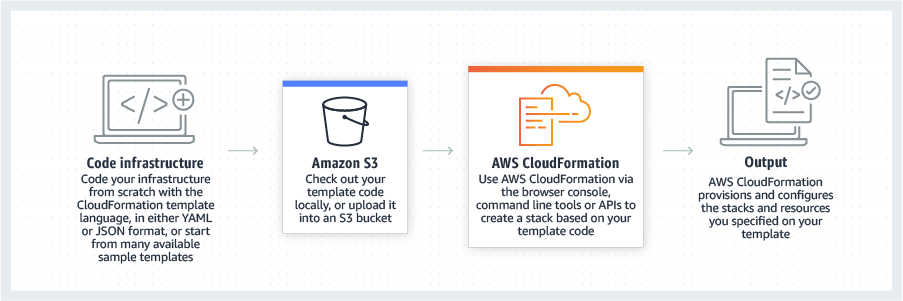
AWS CloudFormation gives developers and systems administrators a way to create and manage a collection of related AWS resources, provisioning and updating them in a predictable fashion. Use AWS CloudFormation’s sample templates or create templates to describe the AWS resources, and any associated dependencies or runtime parameters, required to run an application. Users don’t need to figure out the order for provisioning AWS services or the subtleties of making those dependencies work.…
$0
Pricing
Amazon Elastic Compute Cloud (EC2)
AWS CloudFormation
Editions & Modules
Data Transfer
$0.00 - $0.09
per GB
On-Demand
$0.0042 - $6.528
per Hour
EBS-Optimized Instances
$0.005
per IP address with a running instance per hour on a pro rata basis
Carrier IP Addresses
$0.005 - $0.10
T4g Instances
$0.04
per vCPU-Hour Linux, RHEL, & SLES
T2, T3 Instances
$0.05 ($0.096)
per vCPU-Hour Linux, RHEL, & SLES (Windows)
Free Tier - 1,000 Handler Operations per Month per Account
$0.00
Handler Operation
$0.0009
per handler operation
Offerings
Pricing Offerings
Amazon Elastic Compute Cloud (EC2)
AWS CloudFormation
Free Trial
No
Yes
Free/Freemium Version
No
Yes
Premium Consulting/Integration Services
No
No
Entry-level Setup Fee
No setup fee
No setup fee
Additional Details
—
There is no additional charge for using AWS CloudFormation with resource providers in the following namespaces: AWS::*, Alexa::*, and Custom::*. In this case you pay for AWS resources (such as Amazon EC2 instances, Elastic Load Balancing load balancers, etc.) created using AWS CloudFormation as if you created them manually. You only pay for what you use, as you use it; there are no minimum fees and no required upfront commitments.
When you use resource providers with AWS CloudFormation outside the namespaces mentioned above, you incur charges per handler operation. Handler operations are create, update, delete, read, or list actions on a resource.
More Pricing Information
Community Pulse
Amazon Elastic Compute Cloud (EC2)
AWS CloudFormation
Considered Both Products
Amazon Elastic Compute Cloud (EC2)
Verified User
Anonymous
Chose Amazon Elastic Compute Cloud (EC2)
Amazon Elastic Compute Cloud (EC2) gives better performance for the instance of similar price range, more options for the instance type with good mix of vcpu and memory, administrator finds it easier to manage.
Azure VM Builder offers good service, but the options are quite limited (Too much inclined to Windows as it is prepared by Microsoft). EC2 image building capabilities are the best in the market, and offer Windows, Linux (CentOS, rh2, debian, ubuntu), along with other distros, …
Using Digital Ocean's droplets was much easier and faster to set up and test, but we needed very specific and custom configurations and hardware for our use case, so we went ahead with using Amazon's EC2 instances.
EC2 is easier and more intuitive to use than the same product from other Cloud providers, AWS has been improving on EC2 since its conception in 2006 while the other cloud providers are only following the steps of AWS without much innovation.
We chose Amazon Elastic Compute Cloud (EC2) for our Splunk workloads so that we can take advantage of directly attached high speed storage, along with the other benefits of running on Amazon Elastic Compute Cloud (EC2) instances, such as load balancing, spot pricing and general …
I found Microsoft Azure to be very very complex for new users. The dashboard is very intimidating.
Amazon Elastic Compute Cloud has more popularity and a bigger community to reach out to in case of any issues or help. Found Amazon Elastic Compute Cloud to be the most recommended …
Amazon EC2 is super flexible compared to the PaaS offerings like Heroku Platform and Google App Engine since with Amazon EC2, we have access to the terminal. In terms of pricing, it's basically just the same as Google Compute Engine. The deciding factor is Amazon EC2's native …
I did not select AWS EC2 as my final choice of infrastructure. I picked Linode. Linode, Digital Ocean, AWS EC2 all provide the VPS infrastructure we need. But because I'm a small company, the cost is very important. I also didn't need the other AWS features. I also want to make …
We tried a few other competitors on the web hosting side of our company and ultimately decided to go with AWS EC2 instances. AWS had the most flexibility, the most choices for different types of instances, a variety of Operating Systems, an incredible infrastructure across …
AWS EC2 is fully interfaced with the Amazon Web Services platform and Google compute engine fits in more with Google. While either provider would have been fine, we are pretty much all built on top of AWS at this point barring some clients. It just flowed easier.
Amazon was the first one in the market to provide virtual machines in the cloud and certainly gained a lot of popularity before the rest even came to the picture. The different service providers are quite mutually exclusive, and one cannot easily use more than one at the same …
EC2 has better modes, a variety of instances and UI support as compare to GCE. GCE is completely command driven. As compared to it EC2 provides a better user interface.
We have been using EC2 for so much longer, that even though we use Azure's other features and services more then the equivalent AWS features and services, we don't usually go for Azure's VM offerings first over EC2. I guess that that means this recommendation is mostly based …
Amazon EC2 is the best cloud solution on the market. It has very competitive prices and an incredible number of services available for use. The billing is very efficient and details. EC2 is a great option for individuals, small groups, and large companies. As the needs of …
Amazon's been leading the way in the past few years in cloud computing and have easily become a name we can trust. When we looked at options, nothing compared to EC2 when you looked at the scalability and flexibility of the product. For the needs we were trying to meet, these …
EC2 is a much more advantageous compared with the competitors because it has a much better console, configuration, auto-scalability, uptime, and many other features that are way better than other services I have seen so far. It also provides great backup services integrated …
In our eyes, Amazon has become the de-facto cloud provider. We have searched for other options, but none of them compare when you take documentation, training, support, ease of use all into account. Of all the cloud environments that our admins use daily, AWS is by far the …
All the services above can be built on a server vs using a service. It allows teams that have more breadth of development to dive deep into the implementation and tailor the performance based on the needs they have specifically. In addition, we can tear down failed experiments …
Since the product I'm involved is primarily hosted on AWS we use CloudFormation but in some other products where we have hybrid cloud deployments we prefer terraform which is opensource.
Cloning a virtual machine creates a virtual machine that is cloning a virtual machine creates a virtual machine that is a copy of the original. The new virtual machine is configured with the same virtual hardware, installed software, and other properties that were configured …
As we have our whole infrastructure on AWS, that is why we selected AWS CloudFormation. AWS CloudFormation is better integrated with AWS services than other available products and also provides visibility and tracking on AWS. AWS CloudFormation is free while Terraform …
We didn't look into anything else as Cloudformation was "built-in" for AWS, it just kind of made sense to go with that. Terraform was something that we briefly looked into Terraform but decides to stick with Cloudformation because our task was relatively "simple". Apparently if …
AWS CloudFormation has more features and robustness. It is suited for professional projects since it provides stability and a wide variety of options for configurations. These include not only dividing stacks by specific code changes, but also in regions. This allows more …
The only real comparison would be to Terraform, which is another IaC technology at the infra level. Terraform is cloud-agnostic, which means most popular cloud providers are supported. While AWS CloudFormation is AWS-only. Although, if you consider CDK, CDK for Terraform …
Suitable for companies that are looking for performance at a competitive price, flexibility to switch instance type even with RI, flexibility to add-on IOPS, option to lower running cost with the regular introduction of new instance type that comes with higher performance but at a lower cost.
Cloning a virtual machine creates a virtual machine that is a copy of the original. The new virtual machine is configured with the Cloning Cloning a virtual machine creates a virtual machine that is a copy of the original. The new virtual machine is configured with the same virtual hardware, installed software, and other properties that were configured for the original virtual machine. For information about persistent memory and PMem storage, see the vSphere Resource Management Guide. For information virtual machine creates a virtual machine that is a copy of the original. The new virtual machine is configured with the same virtual hardware, installed software, and other properties that were configured for the original virtual machine. For information about persistent memory and PMem storage, see the vSphere Resource. Management guide. For information virtual hardware, installed software cloning a virtual machine creates a virtual machine that is a copy of the original. The new virtual machine is configured with the same virtual hardware, installed software, and other properties that were configured for the original virtual machine. For information about persistent memory and PMem storage, see the vSphere Resource Management Guide. For information and other properties that were configured for the original virtual machine. For information about persistent memory and PMem storage, see the vSphere Resource Management Guide. For information.
A great variety of choices in Amazon Machine Image (AMI) types. Users can select a more basic type to run generic workloads, but also have the choice to pick an AMI pre-installed with specific services in the AWS Marketplace.
The range of instance types can support the usage from a student's exploration (inexpensive general-purpose nano instances) to an enterprise's most intense workloads (memory or storage-optimized instances with terabytes of memory and ultra-fast network connection).
The pricing options, from regular instances, reserved instances to spot instances allow users to get the job done and make smart choices about how much they want to pay and when they want to pay.
This service is a bit difficult to consume. New users need a big learning curve to use this service effectively.
UI for EC2 service is a little complex and at many places, it misses detailed explanation.
Sometimes it takes too long to create images of EC2 instances. This keeps your EC2 up for that extra time. When instances are heavy, it penalizes a lot of money.
It's easy and straightforward for a technical person to use it via SSH, but when working in cross-functional teams, using Amazon's web console is difficult for this particular service. Most modern cloud providers provide a more seamless user interface to interact with their cloud machines, and the same should have been the case with EC2.
It's easy enough to get a shared template & apply it. You don't even have to download-then-upload or copy-and-paste, a publicly-accessible url works.
Diving deeper, it has enough powerful capabilities to make the life of a platform / DevOps engineer bearable.
However, you need equally deep knowledge to troubleshoot issues, when they inevitably pop up. This is the same for all IaC technologies, as they are additional abstraction layers on top of the native API provided by the cloud providers.
AWS's support is good overall. Not outstanding, but better than average. We have had very little reason to engage with AWS support but in our limited experience, the staff has been knowledgeable, timely and helpful. The only negative is actually initiating a service request can be a bit of a pain.
Azure VM Builder offers good service, but the options are quite limited (Too much inclined to Windows as it is prepared by Microsoft). EC2 image building capabilities are the best in the market, and offer Windows, Linux (CentOS, rh2, debian, ubuntu), along with other distros, which helps customers choose according to their needs.
Since the product I'm involved is primarily hosted on AWS we use CloudFormation but in some other products where we have hybrid cloud deployments we prefer Terraform which is opensource.
With EC2 you pay only when is Running, so you can save up to 75% on Dev environments which are running only on office hours
You have several ways to pay for EC2, with EC2 Reserved Instances you pay with a discount of up to 72% if you make a commitment of using them from 1 or 3 years
With EC2 spot you can use spare AWS EC2 capacity with a discount of up to 90%, your workload must be interrupt tolerant as your EC2 could be reclaim by AWS and the EC2 terminated