It was based on previous experience and a few things that are good about AWS, like S3 and Lambda, the ease of integrating AWS's in-house services, and, of course, support. So, our organization has decided to use AWS.
The AWS relational database service was selected because at the early stages of the implementation of the company product the team didn't have a lot of experience in creating and configuring database inside the company cluster, but there was a need to have a relation database, …
Amazon Relational Database Service (RDS) stands out among similar products due to its seamless integration with other AWS services, automated backups, and multi-AZ deployments for high availability. Its support for various database engines, such as MySQL, PostgreSQL, and …
In a few words, we are just to confortable working with oracle and sql server. Using RDS add another layer of distributed database in order to backup everything we have in case of a disaster and also complies with authorities locally and internacionally. All database we use, …
Deploying PostgreSQL by yourself may appear easy at first but running a production PostgreSQL cluster with millions of records is a hard task, especially for compliance, scalability, and security. RDS automates all complex tasks so you can focus on building your database schema …
With products like Google Cloud SQL, Azure SQL Database, AWS RDS stacks up quite well in all features. Features like licensing, performance, security comes to my mind the most. Another aspect is AWS's global reach.
There are a lot of factor we took into consideration the most important ones are: Ease of use and setup - Compared to other similar options Amazon RDS is very easy to setup just clicking few options and its ready for POC and for production very easy and flexible Terraform …
With the latest serverless technology Amazon Relational Database Service (RDS) has an edge over all its competitors, it works really fast with high log retention.
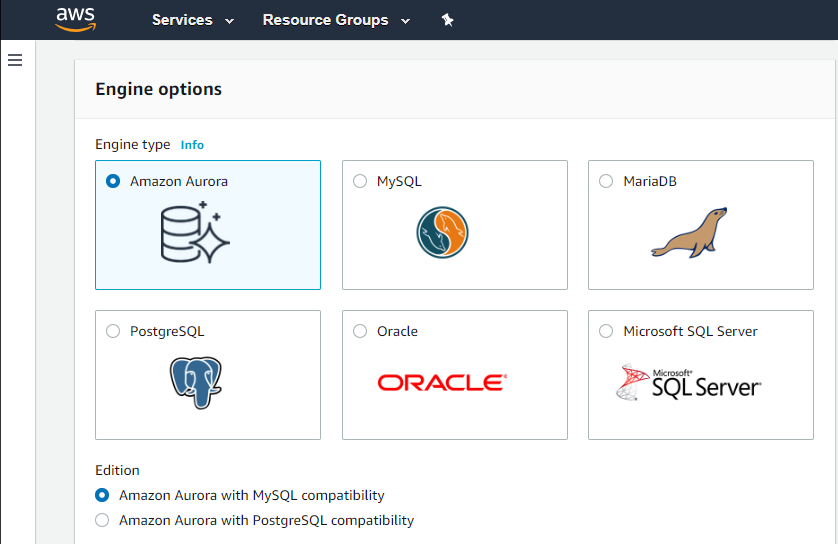
Amazon RDS supports a wider range of database engines, including MySQL,
PostgreSQL, Oracle, Microsoft SQL Server, and Amazon Aurora (MySQL and
PostgreSQL-compatible) than Google Cloud SQL. When compared to Google Cloud SQL, AWS provides a larger global footprint with …
Mongodb is nosql database and some clients prefer it. In our presentation we try to persuade them to use RDS with its pros and cons. The type of selection depends upon the actual need.
Although the Rackspace service is not comparable, even though it is very good, it requires a lot of administration on my part. Regarding Atlas, although it is not the same as RDS in terms of provisioning and administration panel, I mention it because I found it simpler and more …
Previously used Media Temple database hosting (now GoDaddy). While that endeavor was also successful, the AWS RDS is more secure, with higher availability and better documentation.
We have a strong preference for AWS managed services, and we find that RDS offers excellent integration with various AWS services, making it a seamless choice for our infrastructure. Furthermore, RDS supports integration with automation tools such as Terraform, enhancing our …
The main area that stuck out to me in looking at AWS RDS compared to Azure Data Lake Storage was still that RDS is simple to get up and running with over its competitors. The only negative and it holds true for both solutions is that can both be hard to estimate cost control …
During the migration from MySQL installed on Linux to AWS RDS, we were almost surprised as it was done by few clicks rather than too much configurations ans steps in case of traditional DB migrations. In no time our platform was up and running.
Installing, configuring, and managing Oracle Database can be challenging, especially for people who are new to Oracle products. Longer learning curves and higher operational overhead can be caused by this complexity. Amazon Relational Database Service is easy to understand and …
We consider initially only to have the back up product. After analysing different products, we realize that we needed a more complete and robust product such as Amazon Relational Database Service (RDS). Then, the option to hire Amazon Relational Database Service (RDS) was …
1: If your company is already deeply involved in the AWS ecosystem, such as AWS Lambda, Amazon S3, or Amazon Redshift, leveraging Amazon RDS might result in a more seamless integration of services. AWS offers a broad set of cloud services, which makes it easier to design and …
Amazon RDS excels with its widely adopted and mature ecosystem, supporting various database engines. While Azure SQL Database offers a tiered pricing structure and automatic patching, and Cloud SQL provides straightforward pricing and easy scaling, Amazon RDS's extensive …
Compared to Microsoft's SQL Management Studio, Valentina studio was comparable, just harder to get used to in the UI department. It ran slightly slower than other products but did save some time with neat features they baked into the product.
If your application needs a relational data store and uses other AWS services, AWS RDS is a no-brainer. It offers all the traditional database features, makes it a snap to set up, creates cross-region replication, has advanced security, built-in monitoring, and much more at a very good price. You can also set up streaming to a data lake using various other AWS services on your RDS.
If you have to manage a lot of different databases from different vendors, you could do well by standardizing on this product. It checks all the boxes for a proper database management studio. You would only have to learn one product to manage them all. However, if you are looking to find a good product for a single database vendor, you might be better off finding a tool that was designed specifically for that vendor product.
Automated Database Management: We use it for streamlining routine tasks like software patching and database backups.
Scalability on Demand: we use it to handle traffic spikes, scaling both vertically and horizontally.
Database Engine Compatibility: It works amazingly with multiple database engines used by different departments within our organization including MySQL, PostgreSQL, SQL Server, and Oracle.
Monitoring: It covers our extensive monitoring and logging, and also has great compatibility with Amazon CloudWatch
Foreign Key Constraint data viewer! This was a tremendously helpful feature that not many other products have. Just pick a constraint and see the data in the child tables! No setup required!
It is a little difficult to configure and connect to an RDS instance. The integration with ECS can be made more seamless.
Exploring features within RDS is not very easy and intuitive. Either a human friendly documentation should be added or the User Interface be made intuitive so that people can explore and find features on their own.
There should be tools to analyze cost and minimize it according to the usage.
Somewhat laggy performance. Boot up speed was on the slow side and connecting to our database servers was also a little slower than other products.
User interface can be a little clunky. Instead of the usual tree view of servers, databases, and schemas, you are presented with lists that you click on and get new windows to pick the new list of data from. Not organized efficiently.
We do renew our use of Amazon Relational Database Service. We don't have any problems faced with RDS in place. RDS has taken away lot of overhead of hosting database, managing the database and keeping a team just to manage database. Even the backup, security and recovery another overhead that has been taken away by RDS. So, we will keep on using RDS.
I've been using AWS Relational Database Services in several projects in different environments and from the AWS products, maybe this one together to EC2 are my favourite. They deliver what they promise. Reliable, fast, easy and with a fair price (in comparison to commercial products which have obscure license agreements).
I have only had good experiences in working with AWS support. I will admit that my experience comes from the benefit of having a premium tier of support but even working with free-tier accounts I have not had problems getting help with AWS products when needed. And most often, the docs do a pretty good job of explaining how to operate a service so a quick spin through the docs has been useful in solving problems.
Amazon Relational Database Service (RDS) stands out among similar products due to its seamless integration with other AWS services, automated backups, and multi-AZ deployments for high availability. Its support for various database engines, such as MySQL, PostgreSQL, and Oracle, provides flexibility. Additionally, RDS offers managed security features, including encryption and IAM integration, enhancing data protection. The pay-as-you-go pricing model makes it cost-effective. Overall, Amazon RDS excels in ease of use, scalability, and a comprehensive feature set, making it a top choice for organizations seeking a reliable and scalable managed relational database service in the cloud.
Compared to Microsoft's SQL Management Studio, Valentina studio was comparable, just harder to get used to in the UI department. It ran slightly slower than other products but did save some time with neat features they baked into the product. However, in using DBeaver Community and DBForge Studio for PostgreSQL from Devart, we found different products that the team ultimately decided to use. DBeaver has all of the features we needed most (minus the constraint data viewer) and a more intuitive UI that we were used to. DBForge Studio for PostgreSQL has a very standard Windows look and feel and lacks some features, like database/table designers, but makes up for those shortcomings in the much easier filtering and sorting options right in the data grids. You can even write a query and edit the data returned, which is something we don't see in many of these tools. Our team ultimately settled on the developers using DBeaver and the support team that needs data viewing/editing capabilities using DBForge Studio.