Aplos vs. Neon CRM

Overview
ProductRatingMost Used ByProduct SummaryStarting Price
Aplos
Score 9.0 out of 10
N/A
Aplos is a nonprofit and church management software solution. With online fund accounting made for nonprofits and churches of any size, the software is built on a platform that also includes giving tools, people management, and reporting.
$79
per month
Neon CRM
Score 8.6 out of 10
Small Businesses (1-50 employees)
Neon CRM is a constituent management platform designed for nonprofits and membership associations. Its relationship-focused system offers a comprehensive view of supporters and members, to enable more engagement and revenue. It can be used to manage fundraising campaigns, events, communications, and it offers reporting tools to give stronger insights into the user's organization. It automates processes like email marketing, workflows, volunteer management, and payment processing so that users…
$99
per month
Pricing
AplosNeon CRM
Editions & Modules
Aplos Lite
$79
per month
Core
$129
per month
Advanced
$229
Essentials
$99
per month
Impact
$199
per month
Empower
$399
per month
Offerings
Pricing Offerings
AplosNeon CRM
Free Trial
YesNo
Free/Freemium Version
YesNo
Premium Consulting/Integration Services
NoNo
Entry-level Setup FeeNo setup feeOptional
Additional Details10% discount for annual pricing.All plans include unlimited system users, unlimited records, unlimited online forms, and unlimited ticket support. Essentials is a streamlined version of Neon CRM designed for smaller nonprofits. Premium support options are included with Empower. All pricing is based on the organization's revenue.
More Pricing Information
Community Pulse
AplosNeon CRM
Considered Both Products
Aplos
Chose Aplos
I think Aplos has better fund management.

Neon CRM
Chose Neon CRM
We cancelled Neon CRM after 6 years as it became horrible to use
Chose Neon CRM
Neon pales in comparison. Simply put, we regret trusting them with our data. We're a year behind for trying their services.
Chose Neon CRM
We previously used Salsa CRM to store our donation information. NeonCRM is much more user friendly and has better options to store the data we need. Customer service is also much better.
Chose Neon CRM
I liked Classy better. But Classy wasn't trying to be all things for a nonprofit the way that NeonCRM is. NeonCRM is a nonprofit one-stop shop, though our nonprofit is primarily using it for donations and event management. At a previous nonprofit I worked at, Classy was what we …
Chose Neon CRM
Salesforce was over-complicated and overly expensive to use. The learning curve was huge and a real disincentive to use. It needed to be customized which was very expensive. Neon was easy to learn and we are still building it and figuring out how to maximize all of its …
Chose Neon CRM
Neon vs. The Raiser's Edge
Raiser's Edge is the gold standard for fundraising-focused CRM applications. However, it is so complicated that there are higher ed courses and certificate programs you can take to learn it all. The printed manual is hundreds of pages long. You can do …
Chose Neon CRM
NeonCRM can grow with us. We were able to implement a few features initially and, as time went on, incorporate others. We continue to do that.
Chose Neon CRM
It works. It's easy to customize for nonprofit and industry-specific categories. It does what it does well, and integrates with platforms that specialize in those areas rather than trying to be everything to all users.
Chose Neon CRM
Salesforce and Raisers Edge are extremely expensive to set up to be functional. These are great options for very large organizations - colleges and hospitals. For a smaller operation, NeonCRM meets many needs for a much more affordable price.
Chose Neon CRM
Blackbaud had terrible customer service and their product did not work. NeonCRM responds to support questions within hours and are friendly and helpful. Blackbaud did not stand behind their product. The reliability of information making it into the correct record in the correct …
Features
AplosNeon CRM
Communications and Marketing
Comparison of Communications and Marketing features of Product A and Product B
Aplos
-
Ratings
Neon CRM
1.2
Ratings
139% below category average
Constituent engagement and marketing00 Ratings1.50 Ratings
Social listening00 Ratings1.00 Ratings
Digital advocacy enablement00 Ratings1.00 Ratings
Reporting and Analytics
Comparison of Reporting and Analytics features of Product A and Product B
Aplos
-
Ratings
Neon CRM
1.8
Ratings
112% below category average
Reporting and data visualization00 Ratings1.00 Ratings
Wealth screening00 Ratings2.60 Ratings
Fundraising and Events
Comparison of Fundraising and Events features of Product A and Product B
Aplos
-
Ratings
Neon CRM
1.4
Ratings
125% below category average
Online donation options00 Ratings3.10 Ratings
Event registration and ticketing00 Ratings1.00 Ratings
Text and phone donations00 Ratings1.00 Ratings
Volunteer shift management00 Ratings1.00 Ratings
Mobile event check-in00 Ratings1.00 Ratings
Security and Platform
Comparison of Security and Platform features of Product A and Product B
Aplos
-
Ratings
Neon CRM
1.5
Ratings
128% below category average
Role-based user permissions00 Ratings2.60 Ratings
Mobile access00 Ratings1.00 Ratings
Integrations00 Ratings1.00 Ratings
Best Alternatives
AplosNeon CRM
Small Businesses
MIP Fund Accounting
MIP Fund Accounting
Score 8.7 out of 10
Bonterra Network for Good
Score 9.6 out of 10
Medium-sized Companies
MIP Fund Accounting
MIP Fund Accounting
Score 8.7 out of 10
Bloomerang CRM
Bloomerang CRM
Score 8.1 out of 10
Enterprises

No answers on this topic

Blackbaud Enterprise Fundraising CRM
Score 7.6 out of 10
All AlternativesView all alternativesView all alternatives
User Ratings
AplosNeon CRM
Likelihood to Recommend
-
(0 ratings)
1.0
(0 ratings)
Likelihood to Renew
-
(0 ratings)
1.0
(0 ratings)
Usability
-
(0 ratings)
1.0
(0 ratings)
Support Rating
-
(0 ratings)
1.0
(0 ratings)
Implementation Rating
-
(0 ratings)
4.0
(0 ratings)
User Testimonials
AplosNeon CRM
Likelihood to Recommend
Aplos integrates with Bloomerang. It brings donations in as either individual or organization, but there is no name or account number associated with the transaction. When reconciling over 500 transactions each month, many at the same amount, it can be tedious to be sure I am reconciling the right transaction. Having the donor name associated with each transaction would be very helpful
Read full review
If you are looking for a CRM to track your donations and store all donor information, this is a great product. There are tabs under each entry (individual and corporate/foundation donors) to store notes, donation information, and more. Donations entered automatically integrate into the donation campaign section so you can easily track total donation amounts. It is very user friendly and does not require extreme tech knowledge to use effectively. I feel confident storing our information in this CRM. It is very useful to go back to look at past donor information when soliciting new grants and donations.
Read full review
Pros
  • Reporting by Fund
  • Ability to split transactions by fund
  • Custom reports
Read full review
  • The setup and import process was very effective. The team looked at our account import data and recommended ways to format it and explain how it would best be translated into the NEON system.
  • The deduplicate tool is effective and easy to use. The step-by-step system allows a record with multiple addresses to be combined into one account, or added to a household or left as is.
  • It works! We've used other systems that are nightmarish. This system is easy to use and the detailed training videos get into more of the nitty-gritty in a clear and extremely helpful way.
  • Customising form fields was extremely important and easy to do. MailChimp integration using reports from this customization is clutch.
Read full review
Cons
  • In my experience, report filters don't always work like they should.
  • Recent updates have made entering transactions more complicated for me, instead of easier.
  • No ability to delete or deactivate contacts so your list will always grow and you pay based on the number of contacts.
  • In my experience, needs better interface options with other software
Read full review
  • Learning the ropes is largely accomplished by reading manuals and watching videos. I don't learn that way. I'd much prefer to be shown. I guess I'm old school.
  • They can be stingy with the customer support. We bought the big package and I still wind up going back to my salesperson to help me cut through any red tape to get what I need.
Read full review
Likelihood to Renew
No answers on this topic
Neon CRM was difficult and frustrating to use without IT experience, and way to costly for the a small to mid-sized nonprofit. We believe that we lost donors due to the inaccurate report system in Neon CRM
Read full review
Usability
In my opinion, recent improvements have made working in Aplos more cumbersome, instead of easier. The new look seems less professional than the old look to me. I think there should be more options to have a default setting when starting some tasks, like opening a register.
Read full review
The Neon CRM system is confusing (we had to watch video tutorials and html code to understand many of the features, many of which we did not need). Around 2022, Neon started to go downhill. Bells and whistles were added that were of no benefit (to our nonprofit) and the system became even harder to use
Read full review
Support Rating
In my experience, Aplos support used to be awesome...very quick responses and open to suggestions. I could even see my suggestions implemented from time to time. Now I get an answer, but it's usually 'that's how it is' and no solution. 'Improvements' are not improvements to me.
Read full review
As stated before, they push you to read the manual or watch the video when what I want is a human being to walk/talk me through it. Like I said, maybe I am old school but that's how I learn. It's been a challenge.
Read full review
Implementation Rating
No answers on this topic
We had to hire someone to implement our donors into Neon CRM
Read full review
Alternatives Considered
I think Aplos has better fund management.
Read full review
Neon vs. The Raiser's Edge Raiser's Edge is the gold standard for fundraising-focused CRM applications. However, it is so complicated that there are higher ed courses and certificate programs you can take to learn it all. The printed manual is hundreds of pages long. You can do TONS with it, of course, but on the other hand you could spend months mastering just one of its many functions. It is based on architecture from long ago, so it's not slick or user friendly -despite attempts to modernize with a couple of coats of paint (see RE:NXT). Not to mention it is very pricey indeed. If that's not what you need or want, you can turn to Neon CRM as an alternative. Neon has both feet firmly planted in user experience and it will get the job done for basic reporting, email integration, donation processing, easy to read dashboards, it's portable to any device (nothing to download, no servers to host locally or otherwise) and pretty easy to learn. That is why I would recommend it for most users
Read full review
Return on Investment
  • Easy so see what's in each fund at a glance
  • Fixed asset management was not easy for me
Read full review
  • NeonCRM helped our organization during a growth phase to get organized and get almost all of the data into one place.
  • Because the tool doesn't have a simple way to invoice clients, some of the ways we are taking payments from them create a lot more work to reorganize each month.
Read full review
ScreenShots

Neon CRM Screenshots

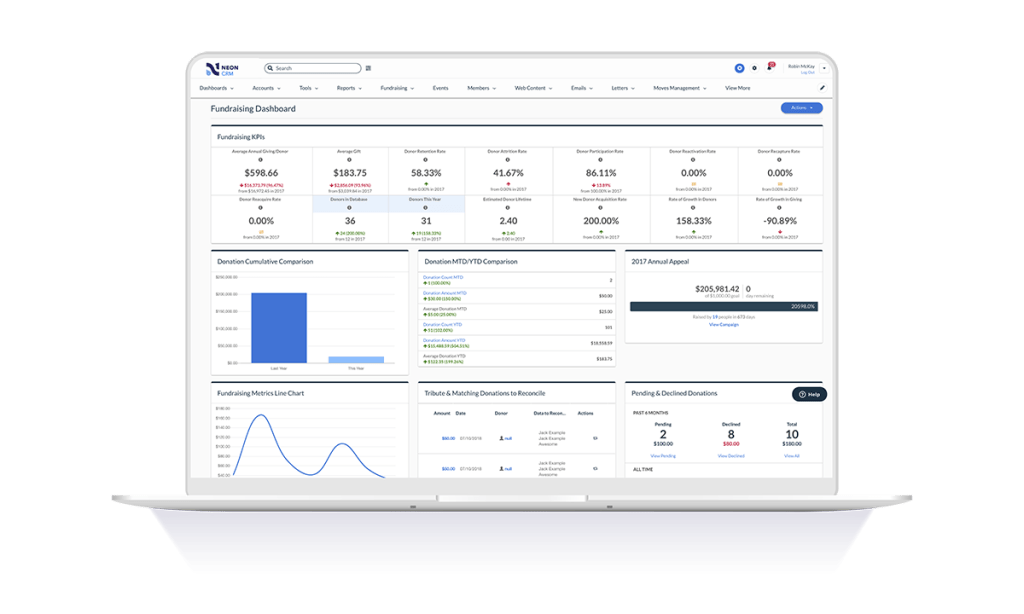
Screenshot of Email Builder: Elevates appeals, newsletters, and other communications with mobile-responsive emails, multi-column layouts, text block editor and full email preview while building.Screenshot of Fundraising Dashboard: Aggregates fundraising data in one place to analyze various campaigns, performance, progress, and comparisons to other years and campaigns.Screenshot of Workflow Automation: Automated workflows that take care of redundant administrative tasks, with workflows to define triggers, audience, and the action to be performed.Screenshot of Reporting: Comprehensive reporting features to pull a variety of reports. By selecting the data source of interest and the fields needed, Neon CRM provides reports to analyze and share with key stakeholders.Screenshot of Donation Form Themes: Drag and drop themes for donation pages matched to the brand with customization.Screenshot of Volunteer Management: To understand the ways that people want to give support, and to track and manage volunteer sign-ups, projects, and time.