Azure Data Factory vs. Matillion

Overview
ProductRatingMost Used ByProduct SummaryStarting Price
Azure Data Factory
Score 9.0 out of 10
N/A
Microsoft's Azure Data Factory is a service built for all data integration needs and skill levels. It is designed to allow the user to easily construct ETL and ELT processes code-free within the intuitive visual environment, or write one's own code. Visually integrate data sources using more than 80 natively built and maintenance-free connectors at no added cost. Focus on data—the serverless integration service does the rest.N/A
Matillion
Score 7.8 out of 10
N/A
Matillion is a data pipeline platform used to build and manage pipelines. Matillion empowers data teams with no-code and AI capabilities to be more productive, integrating data wherever it lives and delivering data that’s ready for AI and analytics.
$2.50
Pay as you go per user
Pricing
Azure Data FactoryMatillion
Editions & Modules
No answers on this topic
Developer: For Individuals
$2.50/credit
Pay as you go per user
Basic
$1000
per month 500 prepaid credits (additional credits: $2.18/credit)
Advanced
$2000
per month 750 prepaid credits (additional credits: $2.73/credit)
Enterprise
Request a Quote
Offerings
Pricing Offerings
Azure Data FactoryMatillion
Free Trial
NoYes
Free/Freemium Version
NoNo
Premium Consulting/Integration Services
NoNo
Entry-level Setup FeeNo setup feeNo setup fee
Additional DetailsBilled directly via cloud marketplace on an hourly basis, with annual subscriptions available depending on the customer's cloud data warehouse provider.
More Pricing Information
Community Pulse
Azure Data FactoryMatillion
Considered Both Products
Azure Data Factory
Chose Azure Data Factory
Azure Data Factory fits well into our overall systems architecture where we already utilize largely Azure services and also Microsoft based products in the on-premises environment. I think cost structure is also very competitive with Azure Data Factory. Most services provide a …
Chose Azure Data Factory
Azure Data Factory helps us automate to schedule jobs as per customer demands to make ETL triggers when the need arises. Anyone can define the workflow with the Azure Data Factory UI designer tool and easily test the systems. It helped us automate the same workflow with …
Chose Azure Data Factory
The easy integration with other Microsoft software as well as high processing speed, very flexible cost, and high level of security of Microsoft Azure products and services stack up against other similar products.
Chose Azure Data Factory
I'd chose data factory because its very easy to use, its UI is beautiful, it's library for .net is very useful and it lives within the microsoft ecosystem.
Chose Azure Data Factory
Azure Data Factory is a relatively new player in the space, and its feature set marks it as such. It does not have the full features of a more mature product set such as any of the above. However, it does allow for the creation of ETL/ELT flows/pipelines with minimal initial …
Matillion
Chose Matillion
Matillion's price is cheaper than Talend and has similar functionalities Matillion has better functionality than Apache Hop
Chose Matillion
Matillion has more security and better version control features. The support of amazing with new connectors introduced every day.
Chose Matillion
Matillion is cheaper and we really like the customer support of Matillion as well as lerning materials provided by Matillion were far better. They also made connectors for us for free while others were charging us for it.
Chose Matillion
I have not used any other products yet
Chose Matillion
Matillion gives great ability to connect to variety of sources and bring data into cloud data warehouse using connector based approach with which we can build complex transformation jobs which can do automated data fetches from your sources.
Chose Matillion
Matillion is affordable, easy to use with a graphical interface
Chose Matillion
I think Matillion is more cost effective and user friendly as compared to the ones mentioned
Chose Matillion
Matillion has better capabilities and better built-in elements that saves your time and efforts. also the connectivity across multiple data warehousing tool is better in Matillion. even the performance of the pipeline and the time required to create a particular pipeline is …
Chose Matillion
Cheaper and faster and more innovative
Chose Matillion
My manager selected Million based on his previous work experience. He believes it is easy to use and maintain, cheaper than competitors, and suitable for our use case.
Chose Matillion
The only other ETL tool I've used was SSIS. At first I thought Matillion seemed "kiddish" after using the polished Microsoft tool but now I think Matillion is easier and can do much more as it has so many built-in connectors etc. We selected Matillion at our job because of …
Chose Matillion
In my opinion Matillion provides more flexibility then the other tools I mentioned.
Chose Matillion
n/a -- joined the team after they already were established in Matillion. Have had brief looks at other ETL products but found nothing compelling enough to suggest a change.
Chose Matillion
We selected Matillion primarily because of it's ability to connect to numerous data sources and easily create transformation jobs. While FiveTran does a better job managing and examining deltas, it is not easy to use and is very non user friendly. SSIS was not a good fit for …
Chose Matillion
Fivetran offers a managed service and pre-configured schemas/models for data loading, which means much less administrative work for initial setup and ongoing maintenance. But it comes at a much higher price tag. So, knowing where your sweet spot is in the build vs. buy spectrum …
Chose Matillion
We decided to move forward with Matillion because it was the best tool among tools that support both ingesting data from a source system to a target database and running transformation workflows on it afterwards. Fivetran and Airbyte only support data ingestion and we had our …
Chose Matillion
Cost and ease of use were better for our purposes. Matillion distinguishes itself from Fivetran and Snaplogic through its user-friendly design, no-code interface, in-depth transformation capabilities, allowing for complex data manipulations directly within the platform, …
Chose Matillion
The Matillion selection was not my decision. But I think it's a good enough choice. It is especially valuable that the team can learn Matillion easily and that the project can be understood by the entire team with the visual environment instead of complex ETLs.
Chose Matillion
Both the Databricks platform and Dbt Cloud are more powerful from the point of view of the development lifecycle and data use cases covered. They are also more complex and require specialized data engineering skills to be used. Matillion has a lower barrier of entry for small …
Chose Matillion
Removes most of the complexity around setting up and preparing things.
If you could describe with words what needs to be done to move data from A to B, the implementation in Matillion would probably be the most similar in terms of simplicity of understanding what you are doing …
Chose Matillion
Better UI, logging, minimal configurations, easy previews and faster
Chose Matillion
Matillion is a good tool for integrating multiple clouds. Informatica has been a market standard for many years, it provides multiple capabilities for data governance, data quality, etc. However, Informatica is pretty expensive compared to Matillion. Also, Matillion is more …
Chose Matillion
This is my first time using an ETL tool
Features
Azure Data FactoryMatillion
Data Source Connection
Comparison of Data Source Connection features of Product A and Product B
Azure Data Factory
9.0
Ratings
7% above category average
Matillion
8.3
Ratings
1% below category average
Connect to traditional data sources9.00 Ratings8.70 Ratings
Connecto to Big Data and NoSQL9.00 Ratings7.90 Ratings
Data Transformations
Comparison of Data Transformations features of Product A and Product B
Azure Data Factory
8.5
Ratings
4% above category average
Matillion
6.9
Ratings
17% below category average
Simple transformations9.00 Ratings7.50 Ratings
Complex transformations8.00 Ratings6.30 Ratings
Data Modeling
Comparison of Data Modeling features of Product A and Product B
Azure Data Factory
7.2
Ratings
10% below category average
Matillion
8.2
Ratings
3% above category average
Data model creation8.00 Ratings9.10 Ratings
Metadata management7.00 Ratings9.10 Ratings
Business rules and workflow7.00 Ratings8.30 Ratings
Collaboration6.00 Ratings7.20 Ratings
Testing and debugging7.00 Ratings7.40 Ratings
Data Governance
Comparison of Data Governance features of Product A and Product B
Azure Data Factory
7.5
Ratings
8% below category average
Matillion
8.2
Ratings
1% above category average
Integration with data quality tools7.00 Ratings8.20 Ratings
Integration with MDM tools8.00 Ratings8.20 Ratings
Best Alternatives
Azure Data FactoryMatillion
Small Businesses
Skyvia
Skyvia
Score 9.9 out of 10
Skyvia
Skyvia
Score 9.9 out of 10
Medium-sized Companies
IBM InfoSphere Information Server
Score 8.0 out of 10
IBM InfoSphere Information Server
Score 8.0 out of 10
Enterprises
IBM InfoSphere Information Server
Score 8.0 out of 10
IBM InfoSphere Information Server
Score 8.0 out of 10
All AlternativesView all alternativesView all alternatives
User Ratings
Azure Data FactoryMatillion
Likelihood to Recommend
9.0
(0 ratings)
7.8
(0 ratings)
Likelihood to Renew
-
(0 ratings)
8.6
(0 ratings)
Usability
-
(0 ratings)
7.0
(0 ratings)
Support Rating
7.0
(0 ratings)
7.4
(0 ratings)
Implementation Rating
-
(0 ratings)
8.2
(0 ratings)
Product Scalability
-
(0 ratings)
7.2
(0 ratings)
Vendor post-sale
-
(0 ratings)
9.1
(0 ratings)
Vendor pre-sale
-
(0 ratings)
9.1
(0 ratings)
User Testimonials
Azure Data FactoryMatillion
Likelihood to Recommend
In a data pipeline, you will be able to add different kinds of activities for example connect from your on-premise SFTP and move CSV files to storage accounts. As well data factory has its own data flow if you are an ETL developer who experimented with maybe you have worked with SSIS, thus, you will start quickly with this new feature of the data factory.
Read full review
Great: Need to query simpler APIs, or utilize well known services such as GSheets etc.? Matillion has got some of the best and easiest to use connectors out there. Not so great: Do you need have a competent CI/CD flow that you will be able to update / compare from Matillion as well as other sources at the same time? Good luck, you will need to be extra careful, as you might have to have a deeper dive into your servers Terminal each time you have a git conflict.
Read full review
Pros
  • Creating ETL and ELT workflows as well as orchestrating and monitoring pipelines without writing any code.
  • Hybrid data integration is easily and agilely possible through this software.
  • It has lot of various useful components
Read full review
  • The user interface of your data pipelines makes it easier for people who aren’t as techy as data engineers to observe what's going on.
  • Customer support is quick, not always as efficient as you would want it to be, but still.
  • Nice documentation available.
Read full review
Cons
  • Learning curve for pipeline creation interface.
  • Alerting isn't necessarily built in. Had to work around this to meet team needs.
  • With GIT enabled, some features can only be done via git, while some need to be done via the portal.
Read full review
  • Static and monolithic, it will show its limits when running multiple concurrent jobs.
  • Github and versioning implementation is messy and broken. Don't use it.
  • There's not way to see/query the system resources, just wait for a server to crash due to out of memory. An admin panel would be appreciated + some env variables with updated info.
  • API implementation is cumbersome and limited.
  • There's no concept of hub and worker engine, everything happens of the same server (designing workflows and executing them). Having separate light ETL engines to run job could be better. (sort of docker/kubernetes/lambda functions).
  • Handling of variables is limited especially for returned values from sub components.
  • Some components could return more metadata at the end of their execution instead of the standard one.
  • Billing is badly designed not taking into account that the server is hosted by the client. Expensive.
  • We had several issue with migration where starting a new instance was required and then migrating the content. It was painful and time consuming also have to deal with support and engineering team on Matillion side.
  • CDC doesn't work as expected or it is not a mature product yet.
Read full review
Likelihood to Renew
No answers on this topic
Matillion is easy to use and flexible to debug. Performance are good and support is giving us a good service level. There are still some technical points to be developed more (such as SAP extraction). but easy flows are really fast to be developed. We are also using a tool for migration from other tools, and it is useful as Matillion is producing XML code.
Read full review
Usability
So far product has performed as expected. We were noticing some performance issues, but they were largely Synapse related. This has led to a shift from Synapse to Databricks. Overall this has delayed our analytic platform. Once databricks becomes fully operational, Azure Data Factory will be critical to our environment and future success.
Read full review
Easy tasks are really easy, and complex tasks are still possible. With prior knowledge of general data warehousing principles and experience with other data transformation tools, it's straightforward to get familiar with and use Matillion. I initially used minimal external support from a partner for some more complex tasks but very soon could work entirely independently with Matillion.
Read full review
Support Rating
We have not had need to engage with Microsoft much on Azure Data Factory, but they have been responsive and helpful when needed. This being said, we have not had a major emergency or outage requiring their intervention. The score of seven is a representation that they have done well for now, but have not proved out their support for a significant issue
Read full review
Overall, I've found Matillion to be responsive and considerate. I feel like they value us as a customer even when I know they have customers who spend more on the product than we do. That speaks to a motive higher than money. They want to make a good product and a good experience for their customers. If I have any complaint, it's that support sometimes feels community-oriented. It isn't always immediately clear to me that my support requests are going to a support engineer and not to the community at large. Usually, though, after a bit of conversation, it's clear that Matillion is watching and responding. And responses are generally quick in coming.
Read full review
Implementation Rating
No answers on this topic
We were able to control on access and built various enviroment for implementation
Read full review
Alternatives Considered
Azure Data Factory fits well into our overall systems architecture where we already utilize largely Azure services and also Microsoft based products in the on-premises environment. I think cost structure is also very competitive with Azure Data Factory. Most services provide a visual interface for designing ETL workflows, but our team found Azure Data Factory's interface more intuitive.
Read full review
We selected Matillion primarily because of it's ability to connect to numerous data sources and easily create transformation jobs. While Fivetran does a better job managing and examining deltas, it is not easy to use and is very non user friendly. SSIS was not a good fit for our team and required a significant amount of attention and server management that we did not want to invest in.
Read full review
Scalability
No answers on this topic
We're using Matillion on EC2 instances, and we have about 20 projects for our clients in the same instance. Sometimes, we're struggling to manage schedules for all projects because thread management is not visible, and we can't see the process at the instance level.
Read full review
Return on Investment
  • Limiting the amount of data moving up and down from the cloud for cloud-native applications.
  • Overall simple to use interface which is actually easier for a first time ETL developer than SSIS.
Read full review
  • Time savings -- we could custom code nearly everything Matillion does, but it would take days/weeks instead of minutes/hours.
  • There's a bit of a learning curve to truly unlock Matillion's potential, and that can be frustrating for some new users, but once you get over that curve, the possibilities are endless.
  • It allows us to centralize the hundreds of way to bring data in, so that even if you have to troubleshoot what someone else wrote, it's easy to jump in and understand what is happening.

Read full review
ScreenShots

Matillion Screenshots

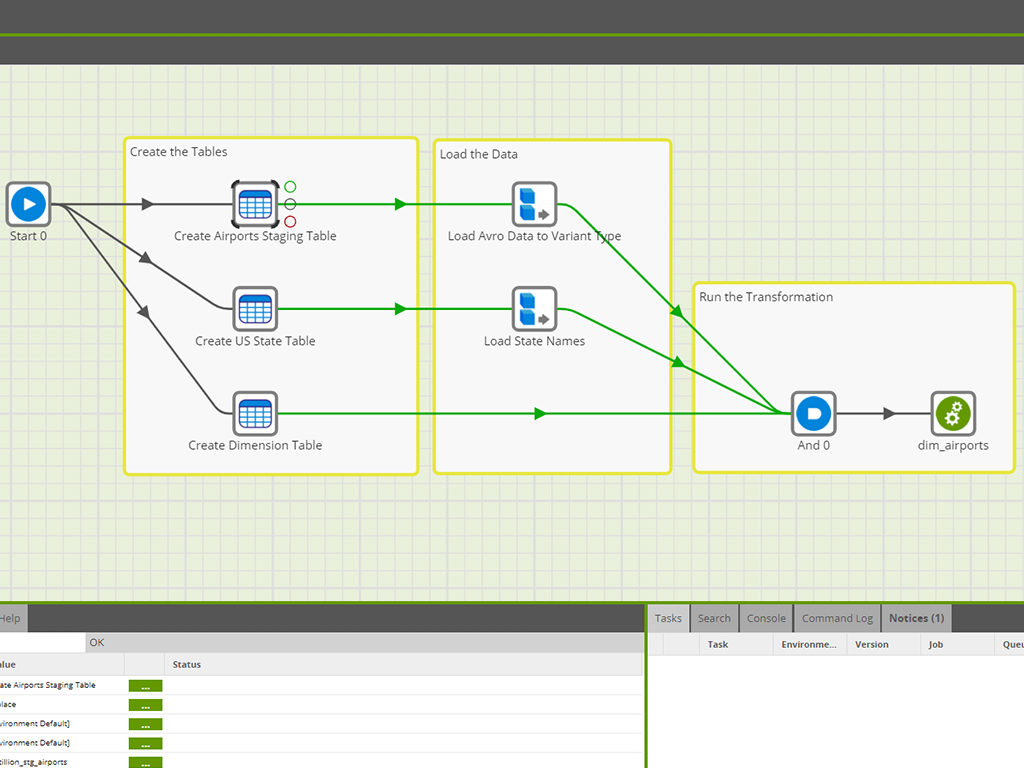
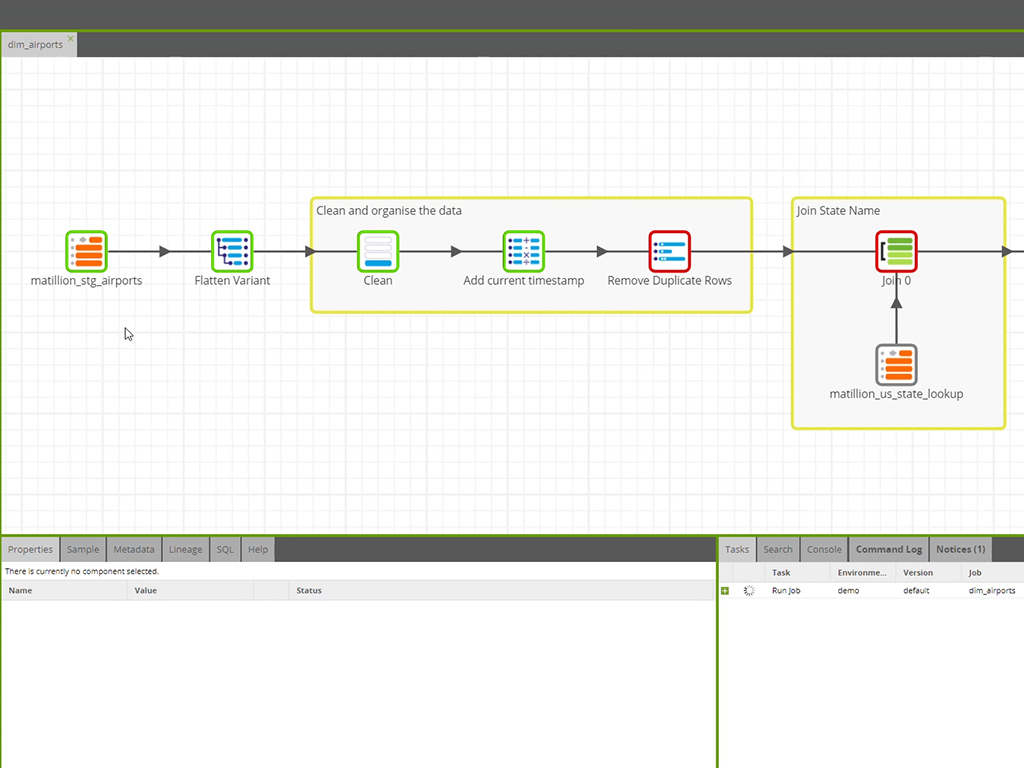
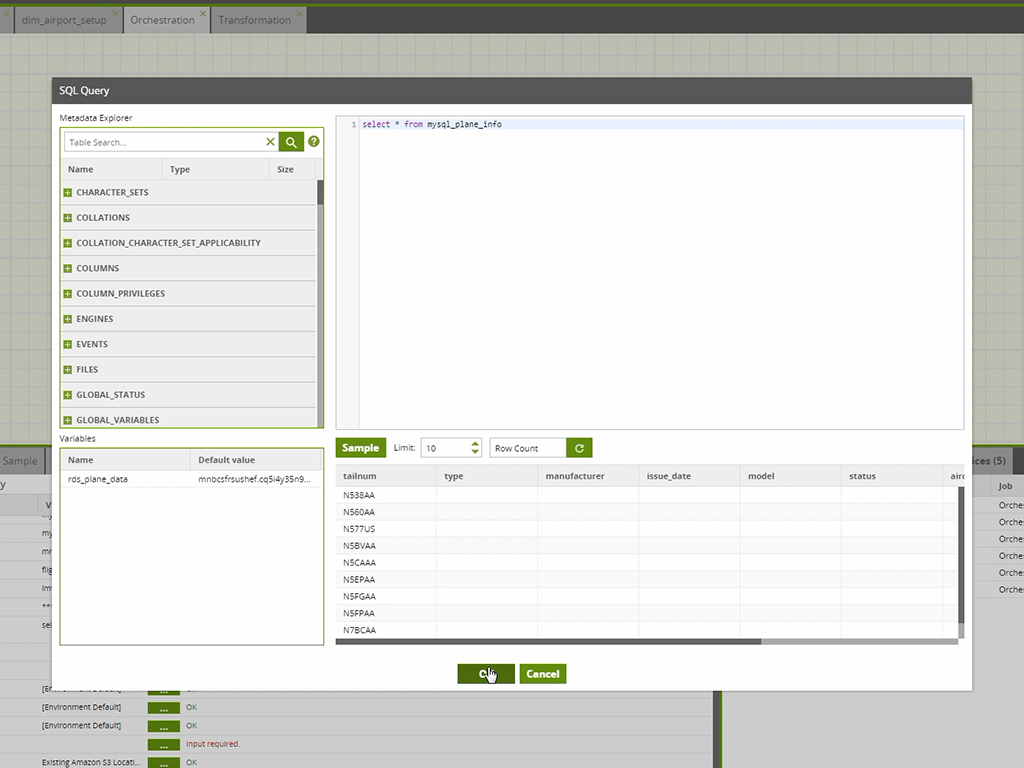
Screenshot of Matillion's GUI, used to orchestrate jobs with control data flow functionality, automating the ETL process.Screenshot of where structured and semi-structured data can be prepared to create clean data sets that can be used with any BI/reporting/visualization tool of choice. Matillion reads and combines data across a target warehouse external storage, such as S3 or Blob.Screenshot of Matillion's self-validating components, sample and row counts. If a job does fail, the warehouse queue services available with Matillion can be used get an alert to a connected email or Slack account.Screenshot of the SQL component used to run custom scripts from within Matillion. With hundreds of pre-built connectors out of the box, Matillion can handle complex transformation needs.