Bonita Platform vs. NewgenONE Digital Transformation Platform

Overview
ProductRatingMost Used ByProduct SummaryStarting Price
Bonita Platform
Score 8.1 out of 10
N/A
Bonita is an open-source business process and workflow management platform created by the French National Institute for Research in Computer Science. It is available as a free community edition or as a commercial subscription product.N/A
NewgenONE Digital Transformation Platform
Score 9.0 out of 10
N/A
A unified, cloud-based low-code platform for automating end-to-end processes and managing content and communications, backed by AI-based cognitive capabilities and its integration ecosystem. The NewgenONE platform, with content management at its core, helps enterprises break down the silos between the front, middle, and back offices by simplifying the information (data) flows between those offices, functions, and departments. The NewgenONE platform includes the…N/A
Pricing
Bonita PlatformNewgenONE Digital Transformation Platform
Editions & Modules
No answers on this topic
Offerings
Pricing Offerings
Bonita PlatformNewgenONE Digital Transformation Platform
Free Trial
NoNo
Free/Freemium Version
YesNo
Premium Consulting/Integration Services
NoNo
Entry-level Setup FeeNo setup feeNo setup fee
Additional Details
More Pricing Information
Community Pulse
Bonita PlatformNewgenONE Digital Transformation Platform
Considered Both Products
Bonita Platform
Chose Bonita Platform
We liked Bonita's architecture, the open-source framework, and the licensing and support model. Maybe fewer features than other BPM platforms but easier to implement and maintain.

Chose Bonita Platform
RHPAM is maybe a very good BPM process engine but is very limited to build a complete application.
We also try site soft W4 which needs more developments to build an application. We finally choose Bonita which is easier to get ready with.
Chose Bonita Platform
Bonita Platform is very easy to use and more convenient when it comes to data handling. In the poTher Bpm Tools, the processing of the data is very difficult and connections are very confusing. In Bonita Platform, one can even use the customized search for the retrieval of the …
Chose Bonita Platform
I didn't use others products from Bonita Platform.
Chose Bonita Platform
One of the best support for BPMN Ability to extend platforms with reusable components to offer common functionality/connectivity Based on Java, used throughout our company
Chose Bonita Platform
Bonita has a community version, open-source, so it´s easy to test the benefits of process automation for any enterprise. Bonita Platform is also very near to Java architecture, so the learning curve for developers is not difficult, and they only need to understand how processes …
Chose Bonita Platform
Bonita may be the easiest to start with without a steep learning curve, anyway on the other side it probably is not as powerful in the case you need to handle a very complicated and high volume or mission critical process. If look by the platform cost or license fee, Bonita has …
Chose Bonita Platform
The Bonita platform is by far the most complete and flexible solution as a BPM suite with the added advantage that the Community edition is usable for production deployment. From a cost perspective, Bonitasoft licenses the subscription edition per server with no limitations as …
Chose Bonita Platform
Bonita Platform is very easy to use as compared with Oracle BPM. The UI part of Bonita is very efficient and easy to use. Oracle has a more complicated UI. Bonita BPM Studio is very fast and processes can be created easily. This is not true in case of other BPM tools. Bonita …
Chose Bonita Platform
Far better design and more intuitive than other solutions. BDM is a great tool for non IT users and help[s] them understand how structured data will improve the work. Community Edition allows us to already manipulate the software and appreciate the power of the tool. I enjoyed …
Chose Bonita Platform
Bizagi and Bonitasoft have many similarities, an excellent process engine and integrated Data Model, unlike Kofax TotalAgility. But Bizagi beats it in the form designer.
Chose Bonita Platform
The Tibco solution makes it possible to manage the organization of the company in a finer and more industrialized way. But Bonita is more user-friendly and can be more easily understood by users. The Bonita solution allows a dialogue with the user around an intuitive interface. …
Chose Bonita Platform
There is no user license in Bonita. Given the opensource, we have freedom here to extend requirements that might be beyond OOTB concept. If you have to kill [an ant] you don't need a missile. I think, for simple use cases Bonita has a simplified approach to address.
Chose Bonita Platform
  • Better price
  • Community package with free evaluation package so you can test main functionalities of a BPM tool
  • Subscription packages are great but are not an impediment to accomplish a task or a whole process in Bonita Business Process Management
Chose Bonita Platform
Bonita is lightweight. It is easy to configure as against SOA which requires heavy lifting and complex code/configuration management.
Chose Bonita Platform
Bonita BPM excels in systems interconnection and UI development. It has a robust and reliable BPM server. Competitors are way too expensive.
Chose Bonita Platform
I found Bonita BPM a more friendly environment, especially when it comes to front-end development. It is also better suited for a gradual introduction to an organization - PoC with Community edition, later upgrade to one of the subscription editions as needed. Tibco's product …
Chose Bonita Platform
  • Consulting capability in order to quickly kick off operational processes within the company
Chose Bonita Platform
Bonita BPM does have some nice visual tools. The annual maintenance is not so high and we particularly liked the visual tool to create business rules. Bonitasoft’s color-coded tools make life a bit simpler and more memorable for beginners or non-coder people. We really like …
Chose Bonita Platform
The extensibility or ability to add functions or modify existing capabilities is much easier and better supported in Bonita. The ability to integrate the Bonita system into customer solutions is much easier and allows for tightener coupling to the existing customer portals. The …
NewgenONE Digital Transformation Platform
Features
Bonita PlatformNewgenONE Digital Transformation Platform
Reporting & Analytics
Comparison of Reporting & Analytics features of Product A and Product B
Bonita Platform
6.4
Ratings
24% below category average
NewgenONE Digital Transformation Platform
-
Ratings
Dashboards6.00 Ratings00 Ratings
Standard reports5.50 Ratings00 Ratings
Custom reports7.70 Ratings00 Ratings
Process Engine
Comparison of Process Engine features of Product A and Product B
Bonita Platform
7.7
Ratings
8% below category average
NewgenONE Digital Transformation Platform
-
Ratings
Process designer9.00 Ratings00 Ratings
Process simulation6.90 Ratings00 Ratings
Business rules engine8.20 Ratings00 Ratings
SOA support6.40 Ratings00 Ratings
Process player6.70 Ratings00 Ratings
Support for modeling languages9.00 Ratings00 Ratings
Form builder8.10 Ratings00 Ratings
Model execution6.90 Ratings00 Ratings
Collaboration
Comparison of Collaboration features of Product A and Product B
Bonita Platform
5.9
Ratings
35% below category average
NewgenONE Digital Transformation Platform
-
Ratings
Social collaboration tools5.90 Ratings00 Ratings
Content Management Capabilties
Comparison of Content Management Capabilties features of Product A and Product B
Bonita Platform
6.8
Ratings
18% below category average
NewgenONE Digital Transformation Platform
-
Ratings
Content management6.80 Ratings00 Ratings
Best Alternatives
Bonita PlatformNewgenONE Digital Transformation Platform
Small Businesses
Square 9 Softworks
Square 9 Softworks
Score 9.1 out of 10
Creatio
Creatio
Score 9.7 out of 10
Medium-sized Companies
Square 9 Softworks
Square 9 Softworks
Score 9.1 out of 10
Quixy
Quixy
Score 9.9 out of 10
Enterprises
CMW Platform
CMW Platform
Score 8.9 out of 10
Creatio
Creatio
Score 9.7 out of 10
All AlternativesView all alternativesView all alternatives
User Ratings
Bonita PlatformNewgenONE Digital Transformation Platform
Likelihood to Recommend
8.2
(0 ratings)
9.0
(0 ratings)
Likelihood to Renew
6.4
(0 ratings)
-
(0 ratings)
Usability
7.7
(0 ratings)
-
(0 ratings)
Performance
8.0
(0 ratings)
-
(0 ratings)
Support Rating
4.6
(0 ratings)
-
(0 ratings)
Implementation Rating
4.5
(0 ratings)
-
(0 ratings)
Ease of integration
7.3
(0 ratings)
-
(0 ratings)
Product Scalability
7.5
(0 ratings)
-
(0 ratings)
User Testimonials
Bonita PlatformNewgenONE Digital Transformation Platform
Likelihood to Recommend
Well suited for low code/no code applications centered around approval flows. It has built-in task management for users to see their pending actions, comments, statuses, etc. It has a very nice design for process flows. Less appropriate may be for generic type applications with complex screens and logic within those screens that need a lot of data to process.
Read full review
The Newgen OmniDocs is the best option when it comes to storing, sharing, disseminate documents. It is also widely used by the Technical team in my previous employers for storing their technical codes & queries and they have always cast their trust vote to Newgen OmniDocs. I have always recommended Newgen OmniDocs to my auditing, finance, technology and banking sector clients for whom data confidentiality matters more than any other industry. It is less appropriate in the businesses that do not require storing the documents as they destroy the documents once sent to the client to ensure they do not save client information or project. Furthermore, it is less appropriate in almost 50% of India as well as many other parts in MENA region where there is no presence of high-speed internet as it takes high bandwidth of internet to operate.
Read full review
Pros
  • Efficient and fast prototyping: a process can be modeled and tried out quickly and with low investment.
  • Full stack prototyping for development and implementation allows the process to be developed and implemented as an application from the prototype. It's not just drawings and wire frames that are tossed over the wall to developers.
  • Data modeling is integral from the beginning of the prototype which is appropriate for the stakeholders in the beginning.
Read full review
  • Swift access to documents and repositories
  • Makes it much easier to share docs. and collaborate with multiple teams at a time
  • Reduce operational cost as well as time to market
  • Much easier to store, and retrieve file
  • Easy to access it anytime on the mobile
  • Supports the documents of all formats
  • Easy to learn. No training required
Read full review
Cons
  • There is only one business data model. Even if deploying new processes does not require stopping the platform, the BDM update requires it.
  • During the platform evolution often new bugs were introduced so it was risky to deploy the platform in the low minor version. For example, there were memory leaks from 7.2.0 to 7.2.3.
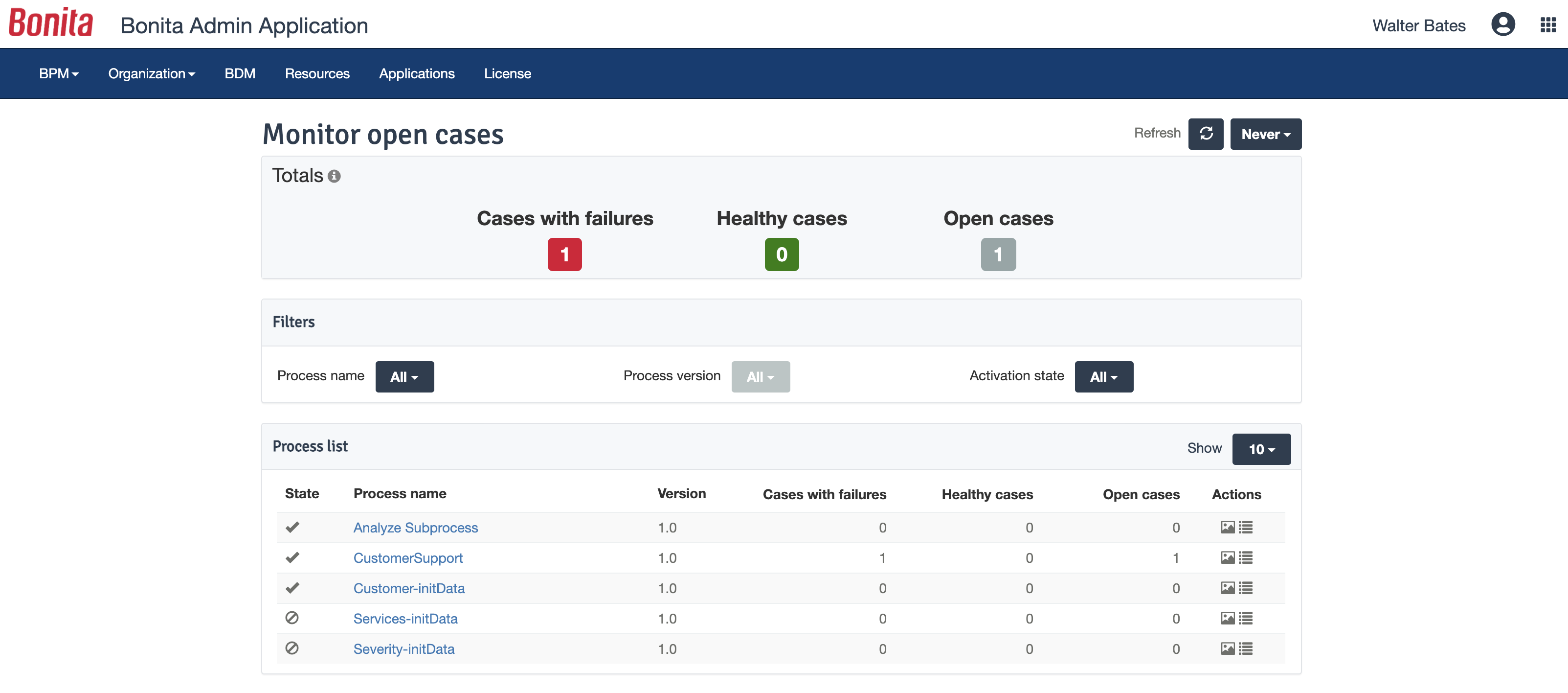
  • The administrator portal could be improved. It is hard to look at subprocess data, for example and it is sometimes better to investigate with SQL queries. I don't like new (7.3) task list either.
Read full review
  • Doesn't operate well in India as the nation has lowest internet speed and it requires higher speed to operate
  • Very long queues and slow response when calling technical helpdesk
  • Takes time to upload documents
Read full review
Likelihood to Renew
We just renewed our license
Read full review
No answers on this topic
Usability
Bonita Platform has allowed us to develop GUI relatively fast using its UI Designer while being able to seamlessly integrate our business logic in Java in a BPMN2 process diagram. It gives a nice productivity boost but still requires programming know-how to be able to deliver the final solution to your business problems.
Read full review
No answers on this topic
Performance
Engine itself is efficient enough for most cases I dealt with. It can also be extended by clustering. I have done performance tests with JMeter and only managed to induce the crash of... JMeter. If there are efficiency issues they usually concern bad design/implementation of created apps or bottlenecks in integrated systems. Although I have met two cases with efficiency loss.
1. Java 7 related PermGen saturation caused by big number of installed apps (there is no jar dependency reusal between apps option).
2. Big number of waiting event handlers in processes stresses the database.
Read full review
No answers on this topic
Support Rating
It was sometimes difficult to get support on Bonita API.
Read full review
No answers on this topic
Implementation Rating
Nothing in particular
Read full review
No answers on this topic
Alternatives Considered
RHPAM is maybe a very good BPM process engine but is very limited to build a complete application.
We also try site soft W4 which needs more developments to build an application. We finally choose Bonita which is easier to get ready with.
Read full review
Newgen OmniDocs is the only one I have used
Read full review
Scalability
Respect of BPMN standard over the long term. Good enhancements by Bonitasoft for new use cases, for example the introduction of a real form editor even if it has been technically difficult to manage. Once done though, we have far greater possibility of human interaction.
Read full review
No answers on this topic
Return on Investment
  • We've had serious problems with 'automated' processes in earlier versions of Bonita (via Talend), especially with connectors. In Bonita 7 we replaced these with REST calls, hoping for better performance.
  • Overall, using Bonita has not had a positive impact on our development efficiency. Moving from Talend (using Bonita 5) to Bonita 7 has improved this somewhat. Still, it remains a pain to integrate Bonita in the development and delivery process.
  • Migrating from Bonita 7.0 to 7.1 has proven to be a difficult undertaking, mainly on the database level. This has cost us a lot of time and better support would be welcomed.
Read full review
  • Faster search with easy to access files which helps me in sending the document quickly to the clients and retrieving it in no time whenever they ask for it. Sending the documents quickly always ensures higher client satisfaction which has great impact on ROI
  • Facilitates easy collaboration with client teams and ensures the research project is done exactly as per the client's requirements & needs. This also always makes clients happy and attract repeat projects and more revenues
  • Makes it easier for the tech. team to store / save technical queries & codes. Thus, whenever I approach them to make changes in my reports/ articles while uploading it on the website, tech. team does that at much faster pace. This leads in increased efficiency of Content writers as well as the tech. team
Read full review
ScreenShots

Bonita Platform Screenshots

Screenshot of process designed in Bonita BPM StudioScreenshot of Bonita BPM project overviewScreenshot of Fully customized end user interfaceScreenshot of Bonita BPM Admin AppScreenshot of Bonita Process Insights