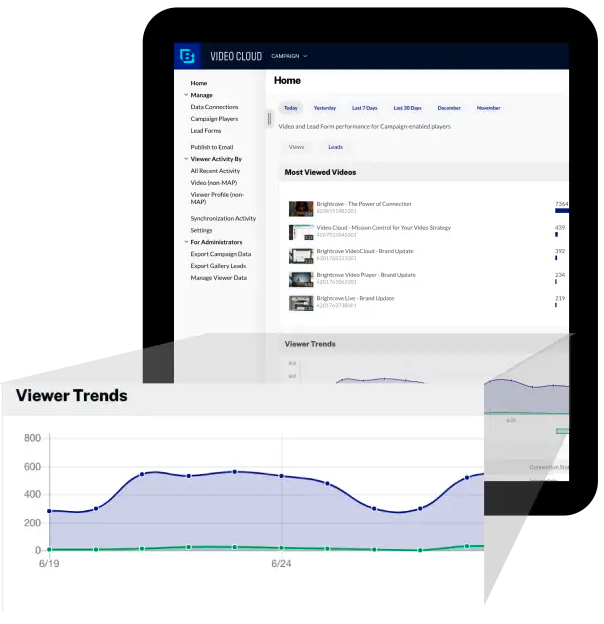
Brightcove Video is a video hosting and publishing solution. The company also provides a cloud media processing product called Zencoder.
N/A
StreamYard
Score 8.2 out of 10
N/A
StreamYard is a live streaming studio in a browser. Users can interview guests, share a screen, and simulcast to platforms like Facebook, YouTube, and LinkedIn.
N/A
Pricing
Brightcove
StreamYard
Editions & Modules
No answers on this topic
Offerings
Pricing Offerings
Brightcove
StreamYard
Free Trial
Yes
No
Free/Freemium Version
No
No
Premium Consulting/Integration Services
No
No
Entry-level Setup Fee
No setup fee
No setup fee
Additional Details
—
—
More Pricing Information
Community Pulse
Brightcove
StreamYard
Considered Both Products
Brightcove
Verified User
Anonymous
Chose Brightcove
YouTube, Vimeo, they are not on list, but still Brightcove Video is the best so far and we have been using it for a long time.

Brightcove is a more affordable option and has a lot of features that are excellent. The only downside is the scalability of the tool, especially as a sales enablement function.
I'm in the process of evaluating other products now as rates for Brightcove were high and I'm not able to find prices immediately when I want to implement it on my projects. I have started to look at Ooyala and DaCast.
I was not part of the decision making for this product, but I heard the decision was based on its ease of use, quick implementation and low maintenance.
Marketing department favors it because EVERYONE uses YouTube. Overall, YouTube offers decent features and functionality. But Brightcove offers the ability to brand and style players, and control what our users see (and so much more) and YouTube does not. For instance, on …
Brightcove is more user-friendly and allows for more opportunity when publishing content.
Verified User
Anonymous
Chose Brightcove
Brightcove is the only product I have used so unfortunately I cannot compare and contrast to competitors. I still stand very impressed with Brightcove during the time I used it and would reccommend it for anyone.
The decision to migrate from Kyte to Brightcove was made before I came on-board. However, I've worked with both systems and I am extremely happy we went with Brightcove. The user-friendly interface and mobile app. made it a great choice for event and sponsorship streaming.
Verified User
Anonymous
Chose Brightcove
I've used Ooyala and I do like Brightcove over Ooyala as I feel their read APIs are easier to work with. However, to be fair, I've never used Ooyala's write APIs, which may or may not be better.
Verified User
Anonymous
Chose Brightcove
Question not applicable
Verified User
Anonymous
Chose Brightcove
I have not used other products that I would consider similar to Brightcove.
We looked hard at Kaltura and thought it was a good product. We were attracted to being able to download a version of the video from the player. In test we had technical questions concerning captions and languages and could not get adequate answers with many attempts. Over time …
StreamYard
Verified User
Anonymous
Chose StreamYard
The StreamYard interface is more functional and easy to understand for participants, speakers, and team members. StreamYard also allows managing live streams in the app without the need to go to social media for checking comments, replying to them, etc. Simultaneously, …
OBS is tricky to use and run. My laptop refused to install some components, and I've never been able to solve that. On the other hand, StreamYard is cloud-based, and you only need your browser to go live. It is easy to manage your guests. Maybe it would be great with co-hosting …
There are other options we have tried that are not here, but the strength of StreamYard is its ease of use and the ability to easily connect to multiple social media channels and stream to all of them at the same time. Some other software has other strengths that StreamYard …
It works very nicely for our company site because it can easily and seamlessly embed into the site and email HTML pages. It also has picture in picture, sharing, closed captioning (CC) as basic functions. It will also show the time of the video. Because these are short-term-use videos or might get updated frequently and also are just targeting a specific audience, being able to hide or not able to show the number of views or date published (unlike YouTube) actually helps us.
We usually recommend it to those that want to start streaming their podcasts LIVE and don't have much bandwidth for learning new software. Its simplicity is perfect for beginners. That being said, if the person we are talking to wants to be able to download high-quality video and audio files after the stream is over -for post-production reasons- we usually refer them to different software.
Ability to easily output a JSON response for requested video data. This makes it easy to work with Brightcove as partner.
The read APIs are very flexible and can the output can be easily customized using cgi args. This provides great customization of the output and sorting and filtering mechanisms to find the videos you're looking for.
The ability to add captions to videos is good, especially with the regulations requiring video captioning. DFXP support works great as long as the player is given the exact XML format it is looking for.
It took quite some time to upload and organize our video library. The amount of time it would require to relocate all this information outweighs any negative aspect I personally have with the experience. They have been pretty good to work with and from speaking with my Brightcove rep, I know some of the issues I have listed are currently being addressed and tested for future releases.
We are notified often of downtime, and I have not heard from a support rep for over a year. It really makes it hard to learn what new things are coming out and how we can take our video to the next level when there is no contact from the team on a regular cadence.
Marketing department favors it because EVERYONE uses YouTube. Overall, YouTube offers decent features and functionality. But Brightcove offers the ability to brand and style players, and control what our users see (and so much more) and YouTube does not. For instance, on YouTube, users are presented with other videos (which could contain competitor videos).
The StreamYard interface is more functional and easy to understand for participants, speakers, and team members. StreamYard also allows managing live streams in the app without the need to go to social media for checking comments, replying to them, etc. Simultaneously, StreamYard has many more options compared to other similar tools. For example, it allows sharing slides from different PowerPoints and screens, adding videos, visuals, and live comments with one click. Due to these options, we save time on managing live sessions and our broadcasts look much more professional and engaging.
It has increased the reach rate and the number of followers on social media pages, for example, on our Youtube page, the number of followers increased by 2 times the original amount.
It has reduced the amount of time our communications team spends on editing videos.
More team members are able to use StreamYard by themselves, which has allowed us to reduce the time our communications team spends on managing live sessions before.