Clickability (discontinued) vs. ManageWP

Overview
ProductRatingMost Used ByProduct SummaryStarting Price
Clickability (discontinued)
Score 7.0 out of 10
N/A
Clickability was a content management system acquired by Upland Software in 2013 which provided a SaaS platform for web content creation, management, publishing, analytics, digital marketing, and online publishing for marketers and enterprises. It has been discontinued, and is no longer available.N/A
ManageWP
Score 10.0 out of 10
N/A
ManageWP is a WordPress management console that allows users to manage multiple WordPress sites with ease.N/A
Pricing
Clickability (discontinued)ManageWP
Editions & Modules
No answers on this topic
Offerings
Pricing Offerings
Clickability (discontinued)ManageWP
Free Trial
NoNo
Free/Freemium Version
NoYes
Premium Consulting/Integration Services
NoNo
Entry-level Setup FeeNo setup feeNo setup fee
Additional DetailsStarting is easy and free. Premium upgrades are there for those that need more. If you want to free up your time and let ManageWP do the heavy lifting - we are there for you with a number of automations (safe updates, automated backups, scheduled security and performance checks, etc.), site migration tools, website templates and more. Special bundles were built for agencies and companies creating affordable discounts for customers with large number of websites.
More Pricing Information
Community Pulse
Clickability (discontinued)ManageWP
Considered Both Products
Clickability (discontinued)
Chose Clickability (discontinued)
We wanted a SaaS provider! There are not many in this area that don't offer a very large and complex product.
Chose Clickability (discontinued)
Many of other content management systems similar to WordPress need custom installation. The server costs and upgrades quickly add up. Clickability while expensive, eliminated the overhead of managing all the dependency needs for a CMS. Clickability also works with its clients …
Chose Clickability (discontinued)
I think it is on par with what I did with Sharepoint. Sharepoint was not the easiest and you have to do many things twice to get it to actually display. I think the easiest I have used is Wordpress. They make mobile very easy and allow for quick changes and are very social …
Chose Clickability (discontinued)
I have mainly worked with open source content management systems like Wordpress, Drupal and Joomla!. Clickability is far more customizable and elegant to code things yourself. The main downfall of Clickabliity is the lack of community developed modules and plugins. If there …
Chose Clickability (discontinued)
Clickability has a stable, efficient system where its features and functionality do not break and are mostly hack-proof. WordPress is mostly a free open-source content management system which almost works like Clickability, but has been plagued by spammed commenting, hackers. …
Chose Clickability (discontinued)
I have not used or evaluated any other similar products. The decision to select Clickability was made by the company. I believe the idea was to find a content management system that could help the company build and manage a robust website that could expand and grow. There's …
Chose Clickability (discontinued)
We also use IIS with .NET to host some website functionality, but would not use that to host websites that simply deliver news content, and allow a newsroom to manage its own content. I have not used many other CMS's but others on my team have described them, and I have yet to …
Chose Clickability (discontinued)
Worldnow and IBSYS were the two biggest competitors for the markets we were in. Cost was a huge factor because Clickability is by far cheaper then the other two in most use cases. Each varies depending on the contract you can negotiate. Really it just comes down to what are you …
ManageWP
Chose ManageWP
ManageWP is the only website management product that we have used.
Chose ManageWP
I'm not sure there are other free options in this space. I haven't heard of any.
Chose ManageWP
Jetpack is going to be a contender in the future, however, at this point in time they are missing some features that ManageWP includes and does very well. These include automatic backups and a robust migration module. Though the UI in Jetpack is a little cleaner and prettier, …
Chose ManageWP
ManageWP is definitely the best in class product for WordPress website management. There are other tools such as InfiniteWP that do similar things, but don't have as complete an offering. Other options like WPEngine are also for hosting and we are not interested in that …
Chose ManageWP
Prior to ManageWP, we utilized InfiniteWP, a free (with paid extensions), self-hosted alternative. We found the interface to be unwieldy, and the paid extension pricing to be a bit confusing. The headache of maintaining the software and server infrastructure to run the …
Features
Clickability (discontinued)ManageWP
Security
Comparison of Security features of Product A and Product B
Clickability (discontinued)
6.9
Ratings
16% below category average
ManageWP
9.5
Ratings
16% above category average
Role-based user permissions6.90 Ratings9.50 Ratings
Platform & Infrastructure
Comparison of Platform & Infrastructure features of Product A and Product B
Clickability (discontinued)
6.5
Ratings
15% below category average
ManageWP
10.0
Ratings
27% above category average
API5.10 Ratings10.00 Ratings
Internationalization / multi-language8.00 Ratings10.00 Ratings
Web Content Creation
Comparison of Web Content Creation features of Product A and Product B
Clickability (discontinued)
6.7
Ratings
14% below category average
ManageWP
8.2
Ratings
6% above category average
WYSIWYG editor6.80 Ratings8.00 Ratings
Code quality / cleanliness6.00 Ratings8.00 Ratings
Admin section7.00 Ratings9.80 Ratings
Page templates7.00 Ratings8.00 Ratings
Library of website themes5.90 Ratings9.00 Ratings
Mobile optimization / responsive design5.90 Ratings7.50 Ratings
Publishing workflow7.90 Ratings7.00 Ratings
Form generator7.00 Ratings00 Ratings
Web Content Management
Comparison of Web Content Management features of Product A and Product B
Clickability (discontinued)
6.7
Ratings
9% below category average
ManageWP
7.0
Ratings
5% below category average
Content taxonomy6.80 Ratings00 Ratings
SEO support6.00 Ratings8.00 Ratings
Bulk management6.80 Ratings10.00 Ratings
Availability / breadth of extensions5.90 Ratings3.00 Ratings
Community / comment management8.00 Ratings7.00 Ratings
Best Alternatives
Clickability (discontinued)ManageWP
Small Businesses
ManageWP
ManageWP
Score 10.0 out of 10
Divi
Divi
Score 10.0 out of 10
Medium-sized Companies
RWS Tridion Sites
RWS Tridion Sites
Score 9.0 out of 10
RWS Tridion Sites
RWS Tridion Sites
Score 9.0 out of 10
Enterprises
RWS Tridion Sites
RWS Tridion Sites
Score 9.0 out of 10
RWS Tridion Sites
RWS Tridion Sites
Score 9.0 out of 10
All AlternativesView all alternativesView all alternatives
User Ratings
Clickability (discontinued)ManageWP
Likelihood to Recommend
7.0
(0 ratings)
9.6
(0 ratings)
Likelihood to Renew
5.5
(0 ratings)
-
(0 ratings)
Usability
7.5
(0 ratings)
-
(0 ratings)
Support Rating
7.6
(0 ratings)
-
(0 ratings)
Implementation Rating
7.3
(0 ratings)
-
(0 ratings)
User Testimonials
Clickability (discontinued)ManageWP
Likelihood to Recommend
I think Clickability does a good job of organizing all the elements in a webpage. You clearly can choose what and where you need to be, via tabs. Some functions are redundant and cumbersome. Like switching an ad placement. We have a, b, c positions and it should be easier to move them around. Currently, it is not. You have to re-create the entire ad, with a different position. Not efficient.
Read full review
It is well suited to anyone that has a Wordpress website, whether it be an individual or a company managing multiple clients sites, its an easy way to manage, maintain and keep your website running smoothly and secure.
Read full review
Pros
  • The ease of search for items by ID makes finding something quick and easy.
  • The system moves very fast, which enables us to respond to breaking news and get content up on the site quickly.
  • Making copies or opening read-only versions of stories are great so that one person can read while another person produces.
Read full review
  • ManageWP consolidates important WordPress site management services into on dashboard.
  • ManageWP makes backing up, cloning, and restoring websites so easy.
  • ManageWP provides a simple, easy to use interface.
Read full review
Cons
  • Choosing ad size/placement should be easier than it is. Now, I have to re-create the whole thing.
  • When you "save" anything a pop-up comes up that is redundant.
  • Ad list only shows a limited number. It's not until you click on one and cancel it out, then you can see all the listings. A bit tedious and redundant.
Read full review
  • The reports could be prettier, more templates in order to avoid having to customize for each client so heavily.
  • It would be nice to see if recommended plugin updates are actually production and not beta versions.
Read full review
Likelihood to Renew
As mentioned in the last questions we are going to use a competitor brand next year. I think the issues are trying to find and fix problems from the previous programer. The steep learning curve and lack of mobile and social sharing capabilities. Things that I like are the strength of the programing which comes with a trade off. The ease for those who don't know markup to make updates to the website. Clickability isn't the easiest and can be difficult to find the content that you are interested in. We will not be using it next year.
Read full review
No answers on this topic
Usability
My experience with Clickability has been mostly positive but there are a few areas for improvement. It's generally easy to learn and use on a daily basis. I can move fast and do my job with speed with needed. But there is some clunky functionality with targeting and page building. My rating would be higher if some improvements were made.
Read full review
It's very straightforward for basic use, but less you dig in more for advanced use. Seems like it would be approachable to the average person.
Read full review
Support Rating
I found that some agents were better then others, usually you have an account representative and that I would consider level 1 support. To get really complex answers you need to talk with an engineer.
Read full review
No answers on this topic
Implementation Rating
Overall, it was pretty seemless to switch the sites over.
Read full review
No answers on this topic
Alternatives Considered
I have mainly worked with open source content management systems like Wordpress, Drupal and Joomla!. Clickability is far more customizable and elegant to code things yourself. The main downfall of Clickabliity is the lack of community developed modules and plugins. If there were developers creating these of wide spread use, Clickability would be a must have for any business.
Read full review
ManageWP is definitely the best in class product for WordPress website management. There are other tools such as InfiniteWP that do similar things, but don't have as complete an offering. Other options like WPEngine are also for hosting and we are not interested in that element. I think that ManageWP is the best tool out there for what it does.
Read full review
Return on Investment
  • I know a big positive is the fact that it is always-on. We are the leading news corporation for our state, and in many markets, nationwide. We pride ourselves on our strong ethics in the community and thus need to exude reliability to maintain the trust of these communities. Having a website fail periodically erodes that reliable perception.
  • It has allowed different areas of the company to approach our team and work in a cohesive manner.
Read full review
  • Reduced update times - allows me to check for updates on all our sites once a week without spending countless time logging in and updating each one manually.
  • Free backups - allows me to have redundant backups just in case other systems fail, without any effort.
  • Free platform - many of the provided features are free, making it very useful for companies who want to keep costs low.
Read full review
ScreenShots

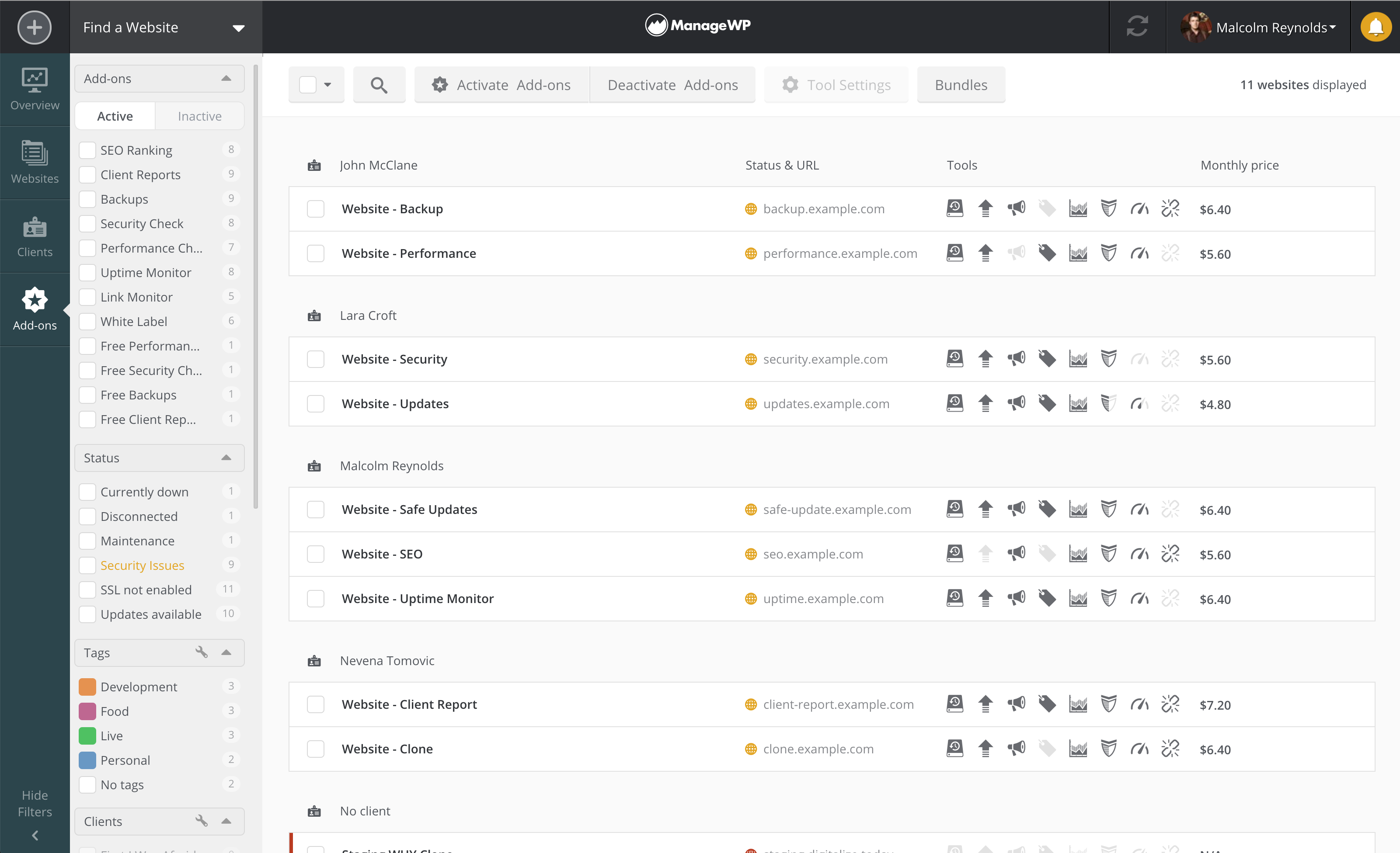
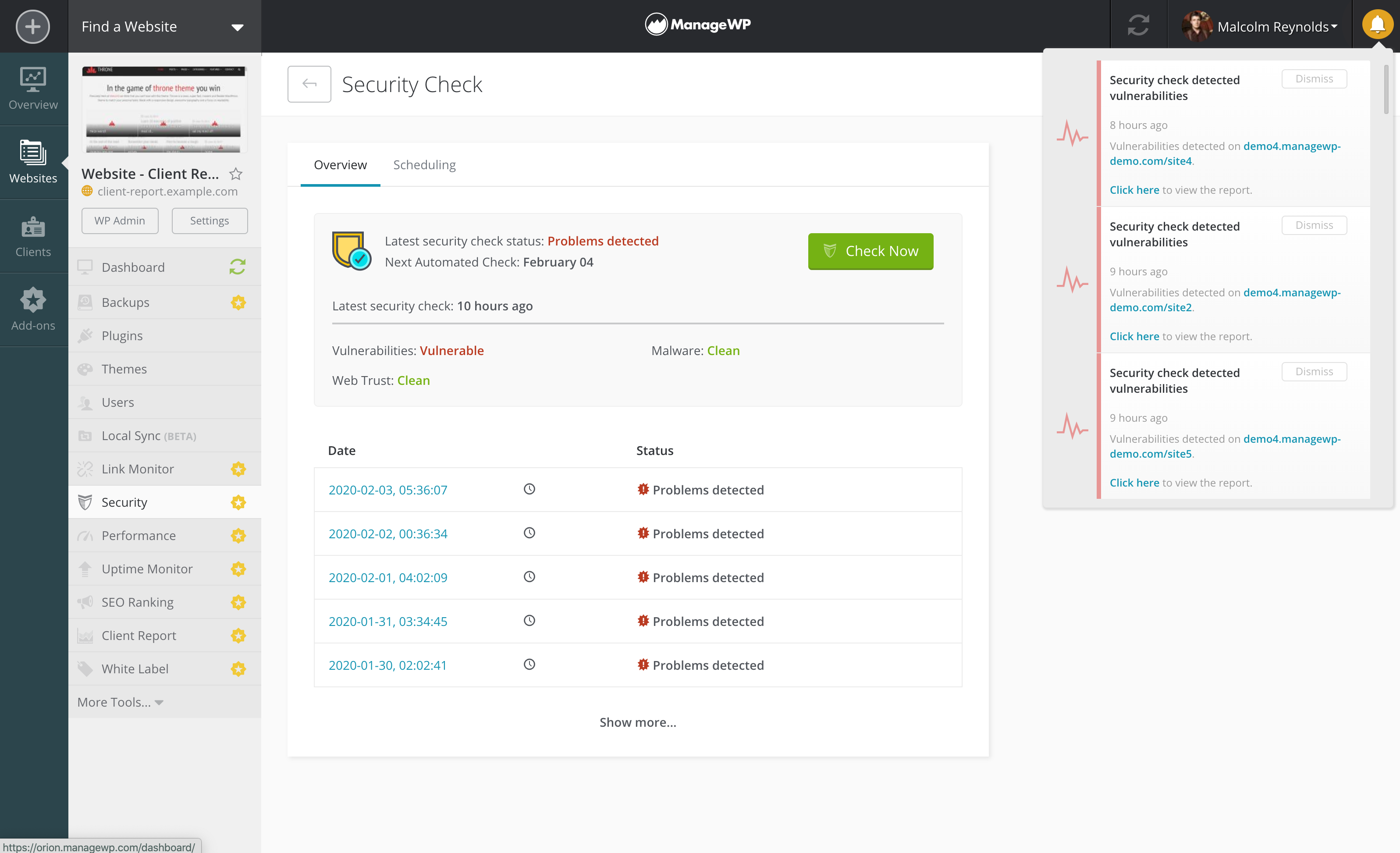
ManageWP Screenshots

Screenshot of ManageWP Overview page with Action centerScreenshot of ManageWP Websites page - landing page for website managementScreenshot of ManageWP Add-ons/Price breakdown pageScreenshot of ManageWP Security check with vulnerabilities detected on a number of websites