Clickability (discontinued) vs. WebWave

Overview
ProductRatingMost Used ByProduct SummaryStarting Price
Clickability (discontinued)
Score 7.0 out of 10
N/A
Clickability was a content management system acquired by Upland Software in 2013 which provided a SaaS platform for web content creation, management, publishing, analytics, digital marketing, and online publishing for marketers and enterprises. It has been discontinued, and is no longer available.N/A
WebWave
Score 9.5 out of 10
N/A
WebWave — an alternative for agencies and freelancers for creating custom websites for clients with the support of CMS. Using CMS with no sacrifices WebWave is a CMS platform that gives a designer precision up to 1 px in every single detail just like in more sophisticated graphic programs such as Photoshop while remaining a drag and drop software. This is to make creating websites much faster without loosing on details. Spend less time talking WebWave…N/A
Pricing
Clickability (discontinued)WebWave
Editions & Modules
No answers on this topic
Offerings
Pricing Offerings
Clickability (discontinued)WebWave
Free Trial
NoYes
Free/Freemium Version
NoYes
Premium Consulting/Integration Services
NoNo
Entry-level Setup FeeNo setup fee$7 per month
Additional Details
More Pricing Information
Community Pulse
Clickability (discontinued)WebWave
Considered Both Products
Clickability (discontinued)
Chose Clickability (discontinued)
We wanted a SaaS provider! There are not many in this area that don't offer a very large and complex product.
Chose Clickability (discontinued)
Many of other content management systems similar to WordPress need custom installation. The server costs and upgrades quickly add up. Clickability while expensive, eliminated the overhead of managing all the dependency needs for a CMS. Clickability also works with its clients …
Chose Clickability (discontinued)
I think it is on par with what I did with Sharepoint. Sharepoint was not the easiest and you have to do many things twice to get it to actually display. I think the easiest I have used is Wordpress. They make mobile very easy and allow for quick changes and are very social …
Chose Clickability (discontinued)
I have mainly worked with open source content management systems like Wordpress, Drupal and Joomla!. Clickability is far more customizable and elegant to code things yourself. The main downfall of Clickabliity is the lack of community developed modules and plugins. If there …
Chose Clickability (discontinued)
Clickability has a stable, efficient system where its features and functionality do not break and are mostly hack-proof. WordPress is mostly a free open-source content management system which almost works like Clickability, but has been plagued by spammed commenting, hackers. …
Chose Clickability (discontinued)
I have not used or evaluated any other similar products. The decision to select Clickability was made by the company. I believe the idea was to find a content management system that could help the company build and manage a robust website that could expand and grow. There's …
Chose Clickability (discontinued)
We also use IIS with .NET to host some website functionality, but would not use that to host websites that simply deliver news content, and allow a newsroom to manage its own content. I have not used many other CMS's but others on my team have described them, and I have yet to …
Chose Clickability (discontinued)
Worldnow and IBSYS were the two biggest competitors for the markets we were in. Cost was a huge factor because Clickability is by far cheaper then the other two in most use cases. Each varies depending on the contract you can negotiate. Really it just comes down to what are you …
WebWave
Chose WebWave
Fast load times: WebWave's websites have fast load times, which is critical for ensuring a positive user experience and better SEO performance.
Responsive design: WebWave's websites are optimized for mobile devices, ensuring that they look great and function well on any screen …
Chose WebWave
price, ease of use, and using a notes system with the client over the top of the page are all improvements against WebFlow
Chose WebWave
It is compatible with many WordPress plugins and offers many more possibilities than google sites, Wix, or similar builders. It is a WordPress as easy to use as Microsoft Word.
Chose WebWave
WebWave is easy, the sites are stunning, and I don't have to pay an arm and a leg for it. Usually, there is a drop in customizability using WordPress. But WebWave allows a great site and an incredible price. For that reason, I'm leaving a great platform in WordPress and jumping …
Chose WebWave
Due to WebWave's innovative and intuitive layer-based design system, it is infinitely more user-friendly than both Webflow and WordPress. Webflow's websites feel lighter and faster, but I'm sure WebWave will address this as they mature. Webflow's animation features are also …
Chose WebWave
Simply easy to use, all in one solution (management portal, design, development and email solution)
Chose WebWave
Only the traditional ones like WordPress with Elementor or WPBakery page builder. It's not an easy comparison. WordPress is the big boss but you have to buy a bunch of services, plugins, other embedded SAAS and such tools to make it work. WebWave, on the other hand, is making …
Chose WebWave
Easy to use and user-friendly. Nice interface.
Chose WebWave
In terms of flexibility and functionalities, WebWave falls behind Webflow. However, practically anyone with a basic understanding of web development or who can use a word processor will be able to teach themselves how to utilize WebWave. Webflow, on the other hand, is far more …
Chose WebWave
It's an easier, super complete option and cheaper Instead of paying everything separately like Wix, this option gives you all for a good price. And is the same with Elementor, you need to pay their license, the hosting, the domain, and connect everything manually, but this …
Chose WebWave
Most Wix and WebWave have the same features as well as their distinctions. They are pretty good on their own functionality. They have their own functionality. From the pricing perspective, WebWave is slightly ahead of Wix. The pricing of Wix is a bit more than WebWave. So, if I …
Chose WebWave
WordPress is a great product but I need to figure out hosting myself, also I need to make sure the theme I am using is mobile friendly.
We WebWave, I don't need to worry about any of those and the drag and drop builder is very easy to get familiar with.
Chose WebWave
With WebWave, the builder and hosting are in one platform. No more efforts to update the plugins and themes as in WordPress.
Chose WebWave
Wordpress is a more flexible and adaptive content management system than Webwave. In addition to the functionalities that are already built-in, I am unable to add any customizable plugins or add-ons. However, in the majority of cases, the inherent features of Webwave are …
Chose WebWave
WebWave is fairly easy to use. For novice users, it is easier to use than WordPress or Shopify. I think WebWave will be more SEO friendly than Wix. The price is affordable for small businesses/clients as well. The template system is much easier and takes less time than …
Chose WebWave
web starts, Convertri Pro, and other alternatives Webstarts has a lot of issues with mobile view. U have to rearrange almost everything again. WebWave on the other hand lets u group and save so that don't have this problem. Also, animations work as they should same with …
Chose WebWave
WebWave stacks up well with other website builders. Especially the all-in-one types. It does things well and things make sense when it comes to editing. There are a lot of options to help you get things the way you want. I like how it can grow with the users. I feel the …
Chose WebWave
To each their own of course but I'll say this: ClickFunnels is too narrow. Webflow is ok. WordPress has too many security issues. WebWave just works.
Features
Clickability (discontinued)WebWave
Security
Comparison of Security features of Product A and Product B
Clickability (discontinued)
6.9
Ratings
16% below category average
WebWave
-
Ratings
Role-based user permissions6.90 Ratings00 Ratings
Platform & Infrastructure
Comparison of Platform & Infrastructure features of Product A and Product B
Clickability (discontinued)
6.5
Ratings
15% below category average
WebWave
-
Ratings
API5.10 Ratings00 Ratings
Internationalization / multi-language8.00 Ratings00 Ratings
Web Content Creation
Comparison of Web Content Creation features of Product A and Product B
Clickability (discontinued)
6.7
Ratings
14% below category average
WebWave
-
Ratings
WYSIWYG editor6.80 Ratings00 Ratings
Code quality / cleanliness6.00 Ratings00 Ratings
Admin section7.00 Ratings00 Ratings
Page templates7.00 Ratings00 Ratings
Library of website themes5.90 Ratings00 Ratings
Mobile optimization / responsive design5.90 Ratings00 Ratings
Publishing workflow7.90 Ratings00 Ratings
Form generator7.00 Ratings00 Ratings
Web Content Management
Comparison of Web Content Management features of Product A and Product B
Clickability (discontinued)
6.7
Ratings
9% below category average
WebWave
-
Ratings
Content taxonomy6.80 Ratings00 Ratings
SEO support6.00 Ratings00 Ratings
Bulk management6.80 Ratings00 Ratings
Availability / breadth of extensions5.90 Ratings00 Ratings
Community / comment management8.00 Ratings00 Ratings
Best Alternatives
Clickability (discontinued)WebWave
Small Businesses
ManageWP
ManageWP
Score 10.0 out of 10
Ecwid by Lightspeed
Ecwid by Lightspeed
Score 10.0 out of 10
Medium-sized Companies
RWS Tridion Sites
RWS Tridion Sites
Score 9.0 out of 10
10Web
10Web
Score 5.1 out of 10
Enterprises
RWS Tridion Sites
RWS Tridion Sites
Score 9.0 out of 10
Adobe Experience Manager
Score 8.4 out of 10
All AlternativesView all alternativesView all alternatives
User Ratings
Clickability (discontinued)WebWave
Likelihood to Recommend
7.0
(0 ratings)
9.6
(0 ratings)
Likelihood to Renew
5.5
(0 ratings)
-
(0 ratings)
Usability
7.5
(0 ratings)
10.0
(0 ratings)
Support Rating
7.6
(0 ratings)
5.3
(0 ratings)
Implementation Rating
7.3
(0 ratings)
-
(0 ratings)
User Testimonials
Clickability (discontinued)WebWave
Likelihood to Recommend
I think Clickability does a good job of organizing all the elements in a webpage. You clearly can choose what and where you need to be, via tabs. Some functions are redundant and cumbersome. Like switching an ad placement. We have a, b, c positions and it should be easier to move them around. Currently, it is not. You have to re-create the entire ad, with a different position. Not efficient.
Read full review
The WYSIWYG web builder marketspace is saturated, but there
are not many solutions out there that eschew table-based design in favor of letting
creators build sites where anything goes wherever you want. You’ll likely want
to skip this product if you need a plug-and-play solution where everything is
automatically responsively. However, if you have an eye for design, love
creative control, and like to sweat the details until you have made the perfect
website, WebWave is a must buy.
Read full review
Pros
  • The ease of search for items by ID makes finding something quick and easy.
  • The system moves very fast, which enables us to respond to breaking news and get content up on the site quickly.
  • Making copies or opening read-only versions of stories are great so that one person can read while another person produces.
Read full review
  • WebWave's site builder is the platform's truly innovative feature. I've never come across another service that deploys a layer-based approach in web design, as most of them usually deploy a grid-based system. This is an incredible alteration that ensures WebWave behaves much like a traditional graphic design tool, thereby resulting in an experience that is a lot more intuitive and instinctive. I believe this has the potential to radically change the way people approach no-code web design.
  • WebWave provides automatic, daily backups and a free SSL certificate for every website. This results in excellent security.
  • WebWave's support team is first-class! I had some teething-issues in the beginning, but the support team quickly got me back on track.
  • WebWave's community/forum is an excellent place to vote and request new features. This proves the development team is committed to making WebWave better by listening to their users.
Read full review
Cons
  • Choosing ad size/placement should be easier than it is. Now, I have to re-create the whole thing.
  • When you "save" anything a pop-up comes up that is redundant.
  • Ad list only shows a limited number. It's not until you click on one and cancel it out, then you can see all the listings. A bit tedious and redundant.
Read full review
  • Some scope for improvement in UX (colors are not very appealing). It is simple to use but design is a little dated. Especially in the builder section, I'd like to see modern design for buttons and maybe gradients also: as this is where visual motivation is also important
  • Some edits take effect only after pressing OK. That should be eliminated as it's an unnecessary addition. It's also kind of annoying to do that again and again, which can add up to a lot as we do so many small tweaks while building the website.
  • Few things (maybe glitches) in design. The rectangle below the footer was uneditable for me. I spent quite some time trying to figure it out so I'm convinced it's a glitch.
  • Website speed should be increased.
Read full review
Likelihood to Renew
As mentioned in the last questions we are going to use a competitor brand next year. I think the issues are trying to find and fix problems from the previous programer. The steep learning curve and lack of mobile and social sharing capabilities. Things that I like are the strength of the programing which comes with a trade off. The ease for those who don't know markup to make updates to the website. Clickability isn't the easiest and can be difficult to find the content that you are interested in. We will not be using it next year.
Read full review
No answers on this topic
Usability
My experience with Clickability has been mostly positive but there are a few areas for improvement. It's generally easy to learn and use on a daily basis. I can move fast and do my job with speed with needed. But there is some clunky functionality with targeting and page building. My rating would be higher if some improvements were made.
Read full review
Very easy to use, intuitive, has many options and plug-ins, and is cheap.
Read full review
Support Rating
I found that some agents were better then others, usually you have an account representative and that I would consider level 1 support. To get really complex answers you need to talk with an engineer.
Read full review
1. The support person does not seem to understand the issues, and seems like they go off to talk to somebody and revert back every 5 to 10 minutes. It takes up a lot of time. 2. There is a lack of reading material to address simple issues like changing the website name in the dashboard, pasting a code, etc.
Read full review
Implementation Rating
Overall, it was pretty seemless to switch the sites over.
Read full review
No answers on this topic
Alternatives Considered
I have mainly worked with open source content management systems like Wordpress, Drupal and Joomla!. Clickability is far more customizable and elegant to code things yourself. The main downfall of Clickabliity is the lack of community developed modules and plugins. If there were developers creating these of wide spread use, Clickability would be a must have for any business.
Read full review
Fast load times: WebWave's websites have fast load times, which is critical for ensuring a positive user experience and better SEO performance. Responsive design: WebWave's websites are optimized for mobile devices, ensuring that they look great and function well on any screen size. Wix simply just doesn't have that and I was really struggling with this issue. Cost-effective: WebWave's pricing plans are affordable and provide excellent value for money, making it a cost-effective option for small businesses and entrepreneurs.
Read full review
Return on Investment
  • I know a big positive is the fact that it is always-on. We are the leading news corporation for our state, and in many markets, nationwide. We pride ourselves on our strong ethics in the community and thus need to exude reliability to maintain the trust of these communities. Having a website fail periodically erodes that reliable perception.
  • It has allowed different areas of the company to approach our team and work in a cohesive manner.
Read full review
  • saved 30 hours per year per site (previously I had to manually run updates and check if everything is fine)
  • earns money for me without a touch (thanks to automatic billing of my customers for hosting and support) - additional (ca.) 120 USD per year per site
  • no negatives so far
Read full review
ScreenShots

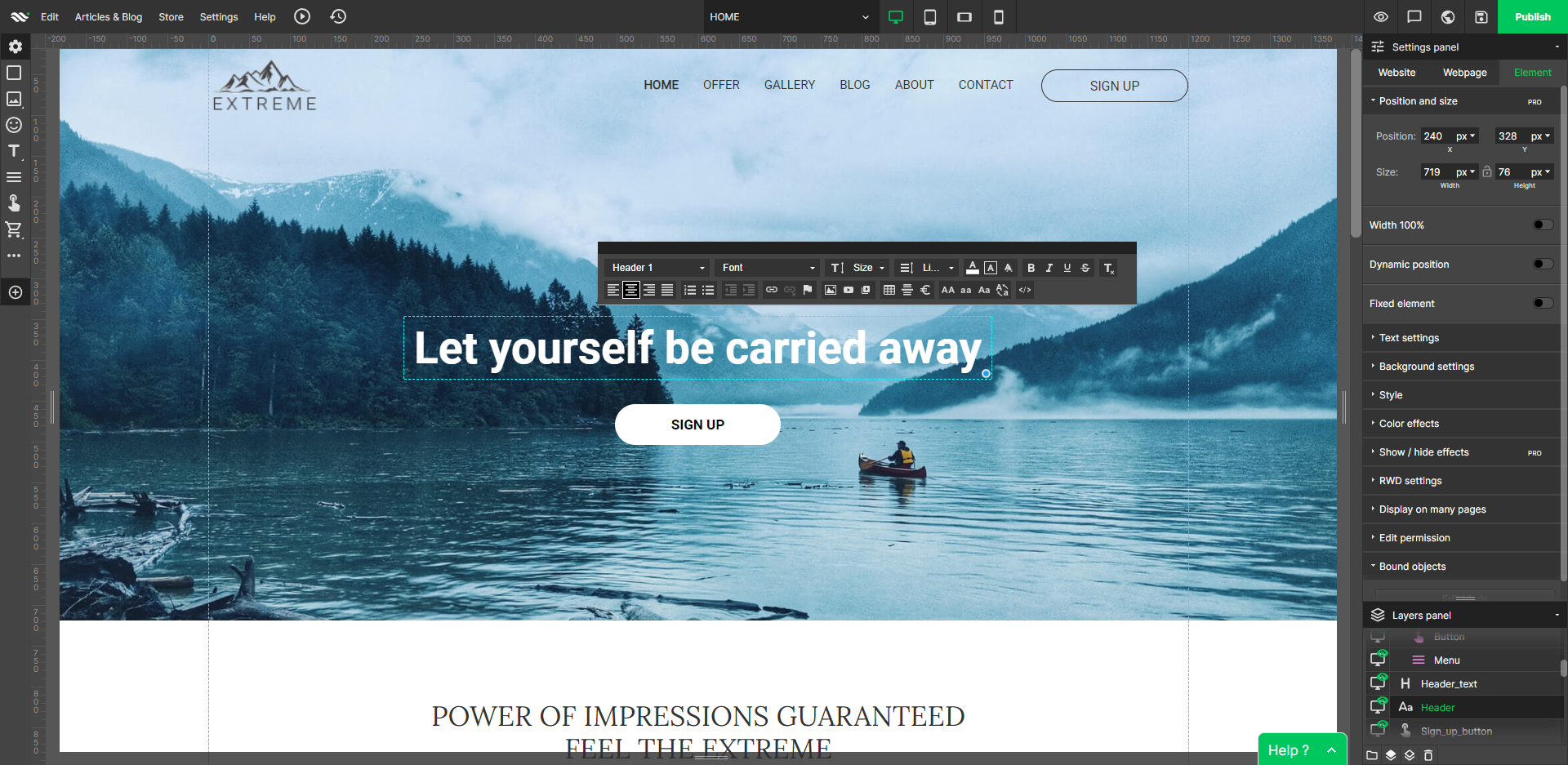
WebWave Screenshots

Screenshot of Customize the interfaceScreenshot of Edit desktop websiteScreenshot of Edit mobile websiteScreenshot of Free stock imagesScreenshot of InterfaceScreenshot of Layers panel