ClickMeeting vs. RemoteMeeting

Overview
ProductRatingMost Used ByProduct SummaryStarting Price
ClickMeeting
Score 7.8 out of 10
N/A
ClickMeeting is a webinar solution formerly owned by GetResponse, an email marketing software company. ClickMeeting's online meeting and collaboration tools are designed to support the sales, marketing, e-learning, and training needs of business of all sizes.
$25
up to 25 attendees
RemoteMeeting
Score 8.0 out of 10
Enterprise companies (1,001+ employees)
A web-based video conferencing tool. Supports mobile, browser and AI minutes. RemoteMeeting is a video conferencing solution. Use a browser to start and join video conferences. No need for a dedicated application. Present a desktop, share documents and interactively mark on them. Create automated meeting minute as record them for later review. RemoteMeeting can detect the speaker automatically and pin it in the main screen for a more immersive…
$0.20
per usage
Pricing
ClickMeetingRemoteMeeting
Editions & Modules
Live 25
$25
up to 25 attendees
Live 50
$35
up to 50 attendees
Automated 25
$40
up to 25 attendees
Automated 50
$45
up to 50 attendees
Live 100
$60
up to 100 attendees
Automated 100
$75
up to 100 attendees
Live 200
$119
up to 200 attendees
Live 500
$139
up to 500 attendees
Automated 200
$145
up to 200 attendees
Enterprise
$165
500 - 5000
Automated 500
$179
up to 500 attendees
Live 1000
$239
up to 1000 attendees
Automated 1000
$279
up to 1000 attendees
RemoteMeeting Pay-per-USE
$0.20 / min
per usage
RemoteMeeting Pay-per-USER
$17.99 / month
per user
Offerings
Pricing Offerings
ClickMeetingRemoteMeeting
Free Trial
YesYes
Free/Freemium Version
NoNo
Premium Consulting/Integration Services
NoNo
Entry-level Setup FeeNo setup feeNo setup fee
Additional DetailsDetailed enterprise pricing on demand.** Server deployment option available upon request.
More Pricing Information
Community Pulse
ClickMeetingRemoteMeeting
Considered Both Products
ClickMeeting
Chose ClickMeeting
ClickMeeting stands out due to its more visually appealing interface and simplified usability. The layout feels more intuitive, especially for hosting webinars and interactive sessions. The platform is easier to navigate for both hosts and participants. Another strength of …
Chose ClickMeeting
For several years we have been using the ClickMeeting platform exclusively for our webinars. As for meetings within the organization - here we previously used other platforms. However, since we have ClickMeeting we also use this platform to organize meetings for our teams. …
Chose ClickMeeting
We selected ClickMeeting for its specialized focus on webinars and virtual events, which aligns with our organization's needs. ClickMeeting's dedicated webinar features and ease of use make it an ideal choice for hosting engaging and interactive online presentations and live Q&A…
Chose ClickMeeting
The interface is clear and legible, user-friendly. The quality of audio-video is outstanding, as with the other platform we sometimes encountered some issues. ClickMeeting has a lot better registration tools and other user engaging features (polls and surveys). The technical …
Chose ClickMeeting
I only use ClickMeeting to conduct online meetings and webinars. I don't need to change the program to another one. I am satisfied with the functionalities that the program offers. The ability to upload your own files and record meetings is very nice. The program helps a lot in …
Chose ClickMeeting
While Google Meet is a reliable product for small, internal meetings, the specific features and functionalities of ClickMeeting make it a better fit for the purposes of organizing large scale events and webinars. Whether through the ability to add multiple event managers, …
Chose ClickMeeting
ClickMeeting distinguishes itself as a standout EU solution primarily due to its GDPR compliance, a feature that sets it apart in the competitive market. Unlike Teams and Zoom, which often grapple with GDPR-related issues, ClickMeeting's adherence to these regulations makes it …
Chose ClickMeeting
In addition to its benefits for staff meetings and online courses, ClickMeeting offers a range of teaching tools that enhance the learning experience. These tools allow for interactive presentations, real-time collaboration, and engaging multimedia content. Furthermore, …
Chose ClickMeeting
While Google Meet is a reliable platform for simple meetings, ClickMeeting offers a more comprehensive set of features tailored for webinars and large-scale events. These include advanced event management, interactive engagement tools like polls and Q&As, and seamless screen …
Chose ClickMeeting
ClickMeeting won competition with other products becuse it gives ability to organise big events, has good support and takes care of clients.
Chose ClickMeeting
We chose ClickMeeting because this solution offers us the optimal basis for our language teaching. Working with the ClickMeeting platform comes in our opinion closest to the possibilities of a face-to-face language training. All classroom tools can be found on the platform, …
Chose ClickMeeting
Our organization considered using skype, but it did not seem safe in terms of data security. Skype also offered fewer features than the ClickMeeting platform. Clickmeeting is a very secure platform. It offers a number of different functions. There is a possibility to conduct …
Chose ClickMeeting
ClickMeeting is better priced, has post-event abilities that I am looking for. LOVE the automated webinars. Love being able to make a separate studio room for a tech check with guest presenters. Been using for so long, the product is very stable, tech support chat is really …
Chose ClickMeeting
Zoom is fine for education, however, it has no support for earning with it ClickMeeting gives us suport for conntact with clients, we can manage webinars easily, it's integrated with FB, it save our time fo administration and organizational work it's really adopted for need of …
Chose ClickMeeting
- does not require installation - clear interface - fast chat technical support - available in Polish language - provides a stable connection - it allows us to share presentations - we can also record the meeting - the process of creating the meeting is quick and easy also …
Chose ClickMeeting
ClickMeeting is more intuitive and provides more stable connectiond during meeting. It also reduces risk of sudden disconnection or logout.
Chose ClickMeeting
ClickMeeting is more intuitive and faster.
Chose ClickMeeting
First of all, ClickMeeting is simpler to use. It has default modes that I can use right away, and there is an option to integrate with Moodle. This makes for an interesting ecosystem for learning. In terms of usage alone, for me Zoom was not as intuitive as ClickMeeting. …
Chose ClickMeeting
ClickMeeting is an intuitive and easy-to-use platform. You can use the ClickMeeting platform from your browser, you don't need to download any application. We also value this tool for its good video
RemoteMeeting
Chose RemoteMeeting
The results we have obtained with RemoteMeeting have been unparalleled, it is an online meeting solution that improves the way we share screen perfectly from anywhere because it provides collaboration tools for more efficient meetings from offering virtual backgrounds, face …
Features
ClickMeetingRemoteMeeting
Performance & Compatibility of Online Events Software
Comparison of Performance & Compatibility of Online Events Software features of Product A and Product B
ClickMeeting
9.5
Ratings
18% above category average
RemoteMeeting
8.0
Ratings
1% above category average
High quality audio9.80 Ratings8.00 Ratings
High quality video9.40 Ratings8.00 Ratings
Low bandwidth requirements9.10 Ratings8.00 Ratings
Mobile support9.90 Ratings8.00 Ratings
Screen Sharing
Comparison of Screen Sharing features of Product A and Product B
ClickMeeting
9.9
Ratings
22% above category average
RemoteMeeting
8.0
Ratings
1% above category average
Desktop sharing9.90 Ratings8.00 Ratings
Whiteboards9.80 Ratings8.00 Ratings
Online Meetings / Events
Comparison of Online Meetings / Events features of Product A and Product B
ClickMeeting
9.8
Ratings
17% above category average
RemoteMeeting
8.0
Ratings
4% below category average
Calendar integration9.90 Ratings8.00 Ratings
Meeting initiation9.80 Ratings8.00 Ratings
Integrates with social media9.90 Ratings8.00 Ratings
Record meetings / events9.90 Ratings8.00 Ratings
Slideshows9.40 Ratings8.00 Ratings
Online Events Collaboration
Comparison of Online Events Collaboration features of Product A and Product B
ClickMeeting
9.3
Ratings
13% above category average
RemoteMeeting
8.0
Ratings
2% below category average
Live chat9.40 Ratings8.00 Ratings
Audience polling9.10 Ratings8.00 Ratings
Q&A9.40 Ratings8.00 Ratings
Online Events Security
Comparison of Online Events Security features of Product A and Product B
ClickMeeting
9.5
Ratings
16% above category average
RemoteMeeting
8.0
Ratings
1% below category average
User authentication9.60 Ratings8.00 Ratings
Participant roles & permissions9.10 Ratings8.00 Ratings
Confidential attendee list9.90 Ratings8.00 Ratings
Best Alternatives
ClickMeetingRemoteMeeting
Small Businesses
Intermedia AnyMeeting Pro
Score 7.1 out of 10
Intermedia AnyMeeting Pro
Score 7.1 out of 10
Medium-sized Companies
JioMeet
JioMeet
Score 10.0 out of 10
JioMeet
JioMeet
Score 10.0 out of 10
Enterprises
Webex Meetings
Webex Meetings
Score 8.4 out of 10
Webex Meetings
Webex Meetings
Score 8.4 out of 10
All AlternativesView all alternativesView all alternatives
User Ratings
ClickMeetingRemoteMeeting
Likelihood to Recommend
9.9
(0 ratings)
8.0
(0 ratings)
Likelihood to Renew
9.1
(0 ratings)
-
(0 ratings)
Usability
9.5
(0 ratings)
-
(0 ratings)
Support Rating
9.9
(0 ratings)
-
(0 ratings)
Implementation Rating
9.1
(0 ratings)
-
(0 ratings)
User Testimonials
ClickMeetingRemoteMeeting
Likelihood to Recommend
ClickMeeting is highly suitable for large-scale webinars, remote training sessions, team meetings, and non-profit outreach events due to its robust features and user-friendly interface. However, for small team meetings or highly interactive workshops, a simpler or more specialized platform might be preferable. Also, its performance could be impacted in areas with limited or unstable internet connections. Overall, it's an excellent tool for remote communication and collaboration, but its suitability may depend on the specific needs and circumstances.
Read full review
RemoteMeeting is a virtual conference room system that offers a simplified user experience with a modern and intuitive design and speed of just one click, it is a meeting tool that always has a room available for my team from anywhere and any device With powerful meeting modes for any occasion, it fully suits our daily virtual communication needs to connect with colleagues, customers, employees and vendors with the ease of just screen sharing with the unique and enjoyable collaboration experience.
Read full review
Pros
  • Branding. Most platforms don't allow you the same flexibility in branding the webinar room as ClickMeeting. This makes your visitors enjoy a seamless experience from your website to your webcasts.
  • Lightweight. There are no downloads required from the viewer's end at all (unlike other major platforms). This allows for a quick, easy experience for everyone logging in for the first time. It also eliminates many firewall issues that may exist on workplace computers.
  • Customizable. You can literally reshape the way the presentation screen appears for your webcasts, with the ability to save different layouts and reuse them based on your needs. This makes it easy to execute several different types of web-based events without trying to fit your presentation model into a specific mold.
Read full review
  • RemoteMeeting works in an extraordinary way to initiate meetings through videoconferences in real time sharing screen audio and video provides dynamic meetings in 3D With avatar profiles that make the experience of the participants much more enjoyable.
  • For team collaboration RemoteMeeting has fallen like a glove, it is a platform that allows high-level business videoconferences to be carried out with security and excellent wireless connection.
Read full review
Cons
  • Export Quality - Isn't the best, we upgraded our plan and still didn't see a difference
  • No sound bugs in the last presentation - Still haven't gotten to the bottom of this but at 3 separate times, our webinar lost sound for what seemed to be no reason.
Read full review
  • RemoteMeeting is a modern and high-level video conferencing solution that provides a quality service, it is a tool where meetings are not boring, so it offers positive and satisfactory results, it provides flexible and intuitive features with solutions that fit our needs. user, ease, visually pleasing interface, safety and quality.
Read full review
Usability
ClickMeeting solves many problems related to the organization of online meetings. Thanks to this platform, you can easily connect with other people from anywhere in the world without leaving your home. This saves time and travel costs. ClickMeeting also enables interactive exchange of information, presentations and documents, which allows for more effective teamwork. Additionally, the platform offers features such as meeting recording, allowing you to easily store and share information. ClickMeeting also provides high quality audio and video, which allows for smooth and effective online communication. All these benefits translate into time savings and increased work efficiency.
Read full review
No answers on this topic
Support Rating
ClickMeeting has never disappointed. This platform made us organize webinars and trainings for our target groups more often. Our internal communication has also improved thanks to the use of this tool. ClickMeeting responds to all our need and we are very glad that we decided to use it. It is a cost-effective tool which is quite important for NGO.
Read full review
No answers on this topic
Implementation Rating
It was very simple.
Read full review
No answers on this topic
Alternatives Considered
In addition to its benefits for staff meetings and online courses, ClickMeeting offers a range of teaching tools that enhance the learning experience. These tools allow for interactive presentations, real-time collaboration, and engaging multimedia content. Furthermore, ClickMeeting's optimized video streaming capabilities minimize delays, ensuring a smooth and uninterrupted learning environment for students.
Read full review
The results we have obtained with RemoteMeeting have been unparalleled, it is an online meeting solution that improves the way we share screen perfectly from anywhere because it provides collaboration tools for more efficient meetings from offering virtual backgrounds, face focus to automatically detect the face on the screen, separate video and information display for multiple monitors, simplicity security and speed is a perfect tool.
Read full review
Return on Investment
  • At the webinars I organize, I have between 50% and 70% of the attendees from the list of all those signed up! This is a very high conversion rate, which I achieve by automatically sending out reminders about the upcoming webinar. Yesterday the success rate was 20% attendance.
Read full review
  • RemoteMeeting has a positive impact on my organization by offering simplified meetings that significantly increase the collaboration and productivity of my work team, offering cloud-based virtual meeting solutions that improve customer relations, reduce work time and additional costs, as well as Provide progress in projects and efficiency.
  • It is a video conferencing solution that improves the way we communicate with colleagues, customers, employees, partners and suppliers with a simplified experience with privacy protection, making all participants feel comfortable and safe in meetings, since we use RemoteMeeting. Work flow has increased by 15%, sales have increased and work teams develop a better relationship with each other.
Read full review
ScreenShots

ClickMeeting Screenshots

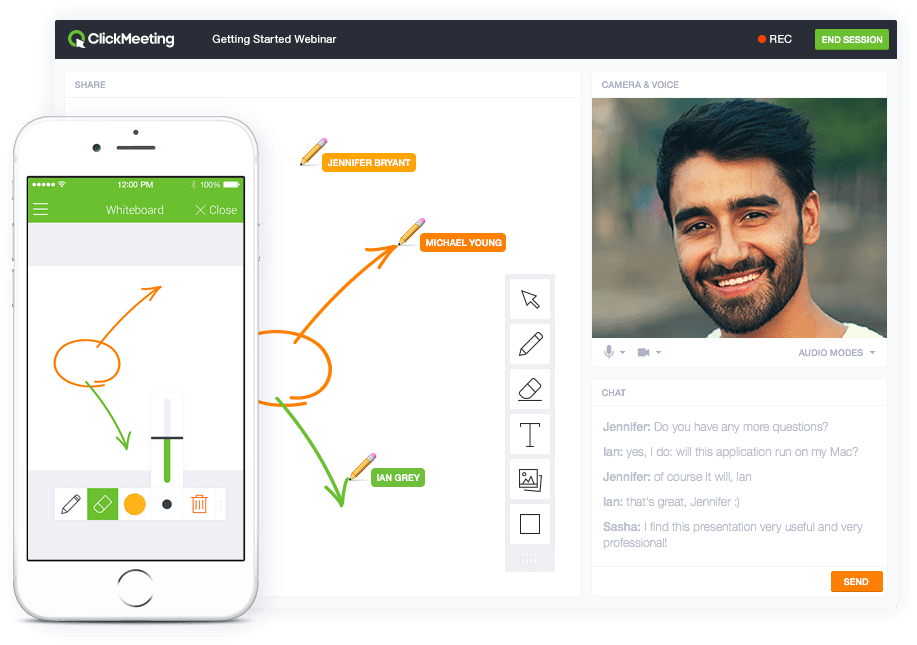
Screenshot of Whiteboard featureScreenshot of Presentation featureScreenshot of Responsive designScreenshot of Webinar roomScreenshot of Webinar room 2Screenshot of Webinar room 3

RemoteMeeting Screenshots

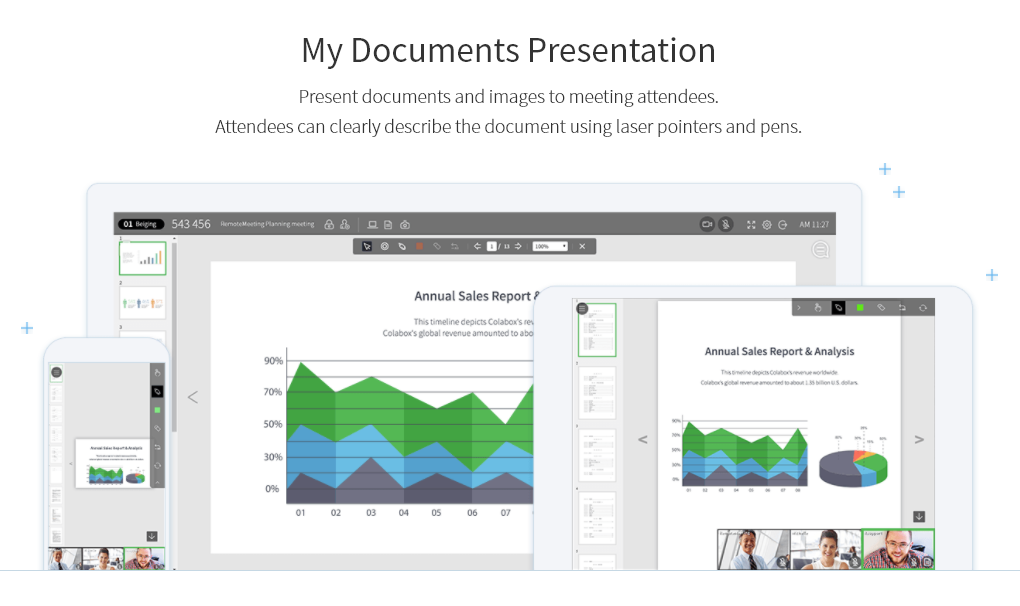
Screenshot of 100% browser basedScreenshot of Share documentsScreenshot of Share desktopScreenshot of Automatic speaker detectionScreenshot of Save money