Coupa vs. DocuSign CLM

Overview
ProductRatingMost Used ByProduct SummaryStarting Price
Coupa
Score 7.9 out of 10
N/A
Coupa’s cloud-native Business Spend Management (BSM) platform provides end-to-end processes that helps drive collaboration across for every business leader from supply chain, procurement, finance, treasury, compliance, and IT and supply chain leaders to help their companies to get the visibility and control they need to spend smarter, mitigate risk, and improve resilience. A unified platform approach frees up IT from complex integrations to help leaders deliver on these goals.
$499
per year
DocuSign CLM
Score 8.2 out of 10
N/A
DocuSign CLM, formerly SpringCM, is a cloud-based platform that can be used to manage documents, contracts and related collateral. The solution includes workflows that can be tailored to an organization's business processes. It is also designed to accelerate team collaboration. SpringCM was acquired by DocuSign in the summer of 2018.
$15
per month
Pricing
CoupaDocuSign CLM
Editions & Modules
Premium Support
$499+
per year
Verified
$549
per year
Advanced
$4800
per year
Registered
Free
Personal
$15
per month
Real Estate Starter
$15
per month
DocuSign for Realtors
$35
per user/per month
Standard
$40
per user/per month
Business Pro
$60
per user/per month
Starter
$75
per month
Intermediate
$450
per month
Advanced Solutions
Contact sales team
Real Estate Plus, Broker Edition
Contact sales team
Sandbox Account
Free
Enterprise Offerings
Contact sales team
Offerings
Pricing Offerings
CoupaDocuSign CLM
Free Trial
NoNo
Free/Freemium Version
YesNo
Premium Consulting/Integration Services
NoNo
Entry-level Setup FeeNo setup feeNo setup fee
Additional Details
More Pricing Information
Community Pulse
CoupaDocuSign CLM
Considered Both Products
Coupa
Chose Coupa
Coupa has more modern web user interface portal pages and is easier to use than Ariba.
Chose Coupa
Taulia works for me as a customer looking for payment on invoices.
No problems at all.
Chose Coupa
Submitting invoices to existing customers' purchase orders is easy. Connecting with new customers is somewhat difficult and confusing.
Chose Coupa
Coupa has the advantage of recurring expense reports. For years I had to create a new one from scratch when I used Concur.
Chose Coupa
Oracle really lacks the reporting and analytics that we’ve found in Coupa. In Oracle, we had to have a dba on staff in order to field the reporting questions. In Coupa, every user has capabilities of their own to grab the reporting they need this is a huge time saver for us and …
Chose Coupa
Concur was a lot easier and more user friendly for employees doing expense reports on their phone. That is not the case with Coupa. You must use your laptop to do expenses and our managers don't always have enough time to do that while out in the field working. This has caused …
Chose Coupa
Coupa is much more robust than Tipalti or Bill.com for tracking invoices. It also allows some customers to order our product via an internal product catalog which is a competitive advantage that Tipalti and Bill.com don't seem to have. However, Bill.com is a lot more user …
Chose Coupa
Coupa is a relatively mature tool when compared to other options available on the market. Although the implementation takes time & effort - it is truly worth it in the long run. Additionally, Coupa's customer support is really good & prompt. Coupa is definitely a top choice for …
Chose Coupa
For expenses, expensify has a much better UI and is easier for business users. However for finance teams, I believe Coupa is more organized on the backend.
Chose Coupa
Coupa is way better then the both of them. Especially Concur, as they pretty much have the same functions. Coupa is just way faster and more updated that Concur, and their Customer Service is way better than Concur.
Chose Coupa
We used Replicon for many years prior to going with Coupa. Replicon lacked the dynamic approval process we needed for our complex organization. It did not integrate with our HR system and we had to manually add our users. When payments were made, there was no way for our users …
Chose Coupa
I didn't have any say in picking Coupa but I know our AP team did extensive research with many products and came to the conclusion that Coupa was the best fit for our organization.
Chose Coupa
We evaluated Ariba, Basware. We chose Coupa for its cost effectiveness, richness of features, functionality and value for money. Coupa customer service is also very good. Coupa is investing time and effort to bring in more features and constantly improving its products. Some of …
Chose Coupa
I briefly used procurify and its UI is far more intuitive and its reporting capabilities are far more robust.
Chose Coupa
Coupa fits within our desire to have best of breed systems delivering value to our organization. We generally work with true cloud providers that are available anytime, anywhere for our mobile workforce. We are pleased that Coupa is in our lineup of service solutions.
Chose Coupa
Coupa does well compared to its competitors. Coupa has an easy to use interface. It's an all cloud based, SaaS. Reporting in Coupa is also above the competition. Coupa also requires less maintenance, upgrades are automatic and we don't need to worry about being on the latest …
Chose Coupa
We looked at a number of solutions. Due to retail's high turnover rate I needed a stable tool that was extremely intuitive that store level employees would find easy (and maybe fun) to use. Coupa is so configurable I can set up each store with different spend authorizations to …
DocuSign CLM
Chose DocuSign CLM
DocuSign CLM has a much improved user experience compared to similar products we have used. The streamlining of templates and traceability through the signing process are huge benefits, and better than competitors. The ability to set up designated templates for different …
Chose DocuSign CLM
DocuSign CLM is the only product that we've used for signing contracts digitally.
Chose DocuSign CLM
Adobe Acrobat sign was a more confusing process compared to DocuSign CLM. Acrobat presented signature abilities, yet sometimes this was electronic and sometimes this was done manually. Additionally, it is difficult to send and track the document when it goes to more than one …
Chose DocuSign CLM
This was the first software of this kind I had found and couldn't be happier. It had resolved the majority of our problems and we do not see the need of looking for another option at all.
Chose DocuSign CLM
The reason I have chosen DocuSign is because it is the most common app that will pop up (especially when opening something in Gmail or Google Drive) to let you sign a document. I do not necessarily want to use DocuSign, and I don't always use it, but sometimes it is just easier …
Chose DocuSign CLM
Hands down the best platform out there - easy to use, safe and secure, and compatible across multiple devices from the computer, tablet, and phone.
Chose DocuSign CLM
Because of all the options, we found in the market, this one was the most suitable for our needs. The price and the functionality were correct. We wanted a user-friendly tool to replace quickly and in an easy way, the handwriting sign-off and this was the best option we had.
Chose DocuSign CLM
N/A. Havent used a similar product.
Chose DocuSign CLM
I've used DocuSign CLM because that is what my employer usually sends me. I think DocuSign CLM is straight to the point and easy to upload and send back to my employer. Adobe Acrobat has more features when it comes to other actions.
Chose DocuSign CLM
Pandadoc seems to be a better option for small businesses.
Chose DocuSign CLM
- Docusign has better integration and flexibility.
- Docusign costs $10 a month for an individual compared to $14.99 for Adobe.
- 30 days free trial in DocuSign vs 14 days in adobe sign.
Chose DocuSign CLM
DocuSign was the more secure and accepted signature platform. A lot of our vendors would actually require we use it and initially would send the document over already signed by them with DocuSign.
Chose DocuSign CLM
I haven't evaluated other products similar to DocuSign. I have used Adobe Sign once but I am not in a position to review it against DocuSign since I only used Adobe Sign once.
Chose DocuSign CLM
I used it for documentation while joining my organization. It was used during the HR process. I had to upload all the documents on the portal and sign it and it was just a few clicks away and the entire process was done in a few clicks. This helped the HR and the BCG team to …
Chose DocuSign CLM
I have used Adobe's version and it does not do a better job. DocuSign is much easier to navigate/use. DocuSign has more options to edit and highlight parts that need to be signed. It has better signature options and you can resize them to make it look clean. Adobe doesn't …
Chose DocuSign CLM
I wanted a contract system to review and assess for the volume of contracts I was sending out. This was one of the first programs to review.
Chose DocuSign CLM
We did not consider an alternative to DocuSign. The reputation and ease of use was enough to make the purchasing decision and begin using it internally and with customers.
Chose DocuSign CLM
I like DocuSign a lot better than Adobe Acrobat Sign....just easier to maneuver and save signatures and copies of the paperwork (contract) to forward to the next person.
Chose DocuSign CLM
DocuSign CLM, formerly SpringCM, was a superior solution when I purchased it two years ago. It is still driving improvements for the company (as of last night's check-in with my old team).
Chose DocuSign CLM
I was not apart of the decision-making process for SpringCM. My assumption is that it does not stack well up against Apptus.
Features
CoupaDocuSign CLM
Contract Authoring
Comparison of Contract Authoring features of Product A and Product B
Coupa
-
Ratings
DocuSign CLM
7.5
Ratings
6% below category average
Contract creation00 Ratings8.00 Ratings
Contract templates00 Ratings8.00 Ratings
Clause library/saved fields00 Ratings8.00 Ratings
Guided logic00 Ratings6.00 Ratings
Contract Collaboration
Comparison of Contract Collaboration features of Product A and Product B
Coupa
-
Ratings
DocuSign CLM
7.6
Ratings
9% below category average
Contract sharing00 Ratings8.00 Ratings
Contract editing00 Ratings8.00 Ratings
Collaborating on contracts00 Ratings7.00 Ratings
Approval process00 Ratings8.00 Ratings
Interdepartmental workflows00 Ratings7.00 Ratings
Contract Monitoring
Comparison of Contract Monitoring features of Product A and Product B
Coupa
-
Ratings
DocuSign CLM
8.3
Ratings
0% above category average
Contract database00 Ratings8.00 Ratings
Contract search00 Ratings7.00 Ratings
Contract milestone reminders & alerts00 Ratings8.00 Ratings
Custom contract reports00 Ratings8.00 Ratings
Tracking contract status00 Ratings9.00 Ratings
Compliance check00 Ratings10.00 Ratings
Contract Management
Comparison of Contract Management features of Product A and Product B
Coupa
-
Ratings
DocuSign CLM
8.2
Ratings
6% above category average
Contract Storage00 Ratings8.00 Ratings
Advanced Search and Filtering00 Ratings8.00 Ratings
Customizable Contract Templates00 Ratings8.00 Ratings
Workflow Acceleration00 Ratings9.00 Ratings
E-Signatures00 Ratings9.50 Ratings
Reminders and Alerts00 Ratings8.00 Ratings
Analytics and Reporting00 Ratings7.00 Ratings
Integration with other Systems00 Ratings8.00 Ratings
Best Alternatives
CoupaDocuSign CLM
Small Businesses
MIP Fund Accounting
MIP Fund Accounting
Score 8.7 out of 10
airSlate WorkFlow
airSlate WorkFlow
Score 7.5 out of 10
Medium-sized Companies
Precoro
Precoro
Score 2.8 out of 10
PandaDoc
PandaDoc
Score 9.0 out of 10
Enterprises
SAP S/4HANA Cloud
SAP S/4HANA Cloud
Score 8.6 out of 10
Conga CLM
Conga CLM
Score 8.8 out of 10
All AlternativesView all alternativesView all alternatives
User Ratings
CoupaDocuSign CLM
Likelihood to Recommend
8.0
(0 ratings)
8.3
(0 ratings)
Usability
10.0
(0 ratings)
-
(0 ratings)
Support Rating
-
(0 ratings)
1.0
(0 ratings)
User Testimonials
CoupaDocuSign CLM
Likelihood to Recommend
Suitable: Simple indirect procurement. Low cost; short cycle implementation. Less Suitable: Complex procurement scenario requiring serious vendor collaboration. End-to-end integration. Direct Material Procurement, especially when planning, quality inspection, and other miscellaneous activities are involved, requires handling various special statuses and updates to meet industry- or country-specific requirements.
Read full review
DocuSign is useful for collecting electronic signatures on isolated documents and packets that are administered separately or integrated into another system. DocuSign is integrated into our onboarding system, Paylocity, which is where the employee completes all onboarding tasks required for employment. Integrating DocuSign with Paylocity allows us to send documents that require more than one signature along with other onboarding tasks, which makes for a less confusing onboarding experience for the worker. DocuSign also allows us to automatically run E-Verify from the integrated Form I-9 Document, which saves us lots of time onboarding each employee.
Read full review
Pros
  • A consistent format is helpful because if you learn the tool once, then you should be set for long term success.
  • Straightforward with some of the fields (not all), but for some pieces of work. It is easy enough due to the direct nature of the tool.
Read full review
  • Alerts when documents are signed
  • Notifications if customers don't complete any or all of their required tasks
  • Showing clients exactly where to sign
  • Making signing easy and fast
Read full review
Cons
  • With one particular customer I have had about 40 emails to be accepted as a vendor. With other customers before Coupa became horrendous I had no problems. As an existing Coupa user why do I have to create a new profile?
  • I have been accepted as a user 3 times then a day later Coupa wants the same form filled again and again.
  • Help is only on a chat line. You cannot speak to anyone and in my opinion they are not helpful. Their suggstions have gotten me nowhere. They refer me to talk with my customer to straighten out the problem. My cusotmer doesn't have a clue.
  • I'm considering not to accept purchase orders that require invoicing through Coupa.
Read full review
  • Increase sending limit for initial plans
  • Faster return for client service requests
  • When correcting a document, no new email is sent for notification of an update. The clients have to go back to the old document, and it feels uncomfortable for them.
Read full review
Likelihood to Renew
I love using coupa but i'm not the decision maker in this regard.
Read full review
No answers on this topic
Usability
-Could be easy or hard to use depending on corporate policies and compliance. At times, errors and cryptical message associated with them could drive users mad.
Read full review
No answers on this topic
Support Rating
-Support is generally speaking OK (not great). The user community is quite active, and the response time is acceptable. I would certainly hope there's more user-generated content (like in SAP, Oracle, and Linux, etc.), but I suppose Coupa is still not large enough, and the incentives are not yet there.
Read full review
I am constantly experiencing issues with SpringCM.
Read full review
In-Person Training
The employee that trained me was not particularly interesting in teaching me but they were not a Coupa employee.
Read full review
No answers on this topic
Alternatives Considered
Coupa fits within our desire to have best of breed systems delivering value to our organization. We generally work with true cloud providers that are available anytime, anywhere for our mobile workforce. We are pleased that Coupa is in our lineup of service solutions.
Read full review
DocuSign CLM has a much improved user experience compared to similar products we have used. The streamlining of templates and traceability through the signing process are huge benefits, and better than competitors. The ability to set up designated templates for different use-case scenarios, and roll out efficient documents for signing, is invaluable, as well as other functions like Bulk Send and PowerForms.
Read full review
Return on Investment
  • The Sourcing Module has returned our investment 23 times on an annualized basis.
  • We're now SOX compliant and as a public company, that's keeping us compliant with our corporate charter.
  • Having one central invoicing location has reduced our AP calls significantly. Our suppliers now have visibility into where their invoice is in the payment cycle. We also have a much higher invoice-to-pay cycle.

Read full review
  • Made our sales process faster and client teams could start implementation faster than increased revenues
  • Our lives are easier as a team when we use e-signatures, saving time, paper, and protecting the environment
  • DocuSign is a well-known brand so that increase our company's value in the eye of clients and makes us look PRO
Read full review
ScreenShots

Coupa Screenshots

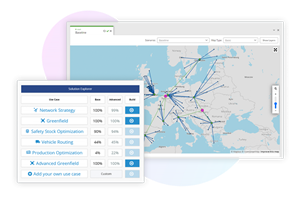
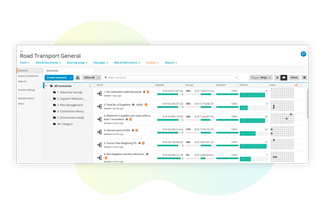
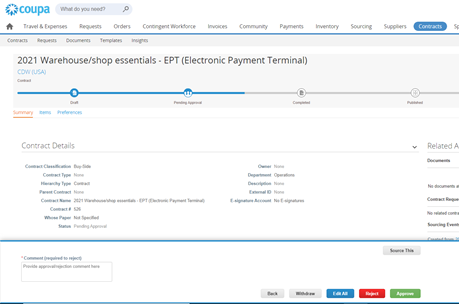
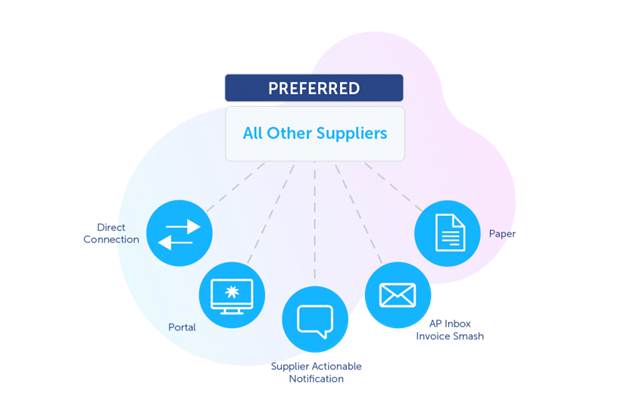
Screenshot of Transform your company’s supply chain planning from running one-off projects to a consistent and repeatable process.Screenshot of Efficiently capture data for apples-to-apples comparisons of suppliers across business requirements, risk factors, ESG, and costs to find the best solution.Screenshot of Understand supplier relationships, ensure that the right mitigation is in place, and onboard suppliers. Use trusted data services, Community.ai, and performance feedback to spot risk and optimize relationships over time.Screenshot of Bring the results of sourcing events and risk vetting together to quickly formalize agreements without costly omissions or delays.Screenshot of Give users an easy experience for all types of goods, services, and contingent worker needs while bubbling up ESG and other favored suppliers. Streamline budget checks and approvals simple emails to get move spend pre-approved, on-contract, and under control.Screenshot of Give suppliers a variety of options for submitting e-invoices — all without fees and in compliance with VAT and global regulations. Boost supplier adoption of e-invoicing by giving visibility into status of invoice approval and digital payments.