Dancing Numbers vs. SnapLogic

Overview
ProductRatingMost Used ByProduct SummaryStarting Price
Dancing Numbers
Score 9.0 out of 10
N/A
Dancing Numbers is a platform that aims to make importing, exporting, and deleting the data in QuickBooks account easier. Dancing Numbers also offers pro advisors who are present 365 days.
$199
per year per user
SnapLogic
Score 6.9 out of 10
N/A
SnapLogic is a cloud integration platform with a self-service capacity supported by over 450 prebuilt modifiable connectors. SnapLogic also offers real-time and batch integration processes for interfacing with external data sources, a drag-and-drop interface, and use of the vendors’ Iris AI.N/A
Pricing
Dancing NumbersSnapLogic
Editions & Modules
Importer, Exporter, and Deleter
$199
per year per user
Importer, Exporter, and Deleter
$199
per year per user
Accountant Basic
$499
per year Unlimited
Accountant Basic
$499
per year Unlimited
Accountant Pro
$899
per year Unlimited
Accountant Pro
$899
per year Unlimited
Accountant Premium
$1,999
per year Unlimited
Accountant Premium
$1,999
per year Unlimited
No answers on this topic
Offerings
Pricing Offerings
Dancing NumbersSnapLogic
Free Trial
YesNo
Free/Freemium Version
NoNo
Premium Consulting/Integration Services
NoNo
Entry-level Setup FeeOptionalOptional
Additional Details
More Pricing Information
Community Pulse
Dancing NumbersSnapLogic
Considered Both Products
Dancing Numbers

No answer on this topic

SnapLogic
Chose SnapLogic
Other providers found it difficult to allow us to use their services on our cloud premises (exclusively in our AWS accounts) which we need for compliance. SnapLogic was able to give us this guarantee.
Chose SnapLogic
Developer friendly tool Debug capabilities Ease of use
Chose SnapLogic
Boomi was our runner-up product. The pricing model was much higher and cost-prohibitive. They were not as flexible with pricing on a non-profit higher education institution. We did love their integration code library shared across all clients. The user interface was on par …
Chose SnapLogic
Strong user community Strong services expertise Strong consulting partnership Product functionality and performance Overall costs
Chose SnapLogic
We opted for SnapLogic due its ease of use and the flexibility it offers, it was the platform that was strongest in both application integration and data integration and both were use cases we wanted to be able to cover.
Chose SnapLogic
The simple interface and ease of building the pipelines with "snaps" was a selling point for SnapLogic. Amongst the multitude of snap packs available with new ones constantly being added. The support and vendor engagement was also very pleasant. Although amongst the more …
Chose SnapLogic
SnapLogic suits my company's needs better than Scribe because it's a lot less complicated to move data between different systems, and the monitoring aspect is way better. Scribe does have better customer support though, as SnapLogic is a lot more hands-off. Scribe feels easier …
Chose SnapLogic
Snaplogic is great for what it is. It's not an all-inclusive solution. You likely don't need a snap license when you have one or two systems, or you don't have a centralized SQL database. Once you have multiple tools and you start automating reports you'll want a license to tie …
Chose SnapLogic
Earlier we used to work on this tool, but since SnapLogic came in the picture it gave us a lot of confidence to work faster, easier and in a more convenient way. So I would recommend using SnapLogic because of its simple functionality for smaller organizations. It is fast at …
Chose SnapLogic
SnapLogic does better API integration than Informatica Power Center. Informatica has better re-usable component integration and version control than Snaplogic. Metadata lineage for Informatica is better than SnapLogic. I do not think that SnapLogic is better than SSIS.
Chose SnapLogic
SnapLogic is easy to use, way cheaper, has extensive support, wide variety of connectors to use and much of their basic snaps are free.
Chose SnapLogic
Snaplogic was much better than Boomi in the customer response time. In fact, this was one of the deal-breaker reasons. SnapLogic was better than Informatica in its ability to read directly from the sources/SFTP files instead of downloading them.
Pentaho is great, but we wanted …
Chose SnapLogic
We selected SnapLogic because it paired really well with the two cloud systems we needed to move data between. The pre-built connecters allowed us to easily set up our pipelines to create the ETL of data between the two systems.
Features
Dancing NumbersSnapLogic
Reporting & Analytics
Comparison of Reporting & Analytics features of Product A and Product B
Dancing Numbers
9.0
Ratings
11% above category average
SnapLogic
-
Ratings
Dashboards8.00 Ratings00 Ratings
Standard reports9.00 Ratings00 Ratings
Custom reports10.00 Ratings00 Ratings
Process Engine
Comparison of Process Engine features of Product A and Product B
Dancing Numbers
5.3
Ratings
30% below category average
SnapLogic
-
Ratings
Process designer8.00 Ratings00 Ratings
Process simulation3.00 Ratings00 Ratings
Business rules engine3.00 Ratings00 Ratings
SOA support9.00 Ratings00 Ratings
Process player7.00 Ratings00 Ratings
Model execution2.00 Ratings00 Ratings
Business Process Automation
Comparison of Business Process Automation features of Product A and Product B
Dancing Numbers
2.0
Ratings
101% below category average
SnapLogic
-
Ratings
Business Process Modeling2.00 Ratings00 Ratings
Cloud Data Integration
Comparison of Cloud Data Integration features of Product A and Product B
Dancing Numbers
-
Ratings
SnapLogic
7.7
Ratings
4% below category average
Pre-built connectors00 Ratings8.20 Ratings
Connector modification00 Ratings6.90 Ratings
Support for real-time and batch integration00 Ratings7.40 Ratings
Data quality services00 Ratings7.70 Ratings
Data security features00 Ratings7.50 Ratings
Monitoring console00 Ratings8.10 Ratings
Best Alternatives
Dancing NumbersSnapLogic
Small Businesses
CMW Platform
CMW Platform
Score 8.9 out of 10
Make
Make
Score 8.9 out of 10
Medium-sized Companies
Quixy
Quixy
Score 9.9 out of 10
IBM App Connect
IBM App Connect
Score 9.5 out of 10
Enterprises
Redwood RunMyJobs
Redwood RunMyJobs
Score 9.6 out of 10
IBM App Connect
IBM App Connect
Score 9.5 out of 10
All AlternativesView all alternativesView all alternatives
User Ratings
Dancing NumbersSnapLogic
Likelihood to Recommend
9.0
(0 ratings)
8.1
(0 ratings)
Likelihood to Renew
-
(0 ratings)
9.0
(0 ratings)
Usability
10.0
(0 ratings)
7.0
(0 ratings)
Support Rating
-
(0 ratings)
8.5
(0 ratings)
Implementation Rating
-
(0 ratings)
9.0
(0 ratings)
User Testimonials
Dancing NumbersSnapLogic
Likelihood to Recommend
Dancing Numbers is ideal for small to medium-sized businesses needing an easy-to-use, cost-effective accounting solution, particularly during transitions from manual bookkeeping or other software. It’s especially useful for firms with basic accounting needs or limited expertise, offering automation for routine tasks. However, it may not be suitable for large enterprises with complex financial operations, businesses requiring advanced customization, or those in highly regulated industries. It also might fall short for companies with extensive international operations or high transaction volumes.
Read full review
Snaplogic is unique from other IPASS tools if you're very sensitive about data security as they have an on-premise option where your data never needs to leave your data center. And data pipelines can be quickly created if Snaplogic has the requisite connector to your data sources. On the downside, if you're transforming a large amount of data for example in training machine learning models, a tool with elastic compute capability is more appropriate.
Read full review
Pros
  • Bulk Data Import
  • Bulk Data Export
  • Bulk Data Delete
  • Data Conversion
  • Software Integration
Read full review
  • Their customer service response time is brilliant.
  • SFTP tasks do a great job in reading the file directly from the server, instead of having to download it and then read it.
  • Tasks expose the ability to run them using external job schedulers.
  • Once you have a server up, setting up SnapLogic service does not take long. They have good documentation and customer support too.
Read full review
Cons
No answers on this topic
  • Git integration outside of Github (Bitbucket, and other git service providers)
  • I would like to see an improved way to perform unit testing within the SnapLogic framework, as opposed to the manual approach
  • I would prefer that the underlying source of SnapLogic pipelines be more human-readable, although it is a GUI approach to authoring pipelines
Read full review
Likelihood to Renew
No answers on this topic
This has been hands down the BEST software company I have ever used and dealt with. I am a 25 year IT veteran at this college. They go above and beyond in soliciting our feedback/input and proactively follow up about bugs, issues, etc. I have given multiple potential clients my thoughts and after seeing the SL demo they all sign up. I appreciate their support model, it's REFRESHING!
Read full review
Usability
I’ve been using Dancing Numbers for a few months now, and overall, it’s been a great experience. The platform is user-friendly and intuitive, making it relatively easy to navigate even for someone with a moderate level of accounting knowledge. The automated data entry and reconciliation features are particularly helpful, saving us a significant amount of time and reducing manual errors.The integration with various accounting systems is a big plus, allowing us to seamlessly connect with our existing tools. Customer support has been responsive and helpful whenever we’ve had questions or needed assistance.However, there are a few areas where Dancing Numbers could improve. While the core functionalities are strong, some advanced features feel a bit limited compared to competitors. Additionally, the pricing structure could be more flexible to accommodate different business sizes and needs.Overall, Dancing Numbers is a solid choice for businesses looking to streamline their accounting processes with a reliable tool, though there’s room for enhancement in certain areas.
Read full review
It is very powerful but has a steep learning curve
Read full review
Support Rating
No answers on this topic
They can be prompt but they have not been as useful as I've wanted. We had a bug that affected many of our customers through an API connection between SnapLogic and our platform. Eventually they were able to figure it out, but it took a long time of negotiating between our engineering team and theirs. Additionally, we installed the SnapLogic groundplex for our customers and we've run into a bunch of problems of connectivity. If SnapLogic offered to be on those calls with our clients to troubleshoot how to fix these problems, I would give them a better grade here.
Read full review
Implementation Rating
No answers on this topic
The groundplex in our VPC is very nice for security reasons and the SnapLogic team was extremely helpful during our implementation
Read full review
Alternatives Considered
No answers on this topic
Boomi was our runner-up product. The pricing model was much higher and cost-prohibitive. They were not as flexible with pricing on a non-profit higher education institution. We did love their integration code library shared across all clients. The user interface was on par with Snaplogic as well as the features that come included. Overall, seemed like a solid product just found something better for a lower price point.
Read full review
Return on Investment
No answers on this topic
  • We had a positive impact at our organization where handful of developers were able to integrate more than 50 systems in less than a year. It has helped us a lot by providing access to data that was previously not possible or unimaginable or get in such easy format.
  • The only place where it didn't have a positive impact was for a realtime application integration project requiring on the fly aggregations, wherein this tool claimed it could do it but wasn't able to.

Read full review
ScreenShots

Dancing Numbers Screenshots

Screenshot of

SnapLogic Screenshots

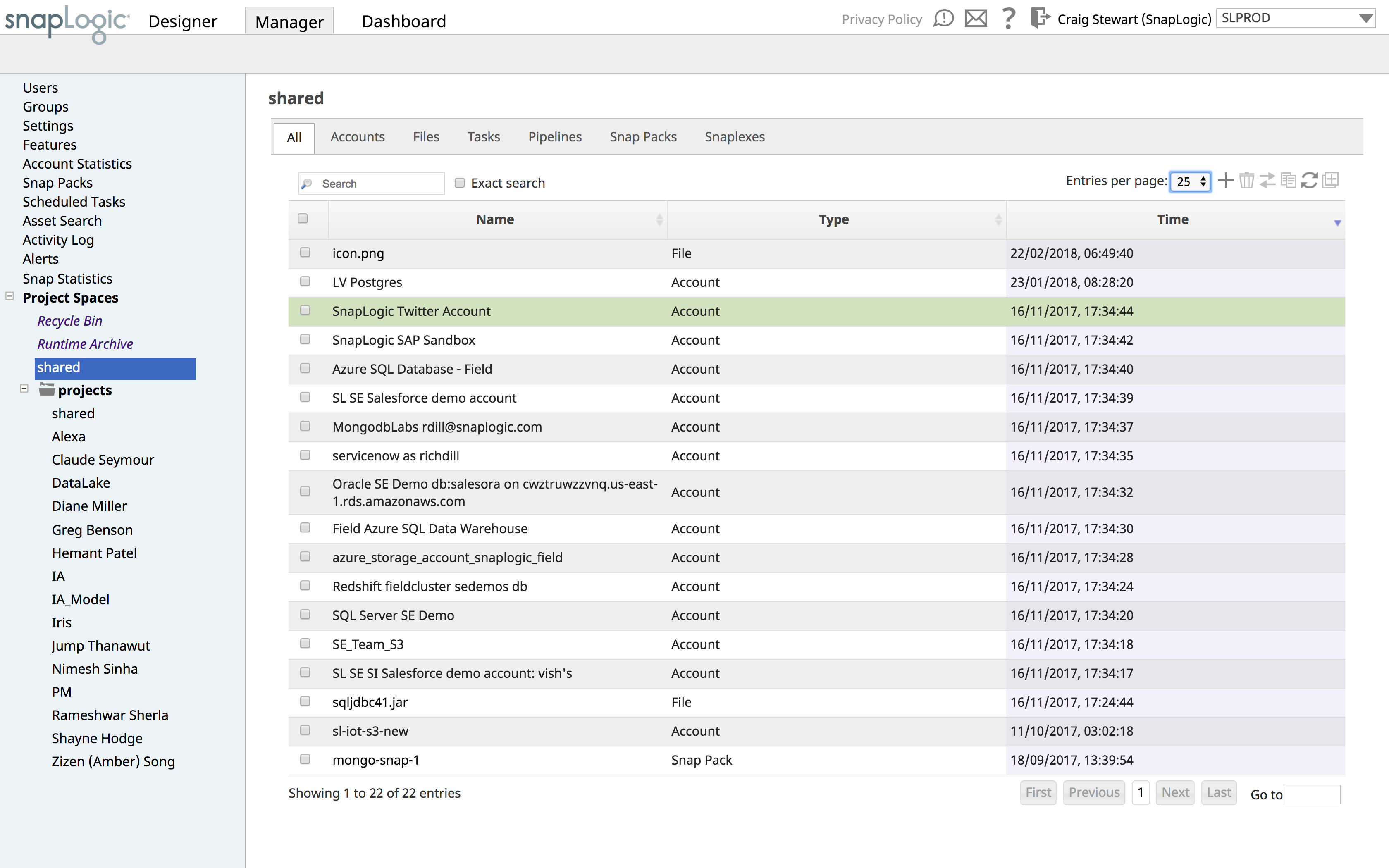
Screenshot of the Designer of SnapLogic's Enterprise Integration Cloud, which showcases the clicks-not-code approach to creating integration pipelines. Notice the machine-learning powered integration assistant, Iris, to the right suggests which Snaps (our term for connectors) to use from our catalogue of nearly 450+ pre-built connectors.Screenshot of the Enterprise Integration Cloud Dashboard used to monitor the status and health your pipelines and Snaplexes. Pipelines can be optimized further from here.Screenshot of the Manager tab of the Enterprise Integration Cloud Dashboard, used to manage users, groups, project spaces, pipelines and security. It can also display account and Snap statistics.