Chose dbForge Studio (Edge)
dbForge [Studio for SQL Server] is far superior in its features, capabilities, ease [of] use, menu layout, and sophisticated design.

| Product | Rating | Most Used By | Product Summary | Starting Price |
|---|---|---|---|---|
 dbForge Studio (Edge) | N/A | dbForge Studio is provided by Devart and is a universal front-end client for database management, administration and development. Devart's GUI tool provides utilities to compare, synchronize, and back up databases (e.g. MySQL, Oracle, SQL Server, PostgreSQL, etc.) with scheduling, and includes the possibility to analyze and report MySQL tables data. For example, dbForge Studio for MySQL works with any MariaDB database servers, and supports all MariaDB objects types. This solution enables users… | $9.95 per month | |
 Sequel Pro | N/A | Sequel Pro is a relational database software solution offered free and open source. It allows users to access any MySQL database through a Mac. | N/A |
| dbForge Studio (Edge) | Sequel Pro | |||||||||||||||
|---|---|---|---|---|---|---|---|---|---|---|---|---|---|---|---|---|
| Editions & Modules |
| No answers on this topic | ||||||||||||||
| Offerings |
| |||||||||||||||
| Entry-level Setup Fee | No setup fee | No setup fee | ||||||||||||||
| Additional Details | — | — | ||||||||||||||
| More Pricing Information | ||||||||||||||||
| dbForge Studio (Edge) | Sequel Pro | |
|---|---|---|
| Considered Both Products |  dbForge Studio (Edge)  Bob Guzek IT Manager Chose dbForge Studio (Edge) I would say that dbForge equals or beats most of the abilities of the other tools I evaluated at the time. dbForge had better support (Devart), and regular feature updates. dbForge has better tools for data comparison and import/export. The price tag is slightly higher, but …  Anthony Aziz Senior Software Engineer Chose dbForge Studio (Edge) We haven't tried any other tools that do comparisons like Data Compare does. Our method prior to buying this tool was to manually run queries on each database and compare the output using text compare or by eye.  Aaron Smith Senior Software Developer Chose dbForge Studio (Edge) While DBeaver ended up being the goto for our development team, everyone else is going to be using dbForge Studio. The UI was hands down much easier to get used to, and the sorting/filtering options make it super easy for anyone to view the data the way they needed it. You …  Jhonathan de Souza Soares Professor Chose dbForge Studio (Edge) Actian PSQL  Mortada Abdul Roda Developer Chose dbForge Studio (Edge)
Chose dbForge Studio (Edge) We used MySQL Workbench tool before dbForge Studio for MySQL and it did not work well. dbForge Studio for MySQL was a much more complete and flexible solution to resolve our development and administration problems. dbForge Studio for MySQL not only resolved our problems it …  Kevin Withers Owner Chose dbForge Studio (Edge) I chose dbForge Studio for MySQL instead of MS SQL Server because: 1) For the most part I don't like Microsoft products. Their UIs are notoriously bad, and you never know when a product tweak will create incompatibilities that will require an expensive upgrade. 2) Since our … |  Sequel Pro  Ilyas Bakouch Cloud Solutions Architect Chose Sequel Pro MySQL Workbench: Sequel Pro is lighter, simpler to use and faster TablePlus: Sequel Pro is free while Table plus is not  Dan Mahoney Member of Technical Staff Chose Sequel Pro MySQL Workbench is a wonderful tool, but the routine editing of existing data is note nearly as straightforward as it is in Sequel Pro. The ability to sort a data view with a single click makes Sequel Pro my definite choice. phpMyAdmin is pretty ubiquitous, but the routine …  Carlos Eduardo de Souza Co-founder & Manager Chose Sequel Pro It's so much easier to use, it's the perfect balance between something deep enough to manage and customize databases, but it's easy enough to get into really fast.  Joey Yax Web Developer Chose Sequel Pro Free is a huge selling point, but beyond that it's secure, powerful and easy to use.  Kyle Randolph Analyst Chose Sequel Pro Amazingly full-featured for a free MySQL client. Met all the requirements for our team. Free & for Mac OS X. Chose Sequel Pro Sequel Pro has a fully functional free version which is fast and unlimited. None of the others let you get to your data as quickly and directly as Sequel Pro does. With the exception of the default tools provided by MySQL, Sequel Pro is probably the client that remains most up … |
| dbForge Studio (Edge) | Sequel Pro | ||||||
|---|---|---|---|---|---|---|---|
| Database Development |
|
| dbForge Studio (Edge) | Sequel Pro | |
|---|---|---|
| Small Businesses |  DBeaver Score 9.2 out of 10 | DBeaver Score 9.2 out of 10 |
| Medium-sized Companies | DBeaver Score 9.2 out of 10 | DBeaver Score 9.2 out of 10 |
| Enterprises | DBeaver Score 9.2 out of 10 | DBeaver Score 9.2 out of 10 |
| All Alternatives | View all alternatives | View all alternatives |
| dbForge Studio (Edge) | Sequel Pro | |
|---|---|---|
| Likelihood to Recommend | 9.8 (0 ratings) | 8.4 (0 ratings) |
| Support Rating | 8.0 (0 ratings) | 7.5 (0 ratings) |
| dbForge Studio (Edge) | Sequel Pro | |
|---|---|---|
| Likelihood to Recommend |
|
Ilyas Bakouch Cloud Solutions Architect |
| Pros |
Anthony Aziz Senior Software Engineer |
Dan Mahoney Member of Technical Staff |
| Cons |
|
Carlos Eduardo de Souza Co-founder & Manager |
| Support Rating |
|
|
| Alternatives Considered |
Bob Guzek IT Manager | |
| Return on Investment |
Mortada Abdul Roda Developer |
 Jake Schlingman Product Manager |
| ScreenShots | dbForge Studio (Edge) Screenshots 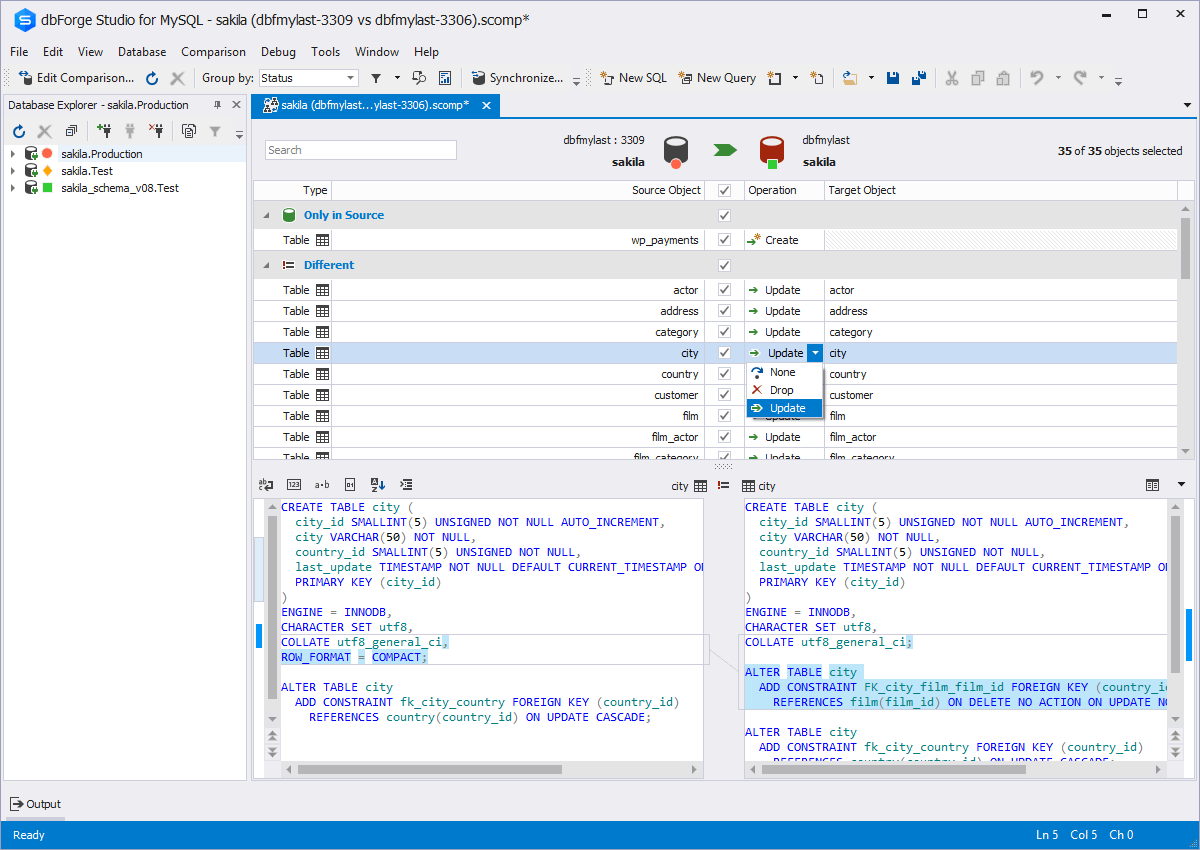  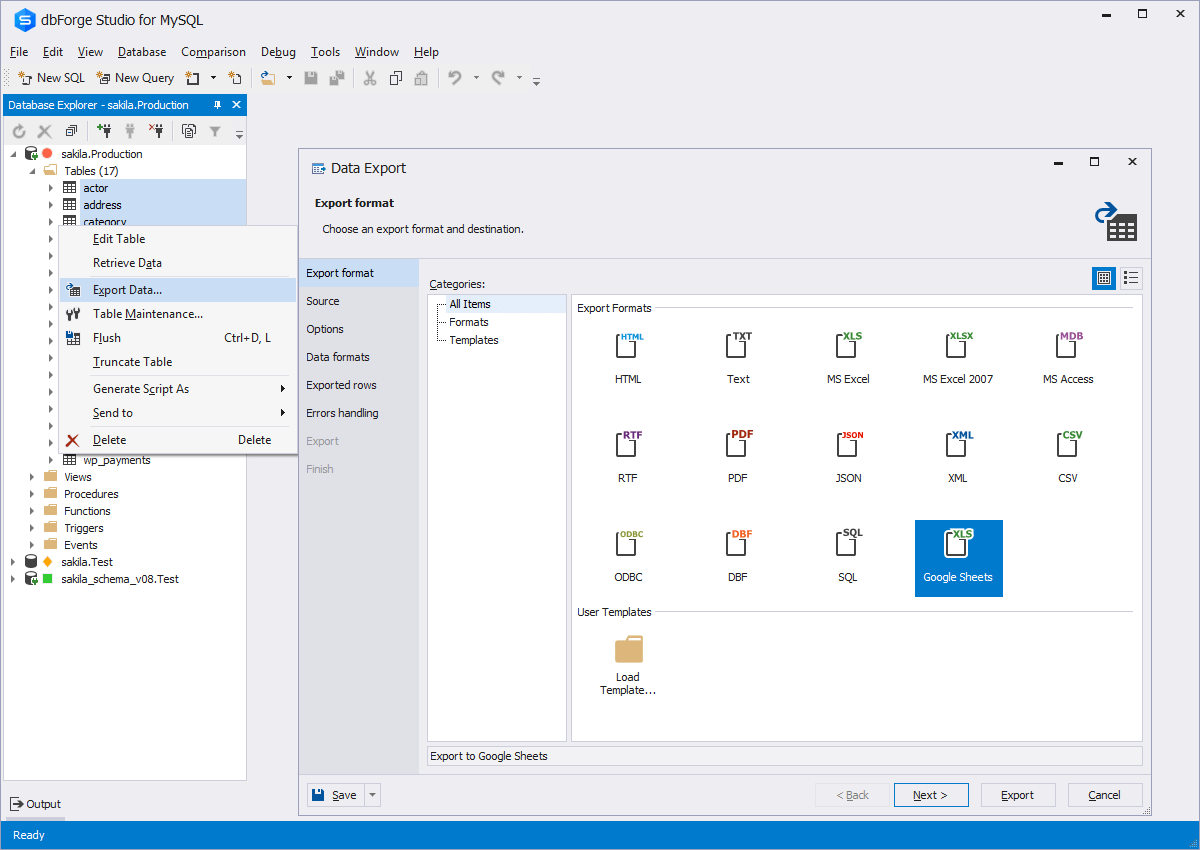   |

