dbForge Studio (Edge) vs. SolarWinds Database Performance Analyzer

Overview
ProductRatingMost Used ByProduct SummaryStarting Price
dbForge Studio (Edge)
Score 8.0 out of 10
N/A
dbForge Studio is provided by Devart and is a universal front-end client for database management, administration and development. Devart's GUI tool provides utilities to compare, synchronize, and back up databases (e.g. MySQL, Oracle, SQL Server, PostgreSQL, etc.) with scheduling, and includes the possibility to analyze and report MySQL tables data. For example, dbForge Studio for MySQL works with any MariaDB database servers, and supports all MariaDB objects types. This solution enables users…
$9.95
per month
SolarWinds Database Performance Analyzer
Score 5.5 out of 10
N/A
SolarWinds Database Performance Analyzer (DPA) enables deep visibility into database performance and expert advice for performance optimization and tuning. What can you monitor with DPA? Oracle Oracle Exadata Oracle EBS Microsoft SQL Server Azure SQL Database Azure SQL Database Managed Instance MySQL DB2 SAP ASE Aurora MariaDB DPA monitors physical, virtual,…N/A
Pricing
dbForge Studio (Edge)SolarWinds Database Performance Analyzer
Editions & Modules
Standard (subcription)
$9.95
per month
Professional (subscription)
$19.95
per month
Enterprise (subscription)
$29.95
per month
Standard (subcription)
$99.95
per year
Professional (subscription)
$179.95
per year
Standard
$199.95
Enterprise (subscription)
$229.95
per year
Professional
$349.95
Enterprise
$449.95
No answers on this topic
Offerings
Pricing Offerings
dbForge Studio (Edge)SolarWinds Database Performance Analyzer
Free Trial
YesYes
Free/Freemium Version
YesNo
Premium Consulting/Integration Services
NoNo
Entry-level Setup FeeNo setup feeOptional
Additional Details
More Pricing Information
Community Pulse
dbForge Studio (Edge)SolarWinds Database Performance Analyzer
Considered Both Products
dbForge Studio (Edge)
Chose dbForge Studio (Edge)
dbForge [Studio for SQL Server] is far superior in its features, capabilities, ease [of] use, menu layout, and sophisticated design.

Chose dbForge Studio (Edge)
Before choosing dbForge Studio I evaluated at least a dozen tools, especially on the Visual Query Builder function. For now, I have identified only one product that has a better Visual Query Builder than dbForge Studio. This other product also manages UNIONs, while dbStudio …
Chose dbForge Studio (Edge)
[dbForge Studio for MySQL is] easy to understand and use because it has a sample UI. We can visibly see database tables and their relationships. We can automate queries according to our use and give access according to their use. Not everyone can delete the table or modify it. …
Chose dbForge Studio (Edge)
I would say that dbForge equals or beats most of the abilities of the other tools I evaluated at the time. dbForge had better support (Devart), and regular feature updates. dbForge has better tools for data comparison and import/export. The price tag is slightly higher, but …
Chose dbForge Studio (Edge)
Prior to dbForge Studio for SQL Server, I have only ever used SQL Server Management Studio to manage SQL Server databases. dbForge software, in my experience, is much easier to use, more intuitive, and hence more productive, speeding up most database-related tasks such as …
Chose dbForge Studio (Edge)

Although we had to pay licensing fees to use dbForge, one of the main reasons we chose dbForge is compliance-related: we did not want to use freeware to analyze our database, since we are a utility company that has personally identifiable information in our databases.

Additionall…

Chose dbForge Studio (Edge)
We haven't tried any other tools that do comparisons like Data Compare does. Our method prior to buying this tool was to manually run queries on each database and compare the output using text compare or by eye.
Chose dbForge Studio (Edge)
While DBeaver ended up being the goto for our development team, everyone else is going to be using dbForge Studio. The UI was hands down much easier to get used to, and the sorting/filtering options make it super easy for anyone to view the data the way they needed it. You …
Chose dbForge Studio (Edge)
We found dbForge Studio for Oracle to be more stable and easy to use than both Toad for Oracle and RStudio, among others. There is still room for improvement, such as the MySQL debugger. In the past, we used MySQL Workbench, but the flexibility and robust tool set of dbForge …
Chose dbForge Studio (Edge)
I did not make the decision to choose dbForge Studio for SQL Server. I personally like dbForge Studio because of my familiarity with the SQL server and the UI.
Chose dbForge Studio (Edge)
  • Much more stable than MySQL WorkBench
  • Has the power tools a db designer wishes for but lacks in free clients like HeidiSQL
  • Is being improved regularly
Chose dbForge Studio (Edge)
We used MySQL Workbench tool before dbForge Studio for MySQL and it did not work well. dbForge Studio for MySQL was a much more complete and flexible solution to resolve our development and administration problems. dbForge Studio for MySQL not only resolved our problems it …
Chose dbForge Studio (Edge)
I chose dbForge Studio for MySQL instead of MS SQL Server because:
1) For the most part I don't like Microsoft products. Their UIs are notoriously bad, and you never know when a product tweak will create incompatibilities that will require an expensive upgrade.
2) Since our …
SolarWinds Database Performance Analyzer
Chose SolarWinds Database Performance Analyzer
DPA is a market leader and goes beyond what most products in the space can offer. It's a battle between SQL Sentry and DPA for the lead and everybody has their favorite. I personally prefer DPA for ease of install, management and better tuning and query advice options.
Chose SolarWinds Database Performance Analyzer
The main thing was their popularity for the products they are providing. Also, we had great customer support for other SolarWinds products also.
Chose SolarWinds Database Performance Analyzer
Our organization has not compared SolarWinds Database Performance Analyzer with any other products. We selected SolarWinds Database Performance Analyzer for the simple fact that we use other SolarWinds products, and we wanted a solution that both compliments and integrates with …
Chose SolarWinds Database Performance Analyzer
SolarWinds Database Performance Analyzer is really good at some scenarios compared to other tools in the market.
Chose SolarWinds Database Performance Analyzer
SolarWinds Database Performance Analyzer gave us better results and is faster than the competition.
Chose SolarWinds Database Performance Analyzer
We have evaluated AppDynamics and Datadog along with Solarwinds DPA and definitely the winner is SolarWinds. We have been using it for the past 5 years. It has better alert functionality and is easy to use while providing great analytics.
Chose SolarWinds Database Performance Analyzer
We were a long-time user of Database Analyzer even before it was acquired by SolarWinds. We did look at other applications in the past. As it has been a long period, its not beneficial to mention here. We have seen some other options like from Microsoft and Oracle which are …
Chose SolarWinds Database Performance Analyzer
I haven't used any other tool as extensively as Database Performance Analyzer.
Chose SolarWinds Database Performance Analyzer
None. We're happy with DPA
Chose SolarWinds Database Performance Analyzer
We use both DPA and Red Gate SQL Monitor (SQM) as third-party tools, and Query Store within SSMS. SQM's alerting and reporting capabilities exceed those of DPA in terms of being able to present single-purpose tiles for a server, where excessive smoothing doesn't hide some …
Chose SolarWinds Database Performance Analyzer
Solarwinds DPA came with a 30-day trial. We used that to evaluate the product, and when a P1 incident occurred with no DBA available we installed another 30-day trial. Its performance was good enough that we bought it that day!

We didn't try any other similar product before …
Chose SolarWinds Database Performance Analyzer
Interface, presentation, wait time...
We are more concerned with improving query performance than hardware/resource usage.
Chose SolarWinds Database Performance Analyzer
I'm used to Oracle Enterprise Manager and it is one of best for Oracle Enterprise Database.
Chose SolarWinds Database Performance Analyzer
There are some overlaps, but DPA has a lot more historical information that allows us to analyze statements over time rather than just see what is going on at that moment.
Chose SolarWinds Database Performance Analyzer
I have used Spotlight (for Oracle on RAC) but it has been several years. The dashboard was crisp, clean, and intuitive, but the tool had a significant overhead. However, no competitor made a tool that met our needs at the time. I have also used Idera's SQL Diagnostic Manager in …
Chose SolarWinds Database Performance Analyzer
We used Toad SQL Tuning advisor. Compared to Toad, DPA is very comprehensive.
Chose SolarWinds Database Performance Analyzer
At the time, we found SolarWinds Database Performance Analyzer to be easier to setup and to have a richer feature set than Redgate SQL Monitor, plus, from what I remember, the DPA pricing worked better for us over the course of a year. We're very happy with all the features DPA …
Chose SolarWinds Database Performance Analyzer
A couple of years ago I did research on a number of products to assist me in providing on-time accurate information about our customer databases. I had a couple in mind back then. I then attended our local Oracle Users Group Annual Conference, where a large number of vendors …
Chose SolarWinds Database Performance Analyzer
At the time of evaluation, this product was similar in terms of cost but DPA was far better to access query performance issues which were the most important aspect for us. Redgate at the time was heavier on resource monitoring which was less important at the time.
Chose SolarWinds Database Performance Analyzer
I like the web-based interface and wait stats analysis of DPA. Some of the other tools have more features, but DPA feels like a more polished tool, and the features it has work well. It's been a while since I've looked at the competitors' products. DPA works well for us, and …
Chose SolarWinds Database Performance Analyzer

The SolarWinds DPA dashboard provides an overview of all monitored instances with detailed response time data captured in the performance data warehouse for every interaction, Database Performance Analyzer helps to identify long-term trends, isolate recurring problems, and …

Chose SolarWinds Database Performance Analyzer
SolarWinds Database Performance Analyzer is faster, cheaper and more reliable. It's missing some native features but nothing extra useful.
Chose SolarWinds Database Performance Analyzer
SolarWinds is much more intuitive and really helpful as a starting point for our monitoring purposes.
Even the junior level colleagues can really make sense of the systems which could be facing any potential issues and act accordingly. It also provides some guidance towards what …
Chose SolarWinds Database Performance Analyzer
I have only used DPA, as that were the best to use when running Oracle Standard Edition.
Features
dbForge Studio (Edge)SolarWinds Database Performance Analyzer
Database Development
Comparison of Database Development features of Product A and Product B
dbForge Studio (Edge)
8.0
Ratings
6% below category average
SolarWinds Database Performance Analyzer
-
Ratings
Database change management8.00 Ratings00 Ratings
Best Alternatives
dbForge Studio (Edge)SolarWinds Database Performance Analyzer
Small Businesses
DBeaver
DBeaver
Score 9.2 out of 10

No answers on this topic

Medium-sized Companies
DBeaver
DBeaver
Score 9.2 out of 10
LogicMonitor
LogicMonitor
Score 8.4 out of 10
Enterprises
DBeaver
DBeaver
Score 9.2 out of 10
LogicMonitor
LogicMonitor
Score 8.4 out of 10
All AlternativesView all alternativesView all alternatives
User Ratings
dbForge Studio (Edge)SolarWinds Database Performance Analyzer
Likelihood to Recommend
9.8
(0 ratings)
8.9
(0 ratings)
Likelihood to Renew
-
(0 ratings)
8.6
(0 ratings)
Usability
-
(0 ratings)
9.0
(0 ratings)
Availability
-
(0 ratings)
9.1
(0 ratings)
Performance
-
(0 ratings)
9.1
(0 ratings)
Support Rating
8.0
(0 ratings)
9.3
(0 ratings)
Implementation Rating
-
(0 ratings)
7.3
(0 ratings)
Configurability
-
(0 ratings)
7.3
(0 ratings)
Ease of integration
-
(0 ratings)
8.2
(0 ratings)
Product Scalability
-
(0 ratings)
8.2
(0 ratings)
Vendor post-sale
-
(0 ratings)
9.1
(0 ratings)
Vendor pre-sale
-
(0 ratings)
9.1
(0 ratings)
User Testimonials
dbForge Studio (Edge)SolarWinds Database Performance Analyzer
Likelihood to Recommend
Whenever a user or DBA wants to compare schematics between two environments, dbForge is extremely helpful. This is useful during version or framework upgrades, a database upgrade, patch implementations, service package implementations, or any time to environments would be different. The time it would take to write and execute queries, and then compare is exponentially longer than it takes with dbForge, where this is done and you have an application that allows you to quickly identify incongruities.
Read full review
I believe that SolarWinds Database Performance Analyzer is a great choice for an organization that does not have a specific DBA or one that is still growing into the role. SolarWinds Database Performance Analyzer is filled with hints, tips, and explanations of the various readings and metrics. This is very useful to help understand what is happening and why, what it means, and what some potential solutions are towards remediating any issues. This is extremely valuable for our development team, allowing them to be more proactive with the queries they write in viewing how they perform and where bottlenecks might be.
Read full review
Pros
  • Compare entire or subset of MySQL tables between databases
  • Configure comparison rules
  • Sync data between compared databases depending on differences
  • Save comparison rules for reuse and sharing
  • Break down differences between missing/new records, or different records
  • See differences highlighted per field
  • Execute sync immediately, or save as an SQL script file
  • Command-line tool that can be used to add comparisons to deploy scripts
Read full review
  • Ability to drill down to wait for the issue and have a clear path as to what may be causing the issue.
  • Ability to quickly add a new target and the ease of installation and upgrades.
  • Reporting features to group my most troublesome customers into a daily report in one email.
  • Excellent customer support on any issues I can't immediately solve.
Read full review
Cons
  • [The] installation error I've already reported (ABARTN).xml [could use some improvement]. This has to do with Windows Defender (the default Windows anti-virus) not allowing the installation on the default installation directory of dbForge Studio [for SQL Server], thus the error. [With] the workaround, [I] was to disable the anti-virus for the duration of the installation, then turn it back on when the installation [was] been completed.
  • [I would like to see] better defined licensing models for larger teams (seated vs. name licenses).
Read full review
  • Resiliency of the Monitoring checks after the server underwent maintenance reboot. My experience is the monitor (Action) needs to be started manually. If possible it can automatically detect service/server then start to monitor again when system is back up.
  • Much lighter UI.
  • Granularity up to minutes.
Read full review
Likelihood to Renew
No answers on this topic
We have relied on this product for a very long time and it continues to exceed expectations. The product is a vital part of our organization at this point, it would not be very ideal for us to abandon it. We use it almost every day and depend on its alerts for critical parts of our business
Read full review
Usability
No answers on this topic
I don't want to think about managing clusters of SQL servers in the future without this tool. We have demoed other tools and SolarWinds Database Performance Analyzer is the gold standard for usability and insight into what your servers are doing. The UI is a bit dated, but everything is laid out in a logical manner and drilling down into queries or timeslices is extremely intuitive.
Read full review
Support Rating
Although experience here is limited, as only one question has been asked and answered promptly, the registration and licensing process was very smooth and professional. There are forums online that discuss dbForge issues, as well as a Facts and Questions section on dbForge's website, so product support does seem to exist if needed.
Read full review
I have had to use their support on a few occasions, for reasons that I am not clear about until recently I have always had problems upgrading the software (although the last 2 updates have gone without issue which I am very pleased to say). On those unfortunate occasions, the support has been brilliant with either excellently documented guides on how to resolve the issue by myself or have been hands-on with calls and screen sharing to remotely fix the issue. Every time the problem was sorted and more importantly, nothing was lost (apart from a bit of time). And as I stated above whatever the problem was that was causing my upgrade issues appears to have been resolved in the last 2 updates.
Read full review
Implementation Rating
No answers on this topic
Follow the guidelines for the capacity of the servers. We found that the DPA databases were getting rather large and also that there are ways to reduce their size built into some of the options.
Read full review
Alternatives Considered
I would say that dbForge equals or beats most of the abilities of the other tools I evaluated at the time. dbForge had better support (Devart), and regular feature updates. dbForge has better tools for data comparison and import/export. The price tag is slightly higher, but renewals rates are pretty good. It's a quality tool that still is well worth the cost.
Read full review
I have used Spotlight (for Oracle on RAC) but it has been several years. The dashboard was crisp, clean, and intuitive, but the tool had a significant overhead. However, no competitor made a tool that met our needs at the time. I have also used Idera's SQL Diagnostic Manager in more than one company. That tool is helpful for a larger environment than we currently have. But I think it is better at alerting than DPA but worse at just about everything else. The good thing is you can flag an alert as acknowledged, so you stop getting emails. The bad thing is I don't think I could use it to troubleshoot issues like I do with DPA. I do not have enough experience to provide helpful feedback on the others selected.
Read full review
Return on Investment
  • We perform better and faster syncing analysis between databases.
  • We update running mysql databases faster and more efficiently.
  • Especially with MySQL Workbench we had immense irritations due to all the crashes during the day. With dbForge Studio we finally had a power tool which is stable and does not crash constantly.
Read full review
  • Paid for itself in days. We had a stored procedure that could not meet its SLA, DPA highlighted the issue and contributed to the resolution.
  • We had a stored procedure that we were able to calculate as running in 9 milliseconds, unfortunately, we had transactions coming in 7 milliseconds, resulting in duplicate transactions, indicating that a mutex function was needed.
Read full review
ScreenShots

dbForge Studio (Edge) Screenshots

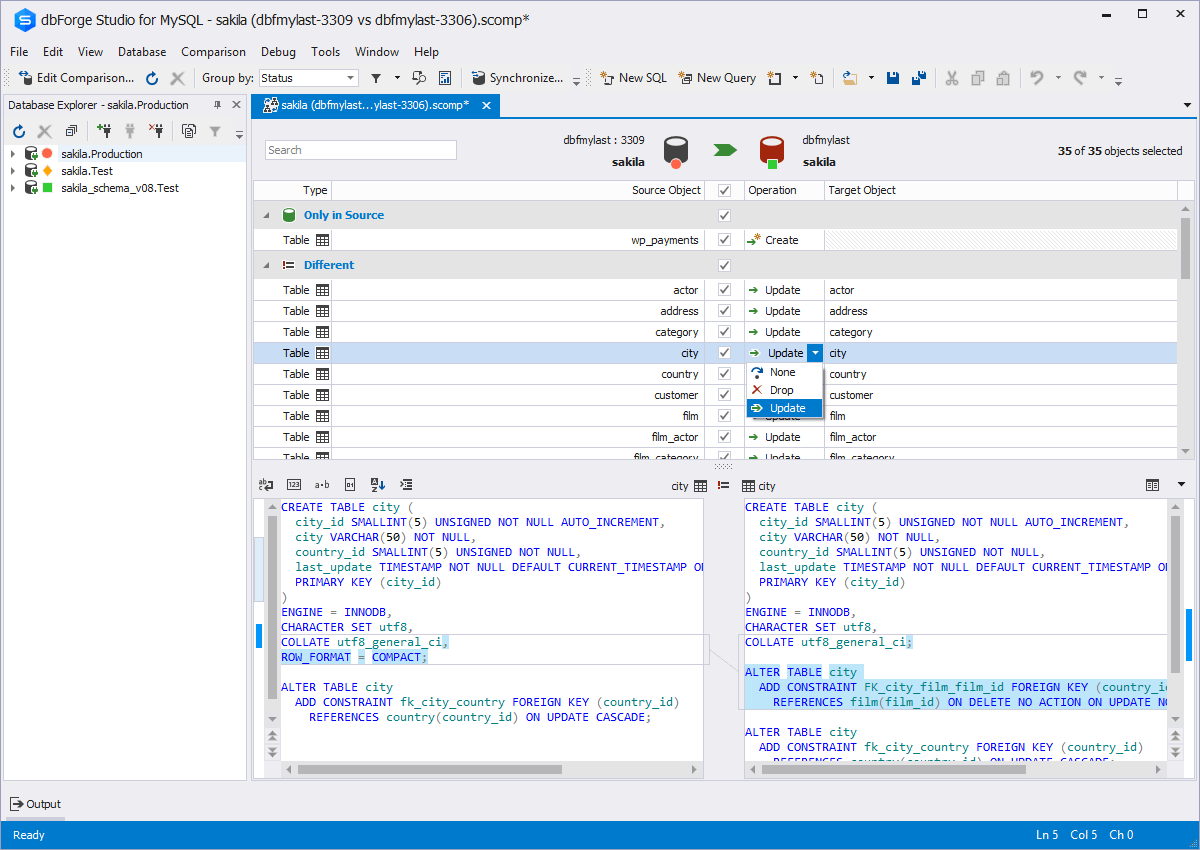
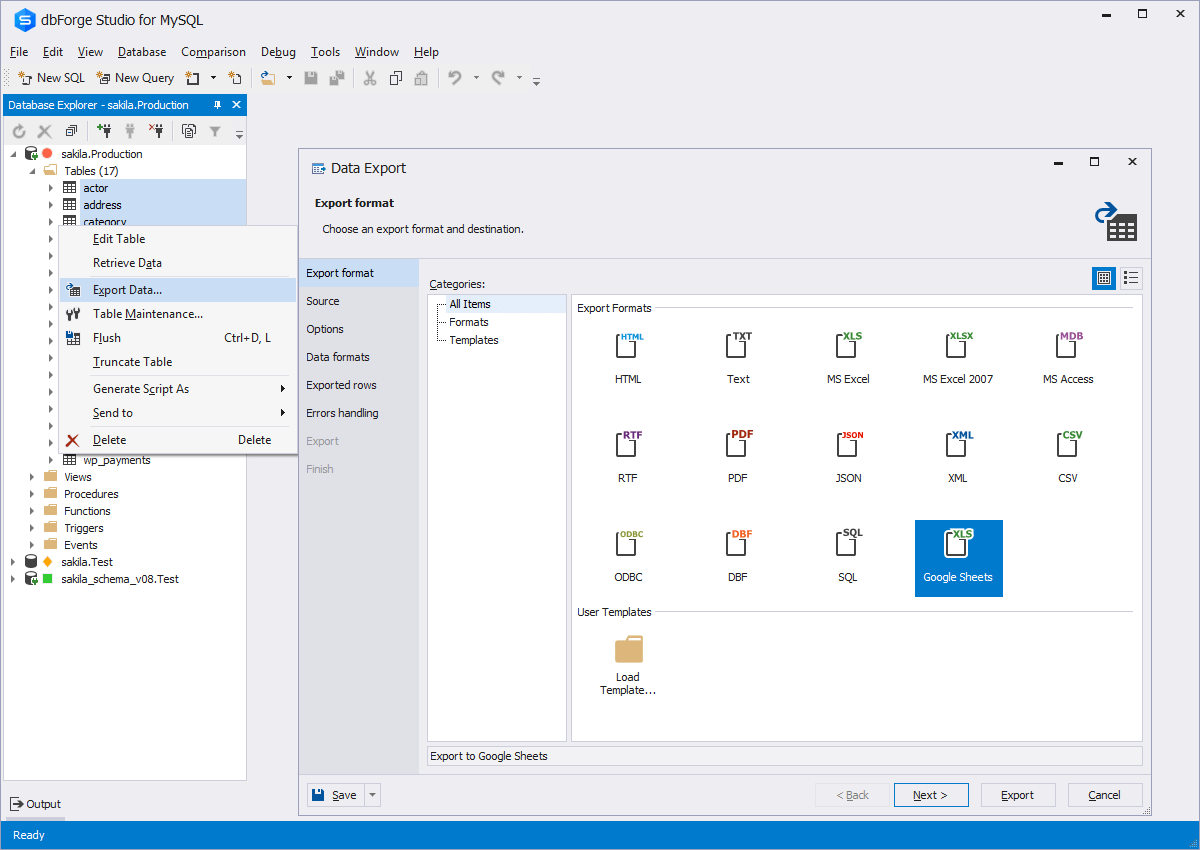
Screenshot of Code CompletionScreenshot of Schema CompareScreenshot of Database DiagramScreenshot of Data ExportScreenshot of Database design & developmentScreenshot of Visual query building

SolarWinds Database Performance Analyzer Screenshots

Screenshot of DashboardScreenshot of Alerts and reportsScreenshot of Application-centric view of DPAScreenshot of Blocking deadlock analysisScreenshot of Collaboration across teamsScreenshot of Intuitive performance monitoring