DocuWare’s document management software delivers digital workflow and document control to boost productivity without the need for IT resources. Its cloud and on-premises products are presented as a best-fit solution for companies seeking to digitize, automate and transform key processes. DocuWare is headquartered in New Windsor, NY, and their solution is presented as a DCM, or lightweight ECM.
$300
per month
Foxit PDF SDK
Score 8.0 out of 10
N/A
Foxit PDF SDK offers high performance pdf libraries to help developers build pdf technology. According to the vendor, key features include: Render PDFs: High performance PDF libraries to render PDF pages, page objects, annotations, and forms the way they were intended to be viewed: sharp, clear, accurate, and easy to read. Allows applications to view, zoom in, zoom out, and print PDF documents and forms. Reflow: PDF is a fixed-layout flat document format, it cannot…
We actually moved from DocuWare to Plate IQ because Plate is restaurant specific and shares many item codes, SKU #'s, etc from major vendors. However, we continue to use DocuWare for other data management because it was so useful to us while we used it for AP.
Foxit PDF was cheaper from a licensing perspective. It was easy on the budget and will not be getting more expensive for enterprise licenses. FoxIt also came with the same features when compared to Adobe and it was much easier to install in our environment. Being that it was …
Back in the day we selected Foxit PDF SDK for all the features and how intuitive and easy to follow the interface is. It was never hard to edit and create portable document files and satisfy our business needs. The cost is what made us switch because how the way the license …
We have used Adobe for years but then it started to give us some trouble, so we had to opt for an alternative. However, it proved to be a good fit for our company as it is more user-friendly and has a lot of options.
Ready for pdf formats, including documents that can be stored documents that can be stored later or shared securely, enabling the converter of documents that are stored quickly and that allow documents to be stored quickly. be shared. PDF technology reduces organizational …
Cost-effective and integrated functionalities in Foxit PDF SDK. Options to have lightweight SDK. Web as well as Windows-based solution. Foxit PDF SDK Provides add-ons such as OCR scanning which helps to convert the scanned document to text pdf. Foxit PDF SDK is also trusted by …
I can get the same results at a quarter of the cost with Foxit PhantomPDF, and I'm more comfortable without having Adobe products on my PC. Despite their identical feature sets, Foxit is both more user-friendly and simpler for new staff to learn. I've been using Adobe for a …
Foxit PDF SDK's UI is much nicer and easier to understand than pdf xchange or nitro. Adobe has more functions but is overkill for what I need and Foxit PDF SDK is priced more reasonably than Adobe.
Adobe Sign can be really frustrating and difficult to log into, renew subscription, and other background functions. Tech support is between useless and non-existent. On the other hand, there is better control over when recipients have been contacted. Overall, Foxit PDF SDK is a …
I would say that Bluebeam has many more options and more capabilities versus Foxit PDF SDK. I would also say that Bluebeam is for users more advanced and comfortable with creating, editing, and combining PDF files. For the price comparison, I would say Foxit PDF SDK wins hands …
I used WPS office in the past for my office related documents, but that software is slightly complicated to use. That software is very expensive also. For every small operation, I needed to buy its premium services. Also, the kind of encryption feature I got in Foxit I didn't …
We can use Docuware Cloud as a checks and balances program for our application processing in our data department. This is a time saver and allows us to access information at our multiple locations, as well as we have clients in various states. We can assign documents to others throughout the processing of applications, and this has allowed us to keep better track of our documentation with clients.
The issue with the application not re-opening previously opened files is a major one for me, therefore I docked a point for that . When editing documents, it usually works well, but there are a few idiosyncrasies, such as the ability to add an extra line when changing a block of text or the inability to define page margins on the left and right. These peculiarities do not bother me, although they might be improved.
It is a very cool development kit to integration different PDF functions.
It is user-friendly and convenient to work with.
It has great functionality for text. For example: adding quick markup, highlighting the text, underlining, and doing strikethrough, and adding signatures is pretty easy.
It offers to do encryption and add passwords for security.
Great search capability that helps finding the text without hassle.
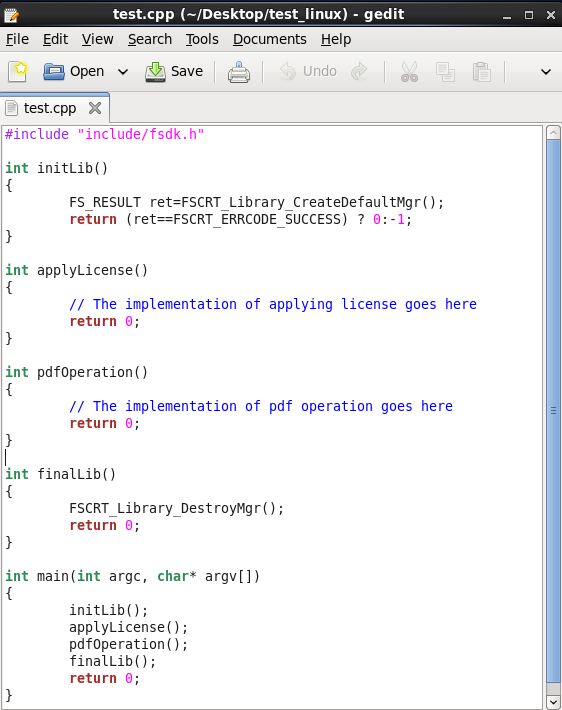
In the C# SDK, which is a wrapper of native C++ code. We need to be extra careful in coding and protecting the calls, because it can be very easy to crash the application in case of errors.
Our whole takeoff department uses the Foxit PDF SDK. To read plan files, produce pdf files, and take notes, we utilize it in conjunction with other tools. We may utilize the Foxit PDF SDK to read, edit, markup, print, and produce PDF files for internal use or to distribute to clients. Some of our users adore the software, but others choose to use alternative programs because they believe Foxit PDF SDK is too restrictive.
I rated this software very high on performance because it is really very quick on my Windows system. It can create any type of PDF files in seconds. It also gives good upload speed when I try to modify my documents for inserting digital signature space. It also gives very good encryption speed to secure my documents.
We use a third-party company to assist in the support process, and they have been great to work with. Quick turn around on issues and almost immediate communication concerning support tickets. They are more than willing to consult with our IT partners as well, which is a must for our business.
I would give it this rating because I personally have never had to contact support regarding Foxit PDF SDK or anything I am trying to do within the program. As I mentioned before, it is very user-friendly and easy to navigate. I think the program in itself lends support to the user because it is so user-friendly and has an easy to use interface.
We actually moved from DocuWare to Plate IQ because Plate is restaurant specific and shares many item codes, SKU #'s, etc from major vendors. However, we continue to use DocuWare for other data management because it was so useful to us while we used it for AP.
Foxit PDF was cheaper from a licensing perspective. It was easy on the budget and will not be getting more expensive for enterprise licenses. FoxIt also came with the same features when compared to Adobe and it was much easier to install in our environment. Being that it was lightweight we are able to install, remove and update the client very easily. Also, the support with Foxit was better suited for our needs than Adobe.
No negative impact but only positive and fruitful I would say. It is a part of our daily work routine and enhances our products. Things are done quickly and delays are very less. Hence, it has added to the overall growth and development of our business.