Chose Edsby
Edsby is a more sophisticated and useful tool.

| Product | Rating | Most Used By | Product Summary | Starting Price |
|---|---|---|---|---|
 Edsby | Mid-Size Companies (51-1,000 employees) | Edsby is a cloud-based learning management system (LMS) for K-12 school districts that uses web and mobile technologies to connect teachers, students, parents and administrators in new ways. This LMS allows students and parents to check grades, attendance, homework and more from a browser, tablet or mobile phone. The vendor says what sets this LMS apart from others is that Edsby is designed specifically for the special requirements and needs of K-12. To make district-wide… | $5 per user/per year | |
 Sakai | N/A | Sakai is an open source learning management system provided by the Apero Foundation. The LMS provides what it calls Core and Expanded Features. The Core Features encompass an integrated tool set that is tested by the Sakai community members and is then included with each new release. The tool set can be configured by: instructors, students, research investigators and project leaders. The other set of tools, known as “Contrib Tools” are specific to Sakai tools and innovations that are developed… | N/A |
| Edsby | Sakai | |||||||||||||||
|---|---|---|---|---|---|---|---|---|---|---|---|---|---|---|---|---|
| Editions & Modules |
| No answers on this topic | ||||||||||||||
| Offerings |
| |||||||||||||||
| Entry-level Setup Fee | Required | No setup fee | ||||||||||||||
| Additional Details | Edsby charges an up-front fee for initial integration. There are also annual costs, variable with the number of students. Parent, teacher and administrator accounts are free. Certain other features are charged for annually. Special pricing applies for private schools. Contact Edsby for details. | Must contact vendor for pricing information. | ||||||||||||||
| More Pricing Information | ||||||||||||||||
| Edsby | Sakai | |
|---|---|---|
| Considered Both Products |  Edsby  Celia Stone Marketing & Admissions Manager Chose Edsby Edsby is far more intuitive to use so it provides a better user experience. |  Sakai  Sarah Daggett Lecturer, Department of Communication & Theatre Chose Sakai Before using Sakai, we used Blackboard. Ultimately, I think moving to Sakai was a financial decision (it was cheaper), but I believe it ended up being better accepted by faculty and students as well. At the time (this was several years ago), Blackboard's UI wasn't as …  Chani Loeb Administrative Assistant Chose Sakai Courses are organized into tabs. Teachers use the program to list assignments with due dates for students in each course. Students use the program to upload assignments before they are due. Teachers upload syllabi along which the students can follow the progress of the …  Dave Eveland Instructional Designer/Technologist Chose Sakai When considering an LMS there are multiple factors to consider, and typically those factors are not co-equal amongst all stakeholders. Some institutions select an LMS based on C-Level directive; others narrow the field based on feedback from the largest constituent user base or …  Keira Dooley E-Learning Developer Chose Sakai Sakai and Moodle seem to be neck and neck. I much prefer a proper LMS over a WordPress LMS Plugin. Sakai was much more robust than a simple plugin solution.  Terry Golightly Assistant Director Online Instructional Design & Technology Chose Sakai We were for a year or two on WebCT, which has been acquired by Blackboard. It was hard to learn and difficult to administer. Changing to Sakai not only meant a great deal of financial savings, but it was easier to use and more responsive to institutional and consortial needs. …  Jason Smith, DPA Instructional Technologist Chose Sakai Every few years we evaluate LMSs. Each time Sakai comes out ahead due to cost, customizations, and the Sakai community. We like to keep things in house because it allows us an extra amount of reliability and control that you will have to give up when running most other …  Andi Sciacca Faculty Member Chose Sakai I was not part of the selection committee, but I believe the ability to white label Sakai was very significant to the choice being made. In another institution I taught (not the one in which I used Sakai) the decision was made to go with MoodleRooms due to the need for support …  Raymond J. Uzwyshyn Director, Library Digital & Collection Services Chose Sakai Sakai is a fair competitor to other online learning systems (i.e. Blackboard, Canvas, Desire-to-Learn). Essentially, Sakai is simply a different flavor of similar models for online learning management systems. It is more different from Moodle and Moodle's social networking …  Samantha J. Blevins Instructor Chose Sakai I did not personally select Sakai. However, it is fairly easy to use and customize. That being said, this product is being abandoned by developers/universities and should not be adopted by an organization.  Becky Roehrs Distance Learning Coordinator/Learning Technologies Specialist Chose Sakai Our faculty found Moodle difficult to use-we tried at least two different releases of it with different vendors. It may have changed greatly since we worked with it in 2010-2012, but that was our experience. Blackboard was what we were familiar with, but some of its tools were … |
| Edsby | Sakai | ||||||||||||||||||||||||||||||||||||
|---|---|---|---|---|---|---|---|---|---|---|---|---|---|---|---|---|---|---|---|---|---|---|---|---|---|---|---|---|---|---|---|---|---|---|---|---|---|
| Learning Management |
|
| Edsby | Sakai | |
|---|---|---|
| Small Businesses |  iSpring Learn Score 9.6 out of 10 | iSpring Learn Score 9.6 out of 10 |
| Medium-sized Companies |  Schoology Learning Score 9.7 out of 10 | Schoology Learning Score 9.7 out of 10 |
| Enterprises | Schoology Learning Score 9.7 out of 10 | Schoology Learning Score 9.7 out of 10 |
| All Alternatives | View all alternatives | View all alternatives |
| Edsby | Sakai | |
|---|---|---|
| Likelihood to Recommend | 8.0 (0 ratings) | 9.0 (0 ratings) |
| Likelihood to Renew | - (0 ratings) | 10.0 (0 ratings) |
| Usability | 9.0 (0 ratings) | 7.4 (0 ratings) |
| Support Rating | - (0 ratings) | 8.1 (0 ratings) |
| Implementation Rating | - (0 ratings) | 10.0 (0 ratings) |
| Edsby | Sakai | |
|---|---|---|
| Likelihood to Recommend |
|
Dave Eveland Instructional Designer/Technologist |
| Pros |
Celia Stone Marketing & Admissions Manager |
|
| Cons |
 David Lee Vice Principal |
Chani Loeb Administrative Assistant |
| Likelihood to Renew | No answers on this topic |
Raymond J. Uzwyshyn Director, Library Digital & Collection Services |
| Usability |
 Matthew David IT Director |
Andi Sciacca Faculty Member |
| Support Rating | No answers on this topic |
|
| Implementation Rating | No answers on this topic |
Samantha J. Blevins Instructor |
| Alternatives Considered |
|
Sarah Daggett Lecturer, Department of Communication & Theatre |
| Return on Investment |
David Lee Vice Principal |
Terry Golightly Assistant Director Online Instructional Design & Technology |
| ScreenShots | Edsby Screenshots    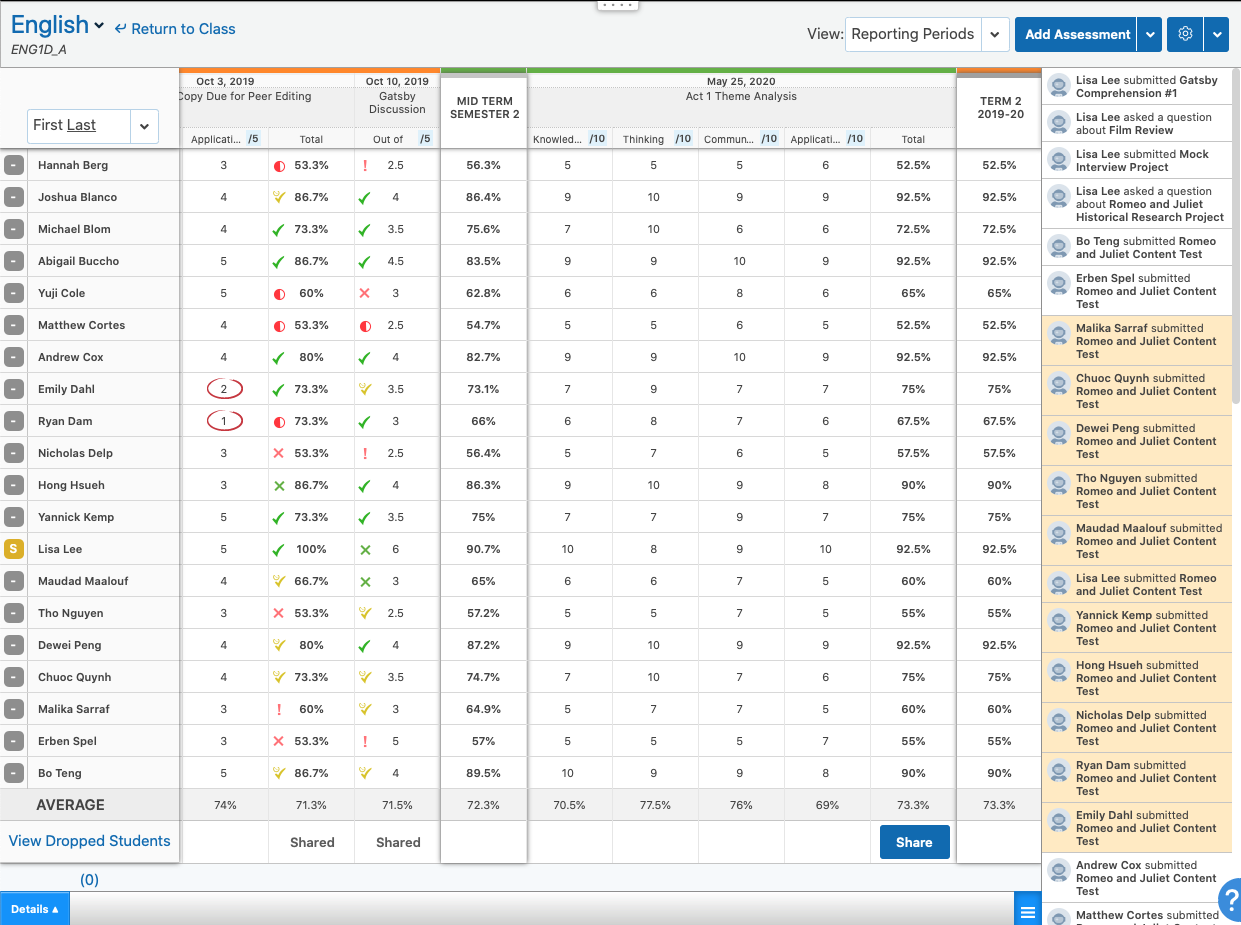  |