Chose Entrinsik Informer
N/A

| Product | Rating | Most Used By | Product Summary | Starting Price |
|---|---|---|---|---|
 Entrinsik Informer | N/A | Entrinsik Informer is a web-based reporting and business intelligence application popular in the higher education vertical market. It helps organizations transform real-time data into actionable information by delivering ad-hoc reporting, data analysis, and interactive dashboards. | N/A | |
 SAS Visual Analytics | Enterprise companies (1,001+ employees) | SAS Visual Analytics provides a complete platform for analytics visualization, enabling users to identify patterns and relationships in data that weren't initially evident. Interactive, self-service BI and reporting capabilities are combined with out-of-the-box advanced analytics so everyone can discover insights from any size and type of data, including text. | N/A |
| Entrinsik Informer | SAS Visual Analytics | |||||||||||||||
|---|---|---|---|---|---|---|---|---|---|---|---|---|---|---|---|---|
| Editions & Modules | No answers on this topic |
| ||||||||||||||
| Offerings |
| |||||||||||||||
| Entry-level Setup Fee | No setup fee | No setup fee | ||||||||||||||
| Additional Details | — | SAS Visual Statistics and SAS Office Analytics are also available as add-ons. | ||||||||||||||
| More Pricing Information | ||||||||||||||||
| Entrinsik Informer | SAS Visual Analytics | |
|---|---|---|
| Considered Both Products | Entrinsik Informer  Karen Brenneman Director of Technical Information Resources Chose Entrinsik Informer I really liked using the Query Builder that was once part of our Colleague system; however, it really relied on power users to provide the information to the campus. As Query Builder was phased out, our campus moved to Informer. The switch over was very successful. For most end …  Brian Pollitt Programmer/Database Administrator Chose Entrinsik Informer We needed to implement a new reporting tool due to Query Builder being eliminated. We went with Entrinsik Informer because it was already being used at some other Colleges that were also using Datatel/Ellucian Colleague, and the reviews from those Colleges were very positive. A …  Ed McClusky Manager of Administrative Computing Chose Entrinsik Informer Entrinsik Informer was chosen because of it's real-time reporting capability from Unidata.  Kate Goldberg Director of Advancement Services Chose Entrinsik Informer My OIT office hasn't provided any other similar tool. Prior to Intrinsik, we typed script into the interface! Any reports were custom programmed by the programmers in OIT.  Kristyn Lederer Database Administrator Chose Entrinsik Informer Infomaker,Crystal Reports,Microsoft Query Analyzer  Timothy Smalarz Associate Registrar Chose Entrinsik Informer Easily Informer is one the most valuable reporting tools available in higher education.  Christopher Jones Director- IT Solutions Consulting and Information Management Chose Entrinsik Informer We use Informer with Ellucian Colleague instead of Ellucian's solutions which were substandard when we implemented Informer and remain unattractive for a variety of reasons with the standouts being cost and support. Informer is a fraction of the cost and the admin …  Sarah Gaither Accountant Chose Entrinsik Informer The closet thing we had to Informer before was something called Query Builder. However, unless you were really good at coding and technology, it was like reading greek to the basic user of our system. Informer provides such an easy user experience that most people who were …  Amanda Curran Business Application Specialist Chose Entrinsik Informer Informer is more cost effective and easier to teach end users to write their own reports, but it still provides just as much functionality as the other products I've used. Informer is easy to manage and administer with a small number of IT employees per number of end users.  Bryan Horstman Information Systems Administrator and DBA Chose Entrinsik Informer We have not evaluated any other products. Previously we simply used Unidata to create report.  Donald Beck Director, Information Technology Services Chose Entrinsik Informer Crystal Reports with UniDATA ODBC. This works quite well but is cumbersome to set up and maintain. This required several steps outside the UniDATA database as well as setting up security views and a variety of processes that have to be monitored more closely. No other systems …  Florante Roa Director, Systems Management & MIS Operations Chose Entrinsik Informer Informer is a complete solution. | SAS Visual Analytics  Raman Ahuja Associate Consultant Chose SAS Visual Analytics Visual Studio IDE  Tapan Jain Data Analyst Chose SAS Visual Analytics Tableau Desktop  Mike Narumiya Director, Data and Information Systems Chose SAS Visual Analytics Price and features we looked at seemed consistent. We chose this product because our staff already knew the product, plus users at the state had recommended it as it is what they use.  suva sahu Project Lead Chose SAS Visual Analytics SAS visual analytics has high sped LASR servers mounted on Hadoop filesystems which makes it more powrful for analytics.  Alex Rubin Sr. SAS Programmer (consultant) Chose SAS Visual Analytics Never used or evaluated other similar products  Erik Larsen Consultant SAS Business Intelligence Architect and Analyst Chose SAS Visual Analytics There is no contest. SAS is easier maintain and has much more in the way of analytics than MicroStrategy has. It can pull from more than one data source and when the underlying architecture changes, it is much easier to maintain. More savvy analysts can perform more with SAS … |
| Entrinsik Informer | SAS Visual Analytics | |||||||||||||||||||||
|---|---|---|---|---|---|---|---|---|---|---|---|---|---|---|---|---|---|---|---|---|---|---|
| BI Standard Reporting |
| |||||||||||||||||||||
| Ad-hoc Reporting |
| |||||||||||||||||||||
| Report Output and Scheduling |
| |||||||||||||||||||||
| Data Discovery and Visualization |
| |||||||||||||||||||||
| Access Control and Security |
| |||||||||||||||||||||
| Mobile Capabilities |
| |||||||||||||||||||||
| Application Program Interfaces (APIs) / Embedding |
|
| Entrinsik Informer | SAS Visual Analytics | |
|---|---|---|
| Small Businesses |  BrightGauge Score 9.1 out of 10 | BrightGauge Score 9.1 out of 10 |
| Medium-sized Companies |  Reveal Score 10.0 out of 10 | Reveal Score 10.0 out of 10 |
| Enterprises |  Kyvos Semantic Intelligence Layer Score 9.9 out of 10 | Kyvos Semantic Intelligence Layer Score 9.9 out of 10 |
| All Alternatives | View all alternatives | View all alternatives |
| Entrinsik Informer | SAS Visual Analytics | |
|---|---|---|
| Likelihood to Recommend | 10.0 (0 ratings) | 9.0 (0 ratings) |
| Likelihood to Renew | 8.7 (0 ratings) | 9.3 (0 ratings) |
| Usability | 9.1 (0 ratings) | 6.0 (0 ratings) |
| Availability | 9.1 (0 ratings) | - (0 ratings) |
| Performance | 8.3 (0 ratings) | - (0 ratings) |
| Support Rating | 10.0 (0 ratings) | 8.0 (0 ratings) |
| Online Training | 7.3 (0 ratings) | - (0 ratings) |
| Implementation Rating | 9.0 (0 ratings) | - (0 ratings) |
| Product Scalability | 7.1 (0 ratings) | - (0 ratings) |
| Entrinsik Informer | SAS Visual Analytics | |
|---|---|---|
| Likelihood to Recommend |
|
Raman Ahuja Associate Consultant |
| Pros |
Brian Pollitt Programmer/Database Administrator |
Tapan Jain Data Analyst |
| Cons |
|
|
| Likelihood to Renew |
|
Erik Larsen Consultant SAS Business Intelligence Architect and Analyst |
| Usability |
|
Raman Ahuja Associate Consultant |
| Reliability and Availability |
| No answers on this topic |
| Support Rating |
Ed McClusky Manager of Administrative Computing |
 Nicole Jagusztyn Institutional Research Officer |
| Implementation Rating |
| No answers on this topic |
| Alternatives Considered |
|
|
| Return on Investment |
Amanda Curran Business Application Specialist |
suva sahu Project Lead |
| ScreenShots | Entrinsik Informer Screenshots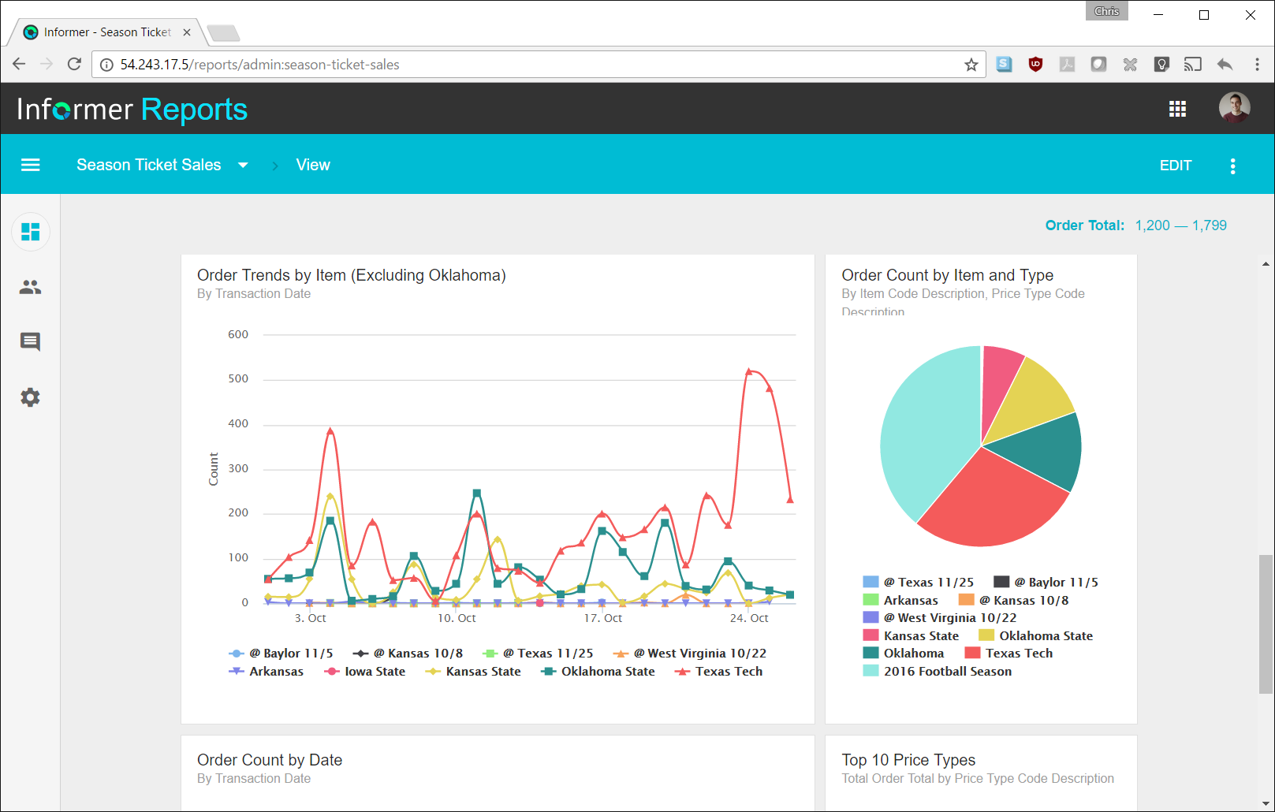   | SAS Visual Analytics Screenshots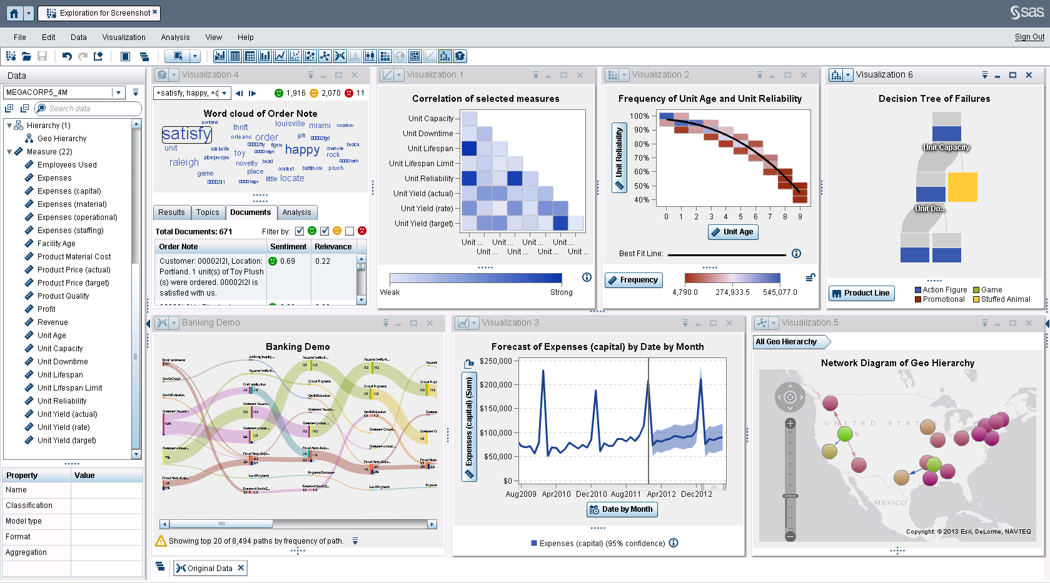 |