esChecker vs. Qualys TruRisk Platform

Overview
ProductRatingMost Used ByProduct SummaryStarting Price
esChecker
Score 0.0 out of 10
N/A
esChecker: a MAST by eShard esChecker combines years of penetration testing experience with a dynamic engine simulating attack techniques. No source code is needed, only the app binary (Android apk or iOS ipa). It takes 30 minutes to find out how an app reacts against many hacking techniques, so that the user can now reserve pentest budget to in-depth vulnerability analyses. What is a MAST? Mobile Application Security Testing solutions implement security…N/A
Qualys TruRisk Platform
Score 6.0 out of 10
N/A
Qualys TruRisk Platform (formerly Qualys Cloud Platform, or Qualysguard), from San Francisco-based Qualys, is network security and vulnerability management software featuring app scanning and security, network device mapping and detection, vulnerability prioritization schedule and remediation, and other features to provide vulnerability management and network attack surface reduction.N/A
Pricing
esCheckerQualys TruRisk Platform
Editions & Modules
No answers on this topic
Offerings
Pricing Offerings
esCheckerQualys TruRisk Platform
Free Trial
YesNo
Free/Freemium Version
NoNo
Premium Consulting/Integration Services
NoNo
Entry-level Setup FeeNo setup feeNo setup fee
Additional Details
More Pricing Information
Features
esCheckerQualys TruRisk Platform
Threat Intelligence
Comparison of Threat Intelligence features of Product A and Product B
esChecker
-
Ratings
Qualys TruRisk Platform
8.7
Ratings
9% above category average
Network Analytics00 Ratings8.90 Ratings
Threat Recognition00 Ratings8.30 Ratings
Vulnerability Classification00 Ratings8.80 Ratings
Automated Alerts and Reporting00 Ratings9.00 Ratings
Threat Analysis00 Ratings8.20 Ratings
Threat Intelligence Reporting00 Ratings8.90 Ratings
Automated Threat Identification00 Ratings8.70 Ratings
Vulnerability Management Tools
Comparison of Vulnerability Management Tools features of Product A and Product B
esChecker
-
Ratings
Qualys TruRisk Platform
8.5
Ratings
5% above category average
IT Asset Realization00 Ratings8.80 Ratings
Authentication00 Ratings7.90 Ratings
Configuration Monitoring00 Ratings8.50 Ratings
Web Scanning00 Ratings8.80 Ratings
Vulnerability Intelligence00 Ratings8.60 Ratings
User Ratings
esCheckerQualys TruRisk Platform
Likelihood to Recommend
-
(0 ratings)
8.6
(0 ratings)
Usability
-
(0 ratings)
2.0
(0 ratings)
Support Rating
-
(0 ratings)
5.0
(0 ratings)
User Testimonials
esCheckerQualys TruRisk Platform
Likelihood to Recommend
No answers on this topic
It is well suited for environments that are looking for a solution that is top notch for vulnerability scanning, and is the most accurate at doing so. It would also fit environments that have a lot of endpoints to scan or like to have scanning done on an automatic basis. It is less appropriate in environments that want to use a platform right away, without getting training in how to use it, or reading documentation on the product.
Read full review
Pros
No answers on this topic
  • Attestation is so easy with Qualys. I find this one feature makes the investment worth the cost
  • Ease of use. Within an hour of first installing, a person can be running compliance tests without a hitch.
  • Great training materials and support. I have never had to take more than twenty minutes to solve a problem either through support or the forums.
Read full review
Cons
No answers on this topic
  • Notices some findings which were not clear why they appear(suspected false positive).
  • Working with Qualys support(for example due to the previous point) wasn't the best experience. the response was very slow.
  • Qualys limit the daily API requests. In case you need more, it will cost.
Read full review
Usability
No answers on this topic
Again, the usability of Qualys has been a pinpoint for this entire review. It was easily the worst thing about the product and because of this, I would not recommend Qualys to anybody in my field. This should be something that Qualys strives to improve if they wish to stay in business.
Read full review
Support Rating
No answers on this topic
They had a support page within the WAS to report any concerns or seek help. But the UI of that is not smooth. Regardless support staff were pretty responsive and helpful. They scheduled calls to understand and address our problems. Email support is good as well.
Read full review
Alternatives Considered
No answers on this topic
We find that Nessus is a great product, on par if not slightly better compared to Qualys in terms of their pricing model. However, Qualys Cloud Platform has better quality reporting, and offers great tips and suggestions on quickly closing a gap and eliminating the risk. In our organization, both products are great and meet our expectations, but due to pricing, we favor Nessus slightly more.
Read full review
Return on Investment
No answers on this topic
  • The most important thing that happens with this program is to automate one hundred percent the security of my system since this program is in charge of supervising each of the applications and websites in detail.
  • One of the purposes for which we trust Qualys Cloud Platform is to keep our system clean and secure; the ability of this software to manage our vulnerability makes us more cautious about working with it.
Read full review
ScreenShots

esChecker Screenshots

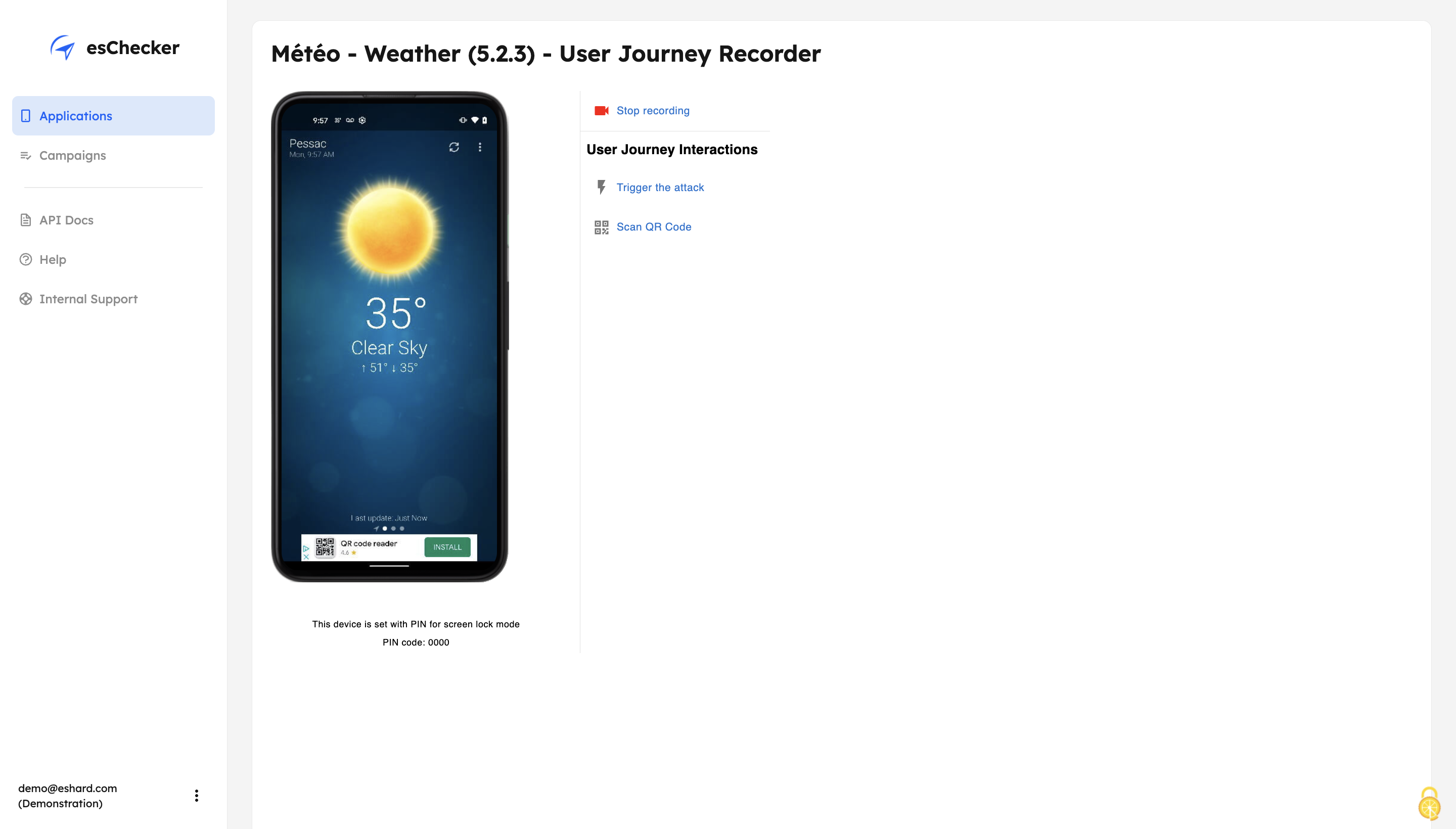
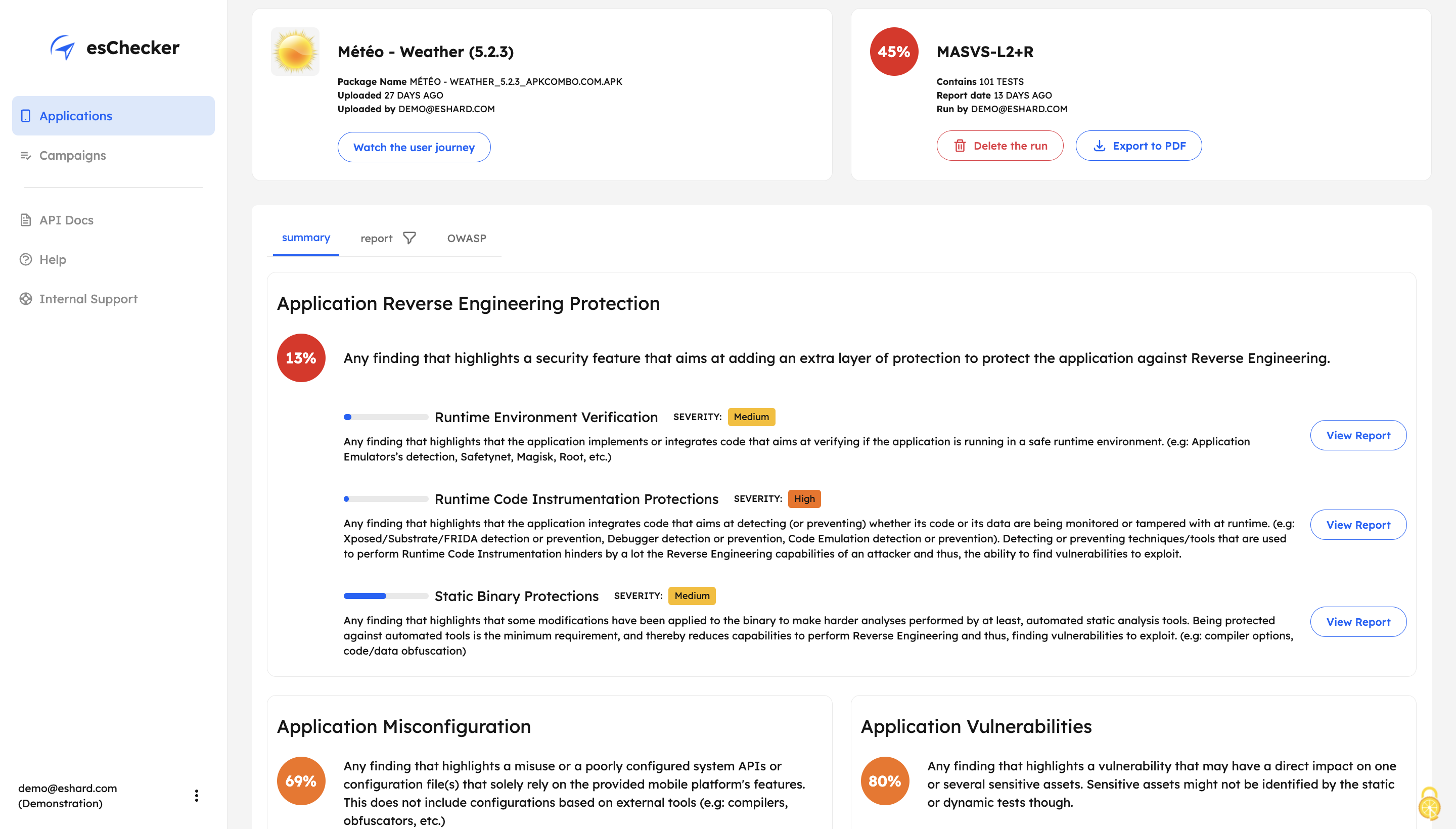
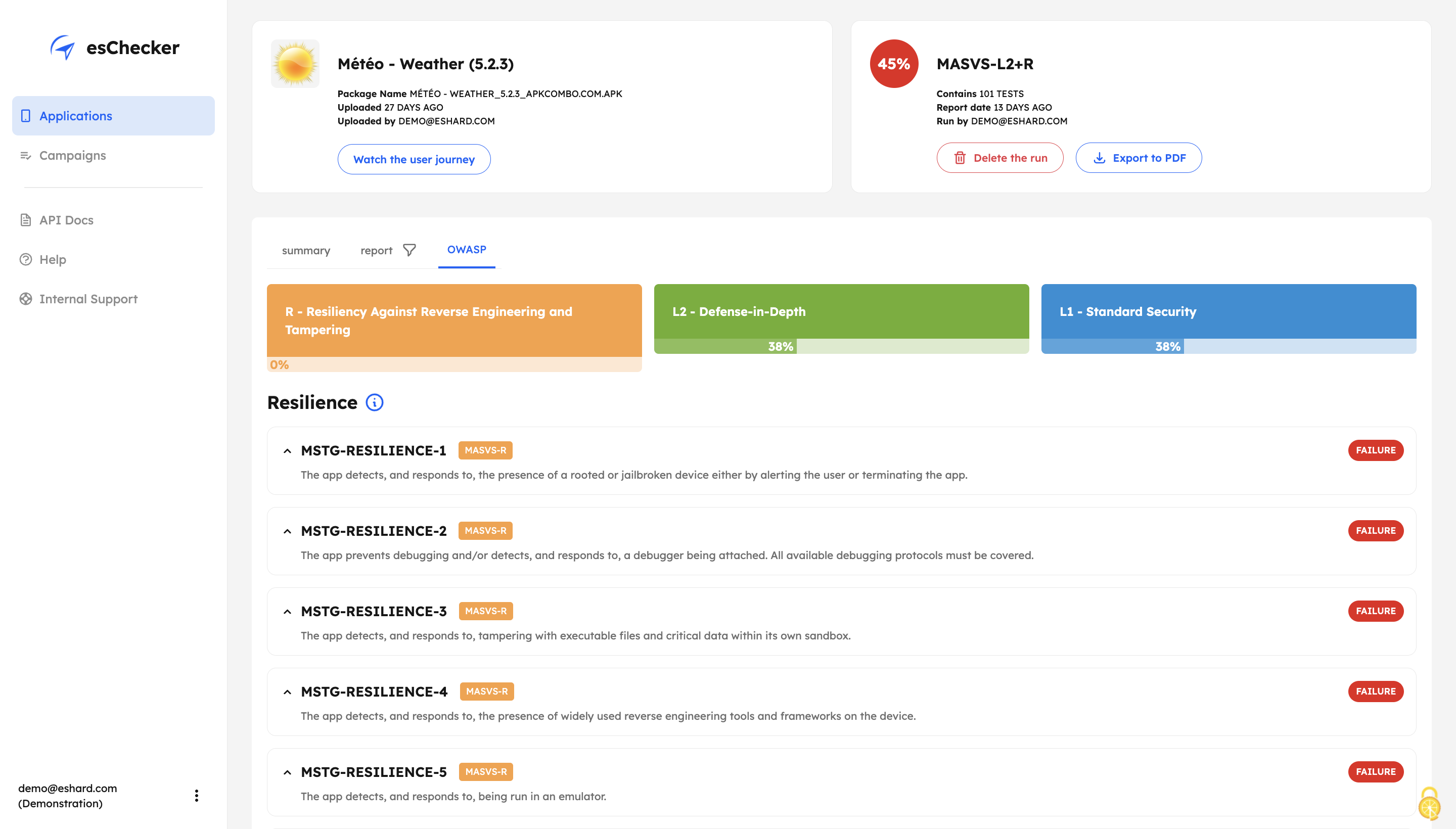
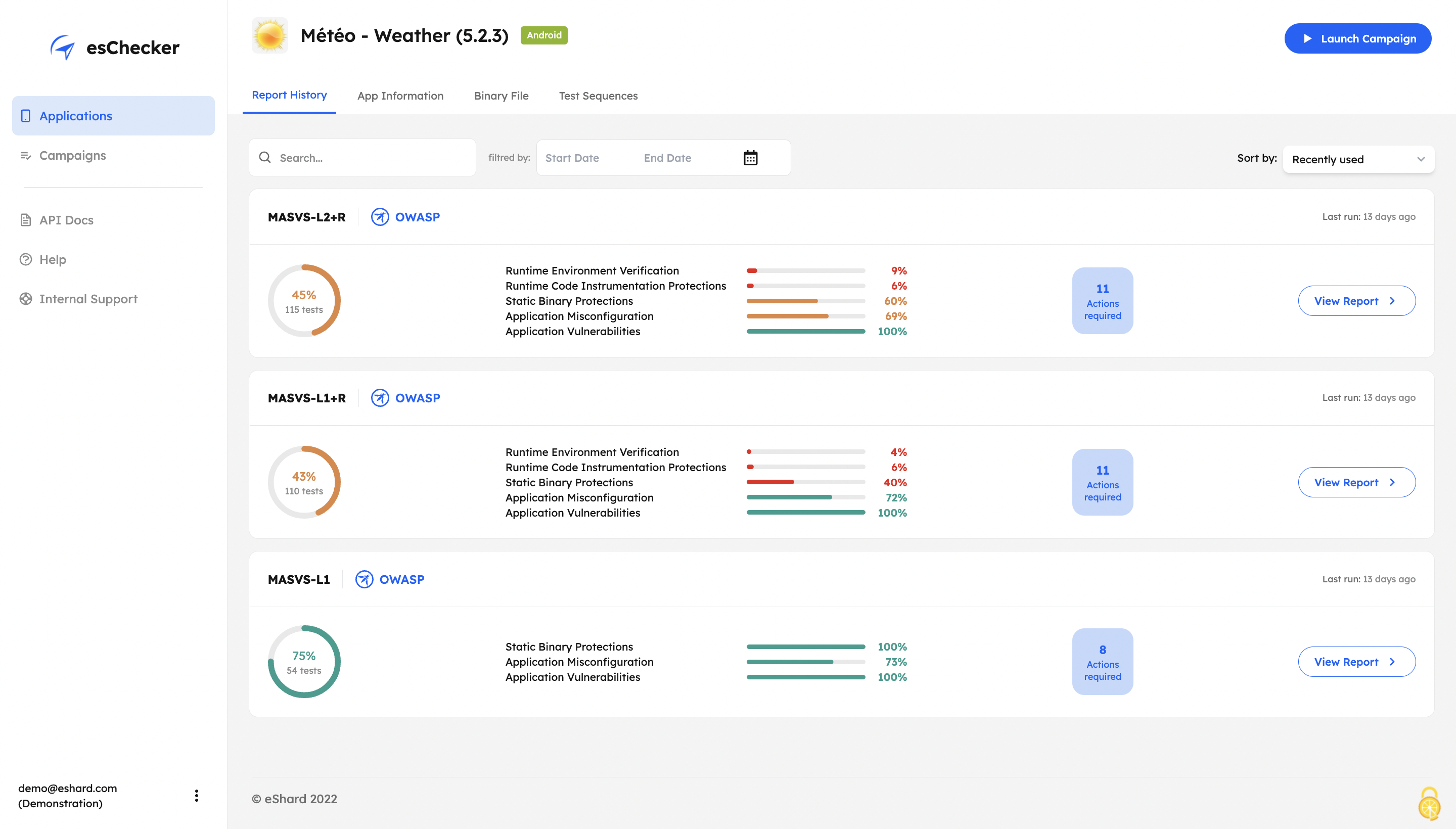
Screenshot of esChecker offers default preset campaigns, according to OWASP standards: MASVS L2+R, MASVS L2, MASVS L1+R and MASVS L1. Users can also choose to create custom campaign to match internal security policies.Screenshot of With its Record and Replay feature, esChecker allows users to browse deep in app screens to target critical user journeys. This ensures that the performed attacks are triggered on the right screens. After a testing session, users can play the video recording of a given test and see how the app reacted.Screenshot of After a full app test session, users are able to understand how strong an application is in: Application Reverse Engineering Protection, Application Misconfiguration and Application Vulnerabilities.Screenshot of The testing report guides the user through the OWASP MASVS to help understand where an application requires more work to be properly protected. This report can be used internally, or externally to show evidence of compliance.Screenshot of The app Defense Score can be used to and compare an app’ results. To help monitor the application’s security protections evolution, esChecker provides a centralized, and graphic overview of the test results.