Chose eXo Platform
We chose it for the Java-based open-source platform and customization options.

| Product | Rating | Most Used By | Product Summary | Starting Price |
|---|---|---|---|---|
 eXo Platform | N/A | eXo Platform is an open-source, social-collaboration software designed for enterprises. Some key features include: Enterprise Social Network, Enterprise Content Management and Social Collaboration. | $0 engaged user/month | |
 HCL Connections | N/A | Connections from HCL Technologies (formerly from IBM, acquired by HCL in 2018) is a collaboration tool and employee digital workspace with key features like social analytics, blogs, document management, and a social network. | N/A |
| eXo Platform | HCL Connections | |||||||||||||||
|---|---|---|---|---|---|---|---|---|---|---|---|---|---|---|---|---|
| Editions & Modules |
| No answers on this topic | ||||||||||||||
| Offerings |
| |||||||||||||||
| Entry-level Setup Fee | No setup fee | No setup fee | ||||||||||||||
| Additional Details | — | — | ||||||||||||||
| More Pricing Information | ||||||||||||||||
| eXo Platform | HCL Connections | |
|---|---|---|
| Considered Both Products |  eXo Platform  Emely Foster Sales and Marketing Manager Chose eXo Platform EXo platform offers a large number of ready-to-use functions, which determined your selection. Also, that it has a user interface is well designed. It is easy to know what tasks are available in each section. Learn the system and have the best customer service.  Luigi Trevisant Project Manager Chose eXo Platform We selected this product firstly because it's easy to use for end-users, even if it's not so simple to configure from an administrative point of view. Managing and tracking overall activities is quite easy and it's also possible to have an immediate vision of everything that is …  Abhijeet Jaswal Tech Evangelist Chose eXo Platform Economical, extensible, and ease in deployability.  Ayhan Şehrin Co-Founder & Shareholder, R&D Director Chose eXo Platform eXo platform combines a number of features such as document management, wiki, internal social networks, messaging, calendaring as well as portal functionality. It is undoubtedly a feature-packed platform of the order of e.g. Sharepoint.  √ Andre Lucas Co Founder Chose eXo Platform The interface, although quite complicated, is still better than the lead competitors. It's indeed a kind of software that requires that many features and we are yet to find a company that will make it incredibly ease to use.  Aron Berman EBS Associate Consultant Chose eXo Platform eXo Platform is a very good application, and I'm sure this application can be a "white horse" for the platforms that I have written about above. This platform has a competitive price and a multi platform environment. This platform is very easy to install, suitable for a new …  Somnath Mane Developer Chose eXo Platform we can built modules and apply them over your portal.
If you are looking for a framework for build a social network I strongly  Russ Bryan Developer Chose eXo Platform Pligg was a pain to set up, especially on a Windows environment.  Divyang Patel Software Consultant Chose eXo Platform One of the main reasons for choosing eXo was the good UI and UX. It is well suited for social collaboration features. Chat application provided by eXo is very good and is outstanding when compared to skype. Also Calendar feature is also very helpful for social apps development …  Michal Kubacki IT Manager Chose eXo Platform vTiger, but very buggy and has to be installed on site. | HCL Connections  Tony Morales, PMP, CSM Project Management Office (PMO) Manager Chose HCL Connections Our company's instance of IBM Connections does not have the project specific link to schedules and budget like Planview Project Place  Jeremiah Miller Associate Director IT Infrastructure Chose HCL Connections IBM Connections offers a complete package of tools that can be useful but it doesn't integrate well with other services. Competitors like Yammer offer slightly fewer features but are cheaper and much easier to maintain. If we were making a decision today we probably would …  Eric Hodge Engineering Manager Chose HCL Connections Confluence is a much truer Wiki system, with easier to understand permissions, better management of content, a better plugin ecosystem, far greater enterprise adoption, and above all else, functional search! If users generate wiki pages inside of Confluence, we actually can …  Sarah Pressman Training and Staff Development Specialist Chose HCL Connections We did not select IBM Connections via searching. We had a previous IBM product that was discontinued and so when we were given IBM Connections, we did evaluate it but not against other systems. However other one off products had been evaluated/used in the past but as I just …  Victor Toal Chief Solutions Architect Chose HCL Connections Better integration points with third party products, most functionality is part of the core product.  Chris Whisonant Lead Consultant Chose HCL Connections From the few times that I have used MS SharePoint, I can say that it doesn't seem to hold a candle to the robust features of IBM Connections. The out-of-the-box capabilities of IBM Connections are amazing and are more easy to access and use than what I've seen with MS SharePoint.  Daniel Lieber President Chose HCL Connections IBM Connections Cloud is a strong competitor to Office365. It provides more functionality for users (e.g. web meetings) at a lower price point and tighter integration.  Olga Toprover Project Manager Chose HCL Connections I have evaluated IBM Connections against MS Sharepoint and IBM Lotus Notes. I would say IBM Connections is beneficial in comparrison to Lotus Notes applications because IBM Connections by default works with browsers vs LN Client and it is easy to use. However with developing …  Adam Pugh Consumer Relations Chose HCL Connections IBM Connections is much more advantageous than a simple cloud storage, such as Dropbox. Dropbox is simple and easy to use, however it does not offer all the features IBM Connections has. The additional abilities of IBM Connections make it a great tool for companies and …  Heather Hegger Manager (Communities), Social Business Chose HCL Connections I have not personally evaluated other products, as I just manage day-to-day operations. I am not a developer, so I am unsure as to how IBM Connections compares to other products in the marketplace.  Erich Schmidt Manager of Application Development Chose HCL Connections Connections is better. Faster, easier to use, better UI and has more features. There's just no comparison. |
| eXo Platform | HCL Connections | |||||||||||||||||||||||||||
|---|---|---|---|---|---|---|---|---|---|---|---|---|---|---|---|---|---|---|---|---|---|---|---|---|---|---|---|---|
| Project Management |
| |||||||||||||||||||||||||||
| Communication |
| |||||||||||||||||||||||||||
| File Sharing & Management |
|
| eXo Platform | HCL Connections | |
|---|---|---|
| Small Businesses |  Stackby Score 9.0 out of 10 |  Concrete CMS Score 9.2 out of 10 |
| Medium-sized Companies |  Troop Messenger Score 9.8 out of 10 |  RWS Tridion Sites Score 9.0 out of 10 |
| Enterprises | HCL Connections Score 9.0 out of 10 | RWS Tridion Sites Score 9.0 out of 10 |
| All Alternatives | View all alternatives | View all alternatives |
| eXo Platform | HCL Connections | |
|---|---|---|
| Likelihood to Recommend | 10.0 (0 ratings) | 9.0 (0 ratings) |
| Likelihood to Renew | 8.2 (0 ratings) | 7.7 (0 ratings) |
| Usability | 9.0 (0 ratings) | 9.0 (0 ratings) |
| Availability | - (0 ratings) | 10.0 (0 ratings) |
| Performance | - (0 ratings) | 9.0 (0 ratings) |
| Support Rating | 8.1 (0 ratings) | 8.0 (0 ratings) |
| Implementation Rating | - (0 ratings) | 7.3 (0 ratings) |
| Product Scalability | - (0 ratings) | 7.0 (0 ratings) |
| eXo Platform | HCL Connections | |
|---|---|---|
| Likelihood to Recommend |
Luigi Trevisant Project Manager |
Chris Whisonant Lead Consultant |
| Pros |
 Corinne Girr Library Assistant |
|
| Cons |
Divyang Patel Software Consultant |
Eric Hodge Engineering Manager |
| Likelihood to Renew |
 Daniel Ferraz Developer |
|
| Usability |
Emely Foster Sales and Marketing Manager |
|
| Reliability and Availability | No answers on this topic |
|
| Performance | No answers on this topic |
|
| Support Rating |
Emely Foster Sales and Marketing Manager |
|
| Implementation Rating | No answers on this topic |
|
| Alternatives Considered |
Emely Foster Sales and Marketing Manager |
Jeremiah Miller Associate Director IT Infrastructure |
| Scalability | No answers on this topic |
|
| Return on Investment |
Emely Foster Sales and Marketing Manager |
Tony Morales, PMP, CSM Project Management Office (PMO) Manager |
| ScreenShots | eXo Platform Screenshots    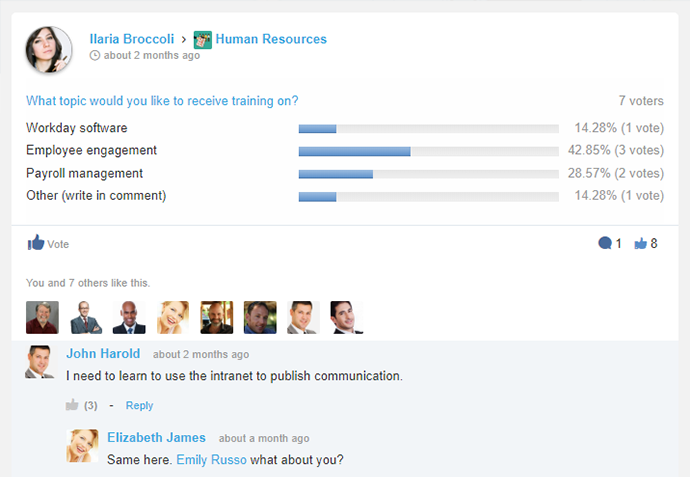  |