The FortiConverter firewall configuration migration tool is primarily for third-party firewall configuration migration to FortiOS—for routing, firewall, NAT, and VPN policies and objects.
N/A
Matillion
Score 8.0 out of 10
N/A
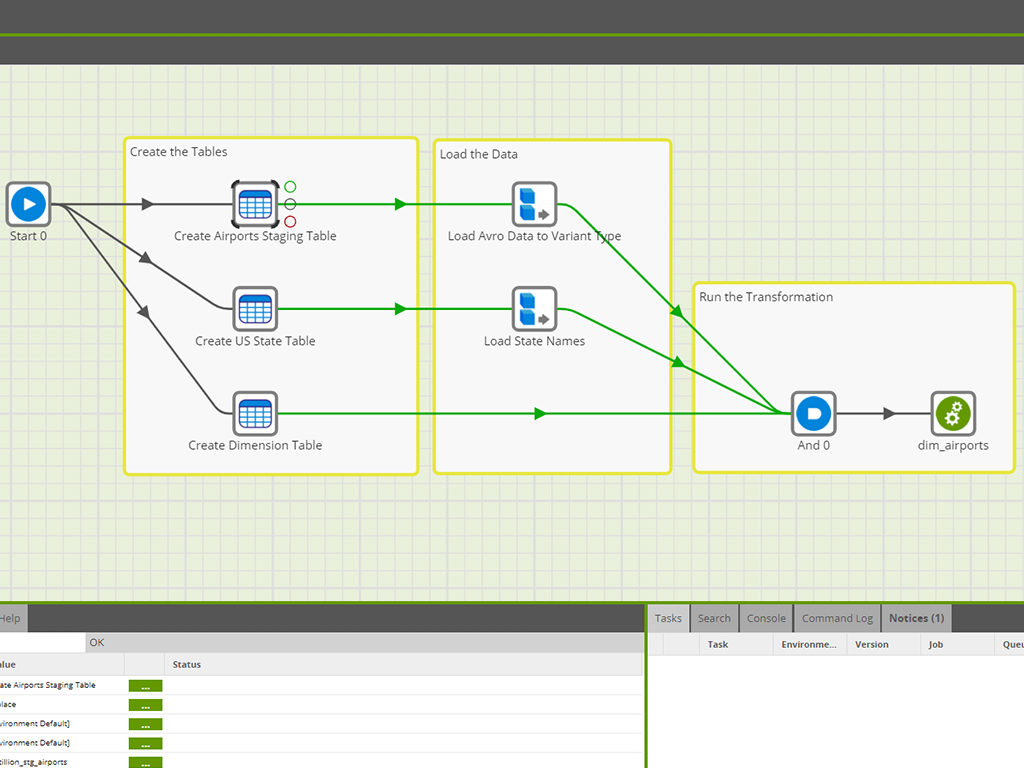
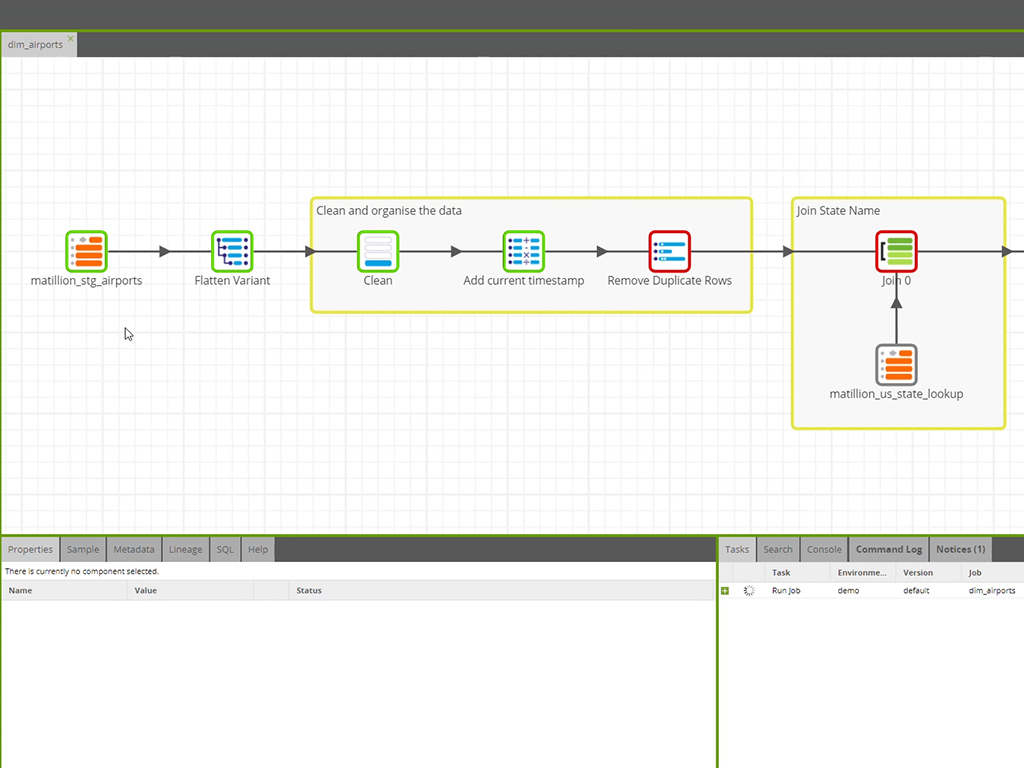
Matillion is a data pipeline platform used to build and manage pipelines. Matillion empowers data teams with no-code and AI capabilities to be more productive, integrating data wherever it lives and delivering data that’s ready for AI and analytics.
$2.50
Pay as you go per user
Pricing
FortiConverter
Matillion
Editions & Modules
No answers on this topic
Developer: For Individuals
$2.50/credit
Pay as you go per user
Basic
$1000
per month 500 prepaid credits (additional credits: $2.18/credit)
Advanced
$2000
per month 750 prepaid credits (additional credits: $2.73/credit)
Enterprise
Request a Quote
Offerings
Pricing Offerings
FortiConverter
Matillion
Free Trial
No
Yes
Free/Freemium Version
No
No
Premium Consulting/Integration Services
No
No
Entry-level Setup Fee
No setup fee
No setup fee
Additional Details
—
Billed directly via cloud marketplace on an hourly basis, with annual subscriptions available depending on the customer's cloud data warehouse provider.
Unless you are rebuilding rules from scratch, FortiConverter is a must-have when migrating legacy rulesets from competing platforms such as Cisco ASA, CheckPoint, Juniper, etc. to FortiGate Appliances. Without FortiConverter, guaranteed there will be some flows you missed and you will be troubleshooting them during your cutover maintenance window. Utilizing FortiConverter, you will minimize such issues as cutover time because you have the ability to stage the new ruleset in advance. Complex topologies and multi-platform migrations require highly skilled consultation from experts that [have] done this several times before.
Great: Need to query simpler APIs, or utilize well known services such as GSheets etc.? Matillion has got some of the best and easiest to use connectors out there. Not so great: Do you need have a competent CI/CD flow that you will be able to update / compare from Matillion as well as other sources at the same time? Good luck, you will need to be extra careful, as you might have to have a deeper dive into your servers Terminal each time you have a git conflict.
Static and monolithic, it will show its limits when running multiple concurrent jobs.
Github and versioning implementation is messy and broken. Don't use it.
There's not way to see/query the system resources, just wait for a server to crash due to out of memory. An admin panel would be appreciated + some env variables with updated info.
API implementation is cumbersome and limited.
There's no concept of hub and worker engine, everything happens of the same server (designing workflows and executing them). Having separate light ETL engines to run job could be better. (sort of docker/kubernetes/lambda functions).
Handling of variables is limited especially for returned values from sub components.
Some components could return more metadata at the end of their execution instead of the standard one.
Billing is badly designed not taking into account that the server is hosted by the client. Expensive.
We had several issue with migration where starting a new instance was required and then migrating the content. It was painful and time consuming also have to deal with support and engineering team on Matillion side.
CDC doesn't work as expected or it is not a mature product yet.
FortiConverter is currently the best option to assist in migrating legacy firewalls to FortiGate firewalls. FortiConverter is flexible enough to be the single tool to use when migrating Check Point, Cisco ASA, Juniper and other platforms to FortiGate Firewalls. FortiConverter is not a multi-user software however it is easy for multiple engineers to work on a single or multiple migration projects.
Matillion is easy to use and flexible to debug. Performance are good and support is giving us a good service level. There are still some technical points to be developed more (such as SAP extraction). but easy flows are really fast to be developed. We are also using a tool for migration from other tools, and it is useful as Matillion is producing XML code.
Easy tasks are really easy, and complex tasks are still possible. With prior knowledge of general data warehousing principles and experience with other data transformation tools, it's straightforward to get familiar with and use Matillion. I initially used minimal external support from a partner for some more complex tasks but very soon could work entirely independently with Matillion.
Overall, I've found Matillion to be responsive and considerate. I feel like they value us as a customer even when I know they have customers who spend more on the product than we do. That speaks to a motive higher than money. They want to make a good product and a good experience for their customers. If I have any complaint, it's that support sometimes feels community-oriented. It isn't always immediately clear to me that my support requests are going to a support engineer and not to the community at large. Usually, though, after a bit of conversation, it's clear that Matillion is watching and responding. And responses are generally quick in coming.
FortiConverter is the easiest of the firewall migration tools to use compared to Checkpoint SmartMove, Cisco Firewall Migration Tool, FWMIG, etc. It has a more robust user interface and allows you to customize the rule imports as needed. Rulebase analysis, hit count, NAT, and dynamic routing are presented in an easy to understand format with FortiConverter.
We selected Matillion primarily because of it's ability to connect to numerous data sources and easily create transformation jobs. While Fivetran does a better job managing and examining deltas, it is not easy to use and is very non user friendly. SSIS was not a good fit for our team and required a significant amount of attention and server management that we did not want to invest in.
We're using Matillion on EC2 instances, and we have about 20 projects for our clients in the same instance. Sometimes, we're struggling to manage schedules for all projects because thread management is not visible, and we can't see the process at the instance level.
Time savings -- we could custom code nearly everything Matillion does, but it would take days/weeks instead of minutes/hours.
There's a bit of a learning curve to truly unlock Matillion's potential, and that can be frustrating for some new users, but once you get over that curve, the possibilities are endless.
It allows us to centralize the hundreds of way to bring data in, so that even if you have to troubleshoot what someone else wrote, it's easy to jump in and understand what is happening.