GFI LanGuard is software used to manage and maintain end-point protection across a network. It provides visibility into all the elements in the network, helping to assess where there may be potential vulnerabilities, and enables the administrator to patch them. It is a patch management and network auditing solution.
N/A
Microsoft Defender for Cloud
Score 8.5 out of 10
N/A
Microsoft Defender for Cloud is a Cloud Security Posture Management (CSPM) and Cloud Workload Protection Platform (CWPP) for Azure, on-premises, and multicloud (Amazon AWS and Google GCP) resources.
WSUS was the other alternative I considered but I believe GFI takes updates, reporting, and functionality to a different level for an enterprise/medium-size business environment.

We were one of the first ones to deploy when Microsoft released it, so it's hard to compare, but what we hear from competitors, the fact that Microsoft can see the full ecosystem using this product makes it a lot better as compared to using a third party tool. So it's the ease …
Evaluated between cost. I just think it integrates better with the Microsoft stack and I mean, I think just cost from just that perspective and being the one pane of glass, I think that's enough.
I believe Microsoft Defender for Cloud stacks up well against the other tools we looked at. It is native to the Azure platform and provides the same insights as the other tools. We selected Microsoft Defender for Cloud because it integrates well with the Azure resources and …
Microsoft Defender for Cloud offered a more integrated and comprehensive solution for our multi-cloud environment, integrating well with our security and compliance needs
Microsoft Defender for Cloud is definitely the choice with the latest market trend and attacks that are currently happening. Microsoft has been able to safe guard a lot after the recent serious attacks happening globally in the digital world. There is a trust in this software …
There is the several ways to protect the applications and lot more tools available in the market. Most commonly we used Crowd strike Falcon for endpoint detection and response capabilities. McAfee endpoint protection also provide broad range of security features. Best …
We used to use Symantec and McAfee. It's been mostly defenders since, gosh, the last eight to 10 years. So we're a small organization. We don't have a lot of folks, so single-painted glass is really important to be able to see the whole environment in a single place. And the …
When we purchase this data fund, we check with not competition and we decided to purchase these tools because it's strong and we have a good relationship with Microsoft.
It is very good in comparison to other products that we have used. Its price is very effective and attractive, and it also provides good security policies. threat intelligence is also good and user protection is also very much better, and it also serves new updates as and when …
Microsoft Defender for Cloud supports the hybrid resource assessment which includes Non-Azure Resources, Aws resources, gcp resources. So it is flexible to asses different cloud platforms. Also its pricing is comparatively affordable then Other cloud security tools available in …
Defender for Cloud (previously known as Azure Security Center) is a more comprehensive and extensive security solution. Currently, threat analytics make up only a small portion of the whole picture. It encourages a comprehensive picture of the cloud environment across all of …
Defender for Cloud is definitely less complex a solution and more turn-key. We found that it was easier to grab the information we needed, faster than the Palo solution. In addition, accounting loved the fact that it was less expensive. At the time of implementation, Palo's …
-To track the vulnerability level of a windows network. -To push windows and other application updates from a central location. -Produce reports to highlight work being done to protect a network. In some organizations, you may have to prove for audit reasons you are enforcing policies put into place around cyber-security. This software can help you track work done on an ongoing basis for such purposes.
If you need to proceed with pay as you go service then go ahead with Microsoft Defender for Cloud. This could be expensive in the long run but if the organization usage is slightly less than then this would suite the purpose. Also, it has the latest threat updates, so you're future proof in terms of potential treats.
Automation is crucial to managing sprawl and the additional complexity that comes with it. SOC management workbooks and process automation give significant flexibility.
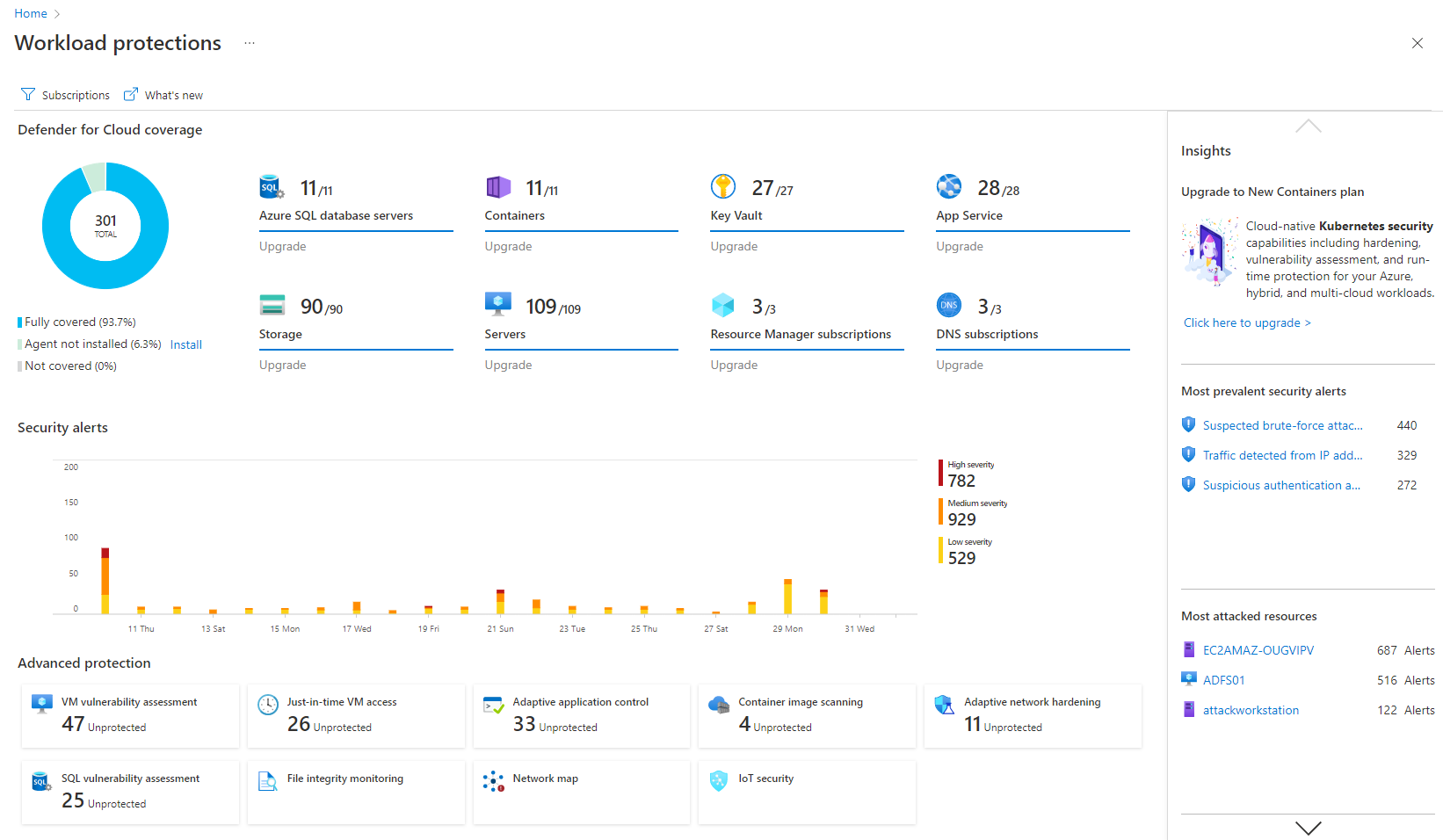
The Security posture score and Security Alerts are neatly centralized and offer me crucial information quickly.
Defender for Cloud avoids the common compromise of simplicity for completeness (former Azure Security Center). The security warnings and advice go into great detail while remaining current and useful.
It could be a bit of information overload which some things are shown can become noise. Maybe different levels of "security" for lack of a better term may be better where you have a summary vs detailed level when it comes to rating the vulnerability of the entire network.
I find I sometimes have issues with PCs on a different network accessed across a VPN where timeouts often occur with very large updates. This aspect can be improved.
UI/UX. It can get a little messy when navigating around with all the flyouts in the Azure portal which can be frustrating, particularly when under time pressure.
The query languages for the queries and workbooks are another language that needs to be learned - it would be nice to have kept it closer to T-SQL or something like that to minimize the need to learn new syntax.
Adding cost estimations to the security recommendations would really improve the experience.
It is a great product that integrates nicely when running an Azure platform and even multi-cloud environment. Not looking for point-solutions but a suite that answers most requirements. It is very comfortable being able to use KQL, workbooks and automation that is native to the azure platform
I only tried to access there support once and it was a relatively pain-free process. They also have a lot of documentation available online which can be used to learn and tailor the software to suit your needs. It just takes time and effort to plan, execute and monitor going forward.
WSUS was the other alternative I considered but I believe GFI takes updates, reporting, and functionality to a different level for an enterprise/medium-size business environment.
I believe Microsoft Defender for Cloud stacks up well against the other tools we looked at. It is native to the Azure platform and provides the same insights as the other tools. We selected Microsoft Defender for Cloud because it integrates well with the Azure resources and gives the needed insight, security alerts and recommendations.
Certainty. It allows you to know where on your network needs attention.
Peace of mind. As security professionals, we can only put the necessary things in place to prevent malicious persons from exploiting a network. The software allows you to know whether or not your risk of exploitation is high or low. and if high what to do with it.