GoldMine CRM was is a Customer Relationship Management (CRM) solutions for small businesses boasting at its peak over 1 millions users across verticals, a CRM solution for businesses running Windows, available for the Cloud, Mobile and on premise. The product was acquired by Ivanti, and currently is no longer available as a standalone application.
$65
per month per user
Insightly
Score 7.4 out of 10
N/A
Insightly is presented as a modern, affordable CRM that is easy to use, simple to customize, and that scales with companies as they grow, designed to solve common pain points that legacy CRMs can't. Available in any vertical, Insightly CRM customers can add companion products for marketing automation, customer service, and integrations in the same platform. Insightly has more than a million users worldwide.
$29
per month (billed annually) per user
Pricing
GoldMine CRM (discontinued)
Insightly
Editions & Modules
Cloud Based
$65
per month per user
On-Premise - multi-user
$1,992
one-time fee 3 shared users (includes 1 year of support)
We use this with GoldMine when placing our orders, they both have there uses with in our company. We also use Zoom for automatic emails and calls, this tool is more for searching for the right contact within the companies I work with. I think GoldMine covers a lot more of my …
GoldMine is a better overall product based on scalability, ease of use and cost effectiveness. All of the customization in GoldMine was beyond the other applications we tested and considered. Overall we believe we made the right choice based on how quickly we saw results. Our …
We didn't consider any other product. We have used GoldMine for nearly 20 years and recently upgraded to the latest version. The additions being offered, like mobile and web access we very tempting for us. Before GoldMine, we used in house Databases and spreadsheets that worked …
I cannot remember the name of the CRM system used at my last company, but it was nothing in comparison to GoldMine. It lacked many of the expanded search features and dashboard.
Our university still utilizes Banner, which requires us to have information stored there and migrate it to GoldMine twice per day. Banner is NOT user-friendly, but our set up makes it more robust than GoldMine. GoldMine makes information available with fewer clicks and puts it …
I have used Salesforce CRM, NetSuite CRM and Zoho CRM. I would say Goldmine is a much better tool than NetSuite, but the features of Salesforce and Zoho make it much better tool than Goldmine.
I have used ACT and preferred Goldmine. I just find it's capabilities greater even if one does not use them all. Also, with it's own internal email system that make it possible to see emails, along with other interactions with a contact, even if the emails originally come from …
Honestly, comparing CRMs is in my "to-do" list since stepping into this role. I have not yet had the chance to do a full market analysis of various CRM offerings. I'm sure it stacks up nicely in the price column based on a very quick survey I did on other CRM options.
Originally, I only knew GoldMine, but over the last few years have used and trialled lots of other software. The big competitors really I think are ACT! and Maximizer for onsite software, still I think my preferred route. At the moment, whilst I think that cloud CRM products …
Insightly
Verified User
Anonymous
Chose Insightly
I did not select Insightly for our company as I am a user but not a decision maker, but compared to Chronus, Insightly is a much more organized CRM. Chronus also had technical issues that slowed or prevented our work, and I have rarely run into that in my time using Insightly.
Insightly has just worked much better. The thing about Insightly that really sets it apart is the email linking. Having the ability to read all of the emails sent and received during the project let's you see the full story of the projects inception to its completion. …
I have forgotten the names of the softwares because we did the scoping over a year ago, but insightly was the best by far for our needs. The other two were focused on a different side of property services and had a lot of features that were not applicable. Without insightly, we …
Insightly is significantly better than Zendesk. It is easy to use, pleasant to look at, and makes sense. However, I don't think Insightly is fair now compared to Salesforce. Insightly can do many of the same things as Salesforce, but I've only started on some of these features. …
I did not select Insightly; my executive team selected Insightly. I would rate Insightly below any other CRM or marketing platform I've used based on its inefficiencies, lack of intuitive work processes, poorly functioning mobile app, and even the design, which is not appealing …
Insightly can be easily navigated and is straightforward. Based on my experience, it is more intuitive, and the menu buttons are self-explanatory, unlike the salesforce I have experienced. There are just a lot of buttons to click from, or sometimes, it could be a drop-down box …
Not too sure sorry, I have not used any other CRMs. We do use platforms such as Monday to track our workflows, we find it a lot easier to track actions as a whole. However Insightly does store details and information regarding our clients a lot better then Monday would.
Insightly was easy to customise and allows for us to have fields in our CRM that are relevant to us. Workflow management and marketing is better on other platforms
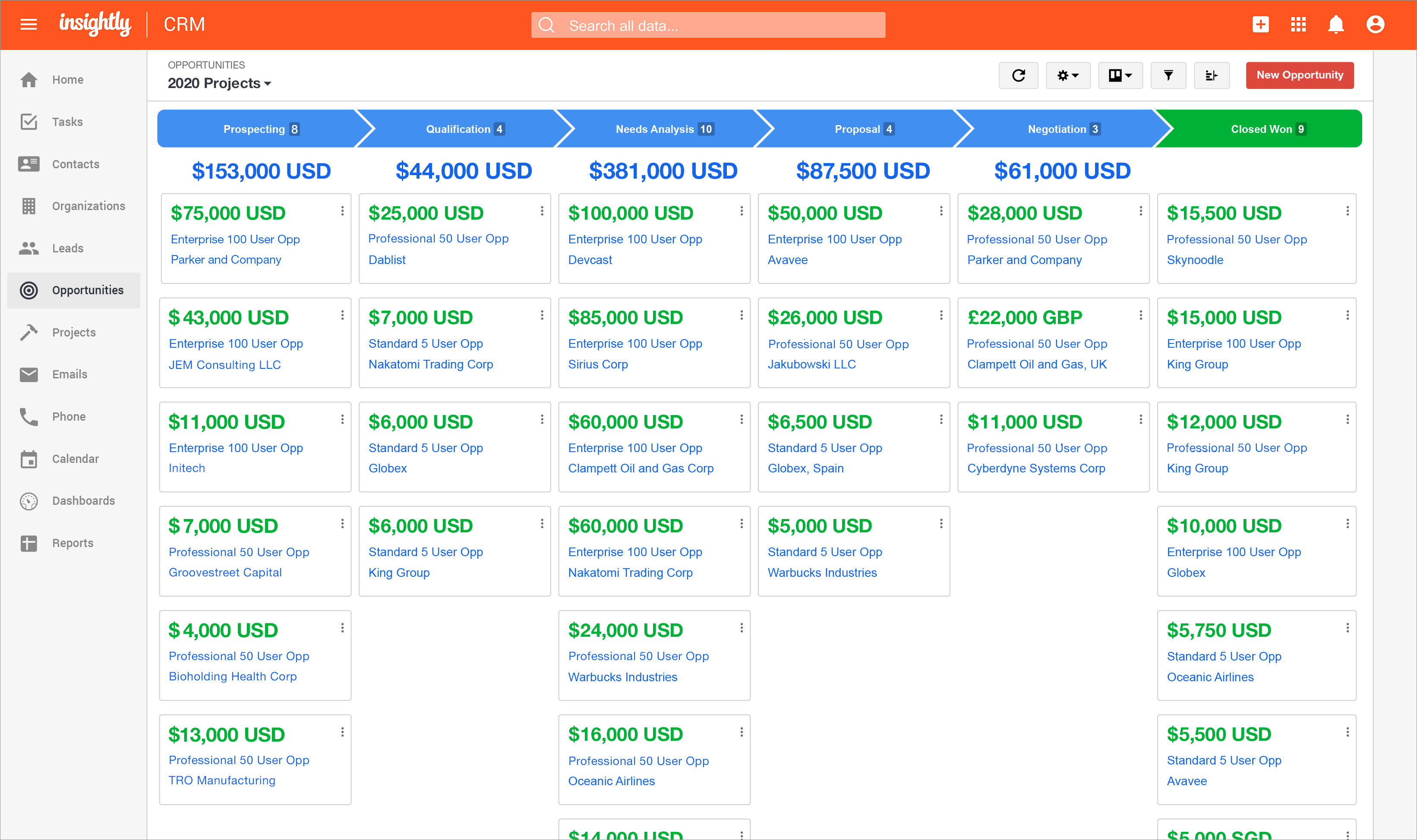
We’re looking to use a simple CRM that can fulfill our needs for a CRM. We needed to manage our Pipeline and Opportunities in a simple and easy format, that the entire team could utilize on a daily basis and Dashboard that were useable and changeable to our needs. Insightly has …
I have had experience with other tools and the Insightly support is far better than my experience with the other tools. Support and training are critical when it comes to the adoption of a new tool within an organization. Insightly very much values their partnerships and …
Insightly can stand on the same line with these other powerful crms. I selected insightly because they are a great value CRM with all the features from the big competition in terms of customisation. They are a powerful software that keeps up with the Joneses but does it at a …
Salesforce was always confusing to use, and quite a mess. Companies that I worked at in the past had to invest a significant amount of time creating a salesforce portal or skin to actually make it usable by the sales representatives. Even then, integration was always a bit …
Insightly has far more modern applications than Goldmine. It allows for more customizations. Our reports are nicer looking and it seems much more user friendly. Insightly also seems to be more than just sales focused. Goldmine seemed to really be geared more towards a sales …
GoldMine brings some great Sales forecasting tools to the table. By using the set analytics business can properly be forecast and adjusted as new variables are added. Trends are easy to pick out once set up and running. The whole list of customization allows most businesses to make adjustments on the fly to produce better results in the field. From small operation on up GoldMine will scale to fit your needs.
For what we use it for and the ease of use I am happy to recommend Insightly however I can appreciate that others may have more complex feature requirements than I use. As such I would mainly only recommend it to people who I feel would use it in a similar capacity to me.
Organizing trouble tickets or "cases" in customer profiles. They are associated with the customer, so you can go into any customer record and click the cases tab and sort them by any of their columns.
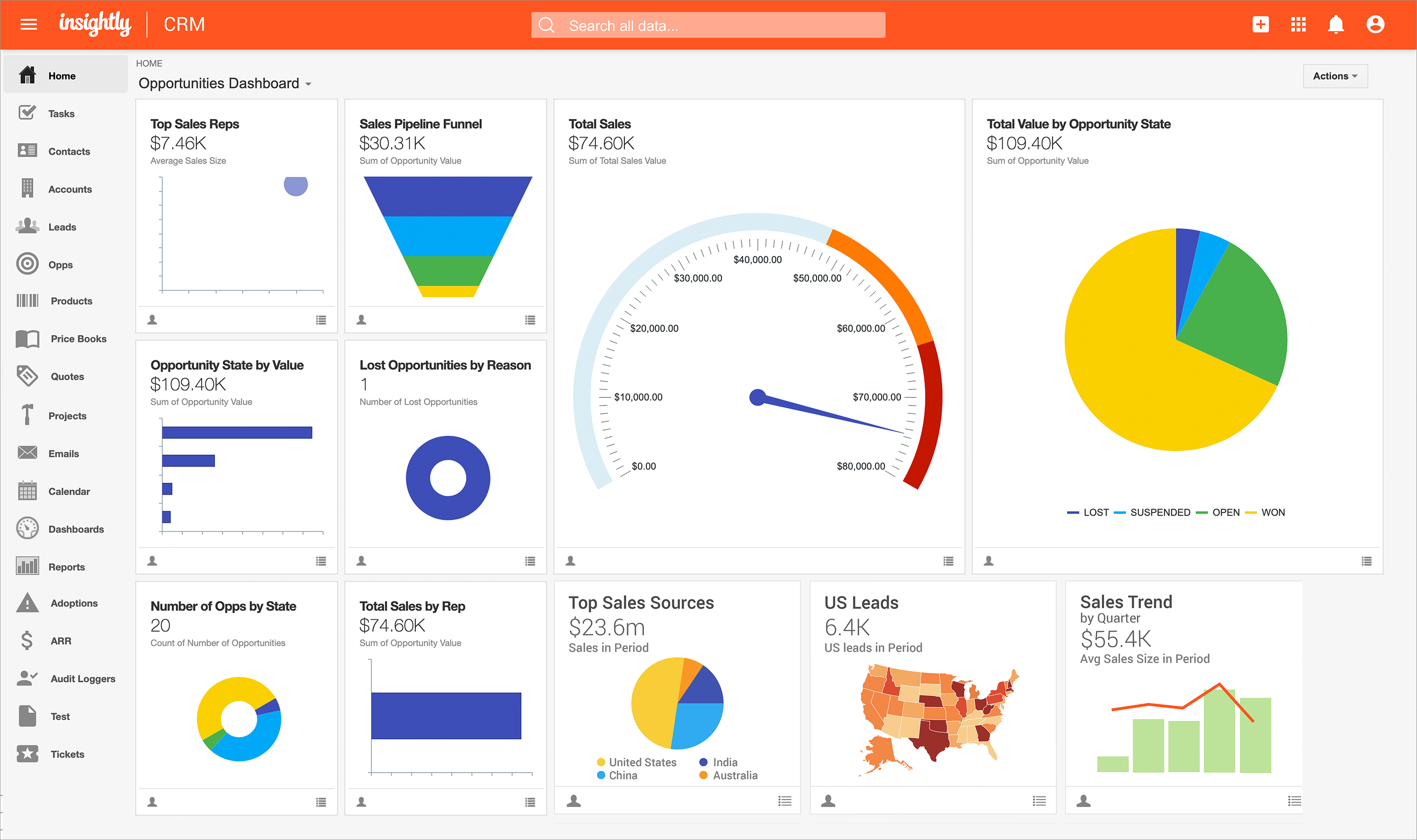
The dashboard is invaluable as a support technician. It allows me to find my trouble tickets and sort them by the date they were last updated, allowing me to continuously follow up on older ones as time goes on.
The integration of companies, contacts, and cases is essential, as it allows our departments to access the same pools of information efficiently.
GoldMine itself can be a little hard to use if editing the information within the program is not enabled. This comes into play if the main information storage is another system that is migrated to GoldMine
Third party apps or software can be complicated to be moved into GoldMine history. It is possible, but requires some upkeep and maintenance.
GoldMine takes A LOT of expertise to set up. If set up incorrectly by a bad representative, then it can affect the overall usage of the program in significant ways. Make sure you ask the Goldmine rep several questions and get recommendations for the rep as well as the product.
If there were a product that would mean less on-site support/maintenance with comparable or not much more cost, I would seriously consider switching. Furthermore, going to a more mobile, paper-less application process would tip the scales in the favor of a competitor. I'd also like something that integrates web forms so that data entry is more stream-lined as is response time
Insightly offers a great product; it's the right fit for our company at this time. We were, however, considering moving to Contactually due to their cost effective automation features. However, they lacked the project management capabilities of Insightly. As our company grows, we would love to stay with Insightly - and if they can nail the automation and add the ability to customize a little bit more, it would be the perfect solution for us. For a larger company with a more involved sales team, you might find the metrics/reporting to be a bit basic. Insightly offers great customer service even to free customers
Personally, perhaps I should give it a higher rating, but I do genuinely think it was very easy to pick up and run with, but I did have a full training session and of course was keen on using it. In my previous marketing role many years ago, I 'd tried to create an MS Access database and this has taken ages, so being introduced to the power of GoldMine really impressed. People have comments on it, but my opinion is its still fast and a great workhorse
Some items are not easily accessible as an admin, and the number of available resources is outdated (video from 2017). For basic tasks such as updating prospects or contacts, it is fine. However, when you change the screen size, the system becomes less responsive, with tables often being difficult to read.
For me, its always been there, no worries here about downtime or the internet being down or switched off. Having it on a laptop as well with Goldsync means I'm always able to updated my notes and then synchronise. This to me is one of the benefits of purchased on-premise software, it cant simply be turned off!.
The provider is 100% available, with no downtime, maintenance, or unexpected outages. We have been able to perform solid continuous services for 12 months without any interruptions. We have backups as well, unlike the in-house backup that they keep on their end. I believe they have a very good redundancy and backup infrastructure in case they get any outages.
Pretty good, Yes, there are occasions when i may think there should be an easier way to do things, but over the years, I've always found a way to get the information out that i want, sometimes just needing a bit of help from the technical team. Day to day,. it works for me very well.
Pages normally load quickly, but every now and then, as entering updates to fields, it take a while to update. Sometimes even after refreshing the screen, we have to exit and go back in to get the fields or queries to update.
Their customer support is spot on! We never feel like we're being made to wait, and when we email, they respond and offer assistance very quickly. It's the same response I'd expect from an in-house IT team down the corridor. Some support teams you know you're talking to the first line support chap who probably doesn't know how to resolve your issue, and you have to wait until they give up and pass it, but GM support people seem very knowledgable
We have used Insightly for almost 2 years now. We have always been able to get in touch with support for a variety of reasons and they have never disappointed us. The support staff have always been very understanding. They have assisted with answers to our questions and have provided great tech support. We would highly recommend them.
I was originally trained by the UK distributor and then subsequently trained my self and had access to GoldMine consultants. In the long run, this saved me a lot of time really since I knew the product on an advanced/administrator basis and able to perform day to day tasks. Some things, still needed the consultants. The trick was with the training, I knew when I was out of my depth
Well, we didn’t get the chance to do this in-person training but rather one-on-one online training with HR in-house. There were PowerPoints to discuss as well as video instructions on how to use the app, so it was okay. We were able to play around with it during the training or onboarding session.
I've used Insightly's online training &/ or learned as I went. I've found the blogs and online written material helpful. I've also attended a few webinars, which can be useful if you use a J-I-T approach so as not to overwhelm you (or your staff) with functionality that you are using just yet. The fact that it's all available on their website and you can learn at your own pace is invaluable
As I said earlier, to me now with all this experience, it is ensuring that you focus on two things:- 1/ Ensure core customisations only are required until you get users started and embedded in using the system. 2/ Ensuring users get some good level of dedicated training time, internal or external, but I feel this is best done in a group rather than at your own speed. Afterall, no one really customises their MS Word or MS Excel each time, they just ignore the bits they don't need or ask if they do need them
did not participate in the implementation of this product did not participate in the implementation of this product did not participate in the implementation of this product did not participate in the implementation of this product did not participate in the implementation of this product did not participate in the implementation of this product
We use this with GoldMine when placing our orders, they both have there uses with in our company. We also use Zoom for automatic emails and calls, this tool is more for searching for the right contact within the companies I work with. I think GoldMine covers a lot more of my needs and [OSAS] Traverse [ERP] is just for billing purposes.
Insightly actually have many different fields and customization options for data management. Other programs do not have the ability to organize data in this way. It is easy to manage customer contact information, phone call and email tracking, company management and many other data fields. Microsoft and Google do not provide equivalent programs or services. Insightly customer service is quick to respond and address issues. It just takes quite a few emails in order to properly specify an issue or request
GoldMine, when maintained well has always been pretty reliable and in over 10 years, I don't think we've ever lost a day or more than an hour or so when we cant use it. Occasional a 'blip' will happen and you will have to log out, the only thing to bear in mind, which I'm not good at is ensuring you keep the mailbox to less than 2000 mails in your inbound box, I hover around 1800 and need to streamline this to get rid of my junk or notifications from LinkedIn groups for example when i mean to read, but never get round to it
(+) Being able to download my LinkedIn connections was a huge benefit. (+) I use the task function to stay on top of my follow-up activity which is another positive feature. (+) The sorting capabilities also help me pinpoint the contacts that I need to stay on top of. (-) When I add a new lead from an existing organization, I would like the organization's information to automatically populate the fields like address, website, description. I enter all that information manually. (-) My mass mailing experience has been tedious due to the email function being interrupted and crashing due to bad email addresses in some of my records. (-) Many of my leads do not have current email addresses. I wish Insightly offered a tool to help find email addresses. I spend too much time researching to find email addresses.
Documentation and easy access to documentation regarding a particular customer or contact.
While utilities exist to re-align territories and other assignments in Goldmine they are not always well documented so even if you are savvy and want to implement some functions yourself you will likely need a VAR support person to do the job for you -- at least the first time.
Typically, I have found support to be responsive and prompt. More importantly, even with drive failures, we rarely suffer any downtime with Goldmine.
For negative impact, the time setting up the various data fields and making sure the data was right and how it showed was not easy.
Having the integrations available has saved all of us time jumping from platform to platform. Definitely assisted with focus and probably scrubbed at least one meeting.
For the few issues we had setting up and customizing the tool, the ease of adoption across all the departments has been truly spectacular and beyond expectations.
Hoping the team will make it more plug and play for future rollouts and work on the mobile app and then this platform would be 100!