Google Forms is an app for creating forms and surveys, and is part of Google Apps for Work. The product focuses on ease of use; the interface is similar to a document editor, with drop down lists of options and drag and drop question re-ordering. Users can embed images and video into surveys. Users can also program the question flow with custom logic. Google sends users basic summaries of the survey results automatically, or users can export the raw survey results data and analyze it via…
N/A
Sogolytics
Score 9.0 out of 10
N/A
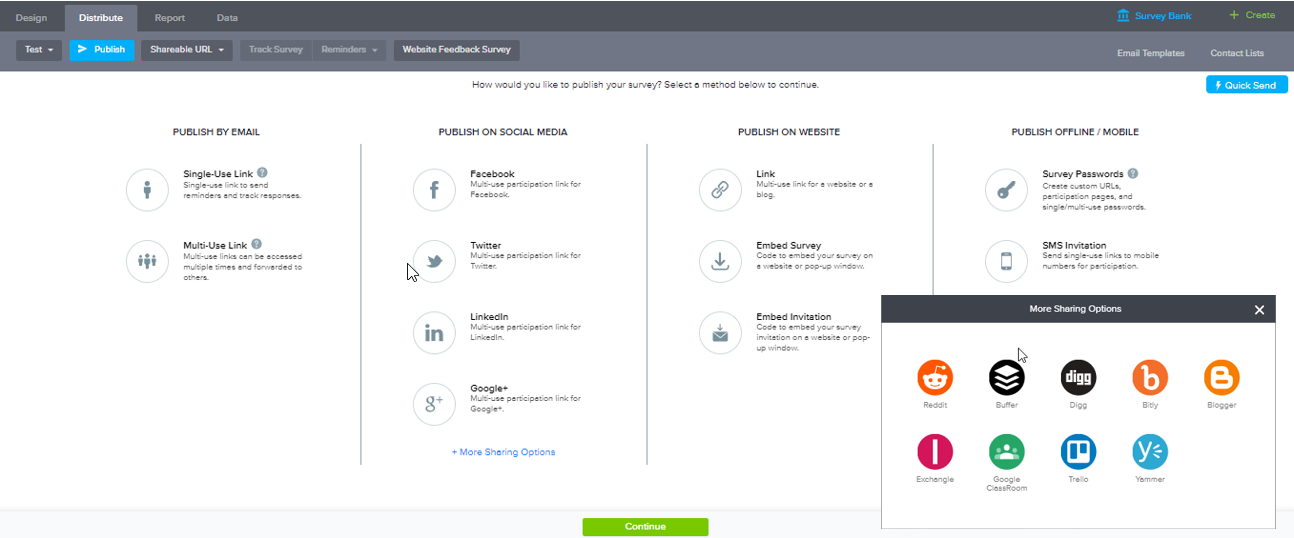
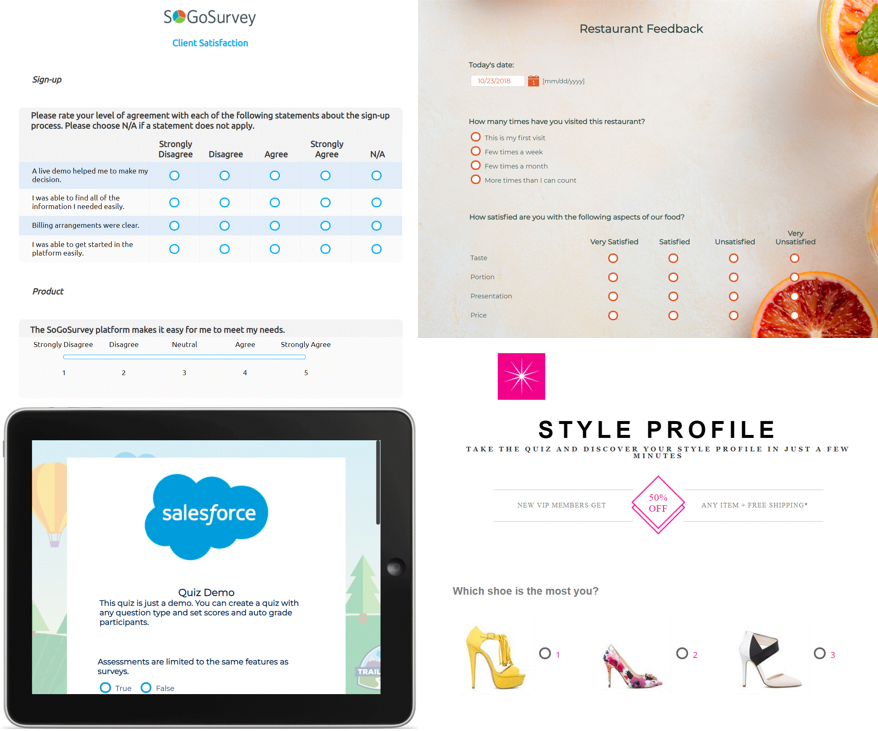
Sogolytics (formerly SoGoSurvey) is an online survey software solution that helps users create surveys quickly. The free package includes basic features for building surveys and the paid package includes advanced features.
SurveyMonkey works well for serious surveys, but it would be too difficult and expensive to use it for every small event. QuestionPro Live Polls is also good, but it is primarily used during specific events, such as Zoom webinars, to collect questions from participants. Google …
They are pretty similar, but Google Forms is better from a cost perspective. They are both simple to use and are great options for creating + sending out surveys.
I haven't used that many other form applications before unless they were standalone applications like Microsoft Word. I used this program, and it was ok, but it requires a paid subscription, and someone renews it yearly. This can be too complicated for some users, such as older …
Cognito forms are really great because of the high degree of customisation that can be done. You can seriously build some amazing workflows using them which we do use for more intricate projects
I think that the Google version of forms is easier to use for both those making the forms and those filling them in than it's Microsoft equivalent. Google's products are more widely used and understood by the public, and they function at a higher level.
JotForm is good too and gives theming & CSS priority. However, I don't think the theme is important in forms, we chose Google Forms because we needed simplicity.
For strictly forms with data driven insights Google forms is the most efficient and hands down easiest choice to go with. It offers a ton of vast and robust features that helps with integrations and many more.
Google Forms is easy to use and affordable. The biggest benefit, however, is that our organization already uses other Google products heavily. Because of this Google Forms was our top choice. Some smaller departments in our organization still use other solutions, such as …
Google Forms is a much more basic tool for collecting feedback. It's better for small events or very basic responses. Survey Monkey is better for getting in-depth insights into data, including insights trends and a better presentation of the data in exportable graphs. But …
I selected Google Forms because of its efficient and quick customer service. I had used other platforms earlier and had trouble connecting with their team for issues.
Google Forms is great because it is free and easy to use. Formative has great features because it is able to give live feedback of responses and it has multiple question types but it is also expensive to subscribe to. Google Forms is very powerful because, in addition to the …
I have been using Google Forms since it started in 2008. I have never explored other alternatives for creating surveys. I like the intuitive design and the visual output of data in charts and graphs. It's easy to share the survey with others. Google Forms embed seamlessly in …
Although both platforms offer similar functionalities, Google Form has a personal advantage and it is the impeccable integration with the different applications of the Google suite, this allows to make use of all of them in a transparent way, which in the work environment …
We use Google Forms now instead of Survey Monkey. The question types are fairly similar and both are easy to use but Google Forms is definitely a "lighter" survey tool than Survey Monkey. It fits our day-to-day needs as we don't do robust surveys requiring large amounts of …
We have also used FormAssembly, which is far more advanced with security, analytics, and functionality, but is also more expensive and takes a greater resource investment to train others to use. While FormAssembly can provide a lot more features, and is definitely the better …
I use both SurveyMonkey and Google Forms. Google Forms are nice for quick and simple everyday information collecting. SurveyMonkey is used for a more robust detailed information collecting where I can dive into analytics/results in a more detailed manner.
Google Forms is more basic than Typeform in terms of design style options and flexibility, but it has an easier-to-use interface. It is slightly less robust in terms of logic and crowd-sourced responses than SurveyMonkey. In general, it's a good option for generating a quick, …
Google Forms definitely isn't as robust as some of the more professional tools out there. However, in my experience, I usually don't need a robust survey tool. I just need to quickly set up a survey or screener. In addition, I love how simple it is to add collaborators to …
Google Forms is easier to use than Qualtrics, but has less robust capabilities, especially in terms of sharing, permissions, survey logic, and reporting features. I also find Google easier to use than the Microsoft Forms tool, but again Microsoft might have better options in …
SurveyMonkey is great but it costs money to get its full power while Google Forms can do a lot of the same but for free. When it comes to simply surveys/data intake, Google Forms is far easier to use and much cheaper.
In summary, Sogolytics has proven to be the perfect fit for our pre and post-test assessments. Its seamless integration, efficient data collection, and powerful reporting capabilities have significantly improved our ability to track and communicate the impact of our programs. …
in my opinion tools such as SoGoSurvey are perfect, especially for students and researchers in small institutions that cannot afford the prices of other platforms such as Qualtrics. SoGoSurvey is much more accessible in terms of prices and offers free advanced or super …
When we were looking for a replacement for SurveyMonkey due to not being able to carry out a specific type of questionnaire without being on a higher level package we discovered SoGoSurvey who were able to provide these features without any additional costs. SoGoSurvey was the …
SurveyMonkey allowed our team to design a complete survey, before asking us to pay a subscription price after this had been finished. This wasted our time and felt like a trick, making us invest time and energy in designing something that would be wasted unless you gave them …
I've used several other survey tools, but for this specific case, I needed a somewhat more sophisticated tool for a specific and larger customer survey with several options. Also the survey needed to be company branded so customers really felt it came from us.
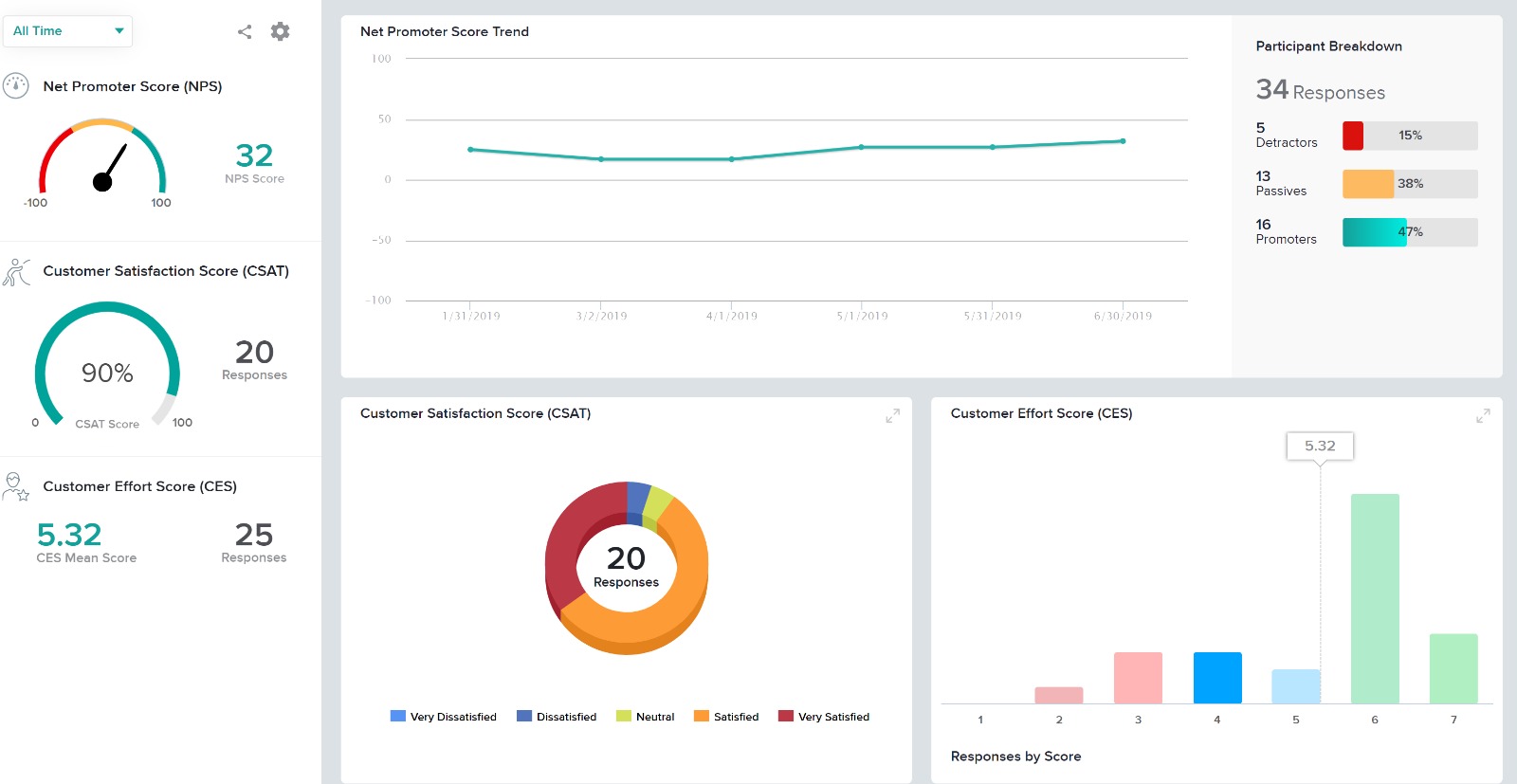
We ultimately went with SoGoSurvey because of its user friendly functionality, robust reporting with customizable graphs and charts, including the word cloud feature and the template library. I also found that the other products we considered were so much more robust than we …
We've used SurveyGizmo and SurveyMonkey in the past. In terms of functionality, they all do the trick. But, in terms of pricing and customer service, there is no comparison. SoGoSurvey has far exceeded our expectations. As a pre-revenue startup they really went above and beyond …
We previously used another survey product that had limited functionality. When we were looking for a change we evaluated two other companies and SoGo stood out the most.
They are very similar products but in the end SoGo's customer service won out. They were so helpful and attentive and we didn't go through multiple layers of people in the Sales process.
The three of them have many similarities, Qualtrics seemed more robust but it felt overwhelming for my needs. Once the Surveymonkey trial period expired, we were unable to print or access any of the work we have done; this wasn't an issue with SoGo. SoGo customer service …
I evaluated several different products, including SurveyMonkey. SoGoSurvey appeared to have the most features at the best value. Unfortunately, the "free" service didn't satisfy our needs and we had to upgrade during the first survey. I found SurveyMonkey and SoGoSurvey to …
SoGoSurvey offered the best value for money mix of features compared to other products that I have investigated. However, recent price increases has undermined this.
SoGoSurvey was more flexible in my opinion compared to the other survey company's I looked at. It had a monthly price option that allowed for the type of logic we needed in our questions. It had great reports, a simple user interface, and tons of helpful tools and question …
Qualtrics and Google Forms both are ok but do not have the same functionality as SoGoSurvey, I would not use Google Forms because of serious shortcomings on question types and data analysis and I would prefer to use Sogo over Qualitics for the functionality boost, Qualtrics has …
SoGoSurvey stacks up against these other two products with its diverse set of reporting/analytics options, question types, and overall workflow. The ability to track a user's score in the Assessments is highly useful for our team, and not possible on other platforms. We …
Qualtrics is excellent, very robust, but extremely expensive. If an organization does not have the means, it's probably beyond most people's reach. SurveyMonkey's features are good, but one has to pay more to get what I got with SoGoSurvey. I evaluated various other survey …
All of them were fine enough, but so go had all the features for a fair price. Most of these platforms had one thing or another, but not everything. The flexibility of the types of questions was great.
I did not have experience using SurveyMonkey previous to our use of SoGoSurvey, but I do know that those who did were excited to hear about a lack of restrictions on survey deployment and some other features that were lacking in the free version of SurveyMonkey.
We use Sogosurvey to obtain feedback from course candidates after they have attended a course. This is invaluable to us as the candidates can complete the feedback in their own time after the course is completed rather than them having to do it while attending the course. We also use SoGoSurvey to get feedback from our volunteer instructors who work for other organizations and at different hours so the ability for them to complete the surveys in their own time is invaluable.
Capture of information from clients and/or consultants for real-time analysis.
Knowledge evaluation for our work team, the predefined templates allow the creation of tests and knowledge tests that are very didactic and easy to grade.
The acquired data is cleanly integrated with google spreadsheets allowing for fast and accurate analysis.
The form completion notifications are customizable and do their job well.
SoGoSurvey makes it easy to create a survey even for the novice. I recently gave a spare license to a peer and they were able to easily develop a survey. I offered my help if she had any questions but she said that she'd definitely ask but "... I already love that I can change the answer format with the drop down. It's the best. "
Customer support. I 'chat' with support personnel when I need to use a feature I haven't used. They are always quick to respond and answer my questions thoroughly. I can get the complete chat via email for future reference as well.
Keeping clients up-to-date. SoGoSurvey regularly hosts free training and best practices webinars that keeps the basics at the forefront and shares best practices.
The canvas (survey metrics) is easy to create and very versatile in summarizing the survey results.
Edit view limits the questions as seen by viewers. The view function is nice to toggle between to see what the question will look like, but the edit view of some questions (like checkboxes) is confusing for the editor.
It would be wonderful to be able to assign responses to go to specific users. The user needs to go into the responses section and select the option to receive notifications, versus the owner of the form being able to do that.
Having a dependency feature for questions (in addition to sections) would be very helpful, so that if a question is answered a certain way, another question appears.
Providing users the ability to follow along a specific question example (eg. placeholder text in questions that users can see what the answer might look like)
Better media management and implementation (eg. placing images/videos/gifs/etc. as standalone assets in the survey)
Making the images added into a survey responsive to the screen they are being viewed on (eg. any images added to a survey do not adjust to the size of the screen, consequently showing up very small on mobile/tablet view)
Exporting the survey to Word looks horrible - we'd love if the survey could be exported the way it looks when live into a similar-looking Word document or template
I will definitely renew my use of Google Forms because I really like the ease of use and the number of tools that Google forms provide. I also love that I can administer a test in real-time and get results in a timely manner
The interface is simple and intuitive. The first time you use Google Forms, it has a built in tutorial that goes through all the basics. Most people can pick up how to use it with minimal support. There are some advanced features that require a bit more work but there are plenty of videos and directions online. Google has a great support section that is easy to follow
Very easy to use. My only challenge was the features offered in their Plus package didn't offer everything I would have liked (e.g. branching). The other area for improvement would be to allow an easier transition between Tracking and Reports.
In the years I've used GoogleForms I've never ran into any issues with the reliability or availability. Google is a gigantic company with essentially limitless resources which makes it very easy to trust that I will continue to be able to enjoy the same reliability I've come to know and expect from GoogleForms
One of the things that comes as a benefit of the lack to create complex logic branching and truly custom design is that there isn't lot of room to bog down the software. GoogleForms has always loaded just as fast as my internet service and device would allow it. I'm not sure about front end integrations or integrations into the form itself, as I've never explored it, but on the backend, I've never had any issues with integrations channeling from GoogleForms from the GoogleForms's end of things.
I have not had to use Google Forms support - it's always worked as expected. However, with other Google products, I've always been able to find a plethora of resources for answering questions or dealing with issues. The benefit of Google is how widely adopted its products are and how robust its support is.
I had an issue whereby I used a free trial that ended, locking me out of my account. I contacted their customer service to help with this issue, which they resolved in under half an hour. I was extremely impressed with their speed and quality of service, which led me to filling out this review!
Google Forms is easy to use and affordable. The biggest benefit, however, is that our organization already uses other Google products heavily. Because of this Google Forms was our top choice. Some smaller departments in our organization still use other solutions, such as SurveyMonkey, but as a whole it has been helpful to standardize on a single product.
In summary, Sogolytics has proven to be the perfect fit for our pre and post-test assessments. Its seamless integration, efficient data collection, and powerful reporting capabilities have significantly improved our ability to track and communicate the impact of our programs. We highly recommend Sogolytics to organizations looking for a reliable and user-friendly data management solution.
GoogleForms lacks the ability for complex logic branching and the ability to truly design it in a custom manner. It's pretty obvious when you land on a GoogleForm that it is in fact a GoogleForm. This rating solely reflects the lack of flexibility which in turn makes it something that wouldn't usually be scaled. That being said, if needing to scale a simple solution, GoogleForms would be up for the job.
Google Forms provides us a vehicle to gauge faculty and student response to our online courses and their features in real time so that we can keep our courses updated for students and faculty who facilitate them.
Since Google is free, provides storage space, and provides Shared Drives (at least in our institutional account), using Google Forms helps us manage our data. We support over 400 courses with thousands of sections so Google Forms helps us manage the data coming out of these courses, mostly student and faculty feedback about what is working and what is not.
We encourage our faculty to use Google Forms to survey their students for prior knowledge, for interest inventories, and the like. It's incredibly nimble and useful for collecting data quickly and presenting results in easy-to-understand charts and graphs.