Google PageSpeed Insights is a search engine optimization software solution offered by Google.
N/A
Textmetrics
Score 6.0 out of 10
N/A
Textmetrics (formerly Webtexttool) aims to help content creators create rank-boosting web content. The tools key differentiator is big data Textmetrics creates predictive data, by analyzing the data of users (anonymously). 20.000+ user generated texts are analyzed and compared to real-world outcomes. The best performing outcomes are used to better its real-time optimization tips. Value prop: More website…
The results are in the eyes of Google and as we know they are the most popular search engine. Great information from Google. Pingdom and Gtmetrix allow for shareable results. Google Pagespeed does not have the option to see past tests run.
I've never used any software beyond PageSpeed Insights and Google Lighthouse (the source of the PAgeSpeed Insights software.) I've used similar programs like Hummingbird for WordPress that pulls the same data using the same engine, but its really the only game in town as far as …
Google's approach is a little different from competing services like WebPageTest and Pingdom by providing Google-specific benchmarks. Their interface is a bit simpler and well-suited to more novice and intermediate site owners. Advanced users will prefer the granular data and …
I think GTmetrix has some feedback that PageSpeed doesn't provide, but Google's tool is easier overall and has a better user experience; also offers compressed images, CSS, and javascript files if that's the case. Also, Google has extensive documentation to help you better …
I've not used any other tools like WebTextTool (TextMetrics) in the past. This is the first and only one I've used with this kind of functionality, so, unfortunately, I can't compare it to any other tools. I'm not familiar with any other tools that analyze written content in …
It should be an essential tool for all website owners - everyone should care about page loading time from the CEO down to the junior web developer. Page speed is a factor that hugely affects visitor satisfaction, and Google takes it seriously by offering PageSpeed Insights. If you work in a larger organisation and focus on one particular part of website development and maintenance, such as a content writer, then this tool won't be as useful. It's intended for users with development or marketing-related responsibility
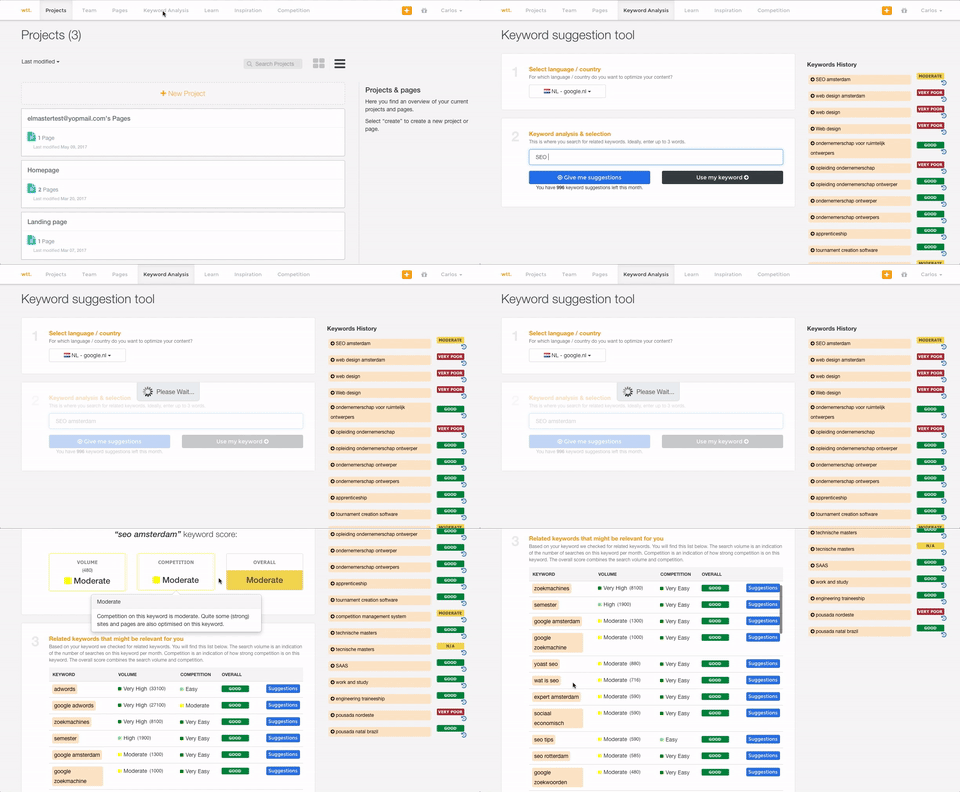
It is a super cool tool when used with WordPress for optimizing the content of a blog post. Its suggestion will fix any mistakes I make. Facebook posts are optimized, too. If you want to do keyword research, I think it is not so well-suited. Its keyword analysis is too simple to help you.
WebTextTool (TextMetrics) assumes that each uploaded or typed in the article is intended for online publishing, mostly in a blog type environment. While this is a perfectly understandable assumption in this day and age, it shouldn't be so difficult to ask the question of whether the content is intended for online or print media.
The "Credibility" section tends to be a little too harsh for my taste. Depending on the style of writing and the type of content, "too many adjectives" is too subjective a metric to apply to all writing ( still, I do get why they try to do it).
This is a little nitpicky, but I'd prefer to see how many projects and credits I have left to use on the dashboard page as opposed to having to click over to my account. A dashboard should show everything that a user needs to see in one shot.
I only had to reach out to TexMetrics once when initially getting my account setup after signing up. The response was swift, and they addressed my question completely. I've had no other issues since I began using TextMetrics, so based on that one interaction, I have to give them a great score. I assume that it is still the same as when I reached out that one time (at least I hope it is!).
I've never used any software beyond PageSpeed Insights and Google Lighthouse (the source of the PAgeSpeed Insights software.) I've used similar programs like Hummingbird for WordPress that pulls the same data using the same engine, but its really the only game in town as far as I'm concerned.
I've not used any other tools like WebTextTool (TextMetrics) in the past. This is the first and only one I've used with this kind of functionality, so, unfortunately, I can't compare it to any other tools. I'm not familiar with any other tools that analyze written content in this fashion.
WebTextTool (TextMetrics) has saved me lots of time in proofreading and re-reading my content to make sure it follows SEO protocols as well as hits all the right spots concerning content.
It has made me more confident as a content creator. I do not consider myself eloquent or even a good writer by nature. But when it comes to SEO, that doesn't matter as much as making sure you hit your targets for SEO effectiveness.
Knowing that I'm not the best writer, I can fall into the trap of thinking that my writing is perfect as long as it's been run through TextMetrics. It can provide a little bit of false confidence in not needing to have another set of eyes look over the content. In that sense, it will never replace a human editor, and so that will always be required.