Google Surveys is an app for custom surveys, and is part of Google Apps for Work. The insights from audience targeted surveys can be expressed in instant, easy-to-digest graphs and charts help you make sense of the survey data. Surveys natively integrates with other solutions, allowing you to use data from one product while working in another. Survey responses from real people can be sourced by Google's Opinion Rewards app, where respondents answer questions in exchange for incentives.
$10
per completed survey
Sogolytics
Score 9.0 out of 10
N/A
Sogolytics (formerly SoGoSurvey) is an online survey software solution that helps users create surveys quickly. The free package includes basic features for building surveys and the paid package includes advanced features.
N/A
Pricing
Google Surveys
Sogolytics
Editions & Modules
Surveys
10¢
per completed survey
No answers on this topic
Offerings
Pricing Offerings
Google Surveys
Sogolytics
Free Trial
No
Yes
Free/Freemium Version
No
Yes
Premium Consulting/Integration Services
No
No
Entry-level Setup Fee
No setup fee
No setup fee
Additional Details
—
—
More Pricing Information
Community Pulse
Google Surveys
Sogolytics
Features
Google Surveys
Sogolytics
Survey Format & Appearance
Comparison of Survey Format & Appearance features of Product A and Product B
Google Surveys
6.3
Ratings
23% below category average
Sogolytics
-
Ratings
Survey templates
6.60 Ratings
00 Ratings
Themes
6.00 Ratings
00 Ratings
Custom logo/branding
6.30 Ratings
00 Ratings
Survey Content
Comparison of Survey Content features of Product A and Product B
Google Surveys
5.5
Ratings
43% below category average
Sogolytics
-
Ratings
Changes to live survey
7.00 Ratings
00 Ratings
Question design help
4.60 Ratings
00 Ratings
Multiple question types
4.80 Ratings
00 Ratings
Survey Logic
Comparison of Survey Logic features of Product A and Product B
Google Surveys
4.4
Ratings
61% below category average
Sogolytics
-
Ratings
Survey logic flexibility
4.40 Ratings
00 Ratings
Survey Reporting & Analytics
Comparison of Survey Reporting & Analytics features of Product A and Product B
Google Surveys
5.7
Ratings
35% below category average
Sogolytics
-
Ratings
Response tracking
5.60 Ratings
00 Ratings
Data export
5.60 Ratings
00 Ratings
Standard reports
6.20 Ratings
00 Ratings
Custom reports
4.60 Ratings
00 Ratings
Analytics
6.40 Ratings
00 Ratings
Survey Administration & Security
Comparison of Survey Administration & Security features of Product A and Product B
Google Surveys
7.2
Ratings
19% below category average
Sogolytics
-
Ratings
Access controls
7.20 Ratings
00 Ratings
Compliance
7.20 Ratings
00 Ratings
Survey Distribution
Comparison of Survey Distribution features of Product A and Product B
I do appreciate the ease of use and connection Google Surveys has with other Google products - that's a huge plus. While I'm a fairly digitally-minded user, some of our users are not, so that becomes a challenge if you want them to see the Data Studio reports or be able to print something for them. But if you're completely digital, gaining insight from the reports is very valuable. We've mostly used Google Surveys to generate answers to questions we have on how things are running or to collect information from our users/members/students on how they "feel" about particular topics, situations, or their work, in general. For that, it's been a breeze. But we're finding for more specific surveys that may have decision trees associated with the answers (if they answer "this" then send them to "that") we work more with Qualtrics. But you can't beat the price of Google Surveys when you can begin one for $50.
We use Sogosurvey to obtain feedback from course candidates after they have attended a course. This is invaluable to us as the candidates can complete the feedback in their own time after the course is completed rather than them having to do it while attending the course. We also use SoGoSurvey to get feedback from our volunteer instructors who work for other organizations and at different hours so the ability for them to complete the surveys in their own time is invaluable.
SoGoSurvey makes it easy to create a survey even for the novice. I recently gave a spare license to a peer and they were able to easily develop a survey. I offered my help if she had any questions but she said that she'd definitely ask but "... I already love that I can change the answer format with the drop down. It's the best. "
Customer support. I 'chat' with support personnel when I need to use a feature I haven't used. They are always quick to respond and answer my questions thoroughly. I can get the complete chat via email for future reference as well.
Keeping clients up-to-date. SoGoSurvey regularly hosts free training and best practices webinars that keeps the basics at the forefront and shares best practices.
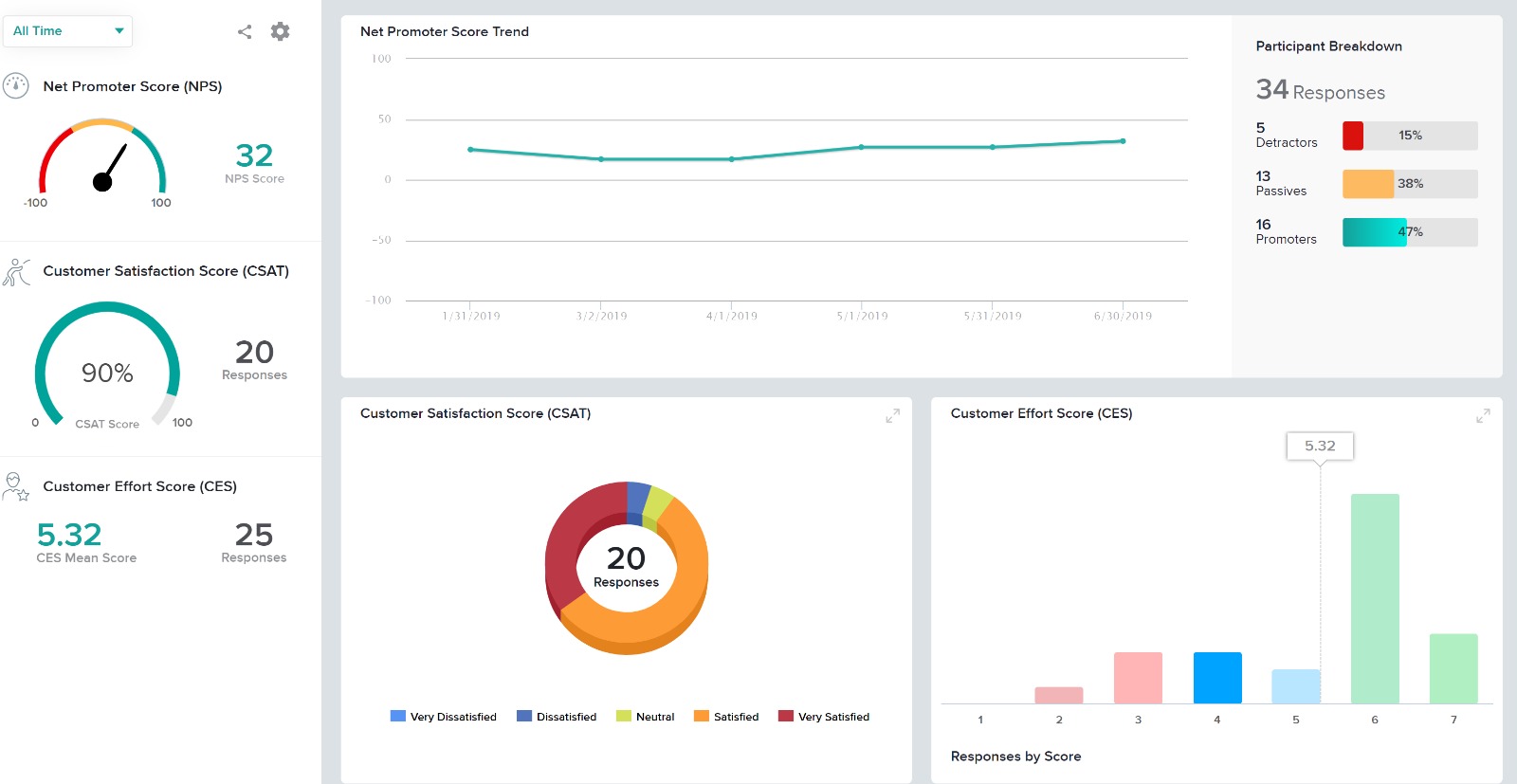
The canvas (survey metrics) is easy to create and very versatile in summarizing the survey results.
Providing users the ability to follow along a specific question example (eg. placeholder text in questions that users can see what the answer might look like)
Better media management and implementation (eg. placing images/videos/gifs/etc. as standalone assets in the survey)
Making the images added into a survey responsive to the screen they are being viewed on (eg. any images added to a survey do not adjust to the size of the screen, consequently showing up very small on mobile/tablet view)
Exporting the survey to Word looks horrible - we'd love if the survey could be exported the way it looks when live into a similar-looking Word document or template
Relatively simple so that those who are less than familiar with computers can figure it out. User friendly and already embedded with other Google products. Receives an 8 because many features available with Google Surveys are also available with similar, free products on the internet today. Good, but not stellar.
Very easy to use. My only challenge was the features offered in their Plus package didn't offer everything I would have liked (e.g. branching). The other area for improvement would be to allow an easier transition between Tracking and Reports.
Google Surveys has a world-class support team. If you have any questions you can reach out to support and gain additional insight on how the product can meet your needs. As part of Google, the support team is very reliable. Our team has not had any issues reaching support and having a quick resolution turnaround.
I had an issue whereby I used a free trial that ended, locking me out of my account. I contacted their customer service to help with this issue, which they resolved in under half an hour. I was extremely impressed with their speed and quality of service, which led me to filling out this review!
I use Google Analytics periodically to see how our website is performing. It's so slick to be able to see how many visitors we've had from month to month and year to year, where the visitors are coming from, what search terms are most potent, the effectiveness of organic vs. paid advertisements.
In summary, Sogolytics has proven to be the perfect fit for our pre and post-test assessments. Its seamless integration, efficient data collection, and powerful reporting capabilities have significantly improved our ability to track and communicate the impact of our programs. We highly recommend Sogolytics to organizations looking for a reliable and user-friendly data management solution.