Google Trends is a search engine optimization software solution offered by .
N/A
Textmetrics
Score 6.0 out of 10
N/A
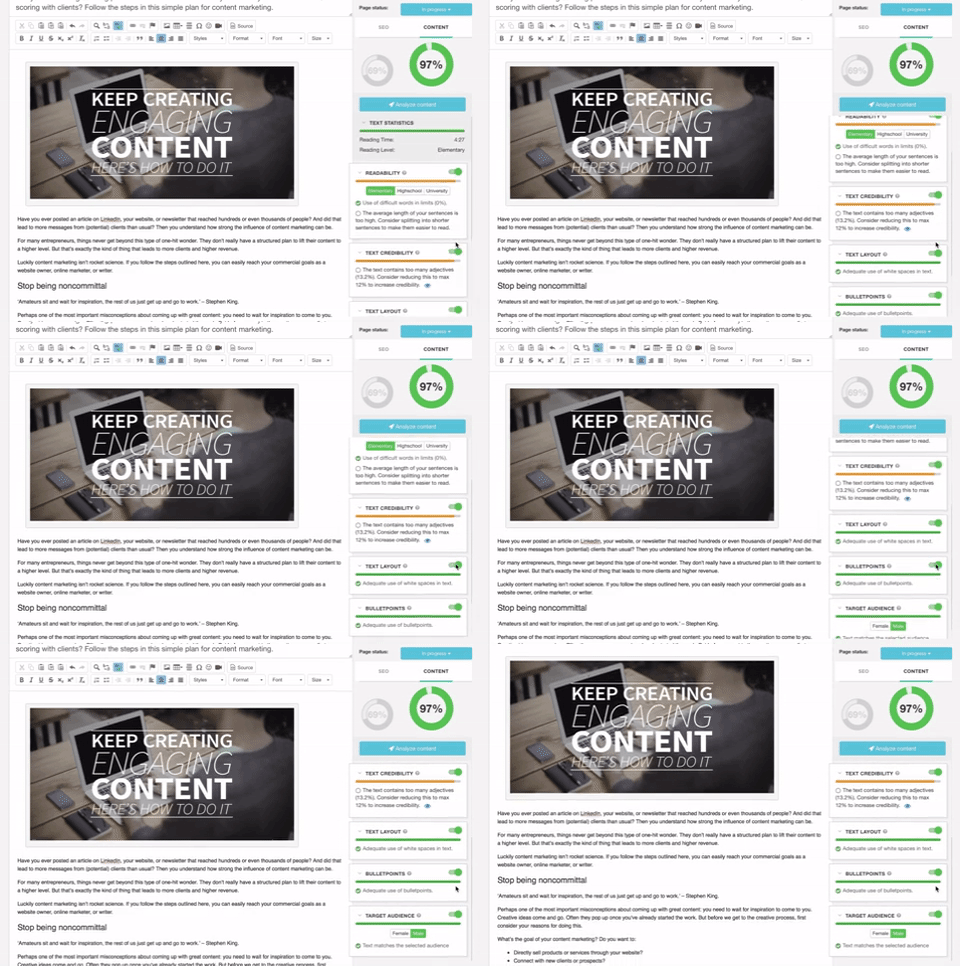
Textmetrics (formerly Webtexttool) aims to help content creators create rank-boosting web content. The tools key differentiator is big data Textmetrics creates predictive data, by analyzing the data of users (anonymously). 20.000+ user generated texts are analyzed and compared to real-world outcomes. The best performing outcomes are used to better its real-time optimization tips. Value prop: More website…
Overall I think that Ahrefs is a better product when it comes to really drilling down and getting all the data that you need in order to understand a given behavior or problem. Ahrefs is much more powerful in its feature set but does not have the same level of overall …
They are both great tools. I prefer Google Trends because of the location capabilities and being able to go hyper-local. It does not however provide the details on cost and competition like SEM Rush does.
Google Trends is probably the easier of the many other Google platforms to identify keywords. I haven't used other keyword platforms because I don't trust them—I rather use a tool directly from Google to evaluate popular keywords. That being said, Google Trends is very limited …
I like using Google Trends because it gives you a clear visual of seasonal trends and compares multiple queries at once. However, I do prefer using other systems like SEMRush and Ahrefs because they are more detailed in the information they give you regarding your website and …
It's not really an either/or thing — I use the complete "Google Marketing Stack" including Analytics, Trends, Keyword Planner, Search Console, etc. It's also essential to integrate some of their data, like making sure Google Search Console and Google Analytics are connected — …
Google Trends provides insights that are only available through Google, however, it does not include other important trends such as those on social media or via their competitors.
I've used SEMrush, while more of a SEO Manager than keyword trend analyzer, it does have that option as it does relate to SEO management, but between the two, its nice to have the option in SEMrush, but Google Trends is better at doing the trend analyzing than SEMrush is.
One of the most obvious reasons why I chose Google trends over other keyword research platforms is because it's free. At the same time, it also has the most relevant and easy-to-use features out of the bunch. Google Trends does not have as many features as SEMRush or BuzzSumo, …
We used multiple platforms. Google Trends is just one of them! It's important to have multiple tools to check and reference back and forth. Google Trends is totally free for everybody so why not give it a try.
Google Trends tends to be slightly more accurate than the other products, because Google has access to more user data for the algorithm to take into consideration when providing trends and information. We like this tool because it also aligns better with the Google tools we use …
We use Google Search Console and Moz mostly for our website improvement, and Google Trends we use mostly to look for trends: what people are searching for now. Google Trends is free and has very clean, simple and understandable user interface, it gives lots of usable data for …
There really isn't a product I know of that does what Google Trends does. I do use https://soovle.com/ in a similar fashion. I recommend trying Soovle out for content ideation.
Google AdSense is much more detailed, but requires the user to be logged in and have an active Google Adsense account, sometimes it's quicker to just use Google trends.
Google Trends has the biggest source of data and is the most accurate. It cannot be used without any other tool because of its own limits (keyword suggestion, semantical analysis, etc.).
Google Trends is sometimes a helpful supplement to other analytics and advertising tools, but it is not very useful as a standalone analysis tool. We have seen much more benefit from the intelligence and audience information built in to our other core tools. Better predictive …
Google Trends and Open Web Analytics are both similar and different. While both products allow a user to track the popularity of a given webpage or search term, Google Trends is more effective in providing content and suggesting trends. Furthermore, I liked the ability to use …
Google Trends is a great place to start in the content curation, content research, blog post writing, and resource page creation process. It is not, however, a place to do serious SEO optimization. Tools like Moz, or Analytics SEO would be a better place to go after you do …
They're different tools and thus have overlap, but still do quite different jobs. So there really is no exact comparison, in free to use tools, to Google Trends out there. If it could generate periodic reports it would be even better.
I've not used any other tools like WebTextTool (TextMetrics) in the past. This is the first and only one I've used with this kind of functionality, so, unfortunately, I can't compare it to any other tools. I'm not familiar with any other tools that analyze written content in …
Google Trends is appropriate in so many scenarios, but I definitely suggest it for content ideas and inspiration. Many people utilize it after already writing their content to add in popular phrases or words, but that is not enough. The platform should be used prior and during the content creation process so that you can use the data to see what your audience/customers are interested in at the moment and create the content based on their interests. It can help, but I find it much less appropriate to use it after your article, eBook, etc. is already written. Maximize on this useful tool by ensuring the topic you're writing about is relevant in the first place before simply adding in popular keywords. An article that's written based on what's trending will be far more successful than an article that solely has popular phrases added to it.
It is a super cool tool when used with WordPress for optimizing the content of a blog post. Its suggestion will fix any mistakes I make. Facebook posts are optimized, too. If you want to do keyword research, I think it is not so well-suited. Its keyword analysis is too simple to help you.
Allows you to search keywords and phrases in certain locations to see search volumes, this is huge and helps us be successful with our Google Ad campaigns.
Shows us insights into trending topics which allows us to stay in the know and apply any relevant trends to current clients.
Year in Search and Trending Topics provides us great inspiration for our ads
Being able to search in certain locations gives us a ton of help when setting up campaigns and doing our keyword research for clients.
Being able to compare multiple keywords or search terms side by side is extremely helpful.
WebTextTool (TextMetrics) assumes that each uploaded or typed in the article is intended for online publishing, mostly in a blog type environment. While this is a perfectly understandable assumption in this day and age, it shouldn't be so difficult to ask the question of whether the content is intended for online or print media.
The "Credibility" section tends to be a little too harsh for my taste. Depending on the style of writing and the type of content, "too many adjectives" is too subjective a metric to apply to all writing ( still, I do get why they try to do it).
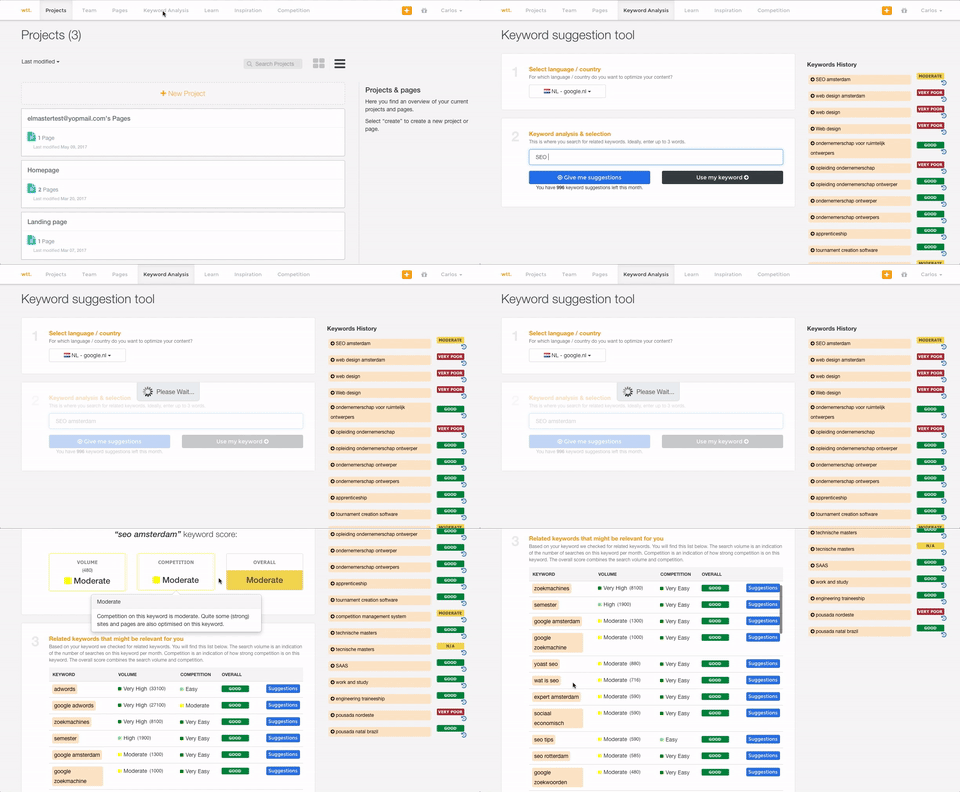
This is a little nitpicky, but I'd prefer to see how many projects and credits I have left to use on the dashboard page as opposed to having to click over to my account. A dashboard should show everything that a user needs to see in one shot.
Google Trends is very easy to use. you just search for a certain keyword or phrase, and it tells you how often that keyword or phrase is searched, where in the world it is searched, and over the last decade, how often it is per year.
I haven't needed to use any support for Google Trends. However, I've used Google's support in general and it's a hit or miss. Usually, there's a long wait or they don't understand my problem. They are the only ones that can help, so sometimes I feel stuck. They prioritize paying customers for sure.
I only had to reach out to TexMetrics once when initially getting my account setup after signing up. The response was swift, and they addressed my question completely. I've had no other issues since I began using TextMetrics, so based on that one interaction, I have to give them a great score. I assume that it is still the same as when I reached out that one time (at least I hope it is!).
I've used SEMRush, while more of a SEO Manager than keyword trend analyzer, it does have that option as it does relate to SEO management, but between the two, its nice to have the option in SEMRush, but Google Trends is better at doing the trend analyzing than SEMRush is.
I've not used any other tools like WebTextTool (TextMetrics) in the past. This is the first and only one I've used with this kind of functionality, so, unfortunately, I can't compare it to any other tools. I'm not familiar with any other tools that analyze written content in this fashion.
I can't really give a measurement of how Google Trends has directly contributed.
Since Google Trends is free I would have to say that it is all positive ROI.
I can say that Google Trends definitely makes it easier to accomplish my business objectives of delivering the most relevant and insightful advice to my clients regarding their SEO, Social Media Publishing, and Online Advertising.
WebTextTool (TextMetrics) has saved me lots of time in proofreading and re-reading my content to make sure it follows SEO protocols as well as hits all the right spots concerning content.
It has made me more confident as a content creator. I do not consider myself eloquent or even a good writer by nature. But when it comes to SEO, that doesn't matter as much as making sure you hit your targets for SEO effectiveness.
Knowing that I'm not the best writer, I can fall into the trap of thinking that my writing is perfect as long as it's been run through TextMetrics. It can provide a little bit of false confidence in not needing to have another set of eyes look over the content. In that sense, it will never replace a human editor, and so that will always be required.