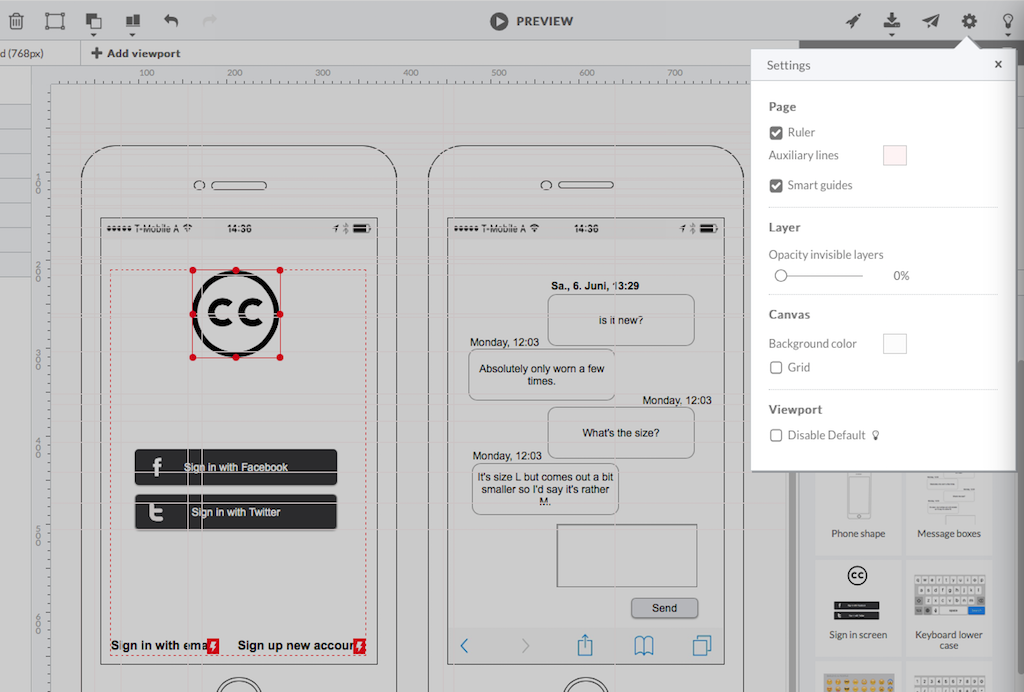
HotGloo is an online wireframing and prototyping tool. This solution has been designed for all those engaged in the concept, design and development of web or app projects: project managers, information architects, usability experts, freelancers, concept people, digital agencies, web companies, publishers, web designers, web developers and many more. The vendor’s value proposition is that this solution makes it easy to wireframe web and mobile sites and to collaborate with others due to the…
$13
up to 4 users, 2 active projects, unlimited reviewers
UXPin
Score 7.9 out of 10
N/A
UXPin is a UX design platform with wireframing, prototyping and interactive mockup features.
N/A
Pricing
HotGloo
UXPin
Editions & Modules
Group
$13
up to 4 users, 2 active projects, unlimited reviewers
Team
$27
up to 10 users / 6 active projects / unlimited reviewers
Agency
$54
up to 20 users / 15 active projects / unlimited reviewers
Enterprise
150 +
More users and projects, priority support. Get in touch for an individual quote.
No answers on this topic
Offerings
Pricing Offerings
HotGloo
UXPin
Free Trial
Yes
No
Free/Freemium Version
No
No
Premium Consulting/Integration Services
No
No
Entry-level Setup Fee
No setup fee
No setup fee
Additional Details
The billing period starts on the day you upgrade from the free trial to a paying plan. If you pay by credit card the service is billed in advance on a monthly basis and is non-refundable. There will be no refunds or credits for partial months of service, upgrade/downgrade refunds, or refunds for months unused with an open account. If you do choose to cancel your account in the future, you will never be charged again, but you are responsible for charges already incurred up until your cancellation. For monthly recurring payments we accept Visa, MasterCard and American Express through our online payment system. You can also prepay any account for 12 months with credit card. In certain cases we also take money transfers – please contact us beforehand if you want to use this option.
HotGloo was extremely intuitive to use, particular for users who were not from a UX background. The wide-ranging widget library and elements available meant little domain knowledge was required to get up and running with the product. The product was supported by a great online …
Being able to export the finished wireframe to HTML was a huge time saver for me and my team. Getting to that next step quickly and seamlessly was a massive help. Not only that, but other tools that do this, we have not as much luck. HotGloo's functionality was a step above the …
HotGloo is tailored to this use case and therefore considers the right user needs. I think one strength is that it focuses on the main aspect. There are other tools, that have more extensive features. However, those are then more complex and not so well made for the specific …
Adobe XD is so much more than UXPin, with Adobe Cloud you can easily share designs as well. We used Adobe XD before changing to UXPin. At first UXPin seems so advanced and helpful, but don't get fooled. You're heavily limited in the long run, and after all the training and …
The first thing I’ll say is the learning curve is way lighter on UXPin. Also UXPin updates their app, and performance routinely and adds new features based on community needs.
It’s the first web-based tool that outputs code rendered in the browser from a design created in a …
Marvel was great for helping to define app flows and apply app designs to give our clients a better visual of how their apps would flow and work in order to assist with UX. However, we needed something a bit more robust. We weren't just looking for something that was pretty. We …
There are definitely pros to these other tools, but UXPin gains a significant edge by providing tools to perform several significant steps of the design workflow in one place. For instance, we could wireframe in LucidChart, prototype in Marvel, then manually perform user …
Quick to prototype, easy to share, multiple devices, fully responsive breakpoints, export CSS, publishing from the tool, Photoshop integration. Has a fairly easy to use interface when compared to InVision and quite easy to integrate with other tools and collaboration solutions …
Between UXPin and Balsamiq, I think UXPin gives you better control over the designs and iterations. UXPin seems to continuously iterate on their own product to make it better. I like how UXPin fits in nicely with my workflow.
We'd been using Adobe Photoshop for our high fidelity wireframes up until now. Photoshop is a great tool (one of my favorites!), however, UXPin is allowing us to provide living, breathing, interactive wireframes/prototypes that really help us communicate with our engineers and …
I went through several tools trying to find something that was easy to use and made me faster. Visio was such a pain at creating something reusable to make me faster, too much building. Axure and Balsamiq looked like great options but were too cumbersome for my needs and I …
HotGloo is well suited to a dispersed team of users who are looking to collaboratively wireframe and prototype their latest web solutions. It's extremely intuitive and comes with a large widget library meaning the newest user can be up and running very quickly. In browser access means it's extremely accessible whether you're working in a room together or across the country at home.
If you're a very simple designer, with very simple requirements UXPin is very good, especially because you can share the designs very easily. If you are an advanced designer with specific client requirements never use UXPin. Don't even get started because you will waste your time. Example is their component feature, it has a lot, but misses very crucial aspects to be functional on a broader scale.
Sometimes, it can be a bit buggy and slow if the prototype is complex with dozens of layers.
The learning curve can be steep the first time you use it. Or, if you haven't used the app for awhile; I sometimes need to relearn it if I haven't used it for a month or so.
The loading times can be quite slow where a page gets stuck. It would be great if this didn't happen.
We'll definitely continue to use UXPin. Right now it provides us with everything we need in order to deliver quality projects to our clients. If at any point in time, UXPin doesn't provide us with what we need, we'll start vetting other software out there that may be similar. My guess is that UXPin will continue to make updates and improvements so we'll likely stick with it for quite some time.
As far as I know, my teams have only had to use the UXPin support once. The experience went really well. We just needed a bit of assistance with using the Documentation feature. UXPin's support was quick and helped my team in a matter of minutes. We will definitely reach out to their support without hesitation in the future.
HotGloo is tailored to this use case and therefore considers the right user needs. I think one strength is that it focuses on the main aspect. There are other tools, that have more extensive features. However, those are then more complex and not so well made for the specific work I use it for. Thus, I like HotGloo also because of the element and symbols library. Which has the right depth and detail - no more, no less then needed.
I went through several tools trying to find something that was easy to use and made me faster. Visio was such a pain at creating something reusable to make me faster, too much building. Axure and Balsamiq looked like great options but were too cumbersome for my needs and I couldn't get to the live link fast enough. Moqups was my first choice before I heard about UXPin. I switched to UXPin because the had more built in features, more icons and just an overall better and more usable interface that appealed to my design side.
Saving money by using one tool for lo-fi wireframing, high fidelity wireframing, prototyping, and user testing, rather than four separate tools.
The ability to create and use team libraries enables us to create visually consistent designs with less effort than creating every single design from scratch, which allows us to save considerable time (and therefore money!)
In-platform collaboration saves our team a lot of time and energy. With everything in one place (wireframes, prototypes, user feedback, collaboration comments), we can all be on the same page about the design workflow and pinpoint discussion points that are based on up-to-date designs.