IBM Watson Studio on Cloud Pak for Data vs. OpenText Magellan

Overview
ProductRatingMost Used ByProduct SummaryStarting Price
IBM Watson Studio
Score 10.0 out of 10
N/A
IBM Watson Studio enables users to build, run and manage AI models, and optimize decisions at scale across any cloud. IBM Watson Studio enables users can operationalize AI anywhere as part of IBM Cloud Pak® for Data, the IBM data and AI platform. The vendor states the solution simplifies AI lifecycle management and accelerates time to value with an open, flexible multicloud architecture.N/A
OpenText Magellan
Score 9.0 out of 10
N/A
OpenText Magellan Analytics Suite leverages a comprehensive set of data analytics software to identify patterns, relationships and trends through data visualizations and interactive dashboards.N/A
Pricing
IBM Watson Studio on Cloud Pak for DataOpenText Magellan
Editions & Modules
No answers on this topic
Offerings
Pricing Offerings
IBM Watson StudioOpenText Magellan
Free Trial
NoNo
Free/Freemium Version
NoNo
Premium Consulting/Integration Services
NoNo
Entry-level Setup FeeNo setup feeNo setup fee
Additional Details
More Pricing Information
Community Pulse
IBM Watson Studio on Cloud Pak for DataOpenText Magellan
Considered Both Products
IBM Watson Studio
Chose IBM Watson Studio
Google Cloud may be a good place but it is not as easy to understand as IBM Watson is. Google Cloud has a lot of things and it is terrifying for a beginner. You need hours of specialization for that. On other hand, anyone can start using IBM Waston just by the following …
Chose IBM Watson Studio
  • Data ingestion
  • Batch data processing
  • Built-in connectors to Python
Chose IBM Watson Studio
Anaconda and Jupyter Notebook
Chose IBM Watson Studio
AWS Sagemaker is a well-established product that supports on-demand notebooks, data pipelines, and so on, however, it also comes with the learning overhead of the whole AWS stack. It does allow per-defined models, but the benefit of using IBM Watson Studio is that users are …
Chose IBM Watson Studio
Organization of data, use of data, manage the data, visualize the data is easy. Use of the environment for any project. We can use python or R or Scala in the notebook.
Chose IBM Watson Studio
It provides better user experience. All your data on cloud and does not take up space locally.
Chose IBM Watson Studio
I think they are very similar but IBM Watson is not good enough yet to pay for the services that I can already get from Jupyter Notebook.
Chose IBM Watson Studio
Easy to use, but still requires a lot of coding to use. There is no ranking of models used and models are not persistent, which means you have to keep running the models again every time you leave the session. The filesystem is clunky and need to keep authorizing Google Drive …
Chose IBM Watson Studio
The main reason I personally changed over from Azure ML Studio is because it lacked any support for significant custom modelling with packages and services such as TensorFlow, scikit-learn, Microsoft Cognitive Toolkit and Spark ML. IBM Watson Studio provides these services and …
Chose IBM Watson Studio
IBM offers a deep neural network training workflow, with a flow editor interface similar to the one used in Azure ML Studio. However, the custom build modeling in IBM has notebooks such as Jupiter to program models manually using popular frameworks like TensorFlow, …
Chose IBM Watson Studio
As it offers more features and can be used for several applications like AI,ML,DS etc.,
Chose IBM Watson Studio
With my experience on Jupyter Notebook I think both are good and currently more comfortable with Watson Studio product. With Jupyter it's open source (free) is always good. "Lots of languages (50), data visualization with Seaborn, work with the building blocks in a flexible and …
Chose IBM Watson Studio
We didn’t evaluate other products but we liked what we saw in Watson Studio.
Chose IBM Watson Studio
As an IBM Business Partner, we are financially incentivized to recommend and deploy IBM solutions where it makes sense to do so for the customer. Against other solutions, few have the governance and security that IBM offers, which is essential for any kind of work in highly …
Chose IBM Watson Studio
They are close, but I feel Alteryx is more of an enhanced Jupyter capability, whereas WS is more of an enterprise solution for multiple teams
Chose IBM Watson Studio
I am excited with the roadmap of Watson Studio incorporating SPSS Modeler in the offerings.
Chose IBM Watson Studio
Watson Studio was our choice in data management because its "all-in-one" packaging. Watson studio also stood out to us because it was more affordable and free for our organization to try out. We also greatly value the open source ecosystem Watson Studio has fostered.
Chose IBM Watson Studio
AWS Sagemaker is new, and I personally think it's better than sliced bread. There's very little set up to do. Watson Studio needs to up its game against Sagemaker.
Chose IBM Watson Studio
AWS stacks up very favourably against Watson Studio, and in fact this is what the customer ultimately chose over Watson Studio after an evaluation period due to the sophistication, maturity, security, and capabilities of the AWS components. The downsides of AWS are having to …
Chose IBM Watson Studio
The learning curve for DSX is smaller compared to other tools. The data science user base often has preferred tools that they have used previously which are often not DSX which makes adoption of DSX by trained data scientists harder than new users.
Chose IBM Watson Studio
IBM DSx is more comprehensive and easy to use, IBM Data science experience has many connectors to the data source and guarantees the portability with your old projects.
OpenText Magellan
Chose OpenText Magellan
There is multiple software available in the market to do the reporting and text analytics. Generally, analysts prefer using Python or R. Or we try to use any API available. This software can fulfill almost 80% of those needs without writing the codes. It has the integration …
Chose OpenText Magellan
OpenText Magellan can produce reports that are much more elaborate than PowerBI, which is ideal for users that just need to see a report. On the other hand, PowerBI seems to be better at allowing users to interact with data.
Chose OpenText Magellan
It is vastly superior to these in many ways, for complex reporting it is a much more sophisticated solution. Visualizations are very good. Javascript extensibility is very powerful, others don't support this or as well. Pentaho and MS are both OLAP oriented. Pentaho is moving …
Chose OpenText Magellan
Actuate has been in the industry a while and the open source community make going with Actuate's BIRT a stable decision. Changing report engines can be expensive, so going with a company with a good reputation helps long-term.
Chose OpenText Magellan
I've used JReports and Actuate is very similar but seems to have a lot more customization features for the end user of BIRT reports.
Chose OpenText Magellan
Actuate has a HUGE number of features that can tie nicely into almost any ERP but it takes some time to learn and the development community was relatively small compared to the Crystal Reports alternative. Crystal was far easier to learn and had a massive support base. Probably …
Chose OpenText Magellan
We looked at a few other competitor's products but based on value for features chose Actuate for its total cost of ownership.
Features
IBM Watson Studio on Cloud Pak for DataOpenText Magellan
Platform Connectivity
Comparison of Platform Connectivity features of Product A and Product B
IBM Watson Studio on Cloud Pak for Data
8.1
Ratings
3% below category average
OpenText Magellan
-
Ratings
Connect to Multiple Data Sources8.00 Ratings00 Ratings
Extend Existing Data Sources8.00 Ratings00 Ratings
Automatic Data Format Detection10.00 Ratings00 Ratings
MDM Integration6.40 Ratings00 Ratings
Data Exploration
Comparison of Data Exploration features of Product A and Product B
IBM Watson Studio on Cloud Pak for Data
10.0
Ratings
18% above category average
OpenText Magellan
-
Ratings
Visualization10.00 Ratings00 Ratings
Interactive Data Analysis10.00 Ratings00 Ratings
Data Preparation
Comparison of Data Preparation features of Product A and Product B
IBM Watson Studio on Cloud Pak for Data
9.5
Ratings
15% above category average
OpenText Magellan
-
Ratings
Interactive Data Cleaning and Enrichment10.00 Ratings00 Ratings
Data Transformations10.00 Ratings00 Ratings
Data Encryption8.00 Ratings00 Ratings
Built-in Processors10.00 Ratings00 Ratings
Platform Data Modeling
Comparison of Platform Data Modeling features of Product A and Product B
IBM Watson Studio on Cloud Pak for Data
9.5
Ratings
13% above category average
OpenText Magellan
-
Ratings
Multiple Model Development Languages and Tools10.00 Ratings00 Ratings
Automated Machine Learning10.00 Ratings00 Ratings
Single platform for multiple model development10.00 Ratings00 Ratings
Self-Service Model Delivery8.00 Ratings00 Ratings
Model Deployment
Comparison of Model Deployment features of Product A and Product B
IBM Watson Studio on Cloud Pak for Data
8.0
Ratings
6% below category average
OpenText Magellan
-
Ratings
Flexible Model Publishing Options9.00 Ratings00 Ratings
Security, Governance, and Cost Controls7.00 Ratings00 Ratings
BI Standard Reporting
Comparison of BI Standard Reporting features of Product A and Product B
IBM Watson Studio on Cloud Pak for Data
-
Ratings
OpenText Magellan
7.0
Ratings
15% below category average
Customizable dashboards00 Ratings7.00 Ratings
Report Formatting Templates00 Ratings7.00 Ratings
Ad-hoc Reporting
Comparison of Ad-hoc Reporting features of Product A and Product B
IBM Watson Studio on Cloud Pak for Data
-
Ratings
OpenText Magellan
8.3
Ratings
3% above category average
Drill-down analysis00 Ratings8.00 Ratings
Formatting capabilities00 Ratings8.00 Ratings
Integration with R or other statistical packages00 Ratings9.00 Ratings
Report sharing and collaboration00 Ratings8.00 Ratings
Report Output and Scheduling
Comparison of Report Output and Scheduling features of Product A and Product B
IBM Watson Studio on Cloud Pak for Data
-
Ratings
OpenText Magellan
8.3
Ratings
0% below category average
Publish to Web00 Ratings8.00 Ratings
Publish to PDF00 Ratings8.00 Ratings
Report Versioning00 Ratings9.00 Ratings
Report Delivery Scheduling00 Ratings8.00 Ratings
Data Discovery and Visualization
Comparison of Data Discovery and Visualization features of Product A and Product B
IBM Watson Studio on Cloud Pak for Data
-
Ratings
OpenText Magellan
8.0
Ratings
0% above category average
Pre-built visualization formats (heatmaps, scatter plots etc.)00 Ratings9.00 Ratings
Predictive Analytics00 Ratings7.00 Ratings
Access Control and Security
Comparison of Access Control and Security features of Product A and Product B
IBM Watson Studio on Cloud Pak for Data
-
Ratings
OpenText Magellan
9.0
Ratings
6% above category average
Role-Based Security Model00 Ratings9.00 Ratings
Multiple Access Permission Levels (Create, Read, Delete)00 Ratings9.00 Ratings
Single Sign-On (SSO)00 Ratings9.00 Ratings
Mobile Capabilities
Comparison of Mobile Capabilities features of Product A and Product B
IBM Watson Studio on Cloud Pak for Data
-
Ratings
OpenText Magellan
7.0
Ratings
12% below category average
Responsive Design for Web Access00 Ratings7.00 Ratings
Dashboard / Report / Visualization Interactivity on Mobile00 Ratings7.00 Ratings
Application Program Interfaces (APIs) / Embedding
Comparison of Application Program Interfaces (APIs) / Embedding features of Product A and Product B
IBM Watson Studio on Cloud Pak for Data
-
Ratings
OpenText Magellan
6.2
Ratings
23% below category average
REST API00 Ratings5.00 Ratings
Javascript API00 Ratings9.00 Ratings
Java API00 Ratings5.00 Ratings
Themeable User Interface (UI)00 Ratings7.00 Ratings
Customizable Platform (Open Source)00 Ratings5.00 Ratings
Best Alternatives
IBM Watson Studio on Cloud Pak for DataOpenText Magellan
Small Businesses
Jupyter Notebook
Jupyter Notebook
Score 9.4 out of 10
BrightGauge
BrightGauge
Score 9.1 out of 10
Medium-sized Companies
Posit
Posit
Score 10.0 out of 10
Reveal
Reveal
Score 10.0 out of 10
Enterprises
Posit
Posit
Score 10.0 out of 10
Kyvos Semantic Intelligence Layer
Score 9.9 out of 10
All AlternativesView all alternativesView all alternatives
User Ratings
IBM Watson Studio on Cloud Pak for DataOpenText Magellan
Likelihood to Recommend
8.0
(0 ratings)
9.0
(0 ratings)
Likelihood to Renew
8.2
(0 ratings)
3.9
(0 ratings)
Usability
9.6
(0 ratings)
9.0
(0 ratings)
Availability
8.2
(0 ratings)
-
(0 ratings)
Performance
8.2
(0 ratings)
-
(0 ratings)
Support Rating
8.2
(0 ratings)
9.0
(0 ratings)
In-Person Training
8.2
(0 ratings)
-
(0 ratings)
Online Training
8.2
(0 ratings)
-
(0 ratings)
Implementation Rating
7.3
(0 ratings)
-
(0 ratings)
Product Scalability
8.2
(0 ratings)
-
(0 ratings)
Vendor post-sale
7.3
(0 ratings)
-
(0 ratings)
Vendor pre-sale
8.2
(0 ratings)
-
(0 ratings)
User Testimonials
IBM Watson Studio on Cloud Pak for DataOpenText Magellan
Likelihood to Recommend
It has a lot of features that are good for teams working on large-scale projects and continuously developing and reiterating their data project models. Really helpful when dealing with large data. It is a kind of one-stop solution for all data science tasks like visualization, cleaning, analyzing data, and developing models but small teams might find a lot of features unuseful.
Read full review
It depends on extensibility, set-up, access & style. Actuate performs fairly well, but has performance issues because it sits on top of eclipse, which sits on top of Java. Extensibility usually comes at that price. Set-up is fairly straightforward and it can be secured.
Read full review
Pros
  • Integration of IBM Watson APIs such as speech to text, image recognition, personality insights, etc.
  • SPSS modeler and neural network model provide no-code environments for data scientists to build pipelines quickly.
  • Enforced best-practices set up POCs for deployment in production with a minimum of re-work.
  • Estimator validation lets data scientists test and prove different models.
Read full review
  • Ability to connect to different kinds of sources, including web services, and customize those queries to the extend needed
  • Provide tools to customize the look & feel of the reports as much as needed, even being able to choose different appearances for different outputs
  • Allowing scripting in the reports extends the functionality available
  • Allowing to embed reports without further licensing and maintaining all the functionality
Read full review
Cons
  • The cost is steep and so only companies with resources can afford it
  • It will be nice to have Chinese versions so that Chinese engineers can also use it easily
  • It takes a while to learn how to input different kinds of skin defects for detection
Read full review
  • Report rendering can take a long time for large reports (250,000+ pages) - we run these in batch over night
  • The deployment of production code from development to test to production enviroments can be complex due to the number of components that must compile
Read full review
Likelihood to Renew
because we find out that DSX results have improved our approach to the whole subject (data, models, procedures)
Read full review
I am no longer working for the company that was using Actuate but I believe they would continue to use it because the stitching costs would be to high. It would require a complete rewrite of the reports and the never version of Actuate (BIRT) even required an almost complete report rewrite
Read full review
Usability
The UI flawlessly merges this offering by providing a neat, minimal, responsive interface
Read full review
It is quite intuitive to use. It is fit specifically for doing sentiment, emotion, and intention analysis as well as text classification and text summarization. I would have given 10 if it is fit for the purpose of doing image processing and analysis as well. There is a huge market to analyze video and image data.
Read full review
Reliability and Availability
From time to time there are services unavailable, but we have been always informed before and they got back to work sooner than expected
Read full review
No answers on this topic
Performance
Never had slow response even on our very busy network
Read full review
No answers on this topic
Support Rating
I received answers mostly at once and got answered even further my question: they gave me interesting points of view and suggestion for deepening in the learning path
Read full review
Always there on the front and backend for us and the client.
Read full review
In-Person Training
The trainers on the job are very smart with solutions and very able in teaching
Read full review
No answers on this topic
Online Training
The Platform is very handy and suggests further steps according my previous interests
Read full review
No answers on this topic
Implementation Rating
It surprised us with unpredictable case of use and brand new points of view
Read full review
No answers on this topic
Alternatives Considered
The main reason I personally changed over from Azure ML Studio is because it lacked any support for significant custom modelling with packages and services such as TensorFlow, scikit-learn, Microsoft Cognitive Toolkit and Spark ML. IBM Watson Studio provides these services and does so in a well integrated and easy to use fashion making it a preferable service over the other services that I have personally used.
Read full review
It is vastly superior to these in many ways, for complex reporting it is a much more sophisticated solution. Visualizations are very good. Javascript extensibility is very powerful, others don't support this or as well. Pentaho and MS are both OLAP oriented. Pentaho is moving more toward big data, which was not our primary focus. Others are stuck in the Crystal Reports Band metaphor.
Read full review
Scalability
It helped us in getting from 0 to DSX without getting lost
Read full review
No answers on this topic
Return on Investment
  • Could instantly show data driven insights to drive 20% incremental revenue over existing results
  • Still don't have a real use case for unstructured data like twitter feed
  • Some of the insights around user actions have driven new projects to automate mundane tasks
Read full review
  • Actuate can handle 50 to 60 sub reports inside a report very well.
  • Dynamically creating the datasource, chart, graph, reports are the main advantages. We can do any level of drilling, and can create a performance matrix dashboard efficiently.
Read full review
ScreenShots

OpenText Magellan Screenshots

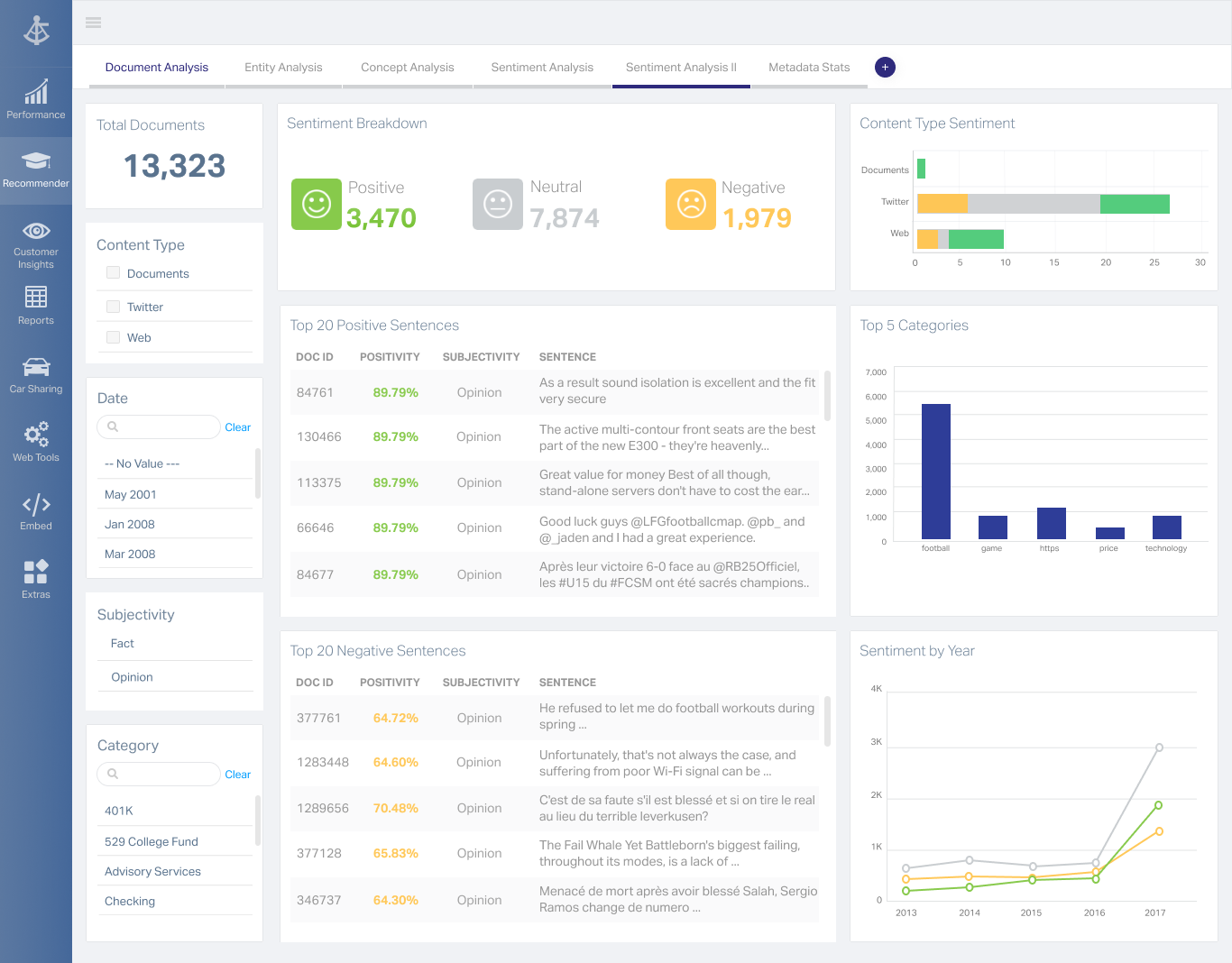
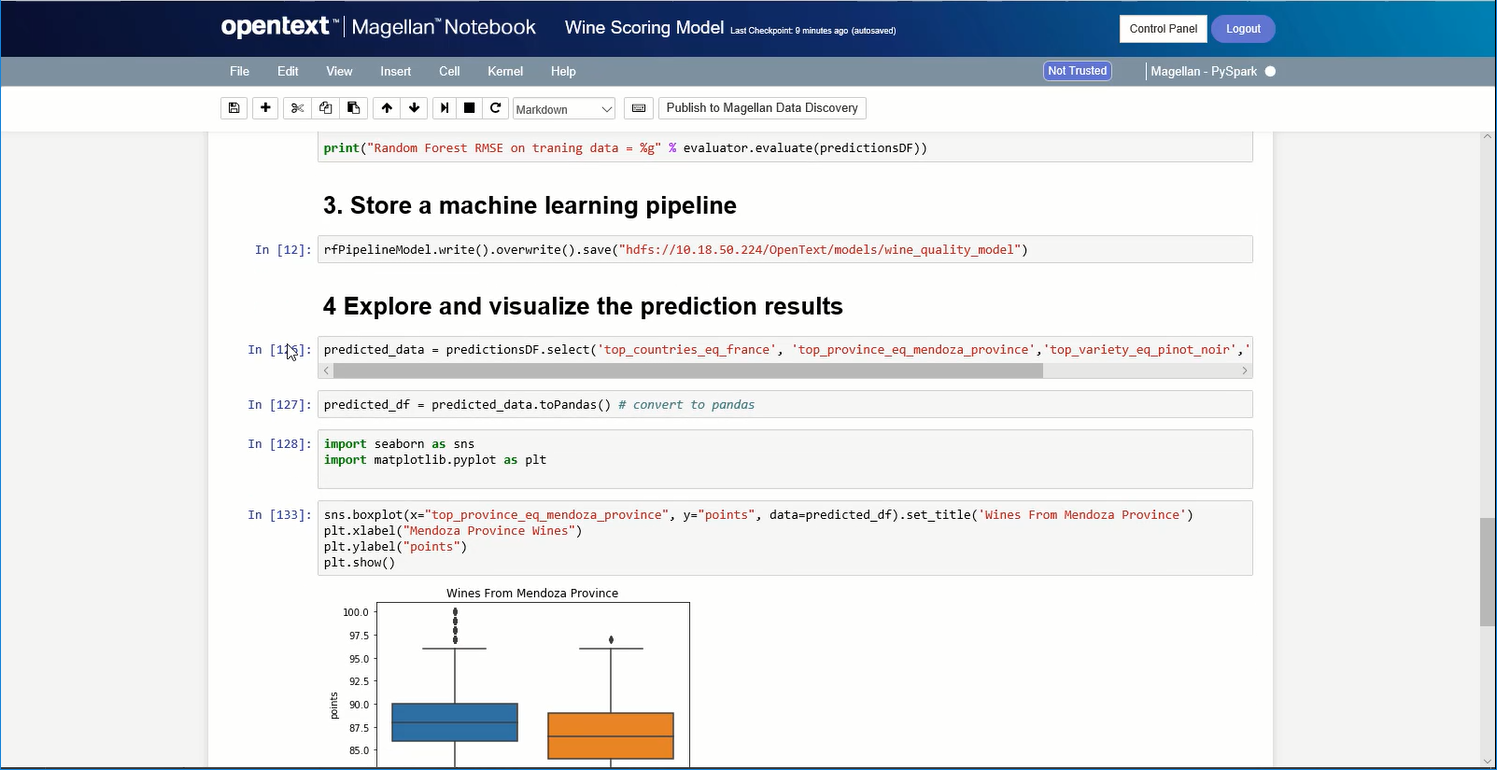
Screenshot of A Magellan BI & Reporting dashboard that an individual can interact with and personalize to their needs, such as changing chart types or computations.Screenshot of Magellan Data Discovery provides a Smart User Interface, designed to equip new users and users seeking a more streamlined set of features for insightsScreenshot of Magellan Data Discovery provides an Advanced User Interface that allows data analytics pros to leverage its breadth of sophisticated capabilities for insightsScreenshot of Magellan Text Mining insights can be displayed within easy-to-use dashboards.Screenshot of Data scientists can create visualizations within the Magellan Notebook and see it dynamically update as they write changes to it.