Invoiced in Austin offers their invoicing and AR automation platform, providing a platform for collecting online payments or presenting electronic invoices, AR analytics, and support for subscription-based business management on higher service tiers with subscription analytics (e.g. churn, pricing plan management, etc.).
N/A
Yooz
Score 8.4 out of 10
Small Businesses (1-50 employees)
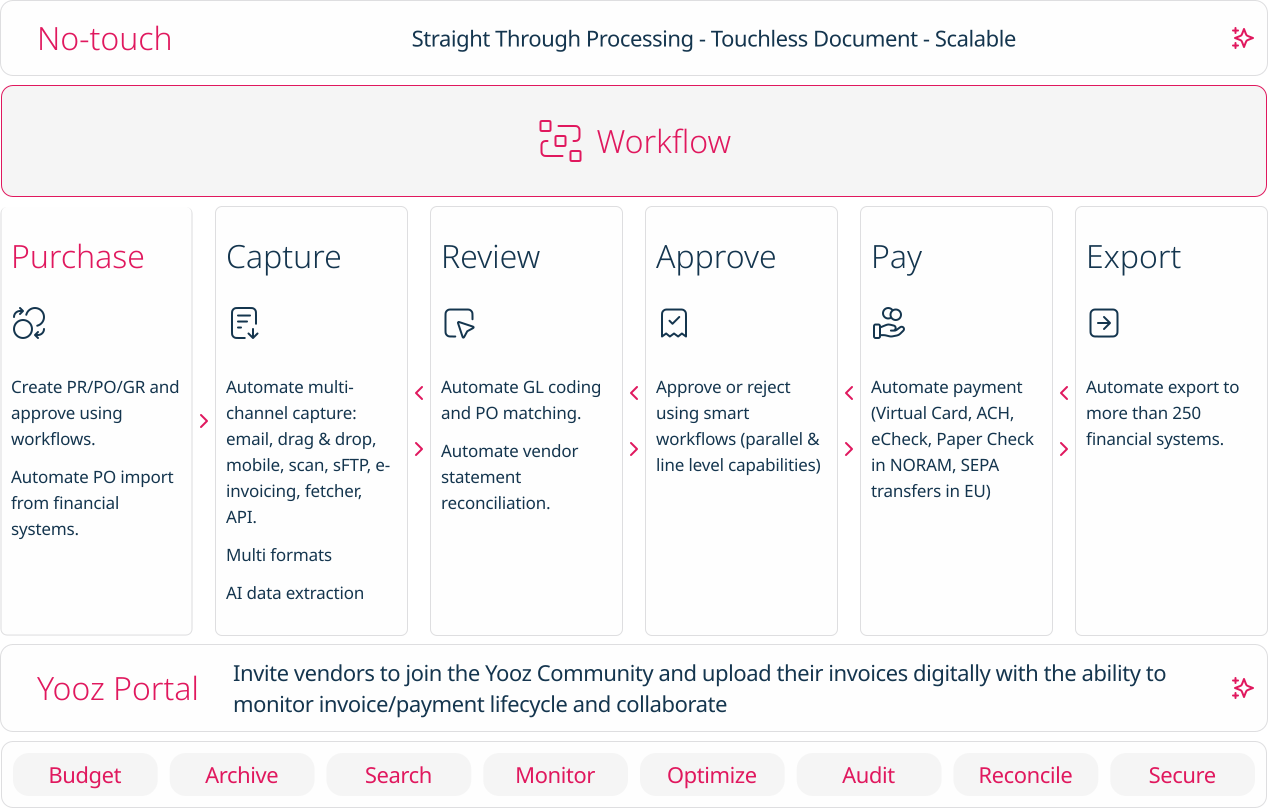
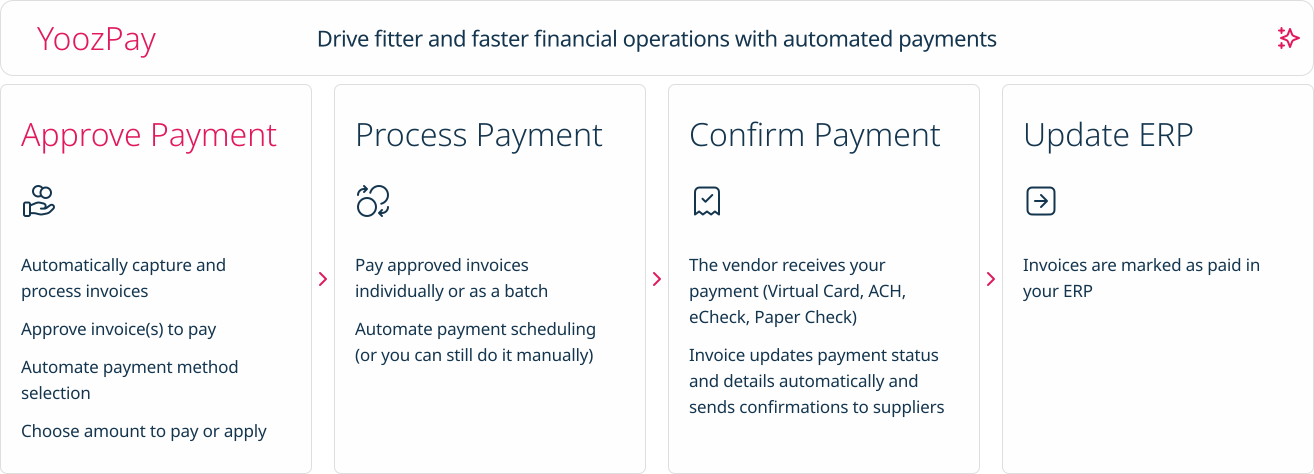
Yooz delivers intelligent financial operations automation that aims to reduce waste, mitigate risk, prevent fraud, and eliminate errors from the AP process. Yooz provides Lean Financial Operations™ for companies of all sizes, offering clarity and control in the most complex environments. The Yooz platform combines a workflow engine, real-time applied AI, and transparency, with advanced fraud detection. Boasting over 7,000 customers worldwide and processing more than 300 million…
N/A
Pricing
Invoiced
Yooz
Editions & Modules
No answers on this topic
No answers on this topic
Offerings
Pricing Offerings
Invoiced
Yooz
Free Trial
No
Yes
Free/Freemium Version
No
No
Premium Consulting/Integration Services
No
No
Entry-level Setup Fee
No setup fee
No setup fee
Additional Details
—
Subscription price based on the volume of documents processed. Unlimited number of users. 4 hours of complimentary service to start.
We selected Invoiced primarily due to their purported high level of customizations and flexibility to handle differing business needs. That, unfortunately, became the exact reason we terminated the contract though. They have a basic framework for something that could be really …
Chrome River is slow and full of inconsistencies. Capturing invoices is confusing, as you have to assign approvers and coding at that time. No time to save it and research those details. It has multiple screens labeled inbox but are for different stages in the approval process …
it better with uploading invoice and easier to use and very assessable and easy to learn and has a lot of verification so errors on payments are avoided and also used to know which invoice is late and needs to be paid and coded
They are all different for each other. In our scenario, since we do not use QuickBooks as our software system, Yooz works better with integration to Sage Intacct
I think Invoiced is great for businesses that have recurring invoices or work with the same client over and over and you can store their payment. I don't see it as a great tool for businesses that only need to invoice one client at a time.
when you have put the amount in, and the amount does not match the invoice yooz sends an alert to indicate that there is a missing amount that you have not added, and it also helps to let you know when some invoice amounts are more than the usual get for that vendor so you can take note
Provides integrations with credit card companies and direct debit providers like GoCardless.
Sales team does good demos, but be VERY careful because these demos may represent an unachievable scenario if you are a larger business or one that has more than the most basic, vanilla needs.
Nothing else, all other experiences with Invoiced were negative.
Usability of Yooz is close to 10, solves the issue that many companies have and serve to its purpose. The platform is simple, but well design and it is always improving. Since we started using it almost 8 months ago, the invoicing process of our company enhanced sharply. But there is also room for improvement that is why a 9/10
We selected Invoiced primarily due to their purported high level of customizations and flexibility to handle differing business needs. That, unfortunately, became the exact reason we terminated the contract though. They have a basic framework for something that could be really great, and the potential is there, but they lack the in-house expertise and the product is far too infantile at present. Major bugs and similar issues need to be stamped out first. I can only hope they take it as a learning experience.
Chrome River is slow and full of inconsistencies. Capturing invoices is confusing, as you have to assign approvers and coding at that time. No time to save it and research those details. It has multiple screens labeled inbox but are for different stages in the approval process that aren't specified unless you go into the invoice and review. When you go to exit the invoice, it takes you back to the main menu instead of the inbox you were currently working in. It is live, but the updates are every 10-15 minutes as opposed to immediately.
Yooz helped us process thousands of invoices in a more efficient manner than our previous process called Checkbook with Bank of America.
Yooz allowed for a more efficient invoice approval process than the previous systems that were used. If the invoices were three way matched, they would be processed quicker.
Yooz made the integration of the invoice and credit memo process into NetSuite more efficient than the previous software, however, there some limitations with Yooz because it did allow for duplicate invoices to be processed, and that was a big issue.