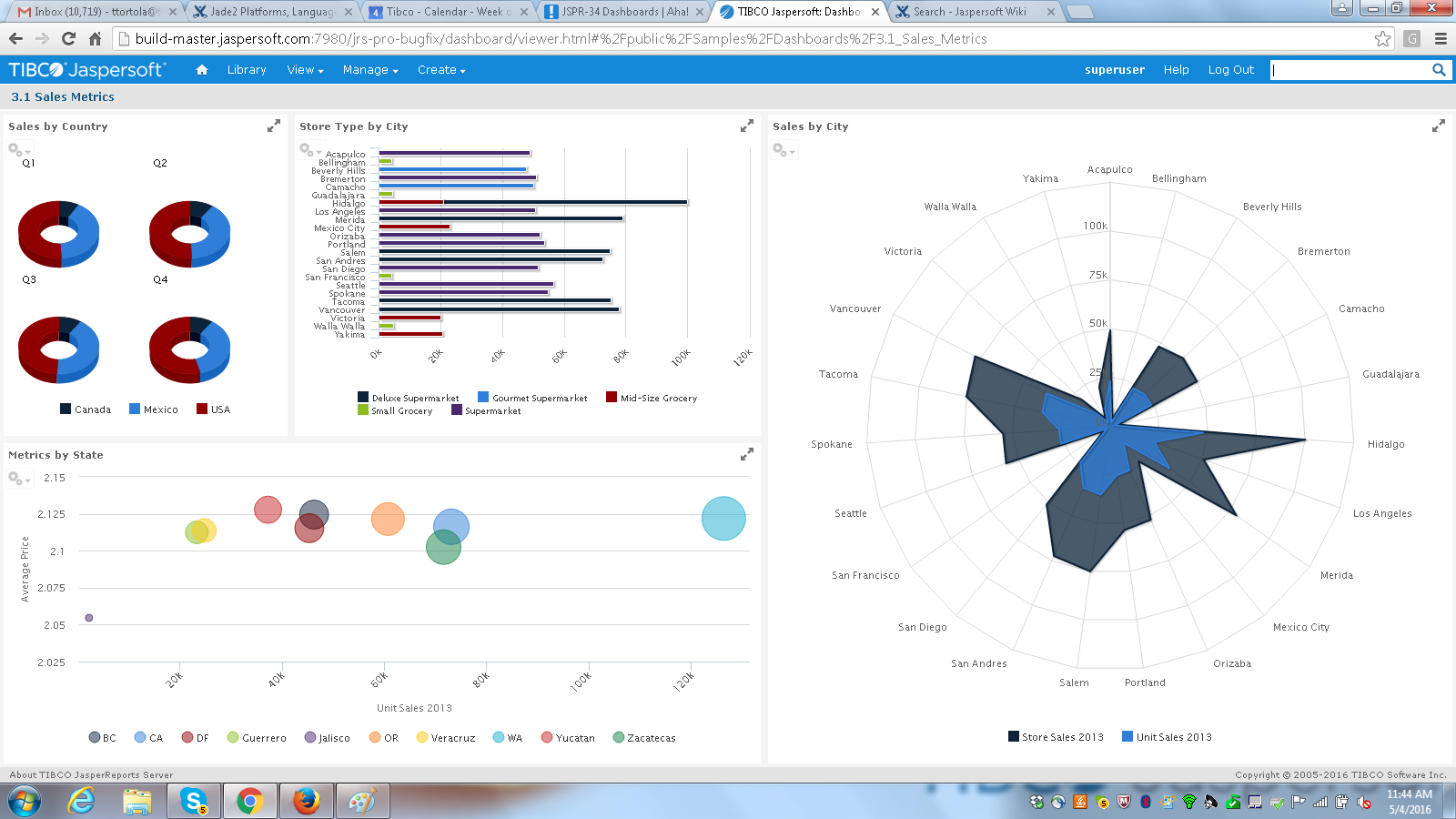
Jaspersoft commercial edition is an embedded business intelligence suite designed to be built-into SaaS products as an integrated reporting engine. It provides reports and dashboards for customer-facing applications without requiring app developers to build their own reporting engine.
N/A
Looker
Score 8.6 out of 10
N/A
Looker is a BI application with an analytics-oriented application server that sits on top of relational data stores. It includes an end-user interface for exploring data, a reusable development paradigm for data discovery, and an API for supporting data in other systems.
N/A
Pricing
Jaspersoft
Looker
Editions & Modules
No answers on this topic
No answers on this topic
Offerings
Pricing Offerings
Jaspersoft
Looker
Free Trial
Yes
Yes
Free/Freemium Version
Yes
No
Premium Consulting/Integration Services
No
No
Entry-level Setup Fee
No setup fee
Required
Additional Details
Jaspersoft offers flexible pricing for ISVs and SaaS per customer or by CPU core.
Must contact sales team for pricing.
More Pricing Information
Community Pulse
Jaspersoft
Looker
Features
Jaspersoft
Looker
BI Standard Reporting
Comparison of BI Standard Reporting features of Product A and Product B
Jaspersoft
7.6
Ratings
7% below category average
Looker
8.5
Ratings
4% above category average
Pixel Perfect reports
7.60 Ratings
8.50 Ratings
Customizable dashboards
7.50 Ratings
8.90 Ratings
Report Formatting Templates
7.80 Ratings
8.20 Ratings
Ad-hoc Reporting
Comparison of Ad-hoc Reporting features of Product A and Product B
Jaspersoft
7.4
Ratings
8% below category average
Looker
8.4
Ratings
4% above category average
Drill-down analysis
7.20 Ratings
8.10 Ratings
Formatting capabilities
7.30 Ratings
7.70 Ratings
Report sharing and collaboration
7.70 Ratings
9.10 Ratings
Integration with R or other statistical packages
00 Ratings
8.70 Ratings
Report Output and Scheduling
Comparison of Report Output and Scheduling features of Product A and Product B
Jaspersoft
7.7
Ratings
8% below category average
Looker
8.7
Ratings
5% above category average
Publish to Web
7.10 Ratings
8.20 Ratings
Publish to PDF
8.70 Ratings
9.00 Ratings
Report Versioning
7.70 Ratings
8.50 Ratings
Report Delivery Scheduling
7.50 Ratings
9.10 Ratings
Delivery to Remote Servers
7.50 Ratings
00 Ratings
Data Discovery and Visualization
Comparison of Data Discovery and Visualization features of Product A and Product B
TIBCO Jaspersoft is well suited for users who are not too technical. These users are able to easily drag and drop domain fields from their database to create friendly table reports. Users can easily add filters to their reports which allows for reusability. On the other hand, if a user is looking to add information that has many-to-many relationships, duplicates will appear. Having duplicates in an ad-hoc view and not being able to easily remove them is a big issue for many of our clients.
When you need to create a centralised dashboard for multiple stakeholders that blends cross-channel reporting. As an SEO agency reporting for clients - Looker is a great solution. It's less appropriate depending on the intended users. For instance, in my experience Looker reports have been under-utilised because they're not accessed regularly, provide too much noise or often simple PDF reports are preferred
The UI on the report designer, Jaspersoft Studio, looks a little outdated. I think that Studio as a whole could use a facelift. Additionally, Jaspersoft Studio tends to slow down over time, requiring a restart of the program.
There is a bit of a learning curve with all of the intricacies of Jaspersoft Studio, it's kind of overwhelming when trying to learn it from nothing.
One functionality that seems to be missing, that would help our use-case, would be the ability to parameterize a JSON URL as a data source. For example, if there was a call to a set of JSON data, it has to be a static URL. But in many cases, APIs that return JSON take parameters via the URL. Jaspersoft does not support that.
We've converted our library of reports to use Jaspersoft. Our clients have had a taste of Jaspersoft and we've had very positive feedback from those interactions. Our internal employees have had great success using iReports and JasperStudio to create very robust reports that better show the data our clients expect to see. Overall, our experiences with Jaspersoft have been great and it's proven to be a very good decision for the direction of our business.
We are very haooy with Looker, it provides us with all the funciomalities we need for both the day to day oerformance tracking and longer periods reporting. It is easy to use for account managers, configurable and customizable for soecialists and what is most imoortant, our clinets generally really love it
I think it's a tool well suited for a software developer. Others with less coding skills could struggle somewhat with the tool. I find java a little unforgiving as a language for expressions and not very user friendly for the technically dis-inclined. Sometimes the numeric conversions cause issues (who knew that 0 and 0.0 would cause different things to happen). Previous experience with a reporting tool that used visual basic for its' expressions that I found much simpler to use. On the other hand, java is so widespread, you can easily google the syntax to accomplish what you need to do.
Looker is relatively easy to use, even as it is set up. The customers for the front-end only have issues with the initial setup for looker ml creations. Other "looks" are relatively easy to set up, depending on the ETL and the data which is coming into Looker on a regular basis.
There have been a few instances where Tomcat has consumed 100% CPU, which requires a restart to resolve, but other than that reliability has been excellent.
Somehow resources heavy, both on server and client. I recommned at least 50Mbs data rate and high performance desktop comouter to be abke to run comolex tasks and configure larger amount of data. On the other hand, the client does not need to worry when viewing, the performance is usually ok
They have a great customer support ticketing system in which they always respond same-day. They offer conference calls with srcreensharing as well in order to better understand your issues.
I wish that the lower level support access came with more than just 12 cases per year though as this makes us less likely to reach out for questions on things that we then instead try to solve ourselves which results in loss of time in trying to acquire new features and or solve a problem.
Never had to work with support for issues. Any questions we had, they would respond promptly and clearly. The one-time setup was easy, by reading documentation. If the feature is not supported, they will add a feature request. In this case, LDAP support was requested over OKTA. They are looking into it.
It did the job of getting us to our deadline we set for ourselves for initial launch. The customer we launched the product for was also there to learn about it at the same in order to better understand the capabilities. This helped greatly so that the customer was on the same page on what was possible when using jaspersoft. I think most people would not want their customers aware the product they are using is third-party but in this case it was a new experience for us both and so as we learned more about jaspersoft, we both had better communication on what the future road map was for their business needs in BI.
Resources available in the TIBCO Knowledge Base are covering almost everything. They are well organized, and covering almost every possibility. There is always the change to get back to the TIBCO support or to the dedicated Customer Success Manager whenever something very specific or bound to a customization is not covered.
Super easy to install and/or upgrade! For all the big name software out there that does some business critical things, Jasper is a pleasure to install and/or upgrade. The bundled installer is all ONE install (one shell script execution at least) that sets up everything. Vastly superior to most other software of this caliber.
TIBCO does a better job in providing seamless data mapping and migration from one legacy system to other without any loss of traffic or compromising the security of the data. Whereas with another tool sometimes because of the integral framework there may be some questions as to why the data packets were lost during mapping and migration.
In my opinion, Looker is no Power BI. It is good, but I think Power BI is amazing. That said, in my experience, Power BI is nowhere near as easy to setup and report on Google services as Looker is. We plan to continue using Power BI for c-suite and corporate reporting, especially for internal databases, but will gladly use Looker for our marketing information for AdWords, Analytics, Search Console, and YouTube.
I used the free version, so obviously the positive side is we did not have to pay
Next advantage is you can pick it up relatively fast, even though I think the UI can be much improved. Otherwise creating PDF reports by programming is quite a complicate task, to me anyway
Other than some people not liking the numbers, I don't see any negative impacts; we haven't experienced that.
The reports help us unravel the story of our users and how they are sifting through our pages.
Our clients enjoy seeing the numbers to understand better what stands out on their sites.
The reports have helped us see what campaigns are working and where we need to tweak things.
The reports have enabled us to have better conversations with stakeholders about how their web pages should be modified, edited, etc., to reflect the data.