Quest now offers the KACE Systems Management Appliance (SMA) as an IT Asset tracking and management appliance (also available as a virtual deployment if hardware requirements are met). Beyond discovery, inventory tracking and license management, KACE emphasizes automating software upgrade distribution with minimal end-user disruption, featuring remote replication for multi-site upgrades and rollouts. KACE SMA may be bundled with KACE Cloud Mobile Device Management (MDM) to form a complete UEM…
N/A
TOPdesk
Score 8.8 out of 10
Mid-Size Companies (51-1,000 employees)
TOPdesk is the flagship highly-modular cloud-based or installed ITSM service desk and asset management solution from the Dutch company of the same name, for enterprise companies.
$76
per month Per agent
Pricing
KACE Systems Management Appliance (SMA)
TOPdesk
Editions & Modules
No answers on this topic
Essential
$76
per month Per agent
Engaged
$109
per month Per agent
Excellent
$155
per month Per agent
Offerings
Pricing Offerings
KACE Systems Management Appliance
TOPdesk
Free Trial
No
Yes
Free/Freemium Version
No
No
Premium Consulting/Integration Services
No
No
Entry-level Setup Fee
No setup fee
Optional
Additional Details
—
The TOPdesk license model:
- Modular: Organizations purchase only the modules needed
- Saas or On premise
- Supports unlimited number of assets.
- Service agents based.
- Discount available for annual pricing.
More Pricing Information
Community Pulse
KACE Systems Management Appliance (SMA)
TOPdesk
Considered Both Products
KACE Systems Management Appliance
Verified User
Anonymous
Chose KACE Systems Management Appliance
More features, better integration into our system(s). Ease of use for not only Techs but also end users.

KACE has been a little bit easier to use and cheaper than when we were looking at Microsoft System Center Configuration Manager (SCCM). We have had much success with KACE as it has extra services such as the license manager and helpdesk ticketing system. Great value for the …
Compared to more robust tools like SCCM, KACE delivers 90% of the value for a fraction of the cost. Not only is the initial upfront investment less it requires significantly less care and feeding to ensure you get what you need.
By far it easier to deploy and manage. It makes the process of deployment, software, and patching much easier, and it's an all-in-one solution that is easy to manage and train helpdesk on.
For our size organization, KACE offered a more complete solution that was easier to understand and deploy when compared to Ivanti. It was also more affordable to get the features we wanted. Ivanti might be more appropriate in a larger environment. You would definitely need …
We liked having the helpdesk portion integrated with our hardware and software inventory instead of having 2-3 different discrete systems that wouldn't talk to each other.
We have selected this software because it rolls several different systems into one. We have a helpdesk system with this and an asset and inventory management system as well. We pay one price for the whole system instead of paying multiple companies different amounts that …
The biggest part to KACE verses these options was the ability to have an agent installed on the endpoint that could communicate back to our primary KACE appliance for updates. As we have customers with different network setups and the machines are never in a direct connect to …
We have selected TOPdesk as the best all-round option. On other parts there are better / more extensive applications but TOPdeks combines it in 1 package. In addition, more than 600 practitioners from participating municipalities were already used to working with TOPdesk, so we …
It is more versatile and better adjustable to our organisation. I have worked with TOPdesk in multiple organisations. And in each of the organisations it was different and still the same. Like lego bricks were the bricks are the same, but the builds are all different for the …
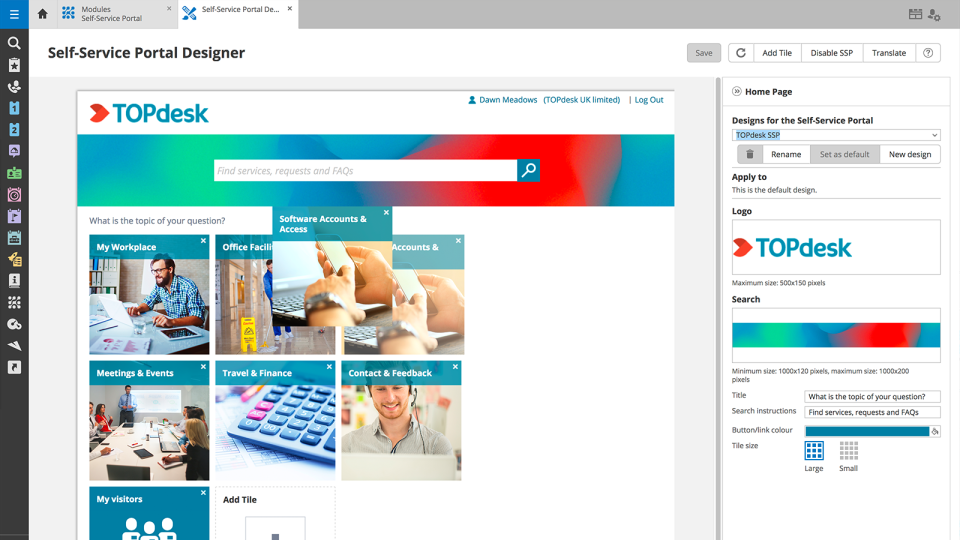
TOPdesk is much more flexible, it also has a self service portal which is convenient. Easy to ask questions to the TOPdesk service desk and good support.
The possibilities are much greater then the ones I have mentioned above. Also it is a Dutch company, it helps to have short lines with the guys/girls in Delft.
TOPdesk is a clear and pleasant program that invites you to look for the right solution. If you can't find out, you have a help button. There are also various options to complete the report.
TOPdesk is customizable in all aspects in a more user-friendly manner. Other tools I worked with required technical and expert-level knowledge to make different queues, portals, and categories. With a little guidance from a consultant and some documentation, you can go a long …
I think it has added value for any organization. It reduced our Tech Support cost by: -Supporting users anywhere -Reducing users downtime as well keep them informed with the status of their tickets -Managing software and hardware actively -Processing automation -deploy mass software installs, patching or updates - Provide approved software's to users to install without IT help
As TOPdesk is pretty intuitive it is often not needed to instruct colleagues on how to use TOPdesk. Most modules and fields do explain themselves. This means there aren't many additional instructions needed for the applications itself. Most information we do need to support our colleagues on based on organizational processes, not our ITSM tool of choice. And if there is more information needed, the knowledge base system can be used for this. On the other hand this could create the idea that no additional instructions are needed. Which might be true for the application itself, but not for how it is being used within your organisation
Helpdesk ticketing, the software allows not only the building of a portal that the users can log into to submit the tickets, but it also allows them to generate a ticket via email, which is a huge successful implementation that we have had.
Live inventory tracking. With an agent installed on a PC, as long as we maintain the data, it can report back information that is crucial to the machine.
Web portal makes for easy maintenance and implementation of the software and updates.
TOPdesk provides a clean and modern interface for all of its modules. Many of the modules have a similar look and feel, which makes it easy for users to utilize each one.
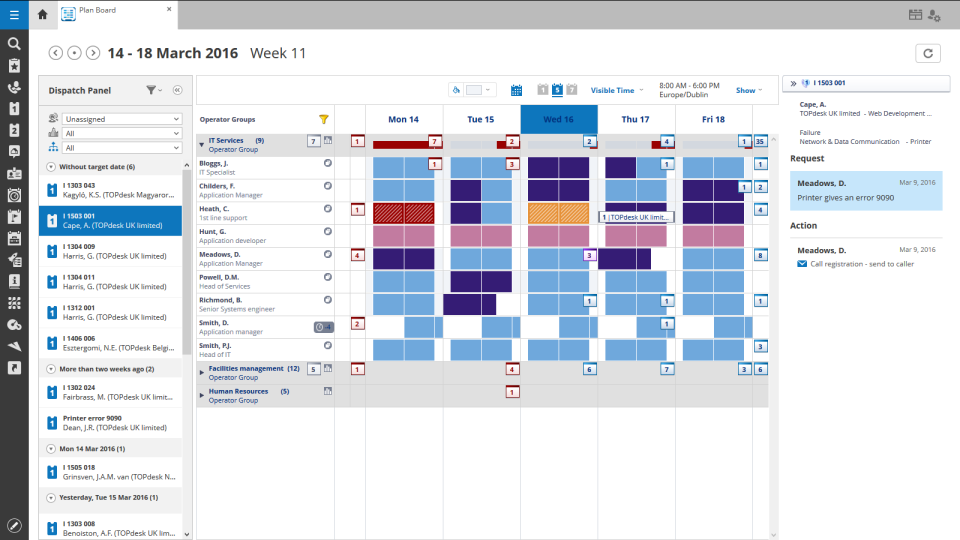
Its workflow system allows administrators and developers to define what needs to occur when certain events happen. This can ensure that processes happen in the correct sequence.
TOPdesk includes a vast API system to allow for external systems to integrate with it, and for TOPdesk to communicate with external systems.
Administrative interface can be slow at times, and does require some decent PC specifications to run adequately.
The cost of the KACE solution can be very expensive depending on how many agents you plan to deploy
There is a learning curve in order to master KACE's capabilities - however Quest does provide lots of resources to dig into. It is not as intuitive as it could be.
We are very content with the application. We use it now for 1 year and we are still learning. We still discover new features withing the application that help improve our efficiency and customer-friendliness and reduce costs. We feel like we can still improve the use of TOPdesk within our organisation and make more use of more modules.
Overall, the software is simple to understand and use. That said, most vendors have been slowly updating their user interfaces to HTML5 so that they have a clean updated look and feel. This is where KACE falls short in that the UI is great for a packaged software 10 years ago. This isn't a major limitation as the software is really meant primarily for technology users.
Sometimes I think some things are hard to find. I often do not know if I have to search in Settings or in Modules. In some cases the user has to do a lot of clicks for example to link a key to a user. Something could work a little smarter.
Like I said somewhere else in this review: the helpdesk of TOPdesk is top of the bill! In the Netherlands, that is. I can not plea for the helpdesks in other countries, but I guess the TOPdesk organization will make sure the quality of the helpdesk is the same in every country.
Although being a SAAS solution, TOPdesk performs pretty fast. One can imagine that any SAAS solution is slow or has hiccups, but we have not experienced such with TOPdesk. Pages load quickly, logging in goes smoothly. We have made reports on premise in the past - that always took some time, as you might expect with such complex tasks. It seems that in the SAAS solution TOPdesk somehow has managed to make it even faster!
KACE does exactly what you need it to do, it maintains your computer environment. You can set patch schedules, inventory computers, setup software catalogs; basically everything you need to ensure the computers on your network are being actively managed. This is all with little need for constant configuration or updating the setup.
Most if not nearly all questions are answered within the same or a few days. The helpdesk is very knowledgable about their product and are always willing to help. The only downside is that for more difficult questions it can take a while due to the experts being further removed from the helpdesk. But they are always willing to answer questions, even if they are not directly related to a problem with the service.
We had Topdesk in-house here training staff for almost a month (2-3 hour meetings 3x a week.) It was invaluable and we were able to take that training and share with the rest of our IT staff. Once implemented we were able to fly from there. The challenges we found were in how to get started. Once started the knowledge base offered from Topdesk has been invaluable.
Online training documentation is easy to access and consume. There is no real challenges with finding information on how to use the product and some really helpful knowledge base items that show us how valuable these options are in our own implementation of it. The online training we've used has been self driven
It was a challenge to port over years of the same thing and we ended up keeping old ideas in Topdesk that we will eventually weed out as time passes and we learn how users view categories and flows of tickets. Planning is key but bear in mind that just because you used to do it this way doesn't mean you still have to
For our size organization, KACE offered a more complete solution that was easier to understand and deploy when compared to Ivanti. It was also more affordable to get the features we wanted. Ivanti might be more appropriate in a larger environment. You would definitely need someone that was primarily dedicated to run behind Ivanti.
Spiceworks is an easier-to-use Help Desk solution but it lacks all other features that Topdesk has. Freshdesk was just too much for our environment. It was cost-prohibitive for our intended use. TOPdesk fit our org size and budget better than the others.
Topdesk is a saas solution. As far as we can notice, there are no scalability problems. We are a small organization, so performance issues are for now not an issue
The time savings on Windows patching through the KACE SMA alone has helped us in saving hundreds of technician hours.
Ticket tracking through the KACE SMA has reduced the amount of calls to our helpdesk asking about the status of a ticket.
The tracking of licensed software through the KACE SMA has kept us in compliance and saved time from having to run around and look to see where the software is installed.