Chose Kintone
Kintone wasn’t cookie cutter like the other options I consider. It was customizable and had great customer service to help me make it what I need.

| Product | Rating | Most Used By | Product Summary | Starting Price |
|---|---|---|---|---|
 Kintone | N/A | Kintone is a customizable digital workplace platform that lets the user manage data, tasks, and communication in one central place. Over 30,000 customers use Kintone’s no-code platform with more than 1.5 million database and workflow applications custom built for their businesses. The no-code drag-and-drop interface can be used to create custom database applications. Whether it’s sales leads, customer quotes, or inventory management, it can be organized in Kintone and viewed from the… | $24 per month per user | |
 TickTick | N/A | TickTick from the company of the same name in San Francisco is presented by the vendor as a simple and effective to-do list and task manager that helps users make schedules, manage time, and organize all aspects of life. | $35.99 per year |
| Kintone | TickTick | |||||||||||||||
|---|---|---|---|---|---|---|---|---|---|---|---|---|---|---|---|---|
| Editions & Modules |
|
| ||||||||||||||
| Offerings |
| |||||||||||||||
| Entry-level Setup Fee | Optional | No setup fee | ||||||||||||||
| Additional Details | All subscriptions have a minimum requirement of 5 users. | — | ||||||||||||||
| More Pricing Information | ||||||||||||||||
| Kintone | TickTick | |
|---|---|---|
| Considered Both Products |  Kintone  Farshad Karimi Implementation Manager Chose Kintone More customizable in my opinion and free, though Kintone has drag and drop which is excellent and my favorite part.  Caneel Johnson Database Developer Chose Kintone Previously we used, sequalm access, and something called CSST. None of them were as dynamic or easy to build and update as Kintone.  Shin Kishioka PRESIDENT Chose Kintone Salesforce CMS  Carmen Miller Project Manager Chose Kintone Monday.com — I used this in my previous job and loved it for tracking stages and tasks (and I color-code everything), but at the time it was more clunky on raw data. It may have improved in this since then? Kintone is strong on data and I still color-code everything! …  Becca Rusinko Life Coach Chose Kintone We selected Kintone because it was the best combination of price and function. We needed something that could grow and scale with the organization, and that included looking at future prices. We didn't want to invest in something if we would be priced out five new users later. …  Beth Barker-Hidalgo She/Her/Tawanda Executive Director Chose Kintone Kintone is much more customizable and user-friendly than Access. We also have experience with Service Point - Kintone is again, much more customizable. We would love a two-way interface between Kintone and Service ice Point. That would be a tremendous bonus for capturing & … | TickTick  Mantra Manan Saraswat Product Manager Chose TickTick Todoist is almost equivalent to Ticktick; the only thing is that it is a bit more expensive. Todoist does have a few more fancy AI features, which I presume will be helpful moving forward. Google Tasks would have been great had it not been left undeveloped by Google. The fact … |
| Kintone | TickTick | |||||||||||||||||||||||||||||||||||||||
|---|---|---|---|---|---|---|---|---|---|---|---|---|---|---|---|---|---|---|---|---|---|---|---|---|---|---|---|---|---|---|---|---|---|---|---|---|---|---|---|---|
| Low-Code Development |
| |||||||||||||||||||||||||||||||||||||||
| Project Management |
|
| Kintone | TickTick | |
|---|---|---|
| Small Businesses |  Stackby Score 9.0 out of 10 | Stackby Score 9.0 out of 10 |
| Medium-sized Companies |  Quixy Score 9.9 out of 10 |  InEight Score 8.3 out of 10 |
| Enterprises |  Creatio Score 9.7 out of 10 | InEight Score 8.3 out of 10 |
| All Alternatives | View all alternatives | View all alternatives |
| Kintone | TickTick | |
|---|---|---|
| Likelihood to Recommend | 9.0 (0 ratings) | 9.0 (0 ratings) |
| Likelihood to Renew | 8.3 (0 ratings) | 9.0 (0 ratings) |
| Usability | 7.8 (0 ratings) | 9.5 (0 ratings) |
| Availability | 10.0 (0 ratings) | - (0 ratings) |
| Performance | 9.0 (0 ratings) | - (0 ratings) |
| Support Rating | 9.4 (0 ratings) | 10.0 (0 ratings) |
| Implementation Rating | 6.8 (0 ratings) | - (0 ratings) |
| Configurability | 9.6 (0 ratings) | - (0 ratings) |
| Ease of integration | 5.0 (0 ratings) | - (0 ratings) |
| Product Scalability | 7.0 (0 ratings) | - (0 ratings) |
| Vendor post-sale | 8.0 (0 ratings) | - (0 ratings) |
| Vendor pre-sale | 2.0 (0 ratings) | - (0 ratings) |
| Kintone | TickTick | |
|---|---|---|
| Likelihood to Recommend |
|
|
| Pros |
Becca Rusinko Life Coach |
|
| Cons |
|
Mantra Manan Saraswat Product Manager |
| Likelihood to Renew |
Shin Kishioka PRESIDENT |
|
| Usability |
Shin Kishioka PRESIDENT |
|
| Reliability and Availability |
Farshad Karimi Implementation Manager | No answers on this topic |
| Performance |
Farshad Karimi Implementation Manager | No answers on this topic |
| Support Rating |
|
|
| Implementation Rating |
Shin Kishioka PRESIDENT | No answers on this topic |
| Alternatives Considered |
|
Mantra Manan Saraswat Product Manager |
| Scalability |
Farshad Karimi Implementation Manager | No answers on this topic |
| Return on Investment |
|
|
| ScreenShots | Kintone Screenshots  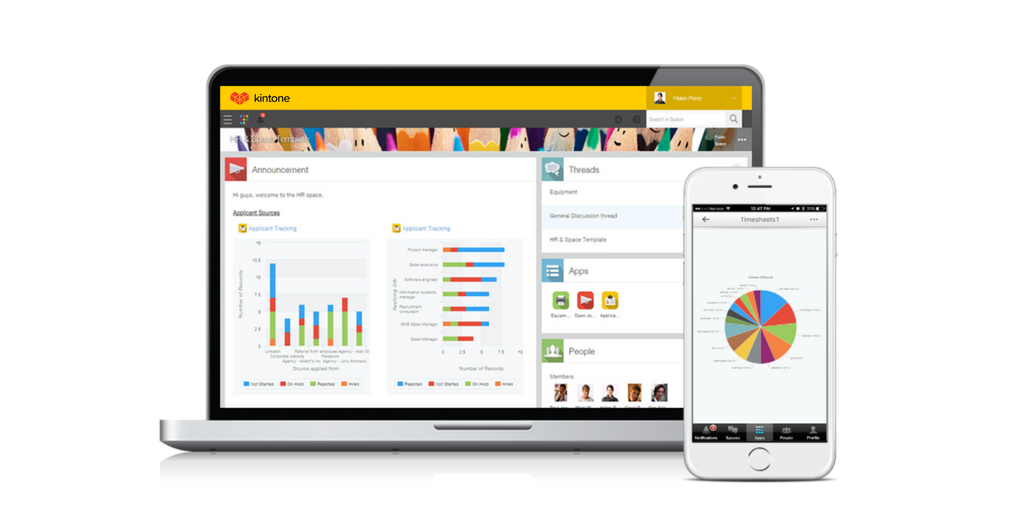   |