Lightspeed Restaurant vs. Smart IP&O Application Suite

Overview
ProductRatingMost Used ByProduct SummaryStarting Price
Lightspeed Restaurant
Score 9.9 out of 10
N/A
The Lightspeed Restaurant POS, from Lightspeed in Montreal, is a restaurant POS and management system designed to enable users to sync the user's menu with major food delivery apps, manage all orders and and reach new customers.
$69
per month 2.6% + 10¢
Smart IP&O Application Suite
Score 0.0 out of 10
Enterprise companies (1,001+ employees)
Smart Software, now part of Epicor, is a provider of demand planning, inventory optimization and supply chain analytics solutions. Smart Inventory Planning & Optimization (IP&O) is a suite of native web applications, helping inventory carrying organizations reduce inventory, improve service levels and streamline Sales, Inventory and Operations Planning.N/A
Pricing
Lightspeed RestaurantSmart IP&O Application Suite
Editions & Modules
Lightspeed Restaurant Essentials
$69
per month 2.6% + 10¢
Lightspeed Restaurant Plus
$189
per month 2.6% + 10¢
Lightspeed Restaurant Pro
$399
per month custom per purchase rates
No answers on this topic
Offerings
Pricing Offerings
Lightspeed RestaurantSmart IP&O Application Suite
Free Trial
NoNo
Free/Freemium Version
NoNo
Premium Consulting/Integration Services
NoNo
Entry-level Setup FeeNo setup feeNo setup fee
Additional Details
More Pricing Information
Community Pulse
Lightspeed RestaurantSmart IP&O Application Suite
Considered Both Products
Lightspeed Restaurant
Chose Lightspeed Restaurant
I have already used two Restaurant POS software but Lightspeed helps me a lot to grow my business. I face some problems when using this but day by day they are constantly developing their services. Their customer support is amazing. If we face any problem the team responds …
Chose Lightspeed Restaurant
Upserve [POS (formerly Breadcrumb)] offers more functionality than Square, which is the only other restaurant POS I've used. Upserve has intuitive employee time tracking, and helpful labor and sales reporting features. I know my data guy would prefer more detailed data …
Chose Lightspeed Restaurant
LAVU is the worst POS system I have ever encountered. It was the most frustrating part of everyone’s shift. They were never available for customer service, Upserve is. Their system would shut down across regions, Upserve does not. Upserve (at the time Breadcrumb) was highly …
Chose Lightspeed Restaurant
POS systems are always evolving. Breadcrumb continues to stay on top of the game.
Chose Lightspeed Restaurant
We chose Upserve POS for the following reasons:
  • Easy to find items on the menu by using the search bar.
  • Ability to modify menu, devices, etc. remotely.
Chose Lightspeed Restaurant
Upserve is on the way to be able to do everything that ALOHA can do. However, the future is with Upserve.
Chose Lightspeed Restaurant
Upserve is smaller, quicker, portable and more user friendly.
Chose Lightspeed Restaurant
Upserve rises above all of it's competition. It's just as robust as a legacy brand like Micros or Restaurant Manager, and simultaneously agile and intuitive like square. It's a perfect balance for modern restaurants.
Chose Lightspeed Restaurant
Upserve is pretty well organized and not hard to adjust to at all.
Chose Lightspeed Restaurant
Upserve is better because of its support team that helps guide you through the implementation process. Upserve is great at managing costs, employee actions, and retail processes.
Chose Lightspeed Restaurant
Upserve is more robust than both of these products. Northstar simply isn't functional, so most anything could outperform it. I would choose Upserve over either of the above products.
Chose Lightspeed Restaurant
It was better than Micros back in the day.
Chose Lightspeed Restaurant
I have not compared any other POS systems.
Chose Lightspeed Restaurant
  • Micros - Very expensive for the initial setup and support afterward, but offers all the features needed for a complex restaurant.
  • Toast - Pretty similar to Breadcrumb, but lacks a development team.
  • Focus - Similar to Micros, but less expensive for the support.
Chose Lightspeed Restaurant
Now as a Toast user, it makes Breadcrumb look like an ancient technology. Toast is way more user friendly and more suitable for a higher volume restaurant. Toast has a more thorough reporting system than Breadcrumb. The display is a lot more vibrant through Toast and people get …
Smart IP&O Application Suite

No answer on this topic

Best Alternatives
Lightspeed RestaurantSmart IP&O Application Suite
Small Businesses
Square POS
Square POS
Score 10.0 out of 10
Webgility
Webgility
Score 10.0 out of 10
Medium-sized Companies
Shopify
Shopify
Score 9.1 out of 10
SAP S/4HANA Cloud
SAP S/4HANA Cloud
Score 8.6 out of 10
Enterprises

No answers on this topic

SAP S/4HANA Cloud
SAP S/4HANA Cloud
Score 8.6 out of 10
All AlternativesView all alternativesView all alternatives
User Ratings
Lightspeed RestaurantSmart IP&O Application Suite
Likelihood to Recommend
9.0
(0 ratings)
-
(0 ratings)
Usability
8.5
(0 ratings)
-
(0 ratings)
Support Rating
8.9
(0 ratings)
-
(0 ratings)
User Testimonials
Lightspeed RestaurantSmart IP&O Application Suite
Likelihood to Recommend
Upserve POS is well suited for any restaurant, bar, or coffee shop. We've utilized this system for full service, quick service, and bar service and it's been perfect for all of it. I can't think of food or beverage service application that Upserve is not well suited to handle
Read full review
No answers on this topic
Pros
  • I love all the backend reporting features of Upserve. It's really robust and helps me manage our restaurant by staying in touch with labor, best selling items, etc.
  • The customer service is great. I had a question and used their chat feature and my question was answered within 5 minutes.
  • I'd highly recommend this product.
Read full review
No answers on this topic
Cons
  • There are a few minor bugs in the reporting that should be fixed.
  • Check out reports could improve by showing each transaction detail.
  • There is not currently a way to check via the reports how many online orders come through since they are processed as a credit card/cash.
Read full review
No answers on this topic
Usability
Upserve is very intuitive. It utilizes a tab system along the left side of the screen for easy access to menu categories. After choosing the tab you want to view (i.e. Food), all the food items and/or sub categories show up instantly on the screen. once your items are chosen, you are a card swipe away from starting the payment process. Very easy. That said, there are a few minor issues with usability. For example, splitting checks is really quite difficult. You have to create new checks one at a time, then have to go searching for the checks to ring guests up. Really not intuitive on this front. Thankfully, it's not incredibly inhibitive
Read full review
No answers on this topic
Support Rating
Seriously, if I could give a 12 rating I would. Upserve support is 24/7 and completely free. No extra fees on evenings or weekends and they are fast. You can actually start a chat support straight from your ipad screen. 90% of our support issues have been solved in just a few minutes from the chat screen. That said, I prefer the phone. Calling into Upserve support is just as easy and everyone is always friendly and fast
Read full review
No answers on this topic
Alternatives Considered
Upserve [POS (formerly Breadcrumb)] offers more functionality than Square, which is the only other restaurant POS I've used. Upserve has intuitive employee time tracking, and helpful labor and sales reporting features. I know my data guy would prefer more detailed data reporting abilities (for instance, you can't pull reports that show modifiers - so when we have Happy Hour and want to track how happy hour modifiers are doing compared to normal price, we have to do this manually wtf?). But overall Upserve is better than the other POS systems I've tried.
Read full review
No answers on this topic
Return on Investment
  • Bestsellers and slower items rise to the top in reporting features, making analysis quicker.
  • Dramatically reduced server error
  • Posed a challenge to continue face-to-face contact between servers and cooks; the POS tends to end conversations about special orders, special customer requests or restrictions, and generally conveys the nuances that contribute to excellent service. So we have to make a conscious effort to continue talking to each other.

Read full review
No answers on this topic
ScreenShots

Smart IP&O Application Suite Screenshots

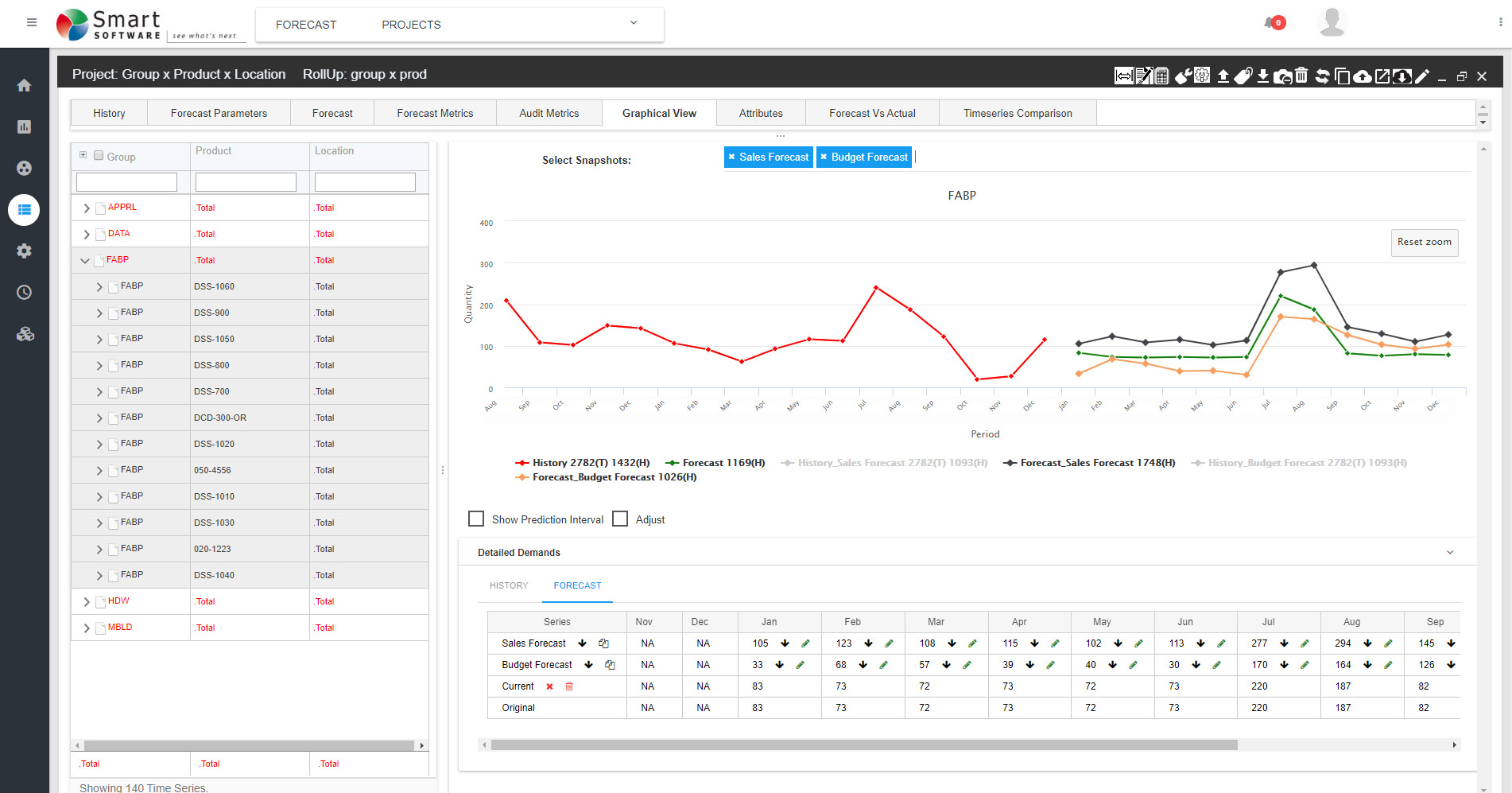
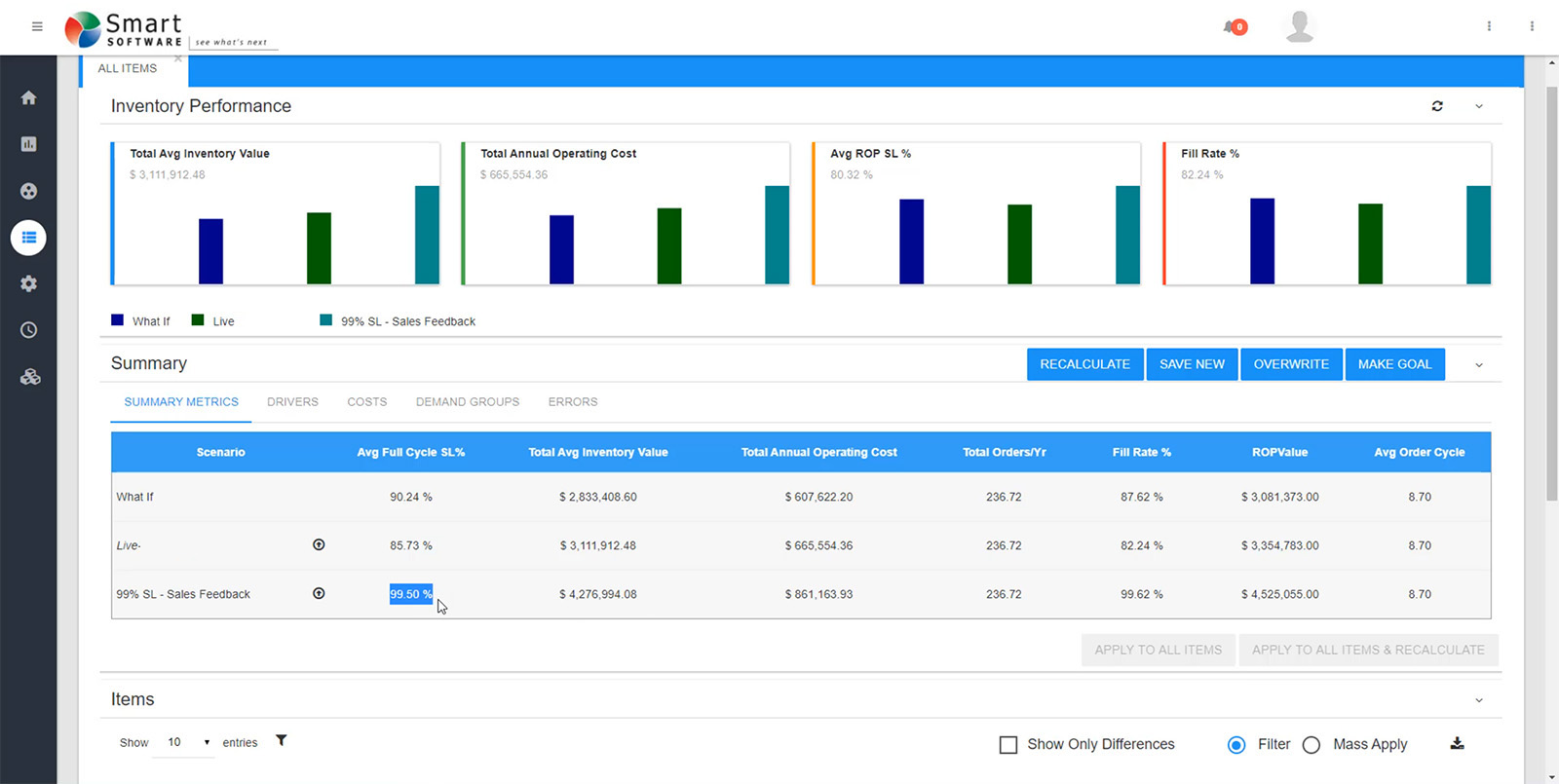
Screenshot of Smart Demand Planner™ is a consensus demand planning and statistical forecasting solution available on Smart’s Inventory Planning and Optimization Platform, Smart IP&O. Smart Demand Planner, powered by the SmartForecasts® Engine, aligns strategic business forecasting at any level of your product hierarchy with granular forecasts of the item mix to improve forecast accuracy. It provides a statistically sound, objective foundation for your sales and operations planning process (S&OP).  Smart Demand Planner’s collaborative workbench enables forecast overrides to be applied, imported, reviewed, and approved by authorized users driving the consensus plan. Forecast accuracy is measured, helping ensure that the best possible forecast is delivered to the business at both the aggregate and item mix levels. The result is more efficient sales planning, budgeting, production scheduling, ordering, and inventory planning.Screenshot of Smart Inventory Optimization (SIO™) is available on Smart’s Inventory Planning and Optimization Platform, Smart IP&O.  It delivers inventory policy decision support and the means to share, collaborate, and track the impact of your inventory planning policy. This can help realize millions in savings by improving customer service and reducing excess stock. You can forecast metrics such as service level, fill rate, holding costs, ordering costs, and stock out costs. Users can identify overstocks and understocks, adjust stocking policie when demand changes, share proposed policies with other stakeholders, collect feedback, and establish a consensus inventory plan.  And unlike traditional inventory planning systems that rely on rule of thumb approaches or require the user to arbitrarily set suboptimal service level targets, Smart Inventory Optimization prescribes the optimal service levels for you.  Users can optionally assign service level constraints to ensure the optimization engine respects business rules. SIO provides the required inventory planning parameters for a variety of replenishment policies such as Reorder Point/Order Quantity, Min/Max, Safety Stock Planning, and Order Up to levels.Screenshot of Smart Operational Analytics (SOA™) is a native web reporting solution available on Smart’s Inventory Planning and Optimization Platform, Smart IP&O.  It provides a fast, easily understood, current perspective on the state of your inventory, its performance against critical metrics, actual supplier lead times, opportunities to rebalance stocks across facilities, and helps you uncover root causes of operational inefficiencies.  SOA automatically refreshes as often as you’d like providing all stakeholders immediate, up-to-date reporting on your operations and performance.  You’ll have constant visibility of inventory levels, orders, shipments, and supplier performance to ensure you’ll always be in tune with the state of your operations and resolve issues before they become problems. Enhance visibility. Improve responsiveness. Increase your bottom line.