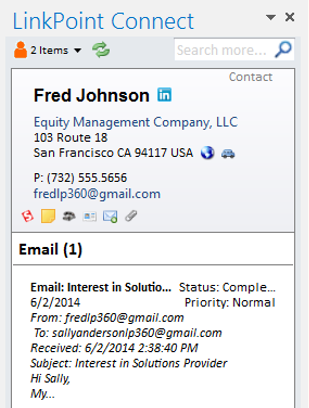
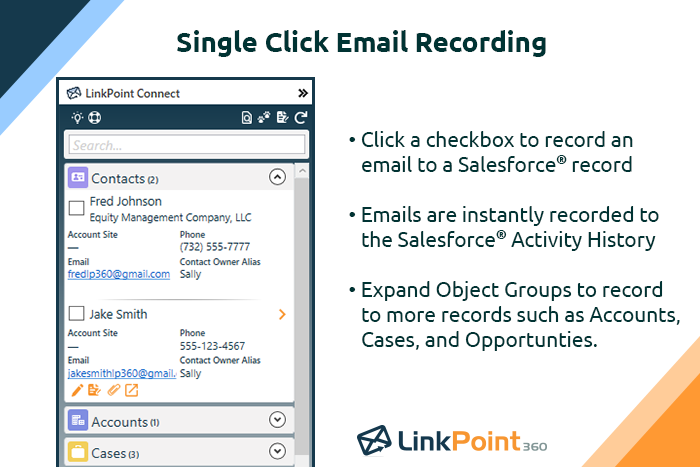
LinkPoint Connect promises to streamline data entry and access by enabling users to instantly view CRM data within their email client. This sales intelligence solution integrates Salesforce and Microsoft Dynamics CRM data in Outlook or IBM Notes. According to the vendor, key capabilities include: View real-time Salesforce data without ever leaving your email. Click on an email, and the LinkPoint Connect Side Panel instantly displays that contact’s information directly from…
$192
per user, per year
Salesforce Inbox
Score 8.0 out of 10
N/A
Salesforce Inbox is a set of apps that add "relationship intelligence" to the Salesforce Sales Cloud. SalesforceIQ Inbox connects customer data from the Sales Cloud to users' email inboxes, surfacing contextual information that can be used to write relevant messages. It also allows users to create leads, contacts, and opportunities and log emails to Salesforce from within their inbox. It is a sales email and intelligence tool that includes email tracking, automated reminders to follow up on…
$25
per month per user
Pricing
LinkPoint Connect
Salesforce Inbox
Editions & Modules
LinkPoint Connect for Outlook + Salesforce
$192
per user, per year
LinkPoint Connect for Outlook + Microsoft Dynamics CRM
$192
per user, per year
LinkPoint Connect for IBM Notes + Salesforce
$228
per user, per year
LinkPoint Connect for IBM Notes + Microsoft Dynamics CRM
$228
per user, per year
Essentials
$25
per month per user
Professional
$75
per month per user
Enterprise
$150
per month per user
Unlimited
$300
per month per user
Offerings
Pricing Offerings
LinkPoint Connect
Salesforce Inbox
Free Trial
Yes
No
Free/Freemium Version
No
No
Premium Consulting/Integration Services
No
No
Entry-level Setup Fee
$16 per user per year
No setup fee
Additional Details
Subscriptions are billed annually. Discounts available for non-profits. Volume discounts available. LinkPoint Connect Solutions are available for Outlook and IBM Notes users. These include preconfigured implementations for Advologix, Apto, Apttus, FinancialForce.com, Jobscience, Navatar, Pardot, Salesforce Shield, and TaskRay.
Prior to our move to LinkPoint, we used the Salesforce add-in for Outlook. This required manual syncing of email and calendar items and no easy to use interface between the two programs. It was very cumbersome for me to use, to the point where I quit using it altogether some …
Cirrus insight was a huge fail for us as it searched and pulled in matching records looking at all custom and standard email fields. We have a lot of emails fields that contained employee email addresses (for notifications) so it pulled in records that didn’t match making the …
While I have not used many other automated email CRM integration systems, SalesforceIQ is hands down a crucial part of my daily work flow. I could not picture our company putting up the monthly numbers we are able to allocate without the efficiency and concise notification …
SalesforceIQ Inbox and Hubspot are both useful in small business organizations. Since they almost have the same features it's hard to tell why SalesforceIQ Inbox is better than other tools. I think the G Suite integration with filters feature is an advantage. The fact is when …
LinkPoint is great for people who spend a lot of time working inside outlook. It allows you to update and add records directly from outlook and it has some built-in duplicate prevention which is nice if you don’t have duplicate prevention measures in place. It’s fast and stable. A lot of our users were unable to use SFO due to it crashing outlook.
When sending emails Salesforce Inbox provides valuable insights before sending. We usually send emails to clients and before Salesforce Inbox we would need to check in Salesforce to get details regarding the contact we are sending to. With the Salesforce Inbox there is no need to look in Salesforce as it is connected directly to Gmail or Outlook.
Setup is pretty seamless, at least from an end-user point of view. Essentially you open both Outlook and Salesforce, and then click on the LinkPoint Connect button in Outlook. You are then asked to sign in (provide username/password) to Salesforce. That's all--once my login information was accepted it was set up and syncing emails and calendar items from Outlook to Salesforce. Pretty painless!
Recording/syncing emails to client records is, from my standpoint at least, the core functionality, and LinkPoint does this pretty much flawlessly and with little to no effort or input on my part. This is incredibly important to me as it creates the documentation record I need in Salesforce to provide excellent service to my clients as well as for compliance reasons.
The LinkPoint interface also makes it very easy and efficient to perform additional actions in Salesforce without ever leaving Outlook. New Salesforce tasks, events, follow up reminders, etc. are all easy to set up from the LinkPoint sidebar directly in Outlook with just a few clicks of the mouse. And, in those cases where you need to go a little deeper there is a link in the sidebar that will open up the client record directly in Salesforce in a single action, bypassing the multi-step process normally required (i.e. open the program, search for the client, select and open the record, etc.). This ease of interaction between the two programs has removed barriers and has helped me be more consistent in fully utilizing what Salesforce has to offer. No longer do I move on to the next item on my to-do list with scribbled note that will hopefully remind me to update Salesforce later, when I have a chance...
Prior to our move to LinkPoint, we used the Salesforce add-in for Outlook. This required manual syncing of email and calendar items and no easy to use interface between the two programs. It was very cumbersome for me to use, to the point where I quit using it altogether some time ago. I found it far less frustrating to just switch back and forth between Outlook and Salesforce and manually perform the requisite actions, create tasks or other items, enter the required data, etc.
While I have not used many other automated email CRM integration systems, SalesforceIQ is hands down a crucial part of my daily work flow. I could not picture our company putting up the monthly numbers we are able to allocate without the efficiency and concise notification settings SalesforceIQ gives Everlasting Capital. I highly recommend if you're looking for fast integration results to update numerous departments within your company, to look into SalesforceIQ as it will make your daily tasks substantially easier while keeping all parties more thoroughly notified.