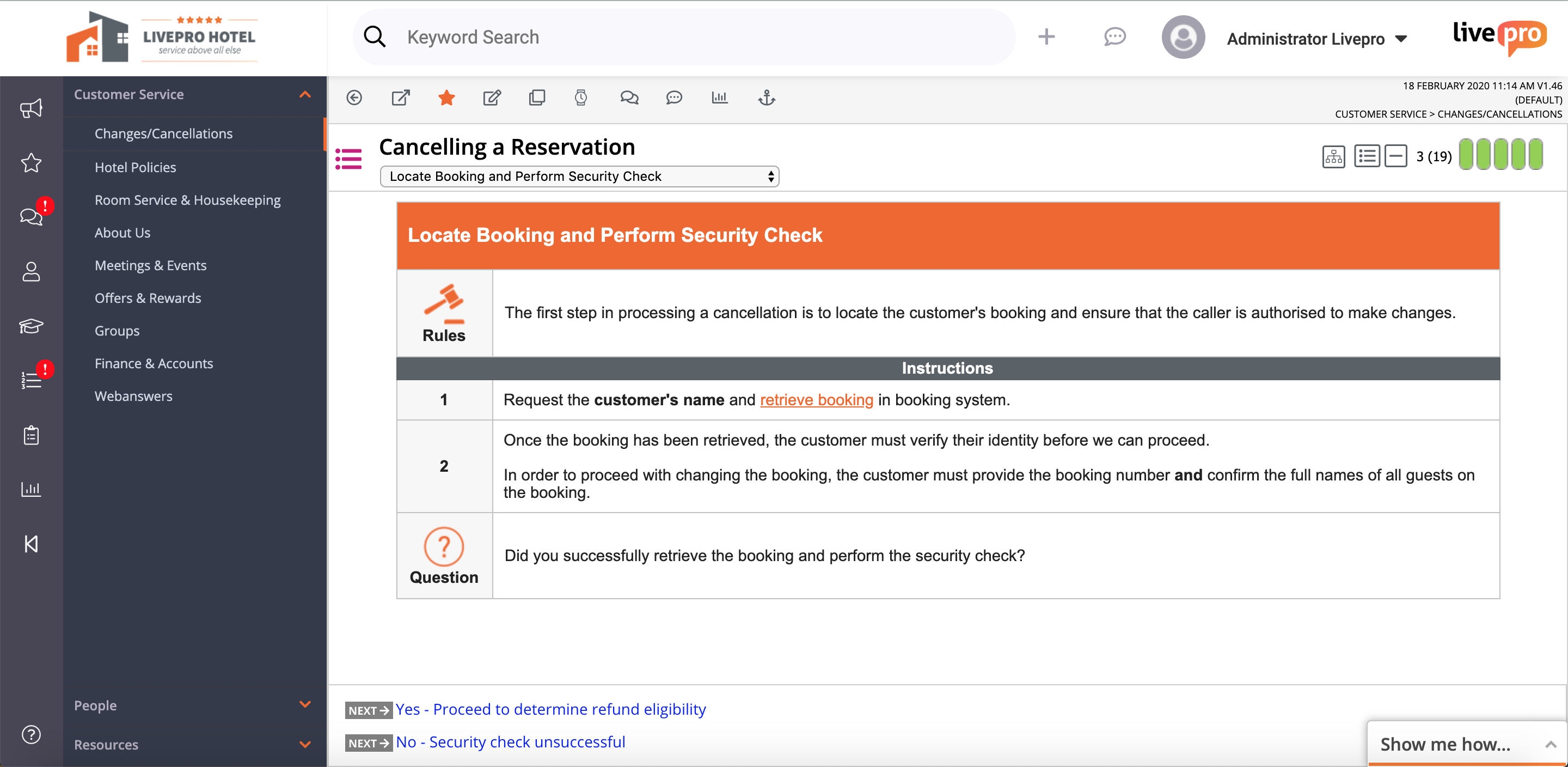
livepro headquartered in North Sydney aims to help users provide improved customer service quality and delivery through their simple knowledge management system.
N/A
Verint Knowledge Management
Score 8.5 out of 10
N/A
Verint Knowledge Management aim to help agents find and share the information needed to answer both customer inquiries and questions they may have themselves. The solution helps ensure the answers agents access are consistent, up to date, and easily accessible.
N/A
Pricing
livepro
Verint Knowledge Management
Editions & Modules
No answers on this topic
KM Professional
Contact Sales
per year Per Interaction
KM Enterprise
Contact Sales
KM Enterprise
Contact Sales
per year Per Interaction
Offerings
Pricing Offerings
livepro
Verint Knowledge Management
Free Trial
Yes
No
Free/Freemium Version
No
No
Premium Consulting/Integration Services
No
No
Entry-level Setup Fee
No setup fee
Optional
Additional Details
Products and plans are priced per user and only when that user accesses knowledge in that monthly period.
The great thing about livepro is you can structure your content the way that suits your organisation. livepro are there to support you in deciding what may work best for your team, it is not a one size fits all solution. The system allows you to write complex processes in a simplified view so staff can easily navigate to the solution they need. The 'rocket' knowledge object allows your processes that have a lot of variation to be written up in a simple decision tree setup, taking your staff to the right outcome every time.
Verint Knowledge Management is a great option to consider when an organization is trying to streamline the accessibility of information or knowledge bases available to their employees. Call center agents will love to have all information that is relevant to their phone call easily available to meet the needs of their clients on the other end of the line.
Easy to navigate. Anyone can jump onto the system with minimal training, it is user friendly and intuitive.
Supportive team. The livepro team are 100% responsive and supportive to all feedback, suggestions and requests. You can tell they are focused on their users and their customer experience is fantastic.
WYSIWYG editor. The editing function when authoring content is very easy to use. You can follow the basic "what you see is what you get" editor, or you can delve into the source code if you want to get savvy with your technical skills.
livepro integrates with a number of other platforms to enhance the user experience. For example, Genesys Cloud.
The tools to submit and manage user feedback are very effective - they help us respond quickly and interconnect the feedback to the applicable content.
The end user experience is clean and feels familiar, making it optimal to support a group of people who generally have never experienced a KM application before.
Our audience responds well to our ability to insert images, GIFs, videos, PDFs, and more into our content.
Feedback module. I'm scratching for things to record in cons here. The feedback module could be improved by having further display options - being able to preview feedback without clicking into it. However, livepro have taken this feedback on board and are already looking at ways to improve.
Admin/roles. The current way to set up the roles/permissions is clunky however this is not a space you need to use often. I'm looking forward to the new and improved version that is being worked on.
The authoring side could be improved with additional options for fonts and easier formatting for table content. I have issues with trying to add colour to one portion of a table and not the other, so I have to resort to creating in Word first and then copying over to Verint. There is also no option to create steps in one row and the next step in the next row. I end up just adding 1., 2., etc. manually.
Many users would like to be able to organize their bookmarks into folders and the system doesn't allow this. Many have taken to creating bookmark folders in Microsoft Edge instead.
There were a few bugs that went on for a few months that made the initial launch of the KMS more difficult for the users and on the authoring side. The issues were with how the search results came up and what displayed for related content. It wasn't the best first impression for our agents using the system while on calls and made it more difficult. The issues were fixed after a few months of use.
Verint KM has many features that - when used the 'right way' can expedite search, content usage, and maintenance. Unfortunately, not all end users want to be bothered with 'the right way' and are looking for simplistic and predictive options (which any KM solution would be hard-pressed to deliver).
The support and development teams for Knowledge are exceptional. They are attentive and truly care about the experience of their customers and their goals
All of these tools were very useful and practical. For our decision, it came down to understanding our core audience - we determined our average associate was largely unfamiliar with call center and office work in their prior work experience, and as such they would not have previously worked in a KM application before. To help adoption, we sought the solution with the simplest and most familiar interface, and based on internal focus group feedback, that was Verint KM Pro.
livepro has improved our right first time response for our customer contact center. In the first six months of going live, our RFT response increased to the 60th percentile from 50 percent.
One source of truth--our customer service team is confident in the answers they are providing and that they can rely on the accuracy and quality of information.
Providing a superior level of customer service--as the team becomes more efficient in using the system, they are processing more calls and creating more meaningful outcomes for our customers. The teams percentage of missed (abandoned) calls has dropped from 4.26 percent to 3 percent since implementation of livepro.
Content is easier to keep up to date and publish on an urgent basis.
Some users love the system, while others still find it difficult to find the information they need and miss the former guides we used. I think this is a result of the system issues that persisted for a few months after launch and will hopefully improve with time.
Users love being able to submit feedback and it makes it easier for errors, missing information and out of date information to be caught and fixed.