LogMeIn Pro by GoTo vs. RealVNC Connect

Overview
ProductRatingMost Used ByProduct SummaryStarting Price
LogMeIn Pro by GoTo
Score 9.3 out of 10
N/A
N/A
$30
per month
RealVNC Connect
Score 7.0 out of 10
N/A
RealVNC® Connect is a secure remote access solution from RealVNC. It can be used to connect to a remote device anywhere in the world to view its desktop in real-time and take control as though sitting in front of it.
$8.25
per month (billed annually) per concurrent session
Pricing
LogMeIn Pro by GoToRealVNC Connect
Editions & Modules
Individuals
$30.00
per month
Power Users
$70.00
per month
Small Businesses
$129.00
per month
Essentials
$8.25
per month (billed annually) per concurrent session
Plus
$16.50
per month (billed annually) per concurrent session (add up to 3)
Premium
$29.75
per month (billed annually) per concurrent session (add up to 5)
Enterprise
Custom Pricing
per year
Enterprise
Custom Pricing
Offerings
Pricing Offerings
LogMeIn Pro by GoToRealVNC Connect
Free Trial
YesYes
Free/Freemium Version
NoYes
Premium Consulting/Integration Services
NoNo
Entry-level Setup FeeNo setup feeNo setup fee
Additional DetailsAll plans are billed annually.Plans work on a Per Concurrent Session basis. Each plan gives access to a bundled number of devices, but limits apply to the amount of devices that can be connected at any given time. The Premium plan includes On-Demand Assist, a useful tool for providing just-in-time remote support to end-users without them needing RealVNC Connect installed on their device.
More Pricing Information
Community Pulse
LogMeIn Pro by GoToRealVNC Connect
Considered Both Products
LogMeIn Pro by GoTo
Chose LogMeIn Pro by GoTo
LogMeIn Pro by GoTo is better but costs more. We use both LogMeIn Pro by GoTo and Teamviewer.
Chose LogMeIn Pro by GoTo
GoTo Connect and GoTo Meeting
Chose LogMeIn Pro by GoTo
I think TeamViewer is a better product overall. It has a cleaner user interface. it allows you to use multiple machines much more easily. It is also faster to use and faster to log in and out of.
Chose LogMeIn Pro by GoTo
LogMeIn Pro is better suited for commercial enterprises as it has got good vendor support, is value for money and comes with a host of features other than screen sharing including secure file transfer. It is light-weight, easy to work with and no installation literally …
Chose LogMeIn Pro by GoTo
There are no security layers in the Anydesk platform, anyone can use it without authentication and with the session ID, and therefore it is not safe to use, LogMeIn Pro is much more secure and is better for corporate use. With proper user authentication and LAN-based access, …
Chose LogMeIn Pro by GoTo
LogMeIn has U.S. servers for connectivity which is super important for us. We are constantly re-evaluating our licensing with these other products. The licenses are renewed simply because management and the technology support staff have not pushed for a detailed review and …
Chose LogMeIn Pro by GoTo
Did evaluate other products 15 years ago, but never had any reason to replace LogMeIn Pro. I don't even remember the competitive products.
Chose LogMeIn Pro by GoTo
LogMeIn works well for small number of devices that need unattended remote access. For cost, LogMeIn in similar to GoToMyPC - works about the same - has similar features for about same cost
Chose LogMeIn Pro by GoTo
LogMeIn has the edge over TeamViewer and GoToMyPC when it comes to accessing/managing multiple machines. The interface is much cleaner and, at least in my experience, connectivity through LogMeIn has proven to be quite a bit more reliable than the other solutions. The one area …
Chose LogMeIn Pro by GoTo
Well, the inventory aspect of LMI is not as robust and detailed as Kaseya. Also, the placement of key tools like the command line, and file transfer, outside of the window is annoying.
Chose LogMeIn Pro by GoTo
LogMeIn Pro, unlike their other competitors, has the fastest connection to a remote desktop connection and the bandwidth is always reliable (the connections have not dropped for the most part) which gives us the ability to complete tasks on time or ahead of time. Moreover, …
Chose LogMeIn Pro by GoTo
ConnectWise is a much easier program to use. The end-user either types in a code or you send an email with a link to the session. A small applet is installed on their computer so you can connect. And this applet is removed when the session is over. Constant remote access …
Chose LogMeIn Pro by GoTo
LogMeIn is more feature rich than Join.me. Easy control panel and easy access to multiple PC's at once. User setup control.
Chose LogMeIn Pro by GoTo
Cisco SSL VPN is great for a large corporation with the resources to invest in a more customization system. LogMeIn Pro remains accessible to the small, or single owner businesses looking for a remote access alternative with a very small financial footprint.
RealVNC Connect
Chose RealVNC Connect
We selected RealVNC Connect due to their support of different OS's and having a mobile client.
Chose RealVNC Connect
Security is a big deal, even more so these days. We needed a remote access tool that we could trust to be secure and constantly evolve to modern standards. VNC Connect came at eh right price for us and provides all the tools we need.
Chose RealVNC Connect
VNC is light and sleek with the quick setup, was impressed with the quick setup despite poor Internet connection outdoor. Teamviewer is good, but the pricing is not as good as VNC. Both do the basic job, but VNC still outperform Teamviewer in terms of performance and ease of use.
Chose RealVNC Connect
TeamViewer is another easy to use remote connectivity software that I like for fast connection and little lag. TeamViewer is good for screen sharing. I often prefer VNC Connect for its cross platform compatibility and its mobile access capability. TeamViewer is a little …
Chose RealVNC Connect
The best part is that [the] VNC Connect application supports multi-platform compatibility with Windows and Linux systems. In addition, it is simple, and the session is approved or unapproved, which enables us to provide quick support in the business process. The running service …
Chose RealVNC Connect
It is good for one-shot use and not having to pre-configure remote devices, but we felt that the interface for connecting was not as simple.
Chose RealVNC Connect
With so many things tech-related we have many options and ways to accomplish the same thing. I think one of the important things to remember is the companies track record and support record for their users. In our experience, VNC Connect has been able to be competitive in all …
Chose RealVNC Connect
VNC Connect works just as well as the top products on the market. At the time VNC Connect was priced better and provided us with a simple reliable tool. VNC Connect works well cross-platform which is important to our institute as we are a 60/40 PC to Mac ratio. Reliability …
Chose RealVNC Connect

Remote desktop - works well but not as easy to initiate

Teamviewer - works well, easy to initiate but more expensive

Chose RealVNC Connect
VNC is much easier to use than any of the listed platforms.
Chose RealVNC Connect
There is no comparison. pcAnywhere was terribly buggy and was never reliable. VNC connect is 99% reliable.
Chose RealVNC Connect
I like VNC over TeamViewer and Microsoft Remote Desktop Services. Teamviewer seems slower than VNC and is more expensive. Microsoft RDP takes over the console so users cannot interact in any way.
Chose RealVNC Connect
VNC is way faster and has more features than Chrome Remote Desktop.
Chose RealVNC Connect
I have used TeamViewer and while both are great programs, VNC just seem more minimalist and tuned to doing EXACTLY what I need it to do.
Chose RealVNC Connect
Overall the VNC Connect software outperforms the TeamViewer software in most areas however, the TeamViewer billing model can be more appropriate for some situations.
Chose RealVNC Connect
VNC Connect stacks up very well to other competitors. With this simple program, you can remotely connect and access other computers with the same VNC Connect agent installed. The only reason we're moving away from using this is that our current Ninja RMM Tools computer …
Chose RealVNC Connect
Like I have mentioned before, depending on what you need, RealVNC may not be the best fit. It's the does-it-all Enterprise ready version produced by the original manufacturers. Installation's pretty simple, it's deployable if needed and it sports a lot of party tricks. …
Chose RealVNC Connect
I'm afraid that the only thing VNC has going for it is that it's free. Otherwise ConnectWise is an infinitely superior product and one which I would heartily recommend. We also looked at Bomgar, but the pricing there was astronomical in comparison with Connectwise. The free …
Chose RealVNC Connect
VNC works really well. It gives a superior level of access compared to far more expensive products such as GoToAssist or WebEx Support Center, and does so at a tiny fraction of the cost. It also consumes far fewer resources than either of those two competing products. It's an …
Chose RealVNC Connect
At the time of our switch to GotoAssist, we we seeking a solution that allowed admin access to workstations. GotoAssist met our requirements for this problem.
Chose RealVNC Connect
We have been using VNC for many years now and continue to use VNC due to its reliability and ease of use. When we need quick access to a remote computer for troubleshooting, VNC doesn't glitch or cause disconnects. Sometimes it may run slow but that is due to network issues, …
Chose RealVNC Connect
TeamViewer seems to crash often, causing the TeamViewer host to have to be restarted. The performance isn't comparable to RealVNC and the GUI isn't very intuitive. TeamViewer does shine better when using it for external connections, but RealVNC is moe lightweight and adaptable …
Chose RealVNC Connect
Screen quality compared to others like ScreenConnect, Bomgar, and others is not as good. But I don't need quality screens. I just need the minimal when connecting to servers so RealVNC fits that need very nicely.
Features
LogMeIn Pro by GoToRealVNC Connect
Remote Administration
Comparison of Remote Administration features of Product A and Product B
LogMeIn Pro by GoTo
8.7
Ratings
7% above category average
RealVNC Connect
7.3
Ratings
11% below category average
Screen sharing9.70 Ratings9.00 Ratings
File transfer8.70 Ratings8.00 Ratings
Instant message8.00 Ratings6.10 Ratings
Secure remote access with Smart Card authentication7.00 Ratings7.00 Ratings
Access to sleeping/powered-off computers9.00 Ratings6.00 Ratings
Over-the-Internet remote session10.00 Ratings9.00 Ratings
Initiate remote control from mobile9.00 Ratings9.00 Ratings
Remote management of servers & workstations10.00 Ratings4.70 Ratings
Remote Active Directory® management6.60 Ratings00 Ratings
Centralized management dashboard10.00 Ratings7.10 Ratings
Session record9.00 Ratings8.00 Ratings
Annotations6.20 Ratings5.30 Ratings
Monitoring and Alerts9.00 Ratings7.00 Ratings
Multi-platform remote control10.00 Ratings9.00 Ratings
Best Alternatives
LogMeIn Pro by GoToRealVNC Connect
Small Businesses
Getscreen.me
Getscreen.me
Score 9.7 out of 10
Getscreen.me
Getscreen.me
Score 9.7 out of 10
Medium-sized Companies
Remote Desktop Manager
Score 9.0 out of 10
Remote Desktop Manager
Score 9.0 out of 10
Enterprises
Remote Desktop Manager
Score 9.0 out of 10
Remote Desktop Manager
Score 9.0 out of 10
All AlternativesView all alternativesView all alternatives
User Ratings
LogMeIn Pro by GoToRealVNC Connect
Likelihood to Recommend
9.4
(0 ratings)
8.0
(0 ratings)
Likelihood to Renew
10.0
(0 ratings)
8.0
(0 ratings)
Usability
9.0
(0 ratings)
8.0
(0 ratings)
Availability
10.0
(0 ratings)
-
(0 ratings)
Performance
9.0
(0 ratings)
-
(0 ratings)
Support Rating
10.0
(0 ratings)
8.0
(0 ratings)
Online Training
-
(0 ratings)
7.0
(0 ratings)
Implementation Rating
10.0
(0 ratings)
8.0
(0 ratings)
Configurability
8.0
(0 ratings)
-
(0 ratings)
Product Scalability
5.0
(0 ratings)
-
(0 ratings)
User Testimonials
LogMeIn Pro by GoToRealVNC Connect
Likelihood to Recommend
LogMeIn Pro is very well suited for small-to-medium sized organisations. The pricing is affordable and the implementation is easier. There are some concerns related to data privacy and security, hence I would not advise this to be used when your session handles PHI and PII kind of data, just to be compliant.
Read full review
It is very easy to use if the remote device is already set up to receive connections, so if you are setting up devices before deploying them, it is a great tool to have. It is well-suited to use when shadowing users or using it as a teaching tool. There are other products that are better if you are trying to help someone on a one-use basis.
Read full review
Pros
  • LogMeIn Pro by GoTo offers unattended remote access that’s reliable and always available. You can securely log in to a client’s device (Windows or macOS) from anywhere, even without them present.....as long as their machine is on.
  • You can transfer files during a session without disrupting work. I've also transferred some pretty large files at times without issues.
  • I like the dashboard as it makes it easy to manage and organize multiple devices across our client base. You can see online/offline status, access machines instantly, and share access with your team all in one easy to view place
Read full review
  • Allow remote connection to pc and servers that are located within our WAN. The connection is stable with fast response (no lag)
  • Allow remote connection to pc and servers that are located outside. The connection is stable with fast response (no lag)
  • It allows chat function with the user, and pasting capability from local desktop and mapped a drive to the remote system.
Read full review
Cons
  • LogMeIn Pro allows only one user to control the remote destination at a time. If more than one user needs to access/control the same destination, they can share the session (visibility to both parties), or will need to wait till the prior user is logged out for a more secure session. Being able to log in and use the same destination at the same time, initiating unique sessions would be ideal. (Similar to VPN.)
  • Ability to override or default session settings for security, for example blanking the remote monitor (or not), recording a session, or changing access while the user is in-session. This would allow an administrator or manager to more closely audit activity.
  • Provide a one-click logout+disconnect. Right now, users must disconnect their session before exiting LogMeIn Pro. If their session is not first disconnected and the user simply exits or logs out of LogMeIn Pro, the session may remain active, without disconnecting. This would show as an active session, even if the user is technically no longer using the remote destination.
  • More detailed audit information. What application did the user access while connected to the remote destination? Was the session shared with anyone else?
Read full review
  • Some of the confusion of VNC upon installation is you need to be connected to the internet for it to function. This is not the case, but is unclear upon installation.
  • The licensing model is not ideal for locations that do not use the internet and function off of the grid.
Read full review
Likelihood to Renew
It works great
Read full review
VNC is a solid product for the price. It simply works and its reliable across different platforms. Some products state they work well in the Mac environment but don't deliver. This one does what it says. Connections are reliable, but of course, this depends on internet connections. The product works well over wireless connections as well. It delivers on what a remote tool should deliver on. My technicians are happy with the product and customers appreciate the ease of use when letting us connect to their systems. Some also appreciate the remote support while they are multi-task.
Read full review
Usability
I will give a Rating of 10 for LogMeIn Pro by GoTo's overall usability because it has a centralized Dashboard to access all machines and servers and a very user-friendly User Interface. Also, the remote connectivity is very smooth and reliable as if you are working on your local desktop or laptop.
Read full review
It's a niche product and in that niche they try to cater to as many use cases as they can. Other as a TCO aspect i don't see many use cases where you can't use this product as the one tool for all remote session use cases in your company
Read full review
Reliability and Availability
Always there as long as there is an internet connection
Read full review
No answers on this topic
Performance
It loads quickly,
Read full review
No answers on this topic
Support Rating
My calls and e-mails to tech support have been few and far between, but those rare interactions were always pleasant and handled professionally. Most support can be accessed electronically, but when the need arises to actually speak to a human being, LogMeIn's customer service reps are clearly well-trained and knowledgeable. Another plus: there isn't the language barrier that I've experienced with other technology companies' support centers.
Read full review
VNC Connect is a reliable product that has been around for a long time. It is reasonably priced and works well in the Mac & PC environment. When you have a small team that supports many users we need tools that we can rely upon and that will get the job done on the first try. Many customers appreciate the quick assistance and can multi-task while our team works on their computer issues remotely. From a customer service point of view, this tool gives us transparency and efficient effectiveness.
Read full review
Online Training
No answers on this topic
The training is very informative, quick and to the point. All of the details one would need are present so the user doesn't have to go searching for additional information just to use the application. The layout of the training was also neat and concise, some of the other training sessions for other companies I've done in the past were confusing and not well thought out, this one is much more superior
Read full review
Implementation Rating
Be aware if you have dual monitors on the host, you can only view one at a time on remote, but it is easy to toggle back and forth
Read full review
No problem at all, love the product.
Read full review
Alternatives Considered
LogMeIn has U.S. servers for connectivity which is super important for us. We are constantly re-evaluating our licensing with these other products. The licenses are renewed simply because management and the technology support staff have not pushed for a detailed review and there have been no significant problems in its use. The licensing cost is considered an annual sunk cost.
Read full review
VNC Connect stacks up very well to other competitors. With this simple program, you can remotely connect and access other computers with the same VNC Connect agent installed. The only reason we're moving away from using this is that our current Ninja RMM Tools computer monitoring agent includes the TeamViewer tool for us to use.
Read full review
Scalability
The view is a little blurry. The resolution could be better
Read full review
No answers on this topic
Return on Investment
  • not sure on a measurable ROI, but LogMeIn has definitely been a useful tool for our one satellite office where there are two devices that require unattended remote access
  • only negative I can think of, cost-wise, is that the cost of ALL remote access software jumped a number of years back where suddenly there were no longer any free options
Read full review
  • I have just used the software for about 1 month and so far so god. I am saving time whenever I can access my client's computers from my desk as opposed to having to leave my office to go to their offices. Saves me time and the client money.

Read full review
ScreenShots

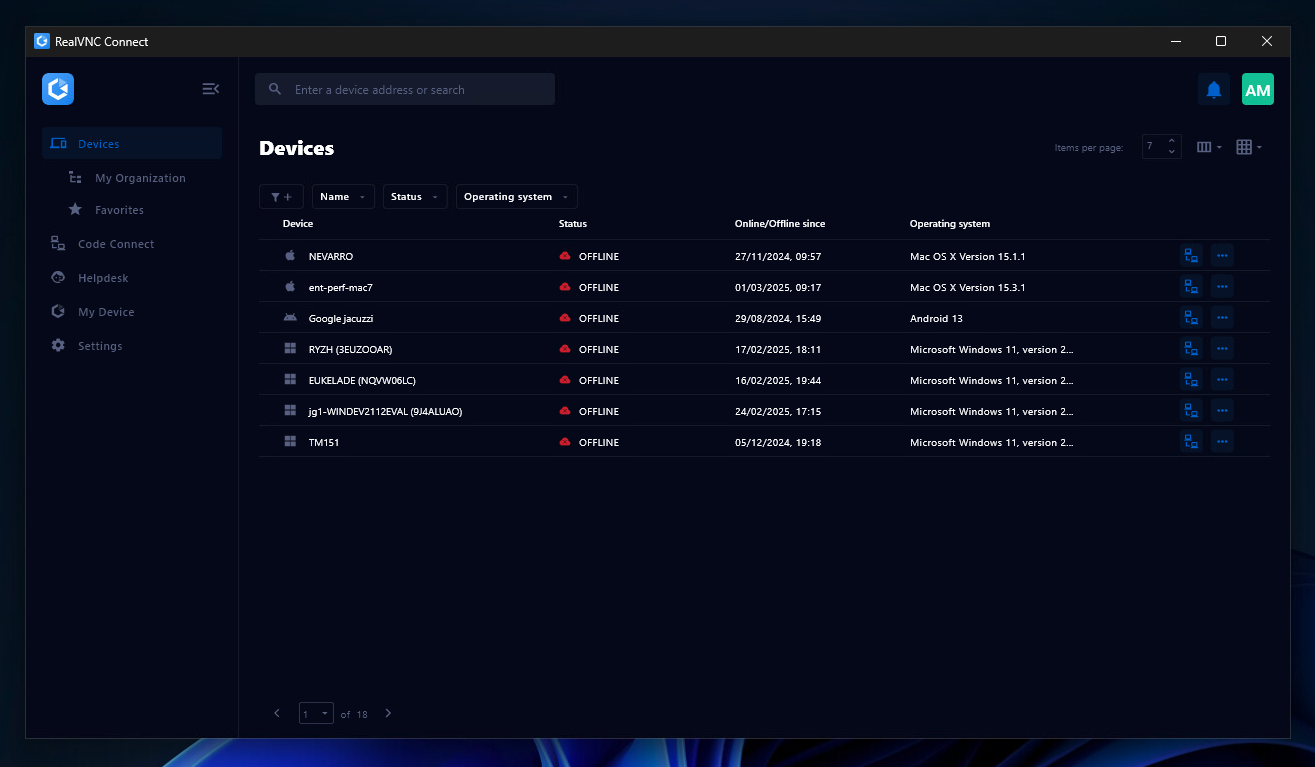
RealVNC Connect Screenshots

Screenshot of the Device List in the Connect v8 desktop appScreenshot of On-Demand Assist, which can be used to start a remote support session using a single-use code.