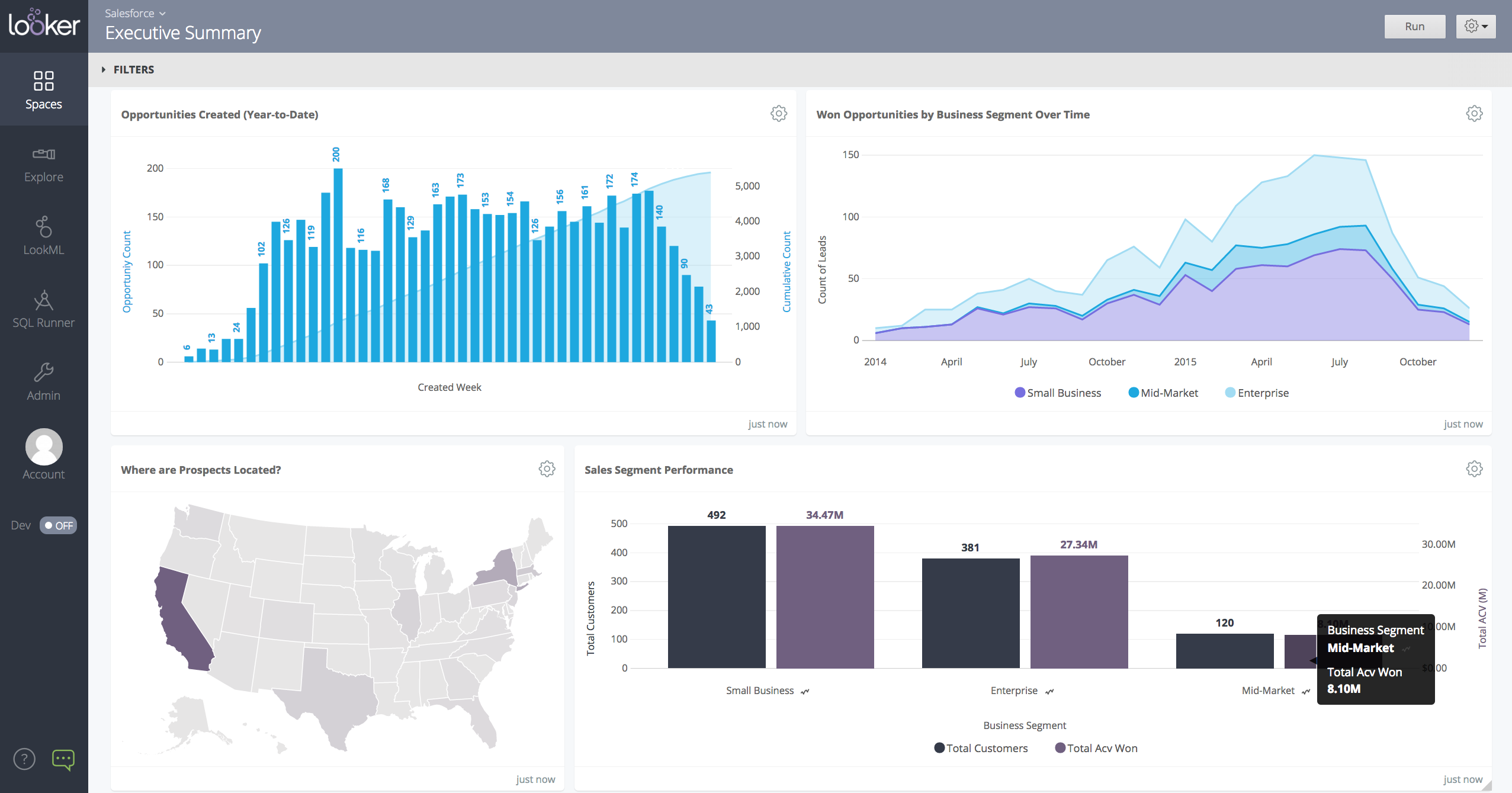
Looker is a BI application with an analytics-oriented application server that sits on top of relational data stores. It includes an end-user interface for exploring data, a reusable development paradigm for data discovery, and an API for supporting data in other systems.
N/A
Pentaho
Score 5.1 out of 10
N/A
Pentaho is a suite of open source business intelligence and analytics products, now offered and supported by Hitachi Data Systems since the June 2015 acquisition.
Looker was easier to use, better integration with non-standard datastores, such as Prestodb, and Snowflake, and BigTable. Ease of manageability. Creation of reports faster and easier compared to QlikView. Tableau has better heat maps, however, Looker has better drill down in …
Looker was, hands down, better than any other products we looked at. It was far easier to get started and keep moving because of Looker's internal programming language and data definition language, LookML. We were up and going in just a few days and were creating advanced …
I think Looker is easier to use than Business Objects, Domo, Pentaho and Tableau. Tableau offers better visualizations than Looker but the overall package in Looker is better.
When you need to create a centralised dashboard for multiple stakeholders that blends cross-channel reporting. As an SEO agency reporting for clients - Looker is a great solution. It's less appropriate depending on the intended users. For instance, in my experience Looker reports have been under-utilised because they're not accessed regularly, provide too much noise or often simple PDF reports are preferred
Pentaho is very well suited to perform data extraction & data mining from various cloud storage & transform that data using various available data models. However, the software struggles when it comes to visualizing the extracted data in an appealing manner & can be difficult for end-users to get an understanding of data tables created using those models.
I think the relative obscurity of the tool is a downside, not as many developers, consultants or peers you can tap into.
Lack of a solid user community held us back, looking at Power BI and Qlik, they have huge user communities that help each other out. Would have liked that here.
Smaller company means smaller sales force, and the lack of a local presence made it hard to only interact online with the account rep. Other companies have someone local who often stops by with pre-sales developers to just pitch in free of charge when they have time.
We are very haooy with Looker, it provides us with all the funciomalities we need for both the day to day oerformance tracking and longer periods reporting. It is easy to use for account managers, configurable and customizable for soecialists and what is most imoortant, our clinets generally really love it
I will use Pentaho until I find a better tool with a better, easier to use report designer client. For now, Pentaho has been the most powerful reporting tool for our clients because of its ability to connect to Odoo, integrate in Odoo (reports are accessible in Odoo) and the flexibility in report design and parameter integration
Looker is relatively easy to use, even as it is set up. The customers for the front-end only have issues with the initial setup for looker ml creations. Other "looks" are relatively easy to set up, depending on the ETL and the data which is coming into Looker on a regular basis.
Even if Pentaho requires less technical skills to develop a pipeline or ETL project, its learning curve can be a bit slow since there are many ways to do the same thing as in any other platform. However, in Pentaho, some things can be confusing some moments for non-technical teams.
Somehow resources heavy, both on server and client. I recommned at least 50Mbs data rate and high performance desktop comouter to be abke to run comolex tasks and configure larger amount of data. On the other hand, the client does not need to worry when viewing, the performance is usually ok
Never had to work with support for issues. Any questions we had, they would respond promptly and clearly. The one-time setup was easy, by reading documentation. If the feature is not supported, they will add a feature request. In this case, LDAP support was requested over OKTA. They are looking into it.
We are an Enterprise customer. They handle problems INSTANTLY when they are critical, including initiation an immediate WebEx screen share call when needed. Smaller/less-critical problems are handled within 1-2 days -- and NEVER fall off their radar, no matter how small. As needed, we can also leverage "professional services" from them -- much of which is included in our Enterprise contract. Finally, when a problem I have discovered turns out to be a bug..they create a JIRA for the fix, and make me a watcher. I love seeing notes come in showing me status updates of bugs filed because of something I found. They really are TOP-NOTCH.
Course Taken: DI1000 Pentaho Data Integration Fundamentals Setup A week before your class started, the instructor will start sending out class material and lab setup instructions. This is helpful so that you understand how the environment is laid out and can start reviewing the content. Ultimately it saved about a 1/2 day trying to setup with 10 other people online which was great! The Course The 3-day course was laid out like many other technical classes with 15-30 minutes instruction and 15-60 minutes of lab exercises. The instructor was very knowledgeable with the functionality from version to version and answered questions as we went along. I was amazed at some of the functionality that was available that I was not using at the time and quickly implemented changes to many existing transformations and jobs. The novice users seemed to catch on quickly and more experienced users explained how some of the functionality was used in their home environments. Towards the end there was enough time so that we were able to ask very directed questions about our own environments. Overall, I really found the class to be informative and deliver enough information to be dangerous. My skills improved and I was able to design better and efficient transformations for the HIE. Course Description: https://training.pentaho.com/instructor-led-training/pentaho-data-integration-fundamentals-di1000
Get the right people in before starting implementation. Start small and build as you go approach is time consuming and involves lot of rework. Evangalize within the organization the capabilities and limitations equally so that correct delivery expectations are set. Set expectations with the Customer that the tool cannot replace proprietary software in terms of stability/usability and that timelines could change given the new ness of the product.
In my opinion, Looker is no Power BI. It is good, but I think Power BI is amazing. That said, in my experience, Power BI is nowhere near as easy to setup and report on Google services as Looker is. We plan to continue using Power BI for c-suite and corporate reporting, especially for internal databases, but will gladly use Looker for our marketing information for AdWords, Analytics, Search Console, and YouTube.
Perhaps Snowflake and SalesForce have some components which align with the Pentaho tools. The Pentaho tools have integrations with these technologies to add more value to the final users. Perhaps the only weakness I can honestly find in the Pentaho tools right now is the lack of a powerful web interface for data transformations. There is a web component from which you can access existing data transformations created with the Pentaho Data Integration tool. Still, the web component only allows visualization of the data transformation and remote execution. A complete web interface with remote execution would be excellent, and I'm sure that we might see something like this available at some point in the future.
Other than some people not liking the numbers, I don't see any negative impacts; we haven't experienced that.
The reports help us unravel the story of our users and how they are sifting through our pages.
Our clients enjoy seeing the numbers to understand better what stands out on their sites.
The reports have helped us see what campaigns are working and where we need to tweak things.
The reports have enabled us to have better conversations with stakeholders about how their web pages should be modified, edited, etc., to reflect the data.