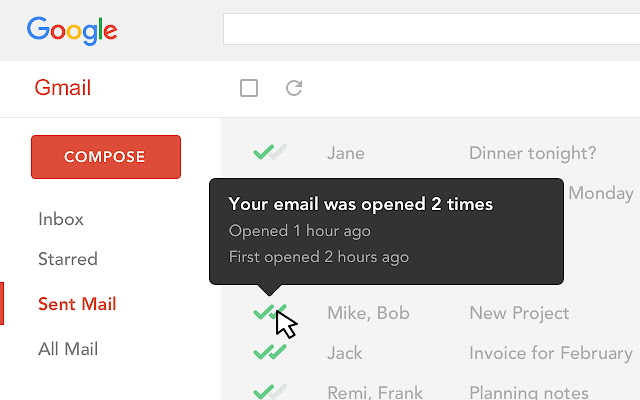
Mailtrack is a free email tracker for Gmail, boasting over 1,5 million active users. The vendor states users will Ffollow up with more accuracy, find out the moment emails have been read, track the…
N/A
Salesforce Inbox
Score 8.0 out of 10
N/A
Salesforce Inbox is a set of apps that add "relationship intelligence" to the Salesforce Sales Cloud. SalesforceIQ Inbox connects customer data from the Sales Cloud to users' email inboxes, surfacing contextual information that can be used to write relevant messages. It also allows users to create leads, contacts, and opportunities and log emails to Salesforce from within their inbox. It is a sales email and intelligence tool that includes email tracking, automated reminders to follow up on…
Boomerang for Gmail was tested. It works well, but wanted to see what else is available before making any commitment. Mailtrack provides a really nice daily summary of emails sent which Boomerang did not.
There's a free tier. Obviously, there are other things to love, like notifications about your email being read, the fact that if an email hasn't been responded to in some time it gets bumped up. The fact that if other people have Mailtrack you will actually get notified who …
I have not yet used any other product or service other than Mailtrack. The reason why I love Mailtrack is because it was easy to download and even easier to use. What is more, is that it has a lot of really nice features as well, this makes it user friendly too.
I have not used any other tracking software for my emails since this was recommended online and by a few people as well. I've been told that it's a really good tracking software and so far, I have no complaints as such. Cannot comment on how it would measure up against other …
I used the pre-installed/internal features of the "mailing box" for tracking email and correspondence. I can not say it was a perfect experience, (will not use product names), but at the moment MailTrack is better.
To be perfectly honest I have only used the same function on Outlook so I don't have anything else to compare it to. However it stacks up very well against Outlook and some aspects are actually superior.
I used Outlook email many years ago with the feature of receiving a confirmation that the email was read, but these days, Outlook is not working for me, as I want to be able to use the Gmail platform for all the emails of my organization, and Mailtrack is working perfectly for …
My company uses SalesForce and it has an email tracking system. I found it to be unreliable and it seemed that some people were somehow able to get around it letting me know when it was opened. It just always should unopened, even after I had gotten a reply from my email.
Mailtrack is the first program I have ever utilized as a tracking system, and I have no intention to utilize anything else. I am perfecting satisfied with it, as it has delivered everything that I have been seeking in an email tracking service. I would highly recommend this …
I have not used any other product except Mailtrack. Previously MS Outlook had the feature of read receipt. This feature got lost when I switched to Web based Gmail which doesn't have this feature.
Basically I have not used any other product for email tracking before this. I am not aware about other competitors' features and usability. But I am completely satisfied with Mailtrack because of its simple usability. It just shows us using green ticks like WhatsApp whether a …
I haven't used any email-tracking software in the past few years. Last time I used one was many years ago, and unfortunately, I don't remember the name. But I do remember that they didn't allow you to remove the watermark, which is when I stopped using it because it was …
While I have not used many other automated email CRM integration systems, SalesforceIQ is hands down a crucial part of my daily work flow. I could not picture our company putting up the monthly numbers we are able to allocate without the efficiency and concise notification …
SalesforceIQ Inbox and Hubspot are both useful in small business organizations. Since they almost have the same features it's hard to tell why SalesforceIQ Inbox is better than other tools. I think the G Suite integration with filters feature is an advantage. The fact is when …
It is critical in Sales to understand if someone received and read the email you sent, and Mailtrack is perfect for this. It is not a critical tool when you are receiving emails but definitely a critical tool when sending emails and you need to know the status and to understand if they even read what you sent.
When sending emails Salesforce Inbox provides valuable insights before sending. We usually send emails to clients and before Salesforce Inbox we would need to check in Salesforce to get details regarding the contact we are sending to. With the Salesforce Inbox there is no need to look in Salesforce as it is connected directly to Gmail or Outlook.
I would rate Mailtrack's overall usability as a ten out of ten. The reasons for this are actually quite simple. For now, only I have been using Mailtrack. However, looking at the rather easy to use characteristics Mailtrack has to offer, I would not hesitate to recommend it to the rest of my colleagues.
This rating is fully deserved for the reasons I mentioned earlier. Namely, firstly, ease of use. Secondly, the reliability and speed of the application. Thirdly, the unobtrusiveness of its functioning. Fourth, the positive effect that the application has on the process of management communication between company employees. Fifth, the overall usability of the application due to the minimum settings.
The biggest alternatives I've tried are whole email systems - Polymail and Newton. Newton was bar none the best email handling application AND the best email tracker, however, unfortunately, they went out of business at the end of summer 2018. Mailtrack is different because it only does one thing, it tracks email. Without Newton (Polymail is also iOS only, and expensive), Mailtrack is really the only decent solution for email tracking without buying a big system like a CRM. I didn't want to pay $100+/month for user seats, I just wanted to track my own emails for some better intel. That's what Mailtrack does, and that's what Mailtrack is priced to do.
While I have not used many other automated email CRM integration systems, SalesforceIQ is hands down a crucial part of my daily work flow. I could not picture our company putting up the monthly numbers we are able to allocate without the efficiency and concise notification settings SalesforceIQ gives Everlasting Capital. I highly recommend if you're looking for fast integration results to update numerous departments within your company, to look into SalesforceIQ as it will make your daily tasks substantially easier while keeping all parties more thoroughly notified.
After I started using the Mailtrack, the responses to my emails increased by at least 30%.
Once I submitted/sent an important email and got the notification that the email was sent, I feel safe that my email/request has been processed/viewed without being worried that the email went to the spam box.