Microsoft Power BI vs. People.ai

Overview
ProductRatingMost Used ByProduct SummaryStarting Price
Microsoft Power BI
Score 8.6 out of 10
N/A
Microsoft Power BI is a visualization and data discovery tool from Microsoft. It allows users to convert data into visuals and graphics, visually explore and analyze data, collaborate on interactive dashboards and reports, and scale across their organization with built-in governance and security.N/A
People.ai
Score 9.9 out of 10
Enterprise companies (1,001+ employees)
People.ai is a revenue intelligence platform for go-to-market teams. The platform promises to help sales, marketing and customer success teams uncover every revenue opportunity from every customer. Customers include: Lyft, Gainsight, Tanium and Palo Alto Networks. People.ai helps them capture contacts, activity and engagement and drive actionable insights across all their revenue generation. Founded in 2016, People.ai is based in San Francisco and is backed by Y Combinator and…N/A
Pricing
Microsoft Power BIPeople.ai
Editions & Modules
No answers on this topic
Offerings
Pricing Offerings
Microsoft Power BIPeople.ai
Free Trial
YesNo
Free/Freemium Version
YesNo
Premium Consulting/Integration Services
NoNo
Entry-level Setup FeeNo setup feeNo setup fee
Additional Details
More Pricing Information
Community Pulse
Microsoft Power BIPeople.ai
Considered Both Products
Microsoft Power BI
Chose Microsoft Power BI
All others apps are enablers and Microsoft Power BI is the visual that end user sees which often adds more value to the end user to make strategic decisions from this. All are equally great but Microsoft Power BI is the end result
Chose Microsoft Power BI
Microsoft Power BI vs. Tableau Power BI cheaper and works well with Microsoft tools. Tableau has better visuals but is costly. Microsoft Power BII vs. Looker Looker is good for big data, but Microsoft Power BI is easier to use. Microsoft Power BI vs. Qlik Qlik is fast for big …
Chose Microsoft Power BI
Microsoft Power BI provide a user friendly in many ways to analyse the data and visualization of the data .Stacking makes the works easier easily attach the table ,chart row and column through the various available tool ..it also reduces the work part and manpower mechanically …
Chose Microsoft Power BI
Microsoft Power BI is more flexible and it requires less effort in order to create a working environment. The results have an attractive and customizable display. The model is a star schema therefore it do not require specific database adaptation. Excel and csv files could be …
Chose Microsoft Power BI
Microsoft Power BI is free. If I didn't want to create a custom platform (i.e. my organization insisted on an existing platform that I *had* to use), I'd use Microsoft Power BI. For any start-up or SMB, I'd just use Claude & Grok to build it quickly, also for free. Would …
Chose Microsoft Power BI
Same need to be large scale.
Chose Microsoft Power BI
Microsoft Power BI is easier to learn, a lot of examples on YouTube, internet documentation books helps to the implementation and personalization of the dashboards easier to use than other platforms.
Chose Microsoft Power BI
While excel can be useful for a very quick data dump, Microsoft Power BI is able to bring that data to life, and show trends and the actual story of what is happening. Microsoft Power BI is the ultimate display tool, and allows us to share information quickly to the CORRECT …
Chose Microsoft Power BI
Compared to this tool, Microsoft Power BI doesn't involve heavy coding and provides user friendly interface to visualize data. Microsoft Power BI reports can be shared and published without exposing your source code. Also, the reports are interactive providing drill down …
Chose Microsoft Power BI
Power BI is much simple to use, and more modern than BusinessObjects, which has now been discontinued. It costs much less to license than Tableau which is perhaps more niche and designed better. It is also much more powerful for data analysis than excel, smartsheet, airtable, …
Chose Microsoft Power BI
Some of the strengths are 1. User-Friendliness 2. Self-Service BI (Caters to all levels of the employees 3. Cost-effective. 4. Easy integration with Microsoft Suits. 5. DAX Calculations 6. Familiar Interface like traditional Excel. 7. Easier Self-Service platform for …
Chose Microsoft Power BI
It's got a larger user base and seems better supported. Personally it feels like alot more work getting comparable results from Tableau. Microsoft Power BI will be WAY easier to work with all your various data sources, if you are working in an environment with M365 already. …
Chose Microsoft Power BI
After several years using Google Looker Studio and BigQuery, Microsoft Power BI is a step-up in terms of visualizations. It is also much more powerful, leading to less errors and has a more intuitive interface. Looker studio has a focus on google analytics whereas Microsoft …
Chose Microsoft Power BI
NA - did not use any other software, yet. Happy with the services and features provided by Microsoft Power BI which helps us navigate through the client requests on a daily basis while also providing actionable insights / solutions with maximum efficiency and that too in a …
Chose Microsoft Power BI
It's the most widely used tool in most organizations
Chose Microsoft Power BI
Each has a different function. I think Microsoft Power BI is easier to use than Tableau and cheaper but SQL and databricks have so much more versatility
Chose Microsoft Power BI
We use Microsoft Power BI in addition to other software.
Chose Microsoft Power BI
I prefer Power BI because of its affordability and fewer complicated tools than Tableau. It's easy to use and compatible with other Microsoft products, which are mostly used in the IT industry. It's not limited to only one platform like Looker Studio, which is mostly used in …
Chose Microsoft Power BI
Microsoft Power BI is more flexible and can also handle more complex reporting scenarios. While Microsoft Excel is a great tool for analyzing data building visuals is not what it is made for. It is complicated to create Excel reports that will be interactive as a use wants to …
Chose Microsoft Power BI
Qlik also builds dashboards upon your data. It's more expensive as Microsoft Power BI and needs as much training as Microsoft Power BI
Chose Microsoft Power BI
Being Microsoft environment it is extremely easy to interconnect the application with other Microsoft tools, such as power point or excel. On top of that, also communication through Microsoft teams is enabled which can result in very good collaboration and exchange of feedback …
Chose Microsoft Power BI
We actually chose both Power BI and Quantum Metric. We use them for different things, but they are very similar tools. Quantum does a good job of integrating with our website and app traffic, whereas we use Power BI for data analysis and importing data sets for further review. …
Chose Microsoft Power BI
We have used Microsoft Power BI for almost seven years. When looking for a reporting platform, remember that you are about to make a long-term choice. Moving reports to another system isn't easy. If you have, for example, more than 100 reports, the move to a different platform …
People.ai
Chose People.ai
We are actually using all of these products and each tool has its own benefit to our organization.
Chose People.ai
I was not the decision-maker on implementing People.ai.
Chose People.ai
Clari primarily focused on attaching activities to Opportunities; Yesware primarily focused on email templates and was limited in its ability to track calls. We selected People.AI because it offered more than both platforms and its strengths were apparent in their UI design and …
Chose People.ai
The easiest comparison would be to email automation vendors like a SalesLoft, Outreach, or Groove. But People.ai doesn't have a template email send like a sequence or cadence feature you would find with them. It is more of a compliment to the email automation vendors than a …
Features
Microsoft Power BIPeople.ai
BI Standard Reporting
Comparison of BI Standard Reporting features of Product A and Product B
Microsoft Power BI
8.8
Ratings
8% above category average
People.ai
-
Ratings
Pixel Perfect reports8.50 Ratings00 Ratings
Customizable dashboards10.00 Ratings00 Ratings
Report Formatting Templates8.00 Ratings00 Ratings
Ad-hoc Reporting
Comparison of Ad-hoc Reporting features of Product A and Product B
Microsoft Power BI
8.2
Ratings
2% above category average
People.ai
-
Ratings
Drill-down analysis7.00 Ratings00 Ratings
Formatting capabilities9.00 Ratings00 Ratings
Integration with R or other statistical packages8.00 Ratings00 Ratings
Report sharing and collaboration9.00 Ratings00 Ratings
Report Output and Scheduling
Comparison of Report Output and Scheduling features of Product A and Product B
Microsoft Power BI
8.6
Ratings
3% above category average
People.ai
-
Ratings
Publish to Web8.00 Ratings00 Ratings
Publish to PDF9.00 Ratings00 Ratings
Report Versioning9.00 Ratings00 Ratings
Report Delivery Scheduling8.00 Ratings00 Ratings
Delivery to Remote Servers9.00 Ratings00 Ratings
Data Discovery and Visualization
Comparison of Data Discovery and Visualization features of Product A and Product B
Microsoft Power BI
8.7
Ratings
9% above category average
People.ai
-
Ratings
Pre-built visualization formats (heatmaps, scatter plots etc.)9.00 Ratings00 Ratings
Location Analytics / Geographic Visualization8.00 Ratings00 Ratings
Predictive Analytics9.00 Ratings00 Ratings
Pattern Recognition and Data Mining9.00 Ratings00 Ratings
Access Control and Security
Comparison of Access Control and Security features of Product A and Product B
Microsoft Power BI
8.6
Ratings
1% above category average
People.ai
-
Ratings
Multi-User Support (named login)9.00 Ratings00 Ratings
Role-Based Security Model9.00 Ratings00 Ratings
Multiple Access Permission Levels (Create, Read, Delete)10.00 Ratings00 Ratings
Report-Level Access Control7.00 Ratings00 Ratings
Single Sign-On (SSO)8.30 Ratings00 Ratings
Mobile Capabilities
Comparison of Mobile Capabilities features of Product A and Product B
Microsoft Power BI
8.0
Ratings
2% above category average
People.ai
-
Ratings
Responsive Design for Web Access8.00 Ratings00 Ratings
Mobile Application7.70 Ratings00 Ratings
Dashboard / Report / Visualization Interactivity on Mobile7.70 Ratings00 Ratings
Application Program Interfaces (APIs) / Embedding
Comparison of Application Program Interfaces (APIs) / Embedding features of Product A and Product B
Microsoft Power BI
8.4
Ratings
7% above category average
People.ai
-
Ratings
REST API8.00 Ratings00 Ratings
Javascript API9.90 Ratings00 Ratings
iFrames8.00 Ratings00 Ratings
Java API8.00 Ratings00 Ratings
Themeable User Interface (UI)8.10 Ratings00 Ratings
Customizable Platform (Open Source)8.40 Ratings00 Ratings
Best Alternatives
Microsoft Power BIPeople.ai
Small Businesses
BrightGauge
BrightGauge
Score 9.1 out of 10
Mediafly
Mediafly
Score 7.7 out of 10
Medium-sized Companies
Reveal
Reveal
Score 10.0 out of 10
LeanData
LeanData
Score 10.0 out of 10
Enterprises
Kyvos Semantic Intelligence Layer
Score 9.9 out of 10
Clari
Clari
Score 9.8 out of 10
All AlternativesView all alternativesView all alternatives
User Ratings
Microsoft Power BIPeople.ai
Likelihood to Recommend
8.5
(0 ratings)
10.0
(0 ratings)
Likelihood to Renew
9.0
(0 ratings)
-
(0 ratings)
Usability
7.9
(0 ratings)
-
(0 ratings)
Support Rating
10.0
(0 ratings)
-
(0 ratings)
Implementation Rating
9.0
(0 ratings)
-
(0 ratings)
User Testimonials
Microsoft Power BIPeople.ai
Likelihood to Recommend
Microsoft Power BI is great for sales tracking, financial reporting, and real-time operations monitoring. It integrates data from multiple sources, creating interactive dashboards for better decision-making. However, it's less ideal for real-time big data processing, offline access, or when deep customization is needed. It works best for structured reporting but struggles with highly complex data models.
Read full review
I've been using People.ai for a bit now, and I've been consistently impressed. I use it to track how my team is doing, how my clients are doing, and how I'm doing. I can create custom dashboards with any metric I want to see. I can set goals, and they'll track my progress towards those goals. I can set up competitions between my team, and they'll tell me who's winning and who's losing. You can share these dashboards with your team, which means that everyone can see how everyone else is doing.
Read full review
Pros
  • It is great at taking in large amounts of data and housing it all.
  • Microsoft Power BI is so user friendly and it's dashboards are very easy on the eye.
  • The ease of sharing dashboards makes it great for use across a large company.
Read full review
  • Their Deal Room presents times when you are multi-threaded, engaged with executives, and have an upcoming meeting scheduled rather than stalking your reps calendar and salesforce activities.
  • They allow you to create areas performance dashboard with custom KPIs you want to measure
Read full review
Cons
  • It would be easier for users could Microsoft Power BI and Excel used the same programming languages.
  • Would like to see the online version of Microsoft Power BI be as powerful as the desktop version.
  • Publishing a Microsoft Power BI file online and then having to save the file is somewhat redundant.
  • Would like to export each page or chart as an image.
Read full review
  • It's beneficial if we receive the report on a daily basis. I don't know if that is something to do with the settings. But for some reason, I am only getting it on a weekly or sometimes twice a week report.
Read full review
Likelihood to Renew
Microsoft Power BI is an excellent and scalable tool. It has a learning curve, but once you get past that, the sky is the limit and you can build from the most simple to the most complex dashboards. I have built everything from simple reports with only a few data points to complex reports with many pages and advanced filtering.
Read full review
No answers on this topic
Usability
Takes a little bit to get used to it. Not natively intuitive but fairly straight forward to pick up. Also docking it a few points because you can create a really clean, simple UI in Claude very quickly that's faster than building all of this yourself in Microsoft Power BI.
Read full review
No answers on this topic
Support Rating
It is a fantastic tool, you can do almost everything related with data and reports, it is a perfect substitutive of Power Point and Excel with a high evolution and flexibility, and also it is very friendly and easy to share. I think all companies should have Power BI (or other BI tool) in their software package and if they are in the MS Suite, for sure Power BI should be the one due to all the benefits of the MS ecosystem.
Read full review
No answers on this topic
Implementation Rating
It was integrated with our erp easily and was accessible on cloud.
Read full review
No answers on this topic
Alternatives Considered
All others apps are enablers and Microsoft Power BI is the visual that end user sees which often adds more value to the end user to make strategic decisions from this. All are equally great but Microsoft Power BI is the end result
Read full review
The easiest comparison would be to email automation vendors like a SalesLoft, Outreach, or Groove. But People.ai doesn't have a template email send like a sequence or cadence feature you would find with them. It is more of a compliment to the email automation vendors than a competitor in my opinion. We want our SDRs to have the ability run sizable outbound campaigns so they still use Outreach. However, we deactivated the Outreach activity sync and run activity syncing through People.ai. If someone gets added into the email CC, People.ai will grab that person and create them as a contact against the matching Salesforce account. For our Sales reps, we want them to have the ability to track opens, link clicks, and send templated emails so we have them use Groove. Again, we deactivated the Salesforce sync and use People.ai syncing. This is a great way to automate the pain away from creating Opportunity Contact Roles and create all relevant contacts in Salesforce from CC's on emails to people added last minute on a calendar invite. My favorite part is how it ingests data directly from Google and doesn't allow a Sales Rep to not to sync an activity to Salesforce, it happens automagically
Read full review
Return on Investment
  • We're still early in the adoption process at this company, but we've illustrated how bad data keeps us from being more productive. ~25% of a team's work week was dedicated to effectively cleaning up entries, but it was always seen as a normal to them.
Read full review
  • People.ai has helped our business meet and prove through data that we are improving our Sales Rep's time spent on selling activities, a key metric for our transformation. People.ai reduced the amount of manual entry required by the reps, giving back time, and the data capture was able to show that since turning on People.ai, the reps have jumped in their external engagement by 10%.
Read full review
ScreenShots

Microsoft Power BI Screenshots

Screenshot of Microsoft Power BI - Turns insights into impact for business usersScreenshot of Power BI integrates easily with Microsoft 365Screenshot of Microsoft Power BI - AI-Powered CapabilitiesScreenshot of Microsoft Power BI - Copilot can be used to create reportsScreenshot of Microsoft Power BI - Data HubScreenshot of Microsoft Power BI - Scales as organizational needs grow

People.ai Screenshots

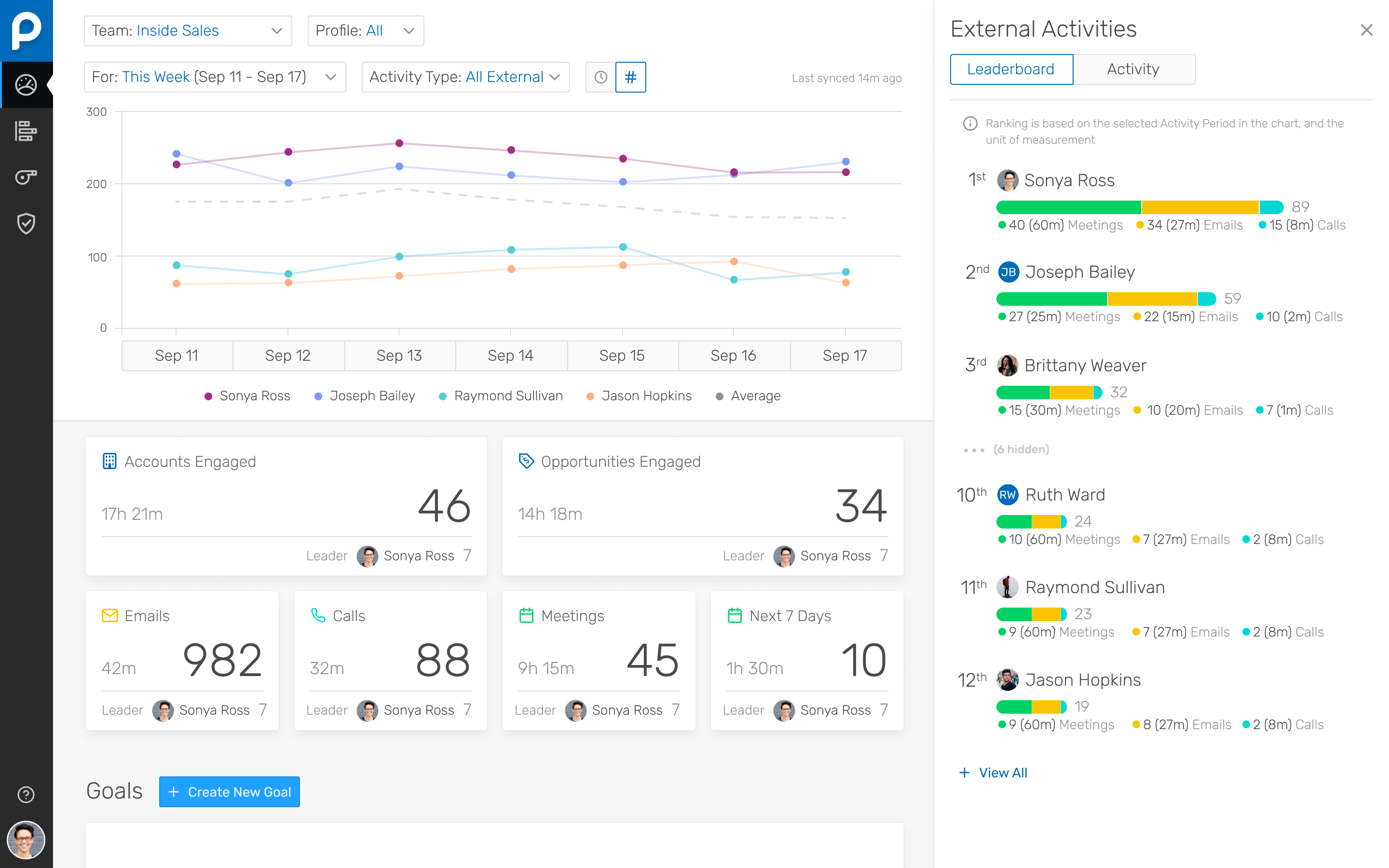
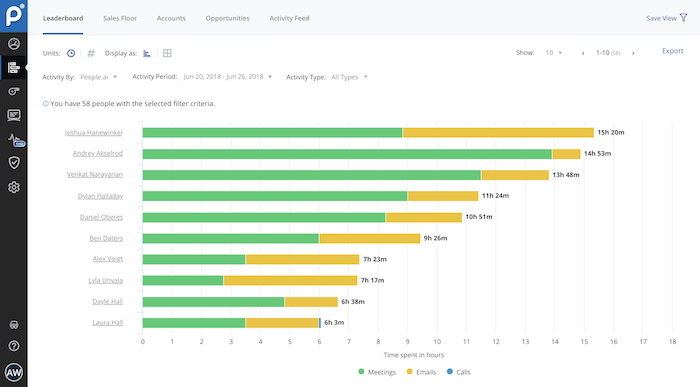
Screenshot of Screenshot of Screenshot of