NinjaOne automates the hardest parts of IT, delivering visibility, security, and control over endpoints. The NinjaOne endpoint management platform increases productivity for IT teams and managed service providers, and comes with unlimited onboarding, training, and support.
N/A
SolarWinds Engineer's Toolset
Score 9.4 out of 10
N/A
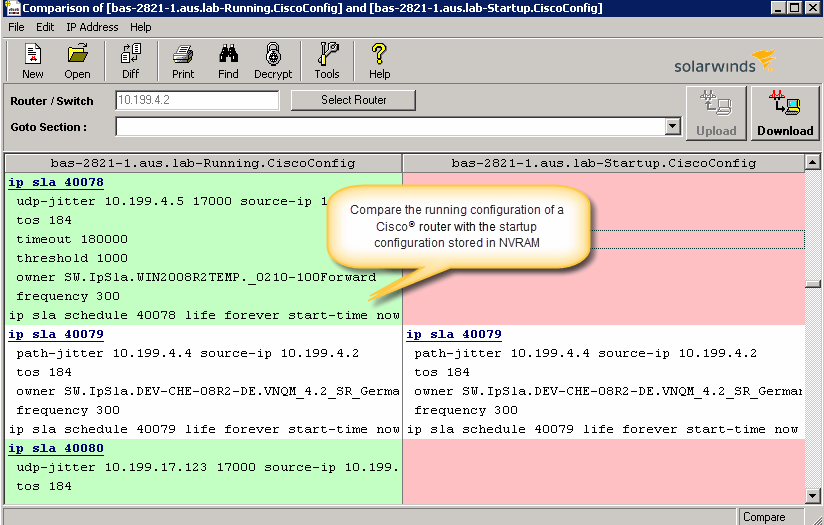
SolarWinds® Engineer’s Toolset (ETS) helps users monitor and troubleshoot a network with over 60 tools for network management. ETS allows users to monitor and receive alerts in real time on network availability and health, and perform network diagnostics for faster troubleshooting and resolution of complex
network issues. With ETS users can deploy an array of network discovery tools including Port Scanner, Switch Port Mapper or advanced Subnet Calculator, manage Cisco®
devices with specialized…
$1,585
Per Instance
Pricing
NinjaOne
SolarWinds Engineer's Toolset
Editions & Modules
No answers on this topic
One Time Price
$1,585
Per Instance
Offerings
Pricing Offerings
NinjaOne
SolarWinds Engineer's Toolset
Free Trial
Yes
Yes
Free/Freemium Version
No
No
Premium Consulting/Integration Services
No
No
Entry-level Setup Fee
No setup fee
No setup fee
Additional Details
NinjaOne is a subscription service with a charge rate per month. For more detailed pricing information, contact NinjaOne directly to request a demo or to start 14-days free trial.
—
More Pricing Information
Community Pulse
NinjaOne
SolarWinds Engineer's Toolset
Features
NinjaOne
SolarWinds Engineer's Toolset
Monitoring Tasks
Comparison of Monitoring Tasks features of Product A and Product B
NinjaOne
8.9
Ratings
18% above category average
SolarWinds Engineer's Toolset
-
Ratings
Remote monitoring
8.80 Ratings
00 Ratings
Network device monitoring
7.50 Ratings
00 Ratings
Activity Monitoring
8.40 Ratings
00 Ratings
Management Tasks
Comparison of Management Tasks features of Product A and Product B
Whether you are an MSP who needs an all-in-one solution for device management, or you are in-house IT who needs a single pane of glass to manage your devices, NinjaOne fits the bill as a top tier solution. The amount of flexibility in scaling to your organization's size is impressive as the platform can be as simple as just using it for remote access, all the way up to deploying comprehensive automation packages in the form of a compound condition that bases its actions on the results of other conditions or scripts.
[SolarWinds Engineer's Toolset is] a great tool for monitoring database servers, highly recommended. The very good thing is that it keeps the history for two weeks, and you can see the time slice for all the server activities. Helps a lot to identify the memory and CPU bottlenecks, research blocking issues and kill the sessions, if necessary.
With Ninja, we are able to have all of our IT tools and management under one umbrella making it extremely easy to keep an eye on all of our servers and workstations.
Their support team is OUTSTANDING and gives quick and helpful answers to our questions. Our account manager calls us personally to review any issues and ensure we are running smoothly.
Ninja gives us automated patch management of our important devices, and has a nice security log to see what's been done.
The unifying component that is intended to be the initial interface to the tools seems clunky. I prefer to start the tools individually rather than using it.
The port scanner could use some improvements to make it easier to use.
I have not had any real issues with NinjaOne and as long as it keeps doing what it is meant to do, I do not plan on looking elsewhere. I need software to be stable and NinjaOne is stable.
Ninja's interface is clean and simple. Overall usability from an interface perspective is good. Some items, policies and scripting for instance, are a bit cumbersome and it's really not clear how to implement with a best practice mind-site. Ninja RMM got the job done for us but as we pushed our needs more into automation and efficiency we felt it wasn't keeping up with our speed of growth. There is definitely usability in the product, and it will get the job done, but there are other RMM's out there that fit better in our business.
Support has been very responsive and my account rep Brian K. has communicated with me continuously making sure we had everything we need. Not like other MDMs where they sign you up and that's the last you hear from them. NinjaOne makes sure you use the product to its best application and you are successful and continue as the product features grow.
Easy to learn and all of the functions and features were easy to learn. Once I started learning all of the features and functions, it made my everyday tasks much easier and more productive. The user interface is very easy to use. If I did have any questions, the Ninja Dojo was a big help.
It was nice and self paced learning. The sections were easy to understand and the functionality was very worthwhile. The online training was very easy to learn and intuitive. I did not feel the need to ask for any clarification or assistance with any of the sections. I am still learning a lot of the functions but fined it very easy to use.
We used Auto Task and Datto. We felt that NinjaOne was a more user friendly platform. There was a large training curve for new employees to learn to use Auto Task. We have noticed a shortened training curve for NinjaOne. We really like the layout and the Ninja Academy.
These tools complement the Engineer's Toolset. They are excellent at detecting most issues and at keeping the network monitored and protected. However, when it comes time to dig into an issue, especially a hard to fix intermittent issue, these products lack the granularity of monitoring needed for these types of issues. Having said that the toolset is not made to do full time enterprise level monitoring. With these tools and the toolset I am able to have a more complete view of the network and deliver higher levels of service and quicker responses to issues.
NinjaOne is a monthly payment with no commitment, this is much better suited to an MSP than other competitors that try to wrap you up into a 3-5-year contract. As an MSP, we could lose a client at any moment and it sucks to be stuck in a contract where we can't lower our agent counts.
NinjaOne helps my techs be more efficient and productive. Saving time and money.