NinjaOne vs. Veritas NetBackup

Overview
ProductRatingMost Used ByProduct SummaryStarting Price
NinjaOne
Score 9.0 out of 10
N/A
NinjaOne automates the hardest parts of IT, delivering visibility, security, and control over endpoints. The NinjaOne endpoint management platform increases productivity for IT teams and managed service providers, and comes with unlimited onboarding, training, and support.N/A
Veritas NetBackup
Score 7.6 out of 10
N/A
Veritas NetBackup is a backup-as-a-service product providing data recovery and protection for enterprises. It supports physical, virtual, and cloud systems and features an automated disaster recovery capabilities.N/A
Pricing
NinjaOneVeritas NetBackup
Editions & Modules
No answers on this topic
Offerings
Pricing Offerings
NinjaOneVeritas NetBackup
Free Trial
YesNo
Free/Freemium Version
NoNo
Premium Consulting/Integration Services
NoNo
Entry-level Setup FeeNo setup feeNo setup fee
Additional DetailsNinjaOne is a subscription service with a charge rate per month. For more detailed pricing information, contact NinjaOne directly to request a demo or to start 14-days free trial.
More Pricing Information
Community Pulse
NinjaOneVeritas NetBackup
Considered Both Products
NinjaOne
Chose NinjaOne
We came from Manage Engine and it is a night and day difference. I would never imagine going back after working with NinjaOne

Chose NinjaOne
We have used many RMM providers and the UI, cost and experience has all been better with NinjaOne.

Datto wasn’t able to improve anything in the three years that we use them, in fact they were sold to and immediately started trying to sell us the other services they had.
Chose NinjaOne
this integrates with Splashtop and works well. I am happy with the integration and prefer it over Teamviewer. This is included in our subscription and works with a few clicks. Users can accept / deny the request and if no one is there we can still remote in. Makes servicing …
Chose NinjaOne
NinjaOne is very simple to use and navigate. There are fewer layers of pages to navigate to get to what you want. This is a time saver and it makes it easier to find what you are looking for.
Chose NinjaOne
NinjaOne feels like a smaller company, and I mean that in a good way. Their support is quick and helpful and because of our size we are escalated directly to their level 2 support. Our account manager is eager to assist and get ideas/issues to the right people and put those …
Chose NinjaOne
We liked the per device pricing and the UI of the platform most when we decided to leave Datto RMM. We believe that NinjaOne's constant development to improve the product has been really helpful. The quality of the community posts with scripts we can use to automate things …
Chose NinjaOne
Prior to NinjaOne, our IT management was a blank slate. We knew we needed something, and we wanted to ensure we were making the best decision for our organization. We attended demos and talked with sales reps, sales engineers, etc. At the end of the day, it was the relationship …
Chose NinjaOne
NinjaOne isn't the cheapest or the most expensive. However, it has the most functionality out of the other solutions that we looked at.
Chose NinjaOne
So far NinjaOne has been more stable to use vs the items listed above. It has been easier to setup and go. Easy to setup end user equipment with a quick setup file that an end user can run if you asked them to. The portal is quick to update and quick to allow you to start …
Chose NinjaOne
NinjaOne has a much better web interface than Automate, in terms of both usability and function. The endpoint search function in NinjaOne is very good with results, and each endpoint agent page has a great overview of the endpoints health, NinjaOne event history, etc. The …
Chose NinjaOne
About 2 years ago we evaluated about a dozen similar utilities that are all aimed at managing and maintaining endpoint from several customers at the same time. At the end of the evaluation, NinjaOne was chosen based on several criteria specifically targeting the use case that …
Chose NinjaOne
Mainly used them to try and push out installs for NinjaOne. But NinjaOne has their own way of pushing out the installs through AD and it made my life so much easier getting this deployed.
Chose NinjaOne
NinjaOne offers the same feature set that the big players offer, for a fraction of the price. when looking at RMM solutions, there are several large companies out there that claim that they do everything well, but what we have found is that they often do many things, but not …
Chose NinjaOne
NinjaOne feels like it is way beyond its competitors. Their UI is fantastic, with the exception of no Dark Mode. It is very responsive and easy to navigate. Also, NinjaOne bills monthly with no contract commitment. This makes it much more accessible to smaller and medium-sized …
Chose NinjaOne
The systems screen on NinjaOne is simpler and has more information. You can customize details/columns per technician. CMD, PowerShell, registry emulate the windows look and feel. Pulseway just gives you a big white page to type commands and it doesn’t respond as seamlessly. …
Chose NinjaOne
NinjaOne has what it takes and is very cost effective for what it provides an IT team. We would not be able to do what we do without it.

Cost comparison wise, NinjaOne is the best option we found that has such a wide breadth of capabilities like it does.
Chose NinjaOne
Ninja does a few things better than Goverlan Reach, like the integrated ticketing. But honestly, Goverlan was much more user-friendly for everything else. N-able has a lot of features, but they're not easy to use, if you can even find them.
Chose NinjaOne
NinjaOne has more overall features than these competitors bundled in their package. Both of these other products have separate add-ons that will accomplish the additional features that NinjaOne bundles in. While it seems that both may be slightly more powerful when it comes to …
Chose NinjaOne
Ninja is much easier to use that anything I've worked with in the past. We selected Ninja because we felt the learning curve for the team would be the fastest, and the roadmap for the product shows its evolving quickly. Can't say that for many of the other platforms I've …
Chose NinjaOne
NinjaOne isn't as versatile as N-able. NinjaOne doesn't have as many features or settings as N-able.
N-able is far more complex, which isn't always a good thing. For vary large-scale MSPs, it might be a better choice. However, for a small to medium-sized team, NinjaOne is an …
Chose NinjaOne
NinjaOne was cheaper and had a more robust platform. Other competitors didn't offer the same number of features or customer support.
Chose NinjaOne
Like all software you have certain features that you don't get in others, specific software like Zoho Assist give great remote access, probably better then Teamviwer (1 of NinjaOne's remote Access Solutions) however you have to have a contract and license for each one and the …
Chose NinjaOne
NinjaOne blows Connectwise out of the water. You can take a college kid right out of school and put them in front of NinjaOne and they will have no issues at all. IT is that easy to use! Connectwise on the other hand uses an academy to get you trained and ready. Yeah if you …
Veritas NetBackup
Chose Veritas NetBackup
Better integration with old and cloud technologies, version stability, and market reputation.
Chose Veritas NetBackup
Pricing is competitive [with] other products in the market and it meets all the requirements of medium business like us. Very easy to learn how to use it, so it is easy for our new team members to familiarize [themselves with] the software. Easy in restoring the files or data.
Chose Veritas NetBackup
From a stablity standopoint against bigger vendors , Veritas NetBackup has a upper hand , one being a pioneer in this field with vast number of years of experience.
Chose Veritas NetBackup
Veritas is totally independent of hardware like other solutions and its licenses are very flexible.
Chose Veritas NetBackup
Veritas kept in higher tier as there is a huge amount of plugins available for maintaining different database workloads like DB2, MYSQL, SQL Server, Sharepoint, SAP, Oracle, only Veritas supports LAN and SAN level configurations for VMware workloads, only Veritas NetBackup …
Chose Veritas NetBackup
It is an enterprise solution that has great compatibility with the cloud.
Chose Veritas NetBackup
The software versus the appliance is about the same, the appliance is more convenient in the fact that it is an all in one solution. Using veritas netbackup you have to build out a backup environment with multiple media servers and a storage target for offloading to disk or …
Chose Veritas NetBackup
CrashPlan has the capability to sync data with a cloud storage source. This is great for a workstation where data is typically only for one user. However, Netbackup does a much better job for maintaining multiple levels of file restores for Enterprise Servers. Netbackup has …
Chose Veritas NetBackup
Veritas NetBackup provides a far better backup solution in terms of the available options and configurability of backups.
It's a more advanced backup tool compared to Data Protector.
Chose Veritas NetBackup
They all have similar features. We have been using Netbackup long before i joined this team.
Chose Veritas NetBackup
We moved from NetBackup to Veeam in mid-2017 largely because of a significant data center migration. Veeam was very quick to configure, compressed the data streams to move entire servers and storage arrays quickly and without disrupting business network use, and costs …
Chose Veritas NetBackup
As stated earlier the system is great for our needs I believe that every system needs to be evaluated for individual requirements to make sure that they are bet to fill the business need. Is Netebackup the best. NO, Is it the worst No. It meets our needs and does its job.
Chose Veritas NetBackup
While comparing NetBackup (NB) to Metalogix SharePoint Backup we found NB to have more features and flexibility than Metalogix SharePoint Backup. The licensing price was also better than what Metalogix SharePoint Backup had to offer.
Chose Veritas NetBackup
Backup solutions are largely dependent on your needs--one size typically doesn't fit all. In an all virtual environment, I would not choose NBU--I would choose Veeam. But in an environment with several different data types, I wouldn't hesitate to try out NBU.
Chose Veritas NetBackup
We selected NBU based solely on cost. When comparing NBU and Commvault, NBU was 10k cheaper in the end and contained roughly the same features as Commvault.
Chose Veritas NetBackup
NetBackup is a tried and proven candidate which always appears in Gartner's magic quadrant. We've been using it without any major issues for a very long time. Symantec's 24/7 support has always been there whenever we've experienced issues and we always have access to our …
Features
NinjaOneVeritas NetBackup
Monitoring Tasks
Comparison of Monitoring Tasks features of Product A and Product B
NinjaOne
8.9
Ratings
18% above category average
Veritas NetBackup
-
Ratings
Remote monitoring8.80 Ratings00 Ratings
Network device monitoring7.50 Ratings00 Ratings
Activity Monitoring8.40 Ratings00 Ratings
Management Tasks
Comparison of Management Tasks features of Product A and Product B
NinjaOne
8.6
Ratings
14% above category average
Veritas NetBackup
-
Ratings
Patch Management8.90 Ratings00 Ratings
Policy-based automation8.80 Ratings00 Ratings
Data Center Backup
Comparison of Data Center Backup features of Product A and Product B
NinjaOne
-
Ratings
Veritas NetBackup
7.9
Ratings
5% below category average
Universal recovery00 Ratings9.00 Ratings
Instant recovery00 Ratings7.00 Ratings
Recovery verification00 Ratings9.00 Ratings
Business application protection00 Ratings7.00 Ratings
Multiple backup destinations00 Ratings10.00 Ratings
Incremental backup identification00 Ratings10.00 Ratings
Backup to the cloud00 Ratings8.00 Ratings
Deduplication and file compression00 Ratings5.00 Ratings
Snapshots00 Ratings10.00 Ratings
Flexible deployment00 Ratings7.00 Ratings
Management dashboard00 Ratings4.00 Ratings
Platform support00 Ratings10.00 Ratings
Retention options00 Ratings9.00 Ratings
Encryption00 Ratings6.00 Ratings
Enterprise Backup
Comparison of Enterprise Backup features of Product A and Product B
NinjaOne
-
Ratings
Veritas NetBackup
8.4
Ratings
3% above category average
Continuous data protection00 Ratings10.00 Ratings
Replication00 Ratings6.00 Ratings
Operational reporting and analytics00 Ratings8.00 Ratings
Multi-location capabilities00 Ratings8.00 Ratings
Ransomware Recovery00 Ratings10.00 Ratings
Best Alternatives
NinjaOneVeritas NetBackup
Small Businesses
Action1
Action1
Score 9.5 out of 10
Cove Data Protection
Score 9.9 out of 10
Medium-sized Companies
Action1
Action1
Score 9.5 out of 10
Druva Security Cloud
Score 9.7 out of 10
Enterprises
TeamViewer
TeamViewer
Score 8.5 out of 10
Druva Security Cloud
Score 9.7 out of 10
All AlternativesView all alternativesView all alternatives
User Ratings
NinjaOneVeritas NetBackup
Likelihood to Recommend
9.4
(0 ratings)
8.0
(0 ratings)
Likelihood to Renew
9.9
(0 ratings)
9.0
(0 ratings)
Usability
8.0
(0 ratings)
9.0
(0 ratings)
Support Rating
9.1
(0 ratings)
10.0
(0 ratings)
User Testimonials
NinjaOneVeritas NetBackup
Likelihood to Recommend
Whether you are an MSP who needs an all-in-one solution for device management, or you are in-house IT who needs a single pane of glass to manage your devices, NinjaOne fits the bill as a top tier solution. The amount of flexibility in scaling to your organization's size is impressive as the platform can be as simple as just using it for remote access, all the way up to deploying comprehensive automation packages in the form of a compound condition that bases its actions on the results of other conditions or scripts.
Read full review
Backuping complex infrastructures (VMware ESXi, Microsoft Hyper-V, Oracle, and MSSQL databases, etc.). Regarding product price, it's not the most affordable for small businesses, but it can handle nearly all infrastructures and systems. With good training people, it's a Swiss knife of company data backup, no stress about keeping backups in a safe place!
Read full review
Pros
  • With Ninja, we are able to have all of our IT tools and management under one umbrella making it extremely easy to keep an eye on all of our servers and workstations.
  • Their support team is OUTSTANDING and gives quick and helpful answers to our questions. Our account manager calls us personally to review any issues and ensure we are running smoothly.
  • Ninja gives us automated patch management of our important devices, and has a nice security log to see what's been done.
Read full review
  • The activity monitor allows me to easily see if there are issues with backup jobs or the environment.
  • Community support for NBU is very good. I've been able to research issues with ease and find other users that have been in similar situations.
  • Policy management for backups is very easy and there are lots of options.
Read full review
Cons
  • NinjaOne does support Mac, however I would like to have more options for automation and scheduled task on Mac devices.
  • I would like it if NinjaOne also provided an MDM solution.
  • It would be nice is NinjaOne could integrate a PAM solution as well.
Read full review
  • Admin console
  • SAP HANA application Templates should also be introduced instead of scripting
  • SAP MAXDB application template should also be introduced
  • Tape Management need improvement
  • MOBILE connectivity is missing
  • Admin console is so simple it should be more funcky or stylish
  • Small database should also be considered for backup
Read full review
Likelihood to Renew
I have not had any real issues with NinjaOne and as long as it keeps doing what it is meant to do, I do not plan on looking elsewhere. I need software to be stable and NinjaOne is stable.
Read full review
Veritas continues to keep up with the backup game. There virtual machine backup capabilities are now top notch, and I believe they will prove valuable when our cloud presence demands a backup solution.
Read full review
Usability
Ninja's interface is clean and simple. Overall usability from an interface perspective is good. Some items, policies and scripting for instance, are a bit cumbersome and it's really not clear how to implement with a best practice mind-site. Ninja RMM got the job done for us but as we pushed our needs more into automation and efficiency we felt it wasn't keeping up with our speed of growth. There is definitely usability in the product, and it will get the job done, but there are other RMM's out there that fit better in our business.
Read full review
NetBackup provides a complete, flexible data protection solution for a variety of platforms. The platforms include Microsoft Windows, UNIX, and Linux systems. NetBackup lets you back up, archive, and restore files, folders or directories, and volumes or partitions that reside on your computer.
During a backup or an archive, the client sends backup data across the network to a NetBackup server. The NetBackup server manages the type of storage that is specified in the backup policy. During a restore, users can browse, then select the files and directories to recover.
Read full review
Reliability and Availability
Availability is very good
Read full review
No answers on this topic
Performance
The software loads quickly for the most part
Read full review
No answers on this topic
Support Rating
Support has been very responsive and my account rep Brian K. has communicated with me continuously making sure we had everything we need. Not like other MDMs where they sign you up and that's the last you hear from them. NinjaOne makes sure you use the product to its best application and you are successful and continue as the product features grow.
Read full review
Veritas support is very prompt and the acknowledgement/followup is hugely appreciable. They go deep to the issue and provide you satisfactory solutions. Creating ticket in portal is also very easy, does not adhere to severity priority, even if Sev2 response is very quick.
Read full review
In-Person Training
Easy to learn and all of the functions and features were easy to learn. Once I started learning all of the features and functions, it made my everyday tasks much easier and more productive. The user interface is very easy to use. If I did have any questions, the Ninja Dojo was a big help.
Read full review
No answers on this topic
Online Training
It was nice and self paced learning. The sections were easy to understand and the functionality was very worthwhile. The online training was very easy to learn and intuitive. I did not feel the need to ask for any clarification or assistance with any of the sections. I am still learning a lot of the functions but fined it very easy to use.
Read full review
No answers on this topic
Implementation Rating
Use of Organizations and locations
Read full review
No answers on this topic
Alternatives Considered
We used Auto Task and Datto. We felt that NinjaOne was a more user friendly platform. There was a large training curve for new employees to learn to use Auto Task. We have noticed a shortened training curve for NinjaOne. We really like the layout and the Ninja Academy.
Read full review
The software versus the appliance is about the same, the appliance is more convenient in the fact that it is an all in one solution. Using veritas netbackup you have to build out a backup environment with multiple media servers and a storage target for offloading to disk or offloading to tape. Using the appliance versus using just the software means you don't have to build out an environment as it comes with the appliance.
Read full review
Scalability
Overall the software is very reliable
Read full review
No answers on this topic
Return on Investment
  • NinjaOne is a monthly payment with no commitment, this is much better suited to an MSP than other competitors that try to wrap you up into a 3-5-year contract. As an MSP, we could lose a client at any moment and it sucks to be stuck in a contract where we can't lower our agent counts.
  • NinjaOne helps my techs be more efficient and productive. Saving time and money.
Read full review
  • When data is lost, we are able to quickly restore and return to normal business.
  • When an application upgrade fails we are able to go back to a known good state.
  • Large restores are slow at times, so be sure to plan for this in your recovery point objective.
Read full review
ScreenShots

NinjaOne Screenshots

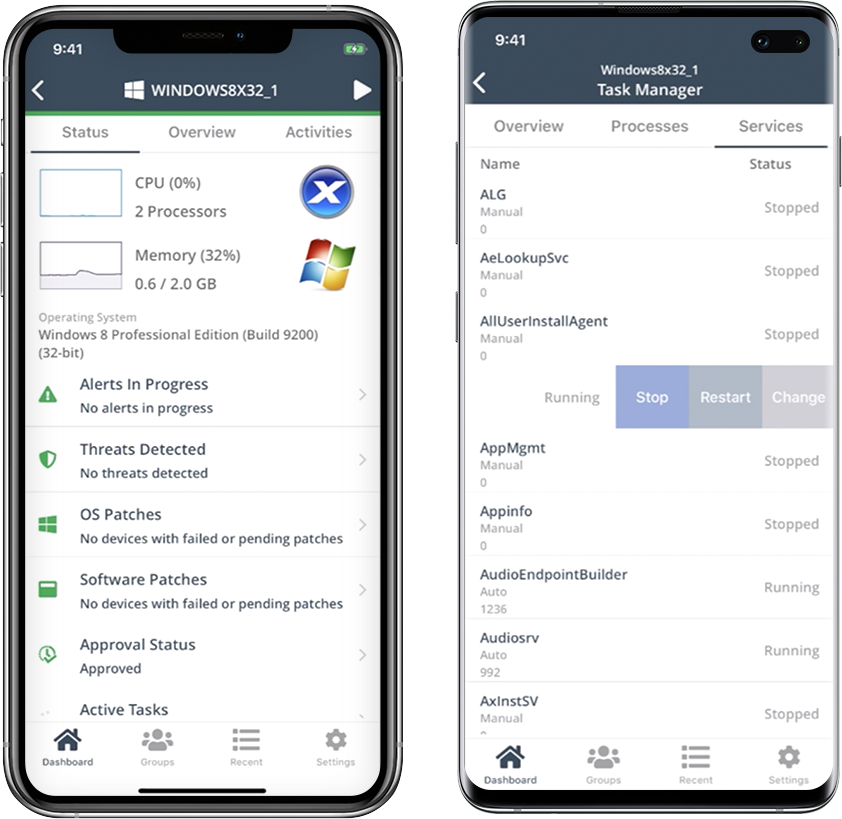
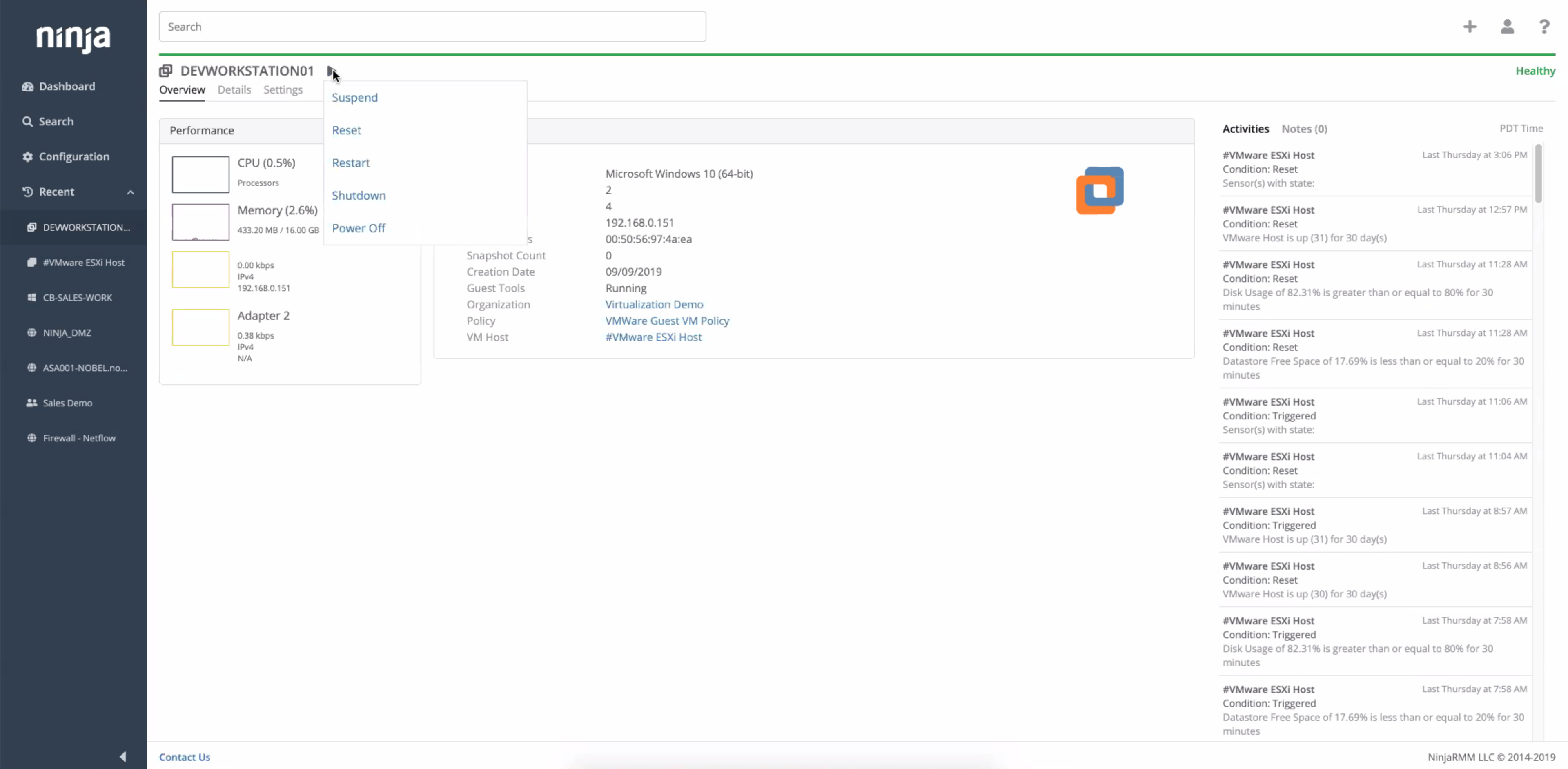
Screenshot of the NinjaRMM dashboardScreenshot of the NinjaRMM mobile appScreenshot of NinjaRMM automationScreenshot of NinjaRMM device detailsScreenshot of NinjaRMM network monitoring - NetFlowScreenshot of NinjaRMM virtual machine monitoring