Chose Ooma Office
When we selected Ooma, it had the better feature set, reliability, and ease of implementation.

| Product | Rating | Most Used By | Product Summary | Starting Price |
|---|---|---|---|---|
 Ooma Office | N/A | For businesses of all sizes, Ooma provides advanced voice and collaboration features which they describe as flexible and scalable. With plans starting at $19.95 per user per month, Ooma Office is available without contracts or long-term commitments so as to make it easy for a small business to scale its office phone system with Ooma as its business grows. Ooma Office features include: Unlimited Calling in U.S., Canada, Mexico and Puerto Rico Free Local… | $9.95 per month | |
 Sprinklr Service | N/A | Sprinklr Service is a cloud-native unified customer service platform powered by AI that enables customer and agent experience across 30+ digital, social and voice channels, and delivers real-time insights. Enables customers to interact with a brand on their preferred channel for consistent brand experience. Empowers agents with unified/360 customer view and recommends the most relevant responses with AI to improve agent productivity and experience.… | $249 per month per seat |
| Ooma Office | Sprinklr Service | |||||||||||||||
|---|---|---|---|---|---|---|---|---|---|---|---|---|---|---|---|---|
| Editions & Modules |
|
| ||||||||||||||
| Offerings |
| |||||||||||||||
| Entry-level Setup Fee | $19.95 per user/month | Optional | ||||||||||||||
| Additional Details | Ooma Office offers plans starting at $19.95 per user/month with no contracts, ever. | Omnichannel Automation, AI and Insights Reporting | ||||||||||||||
| More Pricing Information | ||||||||||||||||
| Ooma Office | Sprinklr Service | |
|---|---|---|
| Considered Both Products |  Ooma Office  Steve Parker Chief Risk Advisor Chose Ooma Office RingCentral is far more difficult to set up and costs more (monthly).  Matthew Perrault Business Owner/Operator Chose Ooma Office Easier to use, more features, and definitely more Bang for your $  Terry Mills Regional Vice President Chose Ooma Office I used a land line company for years and then switched to a VOIP company. When I learned how much better Ooma was, I was really skeptical at first, but they allowed me to try their service. Once I did, there was no comparison. I switched to Ooma and have never looked back.  Jennifer Heagle Director of Coworking Chose Ooma Office So much better, easier to use and less expensive! Overall better product. Support is heads and tails above what Nextiva pretends to offer its customers! I will save over $6000 my first year alone with Ooma. Thank you for making such a great product. You will help small …  David Buckley Senior Pastor Chose Ooma Office We only used our local phone company. Compared to our local phone company, Ooma Office beats it hands down. It is much cheaper. It has an app for my phone that works brilliantly. It is user-friendly. We are able to take calls both in the office and when we are mobile. The …  Hillary Louarti Manager Chose Ooma Office We went over to Ooma [Office] after having had Intermedia for several years. Intermedia was good, but they were due for an update on many of their systems, which they did after we left. With Ooma [Office], we have our hold music and other basic, easy to use options that fit …  Josh Bicknell Owner, Educator Chose Ooma Office This is my first experience with a VOIP phone system, but previously I had tried to use AT&T for my business line, although the setup never even happened because of misinformation I was given. In the end I'm glad I ended up with Ooma instead because it has been much more …  Tom Von Braunsberg President Chose Ooma Office The Ooma product offer significantly more features a small business at a much lower price. The customer service is excellent. We are treated the same as if we were their largest customer. The larger communication companies don’t seem to be too interest in the small business … | Sprinklr Service  Alagu Sathappan IT Emerging Technology Manager Chose Sprinklr Service Repution Twilio Avaya  Robert van Kasteel Account Manager (Acer & Predator) Chose Sprinklr Service We also use Meltwater in our BU, and the good thing about Sprinklr is that you can actually compare your data numbers with the key word searches. Meltwater is limited in that it doesn't offer a wide range of services. Although the graphs and some other analysis functions on …  Alexandra Gambardella Video Content & Community Manager Chose Sprinklr Service I've never used any Sprinklr Modern Care alternatives, but when it comes to communicating directly with customers, I much prefer using Sprinklr Modern Care over contact form and email interaction.  Daved Artemik Solutions Architect Chose Sprinklr Service Prior to Sprinklr Modern Care, we used vBulletin and a custom repository to address the community needs of our customers. Keeping the experience user friendly was a key point on our needs list and our custom solutions and vBulletin forums were only positive experiences for our …  Steve MacLaughlin Director, Idea Lab Chose Sprinklr Service Evaluated and considered tools like uservoice, Lithium, Jive, and SuggestionBox. Ultimately, being able to quickly provision the system and test drive things in real-world situations really influenced the decision. |
| Ooma Office | Sprinklr Service | ||||||||||||||||||||||||||||||||||||||||||
|---|---|---|---|---|---|---|---|---|---|---|---|---|---|---|---|---|---|---|---|---|---|---|---|---|---|---|---|---|---|---|---|---|---|---|---|---|---|---|---|---|---|---|---|
| Cloud PBX |
| ||||||||||||||||||||||||||||||||||||||||||
| Call Management |
| ||||||||||||||||||||||||||||||||||||||||||
| VoIP system collaboration |
| ||||||||||||||||||||||||||||||||||||||||||
| Mobile apps |
| ||||||||||||||||||||||||||||||||||||||||||
| Contact Center Software |
| ||||||||||||||||||||||||||||||||||||||||||
| Workforce Optimization (WFO) |
|
| Ooma Office | Sprinklr Service | |
|---|---|---|
| Small Businesses |  CloudTalk Score 7.2 out of 10 | CloudTalk Score 7.2 out of 10 |
| Medium-sized Companies | CloudTalk Score 7.2 out of 10 | CloudTalk Score 7.2 out of 10 |
| Enterprises |  Cisco Business Edition 7000 (discontinued) Score 9.0 out of 10 |  Google Cloud Contact Center AI Score 7.0 out of 10 |
| All Alternatives | View all alternatives | View all alternatives |
| Ooma Office | Sprinklr Service | |
|---|---|---|
| Likelihood to Recommend | 9.0 (0 ratings) | 9.0 (0 ratings) |
| Likelihood to Renew | 9.1 (0 ratings) | 7.5 (0 ratings) |
| Usability | 8.8 (0 ratings) | 9.0 (0 ratings) |
| Availability | - (0 ratings) | 9.9 (0 ratings) |
| Performance | - (0 ratings) | 9.9 (0 ratings) |
| Support Rating | 8.1 (0 ratings) | 9.1 (0 ratings) |
| In-Person Training | - (0 ratings) | 10.0 (0 ratings) |
| Implementation Rating | 8.0 (0 ratings) | 9.0 (0 ratings) |
| Ooma Office | Sprinklr Service | |
|---|---|---|
| Likelihood to Recommend |
Hillary Louarti Manager |
|
| Pros |
|
 Laura Thomas Social Media Coordinator |
| Cons |
|
|
| Likelihood to Renew |
|
Steve MacLaughlin Director, Idea Lab |
| Usability |
|
|
| Reliability and Availability | No answers on this topic |
Steve MacLaughlin Director, Idea Lab |
| Performance | No answers on this topic |
|
| Support Rating |
|
|
| In-Person Training | No answers on this topic |
|
| Implementation Rating |
|
Steve MacLaughlin Director, Idea Lab |
| Alternatives Considered |
|
|
| Return on Investment |
 Wendy White Facility Manager |
Alexandra Gambardella Video Content & Community Manager |
| ScreenShots | Ooma Office Screenshots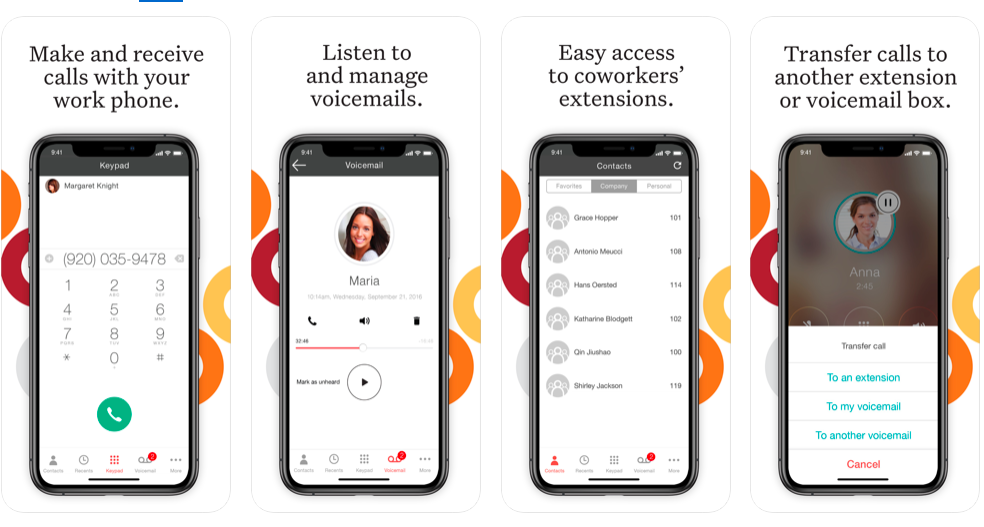    |