PlanSwift, by ConstructConnect vs. Viewpoint ProContractor

Overview
ProductRatingMost Used ByProduct SummaryStarting Price
PlanSwift, by ConstructConnect
Score 9.0 out of 10
N/A
PlanSwift is a quantity takeoff software for construction estimating. It features a drag-and-drop interface and automatically calculates material and labor estimations in exportable formats. PlanSwift was acquired by ConstructConnect in the middle of 2018.
$1,595
per installation
ProContractor
Score 5.0 out of 10
N/A
ProContractor is a Cloud-Based Solution for Estimating, Project Management, and Accounting. Designed to improve visibility and profitability across construction businesses, ProContractor™ by Viewpoint is a cloud-based software solution for estimating, project management, and accounting. The user can manage the entire project lifecycle from bid to cash in a single solution. Built to be flexible and scalable, ProContractor allows users to go all-in-one, or build a complete solution…N/A
Pricing
PlanSwift, by ConstructConnectViewpoint ProContractor
Editions & Modules
Standard
$1,595
per installation
No answers on this topic
Offerings
Pricing Offerings
PlanSwift, by ConstructConnectProContractor
Free Trial
NoNo
Free/Freemium Version
NoNo
Premium Consulting/Integration Services
NoNo
Entry-level Setup FeeNo setup feeNo setup fee
Additional Details
More Pricing Information
Community Pulse
PlanSwift, by ConstructConnectViewpoint ProContractor
Considered Both Products
PlanSwift, by ConstructConnect
Chose PlanSwift, by ConstructConnect
I have not used any other software before! We've had PlanSwift and have stuck with it!

Chose PlanSwift, by ConstructConnect
PlanSwift by far is the superior product. Procore is used more universally in our area, but the drawings features by far surpass Procore. We work offline usually with our tablets. This would be the only way to go when working offline. The submittal process in Procore is much …
Chose PlanSwift, by ConstructConnect
Bluebeam is amazing and can accomplish any take-off needs, but you will spend much more time creating your conditions and take off items. It is not as user-friendly as PlanSwift.
OST (On screen takeoff). This product is by far better than PlanSwift, as it is amazingly easy to …
Chose PlanSwift, by ConstructConnect
Similar product outcome but as I am new to Bluebeam, I have found Planswift to be more user friendly.
Chose PlanSwift, by ConstructConnect
Biggest reason we changed software was the price. PlanSwift is also easy to customize.
Chose PlanSwift, by ConstructConnect
CostX was far too expensive. Vue360 doesn't have the functionality. Bluebeam Revu wasn't very intuitive and was all too hard to get it do what I needed. It was good for document control, but not very good for estimating.
ProContractor
Chose ProContractor
Previously our company used QuickBooks. We loved the ease of use, however we needed something with a certified payroll module. We have looked at migrating to Vista however the expense is quite large and the support we may or may not receive from Viewpoint is questionable. I …
Chose ProContractor
I have not used anything else. This is the first job, I have had to use something like this.
Chose ProContractor
Viewpoint ProContractor is way better than FedEx Cross Border. It is user friendly and helps keep me organized with everything I need all in one location. There is so much more I am able to do quickly, for my company and clients. Everything I need is in one system, rather …
Chose ProContractor
Procore beats Viewpoint hands down but can integrate well with Viewpoint Vista accounting software. I think that if the Viewpoint software was more flexible if they were more interested in patches, updates, and hearing customer feedback in the way the Procore does, that they …
Features
PlanSwift, by ConstructConnectViewpoint ProContractor
Human Resource Management
Comparison of Human Resource Management features of Product A and Product B
PlanSwift, by ConstructConnect
-
Ratings
Viewpoint ProContractor
9.1
Ratings
17% above category average
Employee demographic data00 Ratings10.00 Ratings
Employment history00 Ratings10.00 Ratings
Job profiles and administration00 Ratings10.00 Ratings
Workflow for transfers, promotions, pay raises, etc.00 Ratings7.80 Ratings
Organizational charting00 Ratings9.10 Ratings
Organization and location management00 Ratings7.80 Ratings
Compliance data (COBRA, OSHA, etc.)00 Ratings9.10 Ratings
Payroll Management
Comparison of Payroll Management features of Product A and Product B
PlanSwift, by ConstructConnect
-
Ratings
Viewpoint ProContractor
8.7
Ratings
13% above category average
Pay calculation00 Ratings9.00 Ratings
Support for external payroll vendors00 Ratings6.00 Ratings
Off-cycle/On-Demand payment00 Ratings7.80 Ratings
Benefit plan administration00 Ratings8.00 Ratings
Direct deposit files00 Ratings10.00 Ratings
Salary revision and increment management00 Ratings10.00 Ratings
Reimbursement management00 Ratings10.00 Ratings
Asset Management
Comparison of Asset Management features of Product A and Product B
PlanSwift, by ConstructConnect
-
Ratings
Viewpoint ProContractor
5.0
Ratings
36% below category average
Tracking of all physical assets00 Ratings5.00 Ratings
Reporting & Analytics
Comparison of Reporting & Analytics features of Product A and Product B
PlanSwift, by ConstructConnect
-
Ratings
Viewpoint ProContractor
6.8
Ratings
11% below category average
Dashboards00 Ratings9.10 Ratings
Standard reports00 Ratings7.00 Ratings
Custom reports00 Ratings5.00 Ratings
Data exportability00 Ratings6.00 Ratings
Construction Project & Field Management
Comparison of Construction Project & Field Management features of Product A and Product B
PlanSwift, by ConstructConnect
-
Ratings
Viewpoint ProContractor
7.2
Ratings
5% below category average
Plan distribution & viewing00 Ratings6.50 Ratings
Plan markups & sharing00 Ratings6.50 Ratings
Issue tracking & punchlists00 Ratings7.80 Ratings
Photo documentation00 Ratings7.80 Ratings
Jobsite reports00 Ratings5.00 Ratings
Document sharing00 Ratings2.10 Ratings
RFI tools00 Ratings7.80 Ratings
Collaboration & approvals00 Ratings7.40 Ratings
As-built drawings00 Ratings9.10 Ratings
Mobile app00 Ratings7.80 Ratings
Submittal design and management00 Ratings9.10 Ratings
Checklists00 Ratings7.80 Ratings
Meeting Minutes00 Ratings7.80 Ratings
Specifications00 Ratings9.10 Ratings
Change orders00 Ratings7.00 Ratings
Estimating
Comparison of Estimating features of Product A and Product B
PlanSwift, by ConstructConnect
-
Ratings
Viewpoint ProContractor
7.3
Ratings
9% below category average
Takeoff tools00 Ratings7.20 Ratings
Job costing00 Ratings6.00 Ratings
Cost databases00 Ratings7.00 Ratings
Cost calculator00 Ratings7.00 Ratings
Bid creation00 Ratings9.00 Ratings
Best Alternatives
PlanSwift, by ConstructConnectViewpoint ProContractor
Small Businesses
Bluebeam
Bluebeam
Score 9.1 out of 10
FollowUp CRM
FollowUp CRM
Score 10.0 out of 10
Medium-sized Companies
InEight
InEight
Score 8.3 out of 10
InEight
InEight
Score 8.3 out of 10
Enterprises
InEight
InEight
Score 8.3 out of 10
InEight
InEight
Score 8.3 out of 10
All AlternativesView all alternativesView all alternatives
User Ratings
PlanSwift, by ConstructConnectViewpoint ProContractor
Likelihood to Recommend
9.9
(0 ratings)
5.0
(0 ratings)
Likelihood to Renew
10.0
(0 ratings)
-
(0 ratings)
Usability
10.0
(0 ratings)
7.7
(0 ratings)
Availability
10.0
(0 ratings)
-
(0 ratings)
Performance
9.0
(0 ratings)
-
(0 ratings)
Support Rating
9.0
(0 ratings)
5.7
(0 ratings)
Implementation Rating
10.0
(0 ratings)
-
(0 ratings)
Product Scalability
9.0
(0 ratings)
-
(0 ratings)
User Testimonials
PlanSwift, by ConstructConnectViewpoint ProContractor
Likelihood to Recommend
I use PlanSwift for all my projects - it has just cut my time by a major percentage when it comes to quantifying a blueprint. At times there are funky areas, which are just hard to calculate on paper. It also has a great tool for scaling according to the dimensions, so if a drawing is missing a scale, you can always allot a scale by giving directions and then marking the points. I use this tool to check the scale as well - sometimes the drawings say something but the scale if off and you are left with an incorrect take-off. The dimension tool is a good way to check that. We don't use it much for pricing purposes though, we have found other software which are more robust when it comes to estimation, but we can see using PlanSwift for pricing sometime in the future.
Read full review
ProContractor is a great fit if you are looking to make the jump to an ERP (accounting) system that offers a higher level of complexity and controls than what QuickBooks or Xero have to offer. However, some of those increased features of accounting controls, vendor compliance management, project contracting and documentation, come at the cost of lost integrations. ProContractor is completely siloed and does not openly communicate with other platforms (project management, bank accounts, etc).
Read full review
Pros
  • PlanSwift can be used in basic functions (LF & SF takeoffs) very easily.
  • Has a quick interface for browsing and viewing.
  • Provides easy export to excel functions.
Read full review
  • They help keep me organized to see what job are coming up as well as ones in progress.
  • They help me see my bills that need to be paid to vendors.
  • They help me find invoices from us that still need to be paid.
Read full review
Cons
  • I occasionally have to load drawings at a very low DPI or I get error messages. The resulting poor resolution makes the drawing difficult to read.
Read full review
  • We just changed over to the cloud based system. In my opinion, it a disaster- It does not work
  • Program is not responding- complete company shutdown
  • Tech support is not responding
Read full review
Likelihood to Renew
Price and not wanting to learn another software
Read full review
No answers on this topic
Usability
Plan Swift is a user friendly program that makes takeoffs easy to perform. Not a whole lot of knowledge or skill is required.
Read full review
I give Viewpoint ProContractor a 10 out of 10. This system is user friendly to help keep me organized on a daily basis. I can find everything I need daily with this system. I am able to look up our subcontactors, vendors and clients I need to find quickly. I am able to see bills that I need to pay as well as invoices that I need to send out.
Read full review
Reliability and Availability
Never had an issue
Read full review
No answers on this topic
Performance
Plan Swift is only as fast as your computer system and internet
Read full review
No answers on this topic
Support Rating
I have called once needing support. I was asking about the "compare" tool to compare different versions. They told be about their desktop app and I downloaded. They answered quickly, you could understand them, and they took care of my question
Read full review
When something isn't working, you can contact support who will gladly remote into your system and try and work out a solution. Though several of the issues we encountered, they were not able to fix and had to submit for further review. While some were eventually rectified in updates, it takes time for these to be addressed and implemented.
Read full review
Implementation Rating
just know what use you want to get out of it. In our case it was just to do area take offs.
Read full review
No answers on this topic
Alternatives Considered
PlanSwift by far is the superior product. Procore is used more universally in our area, but the drawings features by far surpass Procore. We work offline usually with our tablets. This would be the only way to go when working offline. The submittal process in Procore is much better, but that would be the only thing we can see
Read full review
Previously our company used QuickBooks. We loved the ease of use, however we needed something with a certified payroll module. We have looked at migrating to Vista however the expense is quite large and the support we may or may not receive from Viewpoint is questionable. I say that becuase when Viewpoint stop servicing Viewpoint for Projects it was a very difficult time to even receive a hard drive with all of our documents that were stored within the service
Read full review
Scalability
Several of our departments can use the take off feature to assist them in their job responsibilities.
Read full review
No answers on this topic
Return on Investment
  • Huge return on investment with time savings compared to manual / hand take off.
  • Accurate and reliable numbers to use for your team.
  • Creating a single take off for all parties to use, in a single location, removing all guess work or confusion.
  • Inspires collaboration by having multiple people work within the same project within the software.
Read full review
  • Procontractor allows our company to visualize the site and figure out the problematic areas that can't be seen just from plans.
Read full review
ScreenShots

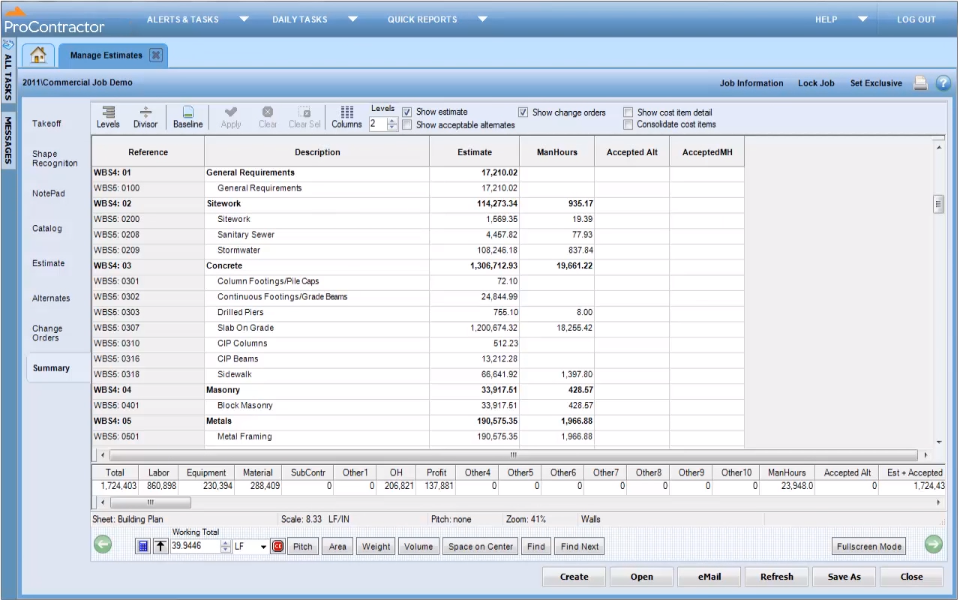
ProContractor Screenshots

Screenshot of