Pop vs. Planview ProjectPlace

Overview
ProductRatingMost Used ByProduct SummaryStarting Price
Pop
Score 9.7 out of 10
N/A
The makers of Screenhero now offer Pop, a remote collaboration platform with features like multiple mouse cursors, voice chat, and high definition screen resolution. Pop supports voice and video collaboration, screen sharing, multiplayer meetings, drawing and highlighting, and the ability to interact from a variety of devices (Mac, Windows, Linux, mobile devices, etc.).N/A
Planview ProjectPlace
Score 8.4 out of 10
N/A
Projectplace is a collaborative work management solution. The vendor says the product is built with teams of all sizes and complexity in mind, from virtual teams of five to entire global enterprises with tens of thousands of active users. It is also designed to incorporate waterfall and agile workflows.N/A
Pricing
PopPlanview ProjectPlace
Editions & Modules
No answers on this topic
Offerings
Pricing Offerings
PopPlanview ProjectPlace
Free Trial
NoYes
Free/Freemium Version
YesNo
Premium Consulting/Integration Services
NoNo
Entry-level Setup FeeNo setup feeNo setup fee
Additional Details
More Pricing Information
Community Pulse
PopPlanview ProjectPlace
Features
PopPlanview ProjectPlace
Project Management
Comparison of Project Management features of Product A and Product B
Pop
-
Ratings
Planview ProjectPlace
7.7
Ratings
1% above category average
Task Management00 Ratings8.40 Ratings
Resource Management00 Ratings6.70 Ratings
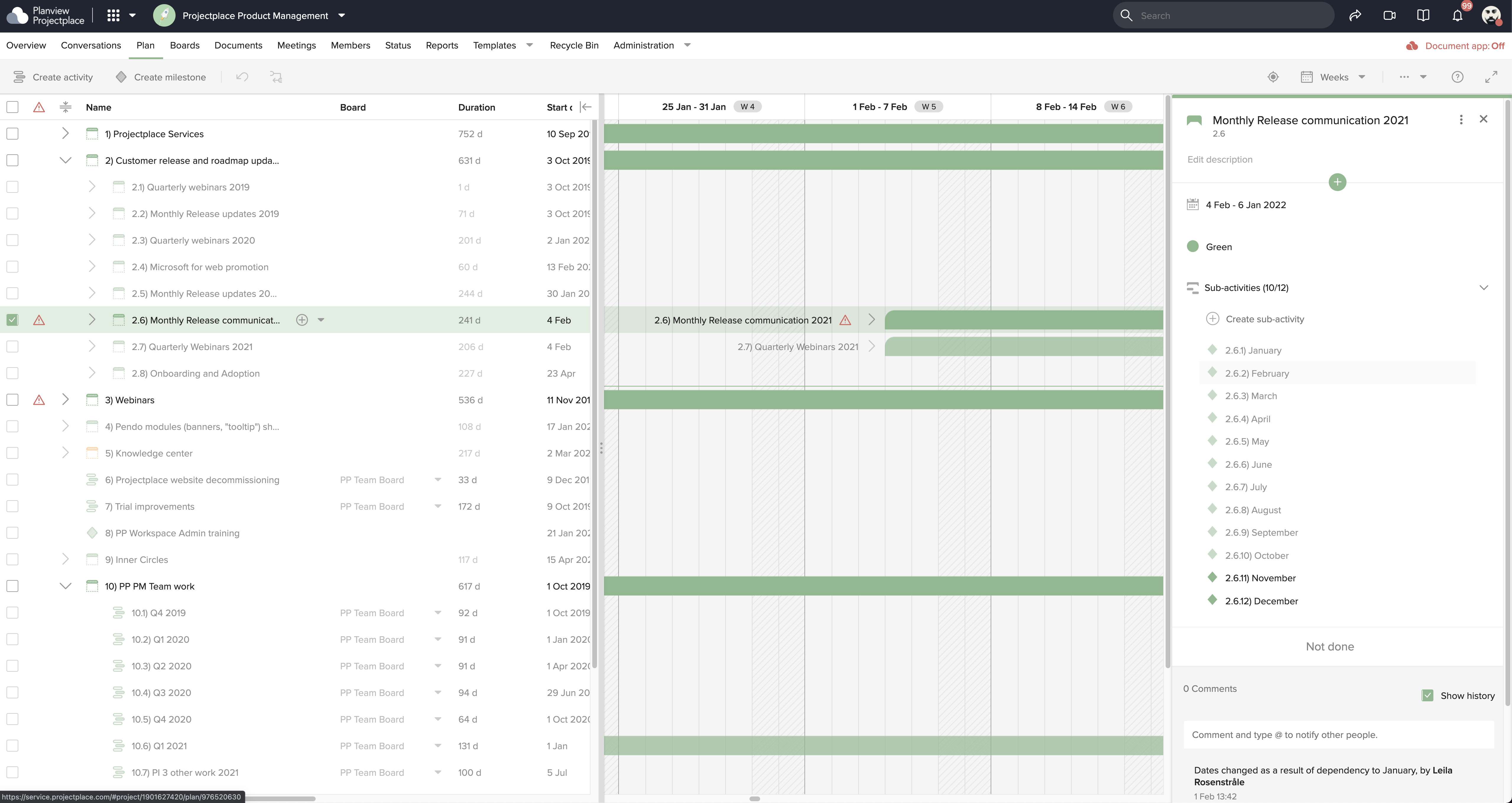
Gantt Charts00 Ratings7.70 Ratings
Scheduling00 Ratings7.70 Ratings
Team Collaboration00 Ratings8.70 Ratings
Support for Agile Methodology00 Ratings8.70 Ratings
Support for Waterfall Methodology00 Ratings7.80 Ratings
Document Management00 Ratings8.90 Ratings
Email integration00 Ratings6.40 Ratings
Mobile Access00 Ratings7.70 Ratings
Timesheet Tracking00 Ratings6.00 Ratings
User Ratings
PopPlanview ProjectPlace
Likelihood to Recommend
9.4
(0 ratings)
8.1
(0 ratings)
Likelihood to Renew
-
(0 ratings)
9.2
(0 ratings)
Usability
-
(0 ratings)
10.0
(0 ratings)
Availability
-
(0 ratings)
9.1
(0 ratings)
Performance
-
(0 ratings)
9.1
(0 ratings)
Support Rating
-
(0 ratings)
8.0
(0 ratings)
Implementation Rating
-
(0 ratings)
9.1
(0 ratings)
Configurability
-
(0 ratings)
6.4
(0 ratings)
Ease of integration
-
(0 ratings)
9.1
(0 ratings)
Product Scalability
-
(0 ratings)
9.1
(0 ratings)
Vendor post-sale
-
(0 ratings)
6.4
(0 ratings)
Vendor pre-sale
-
(0 ratings)
6.4
(0 ratings)
User Testimonials
PopPlanview ProjectPlace
Likelihood to Recommend
  • Pair development
  • Knowledge Shares
  • Bug-reporting and explanation
  • Audio/voice integration WITH video share
  • Makes gaming very fun
  • Copy/Paste works flawlessly from my computer to another screenhero users computer.
  • Screenhero works with screen-recording software, so not only can I pair-develop, I can take video of a pair development session.
  • I can't think of any reason why Screenhero wouldn't be suited for any situation. I would say that they need to bring back the option for a native app capability outside of the slack app like they did during the Slack merge transition.
Read full review
Planview ProjectPlace is a vibrant platform that manages all activities and schedules different roles based on their urgency, importance, and requests. Further, Planview ProjectPlace outlines the need for proper documentation with the aim of accurate referencing. Tasks are credibly shared, and proper reporting is enhanced to transform firms' work environment. ; Lastly, Planview ProjectPlace brings sustainable email integration for enterprises.
Read full review
Pros
  • Screensharing with all participants being able to take control of the screen.
  • A visible mouse cursor for each participant helps keep everything clear and straightforward.
  • The call quality very clear.
  • Seems to be fairly light on bandwidth requirements.
Read full review
  • Easy of use. Modules are well define.
  • Navigation: Users can use the tool's search functionality to find what they are looking for easily. The home page is configurable to the users' needs.
  • The knowledge center is a key function to understand the tool capabilities.
Read full review
Cons
  • There have been some periods of time where the multi-user screen share option is not available.
  • Recently there was a glitch where the app didn't end the call or establish the link well and it froze and kept calling the other user without them meaning to.
  • Wish there was a user search option. The scrolling can get tedious when there are a large number of users in your network to choose from.
Read full review
  • Under the time tracking, it would be nice to have a set template that would load each week and not have to click a button to load the previous week's template.
  • Somehow making it more intuitive.
  • Having to add in each service line and each detail that I cover for every service line each week is a bit ridiculous.
Read full review
Likelihood to Renew
No answers on this topic
I have loved using Projectplace the last few years, however with recent budget issues, we likely need to cut costs in this area, and Projectplace is on the higher price point for project management platforms. There are also a lot of features in Projectplace that our team doesn't utilize/doesn't apply to our workflow needs.
Read full review
Usability
No answers on this topic
Easy to use platform and provides the user with an amazing experience and straightforward tools that empower and help execute tasks with fast performances that allow quick and easy service delivery. Easy on implementation and get started immediately with enterprise-ready Planview Projectplace and start to connect with teams and departments at once.
Read full review
Reliability and Availability
No answers on this topic
No downtime-issues since the implementation. It has been very stable
Read full review
Support Rating
No answers on this topic
I do not think Planview Projectplace is as polished and refined as other project management tools, nor is it as simple and easy to use as other free tools. Integration with the tools we required was difficult to impossible with our staff and toolset. The overall design seemed dated, and we preferred the look and feel of Jira.
Read full review
Implementation Rating
No answers on this topic
create an extensive change management process to help folks embrace the change
Read full review
Alternatives Considered
We originally chose Screenhero for ease of use as a quick solution to inter-team communication for teams separated by physical distance (cross country and in different offices). However: -Screenhero does not have a way to link up outside callers like Join.me and GoToMeeting have -Screenhero is not a catalogued internal chat communication platform like Slack is Screenhero is good at what it does, but is only one facet of a much larger solution
Read full review
It offers a simpler alternative that's easier to manage by the less tech-savvy people. I also think that Planview Projectplace has managed to keep the product updated compared to other project management tools. Miro is perhaps the one that comes to mind, but while evaluating, we saw fewer issues with Planview Projectplace. Overall, the decision came down to the project manager, that had previous experience and recommended the product. For me, using a product from a smaller company is better because I know that there will be a focus on improving it, unlike, for example, Microsoft products that can be discontinued at any moment.
Read full review
Scalability
No answers on this topic
It is a bit more difficult to fluently use in large scale implementations
Read full review
Return on Investment
  • It allows cutting down required meeting time to solve an issue.
  • Makes it very easy to debug problems on the remote end which could otherwise take forever.
  • If you got in, it's free.
Read full review
  • [We have the] ability to support remote work through projects that scale across multiple groups
  • We have large-scale quarterly projects, so the ability to save and duplicate project templates are helpful for us to keep track of tasks down to the specific card
Read full review
ScreenShots

Planview ProjectPlace Screenshots

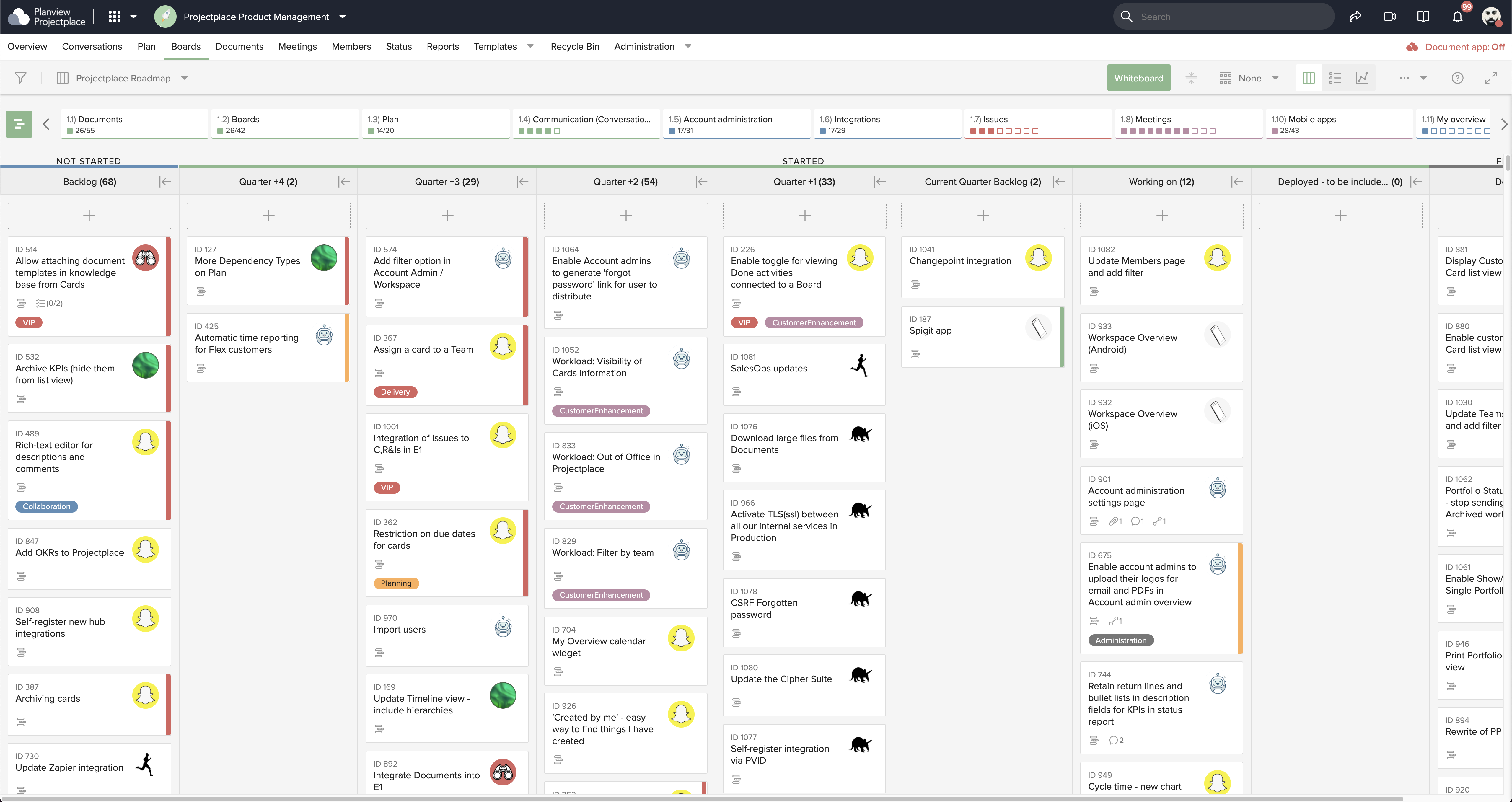
Screenshot of Collaborative Workstream: Streamlined interaction between activities, boards and cards. Users can plan and follow up in the Gantt while their teams execute and collaborate for optimum productivity on the Kanban boards.Screenshot of Document Management: This helps to ensure changes to documents are visible in real-time. Version control ensures that team members see the latest document versions with access to document history.Screenshot of Gantt Charts: These support planning and visualizing every step of enterprise work and projects with Projectplace Gantt Charts. Track progress to make sure you'll meet your deadlines and know when things are not happening on time.Screenshot of Kanban Boards: This enables teams to execute and collaborate for optimum productivity, and includes activity notifications, messaging and visualizations of progress of day-to-day tasks.Screenshot of Workload View: A visualization of the workload of members in all workspaces, used to determine whether a team member is overloaded with work, or has room to do more.Screenshot of Workspace Overview: This offers an overview of all work and tasks that have been assigned across all workspaces. Personal tasks can be added that help offer a more complete picture of what's left to do.