Quickbooks Desktop for Mac is an accounting software designed for Mac users. It is designed to integrate with Apple iCloud. It provides core accounting features in line with the rest of the Quickbooks Desktop product line.
N/A
Yooz
Score 8.4 out of 10
Small Businesses (1-50 employees)
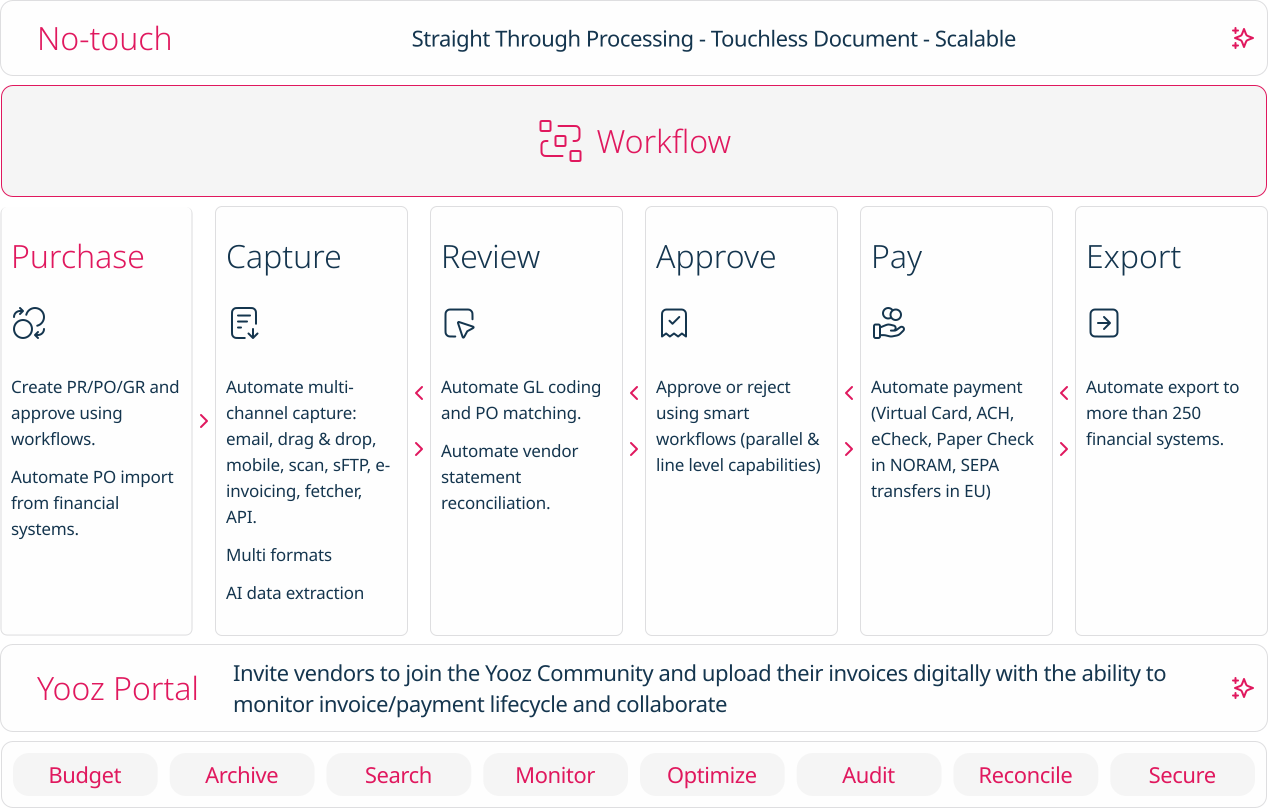
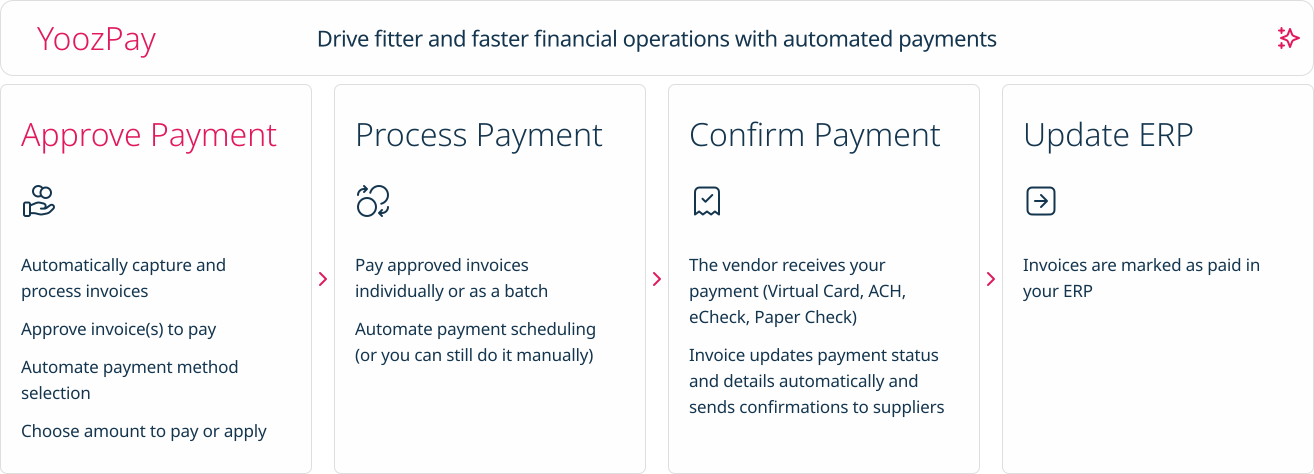
Yooz delivers intelligent financial operations automation that aims to reduce waste, mitigate risk, prevent fraud, and eliminate errors from the AP process. Yooz provides Lean Financial Operations™ for companies of all sizes, offering clarity and control in the most complex environments. The Yooz platform combines a workflow engine, real-time applied AI, and transparency, with advanced fraud detection. Boasting over 7,000 customers worldwide and processing more than 300 million…
N/A
Pricing
QuickBooks Desktop for Mac
Yooz
Editions & Modules
No answers on this topic
No answers on this topic
Offerings
Pricing Offerings
QuickBooks Desktop for Mac
Yooz
Free Trial
No
Yes
Free/Freemium Version
No
No
Premium Consulting/Integration Services
No
No
Entry-level Setup Fee
No setup fee
No setup fee
Additional Details
—
Subscription price based on the volume of documents processed. Unlimited number of users. 4 hours of complimentary service to start.
More Pricing Information
Community Pulse
QuickBooks Desktop for Mac
Yooz
Considered Both Products
QuickBooks Desktop for Mac
Verified User
Anonymous
Chose QuickBooks Desktop for Mac
Quickbook is used with these 3 software. Budgyt has the budget and QuickBooks has the expenses. QuickBooks only allows one person to map. After that, they work well together. PayrollVault is here we paid our staff. Quickbooks usually do not have correct information on how our …
Fortunately our organization began using Mac's back in the early 90's. We were still using the oversized ledgers for expenses/check writing as well as income entries. Very time consuming. It was a no brainer to go with QuickBooks. Didn't really look at any other accounting …
I love using Quickbooks compared to other software we've tried. QuickBooks Online and TSheets interface. Customer service and problem resolution are generally excellent, with well-trained and proficient agents taking calls or on chat. Ease of use and accessibility via the …
I tried switching to QBO (Quickbooks Online) a couple of times. And in both cases it was disastrous. The software is buggy and the workflow is not at all like what I was used to in Desktop and so I felt like there was a brand new learning curve. You would think that they would …
We looked at several different providers. I tested three other software applications. I found that QuickBooks Desktop for Mac was the most intuitive, cost-effective, and out of the box to learn and use. I am still getting used to the differences between the PC version and …
Start with the best and you never have to try anything else. Not the cheapest solution, but the best solution is always a smart business decision. We could not run the business today without QuickBooks - maybe 10 years ago at the startup, it was more than we needed, but within …
I only stick with it because I have used it for 30 years and have to continue as the cost to change over and learn a new system has always been prohibitive. My accountant prefers QuickBooks rather than embarking on another Mac software option.
I've really only ever used Quickbooks and Mint, but I found QuickBooks to be far more powerful than any other accounting software. In fact, it has been so convenient and successful that I've never thought to use anything else. Most other modern solutions are limiting or too …
QuickBooks for Mac definitely outshines other competitors mainly due to its ability to sync seamlessly with all mac products, which other programs have continual problems with. Although the Mac version isn't quite as powerful as the Microsoft counterpart, it is still one of the …
QuickBooks for Mac is great because it has an offline version and cloud storage capabilities. QuickBooks Online is a cheaper alternative but in the event of needing to access the database without internet access, it's nice to have it backed up when you need it. Plus QuickBooks …
I feel that the online (QBO)version is the platform of the future. With third party companies building solid apps and plugins that integrate with QBO seamlessly, the desktop versions are becoming limited.
QuickBooks Mac really is incredible. As a mac user for 10 years, I found this software easy to use and understand. It has a beautiful layout without sacrificing any of the ample features that made me fall in love with QuickBooks Pro.
Installing QB was easy and straight forward in comparison to other Mac apps. I'll be interested to see if updates are easy to accomplish. Adobe products are all cloud based as is QB & I am still uneasy about that as our business is located in a fairly remote & rural area and …
I used to use Wave Accounting for quite awhile and switched to Quickbooks for Mac this year because I need some more rigorous software and record keeping for my accountant. Wave Accounting was an excellent start for a small company but as soon as I had decent revenue, it became …
Intuit Accounting Professionals Trainer/Writer specializing in QuickBooks for Mac, Meetup Groups Organizer/Founder, Adjunct Instructor at Bellevue College
Chose QuickBooks Desktop for Mac
QuickBooks for Mac 2015 has been updated consistently over the last 3 years and continues to provide for the bookkeeping needs of small companies using Macs in their offices. However, it has limited job costing functionality. Outside of that limitation, it is similar in …
Chrome River is slow and full of inconsistencies. Capturing invoices is confusing, as you have to assign approvers and coding at that time. No time to save it and research those details. It has multiple screens labeled inbox but are for different stages in the approval process …
it better with uploading invoice and easier to use and very assessable and easy to learn and has a lot of verification so errors on payments are avoided and also used to know which invoice is late and needs to be paid and coded
They are all different for each other. In our scenario, since we do not use QuickBooks as our software system, Yooz works better with integration to Sage Intacct
It is extremely well suited for smaller companies who are trying to manage things on their own without outsourcing too much. The program is easy to learn and doesn't require too much training time before it can be implemented. The online/cloud feature makes it even more accessible to our employees, so it's great. It would be hard for a large company to use it since it is geared towards smaller companies and the interface may become overwhelming with too many inputs/bills to manage.
when you have put the amount in, and the amount does not match the invoice yooz sends an alert to indicate that there is a missing amount that you have not added, and it also helps to let you know when some invoice amounts are more than the usual get for that vendor so you can take note
Reconciling my bank accounts is made easy by automated bank connections and rules for re-occurring transactions. I can also transfer between connected bank accounts making sure to not double up on transfers or payments.
I love that I can access Quickbooks Desktop via a web browser, iOS, and the desktop app. I live in a mobile world so having the ability to crossover is vital.
Payroll. One simple feature that allows me to track employee and employer taxes, make payments, and automate the entire process. All I have to do is hit approved and the rest is done for me. I love it!
QB for Mac is not nearly as feature rich as the Windows Version
QB for Mac has recently FORCED users to password protect all databases. They SHOULD allow a preference to disable rather than imposing their workflow on the end user. The PW is in my environment [and this step is] unnecessary and a cumbersome waste of time.
I haven't spent that much time with the newer versions of QuickBooks for Mac, but I think I'm seeing it make the much-needed improvements. For example, something as simple as undoing the previous reconciliation was a terrible chore, and I'm glad that feature has been included in the newer versions of QuickBooks for Mac
The Mac version is OK overall. I find the Windows versions to be much more robust but Mac is quite good for Mac users. Though I think die hard Mac users should consider QuickBooks Online instead as there is a new QB for Mac app that makes using QBO much better!
Usability of Yooz is close to 10, solves the issue that many companies have and serve to its purpose. The platform is simple, but well design and it is always improving. Since we started using it almost 8 months ago, the invoicing process of our company enhanced sharply. But there is also room for improvement that is why a 9/10
I've been using the QuickBooks online version for a little over 6 months now (upgraded from Mac desktop) and I haven't had any access issues. There have been times when it was down for service/upgrade however there is always plenty of notification time given by the Quick Books Online Support team. These upgrade maintenance time frames are always over night hours and on the weekends so everything can be worked around very easily.
I tried switching to QBO (QuickBooks Online) a couple of times. And in both cases it was disastrous. The software is buggy and the workflow is not at all like what I was used to in Desktop and so I felt like there was a brand new learning curve. You would think that they would make their online option as close to their Desktop option so that migrating customers would have an easy time. The worst part is that if you have inventory that you need to track, when you migrate from Desktop for Mac, it does NOT bring in your inventory accurately in any way. This was a dealbreaker for me. Be very careful about migrating if you track inventory. So for all the shortcomings of Desktop, I still prefer it over QBO.
Chrome River is slow and full of inconsistencies. Capturing invoices is confusing, as you have to assign approvers and coding at that time. No time to save it and research those details. It has multiple screens labeled inbox but are for different stages in the approval process that aren't specified unless you go into the invoice and review. When you go to exit the invoice, it takes you back to the main menu instead of the inbox you were currently working in. It is live, but the updates are every 10-15 minutes as opposed to immediately.
My private consulting practice slowed down when I chose to only support QuickBooks for Mac clients because there are far fewer QuickBooks for Mac clients than their are clients using other QuickBooks. I chose instead to focus on online accounting options, apps that integrate with online accounting options, and sustainability accounting as a tool for business success.
Intuit Accounting Professionals Trainer/Writer specializing in QuickBooks for Mac, Meetup Groups Organizer/Founder, Adjunct Instructor at Bellevue College
Yooz helped us process thousands of invoices in a more efficient manner than our previous process called Checkbook with Bank of America.
Yooz allowed for a more efficient invoice approval process than the previous systems that were used. If the invoices were three way matched, they would be processed quicker.
Yooz made the integration of the invoice and credit memo process into NetSuite more efficient than the previous software, however, there some limitations with Yooz because it did allow for duplicate invoices to be processed, and that was a big issue.