Laserfiche vs. Revver

Overview
ProductRatingMost Used ByProduct SummaryStarting Price
Laserfiche
Score 8.2 out of 10
N/A
Laserfiche has two main editions: Rio and Avante: Laserfiche Rio is designed to meet the needs of large organizations that have more than 100 users. It combines content management functionality with business process management (BPM), security and auditing, unlimited servers and a thin-client interface. Add-ons include records management functionality, public Web portals and production-level document capture and processing. Laserfiche Avante is an ECM suite for small to medium organizations with…
$540
per year per user
Revver
Score 9.0 out of 10
Small Businesses (1-50 employees)
Revver (formerly eFileCabinet) aims to help businesses reduce their dependency on paper and efficiently complete their document work. Revver does this by helping customers store and organize documents, quickly find information and files, collaborate on document work, automate business processes, and be secure and compliant. The vendor’s clients are typically companies that have frequent customer interaction, require high levels of documentation, and have offices in which compliance and…N/A
Pricing
LaserficheRevver
Editions & Modules
Starter
$540
per year per user
Starter
$600
per year per user
Professional
$710
per year per user (starts at 10 users)
Professional
$830
per year per user (starting at 5 users)
Business
$830
per year per user (starts at 25 users)
Business
$950
per year per user (starting at 25 users)
Enterprise
Custom
No answers on this topic
Offerings
Pricing Offerings
LaserficheRevver
Free Trial
YesNo
Free/Freemium Version
NoNo
Premium Consulting/Integration Services
NoNo
Entry-level Setup FeeNo setup feeRequired
Additional DetailsContact Revver for pricing information
More Pricing Information
Community Pulse
LaserficheRevver
Considered Both Products
Laserfiche
Chose Laserfiche
Laserfiche and Skyward are two very different systems and resources, however, they are not complex and have a very basic design, format and layout. They both are easy to use, efficient and help with organization while not being overwhelming after learning the systems. The …
Chose Laserfiche
Primarily, the ease of the user comes for our colleagues as not losing time is our priority. Besides, comfortable administration is also striking to benefit from using Laserfiche. The form creation of Laserfiche in contrast to DocuWare is doing great that provides amazing …
Chose Laserfiche
Laserfiche is a much more focused product that simply and accurately fills our need for routine reporting and record keeping. By taking time to work on the design of the form you can anticipate the user's needs and possible areas where further explanation may be required. By …
Chose Laserfiche
I have not used any other product other than Laserfiche. As a user, am completely happy with the product and will keep on using the same. I am a happy customer, their product has been very very useful for my organization. I would like to give Kudos to Laserfiche Team. Keep …
Chose Laserfiche
The Laserfiche interface is very easy to use. It is very similar to uploading files on your Windows computer. With close to no training and less implementation time, it was a clear choice. Like other systems, Laserfiche does not have fancy designs or interface. This makes it …
Chose Laserfiche
Laserfiche is the best electronic repository system i have used. The search option is unlike any system ive seen. The indexing is fantastic as well.
Chose Laserfiche
I would pick Laserfiche over Procore in a heart beat. Procore claims to be documents storage and user friendly but they are complete opposite software.
Chose Laserfiche
Alaris is efficient for scanning and editing, but does not provide all of the advanced capabilities that Laserfiche offers. Laserfiche also provides top-notch training to users. Alaris is a more simple software that can be easily self-taught. Laserfiche has more than just …
Chose Laserfiche
The price compared with others was the best. It was user-friendly and had full functionality, even exceeded when comparing with other functions from similar applications.
Chose Laserfiche
The core infrastructure of Laserfiche, and the end user experience, is vastly superior. OnBase has a TERRIBLE UI and administration console by comparison. The core architecture of OnBase is also more scattered, while all Laserfiche processes go through a single service. …
Chose Laserfiche
Document capture from multiple sources (scanning, web form, email, shared folder, etc.) is easier to manage and set up in Laserfiche. Integrating with third party software for document retrieval is easier in Laserfiche. Online form creation is possible with Laserfiche. The …
Chose Laserfiche
Laserfiche is much simpler to implement and use. Its interface much more friendly, allowing our implementation time was much shorter. Hyland OnBase is much more complex and requires a much greater investment in the cost of licenses and hardware requirements.
Chose Laserfiche
Laserfiche was already being used when I started using it many years ago, there are no benefits that the competition has that would make switching a benefit. I have used dropbox and sharefile in several situations, neither has capabilities that outweigh laserfiche.
Chose Laserfiche
I was not involved in the choice of Laserfische, I was the person in charge of the implementation of LF
Chose Laserfiche
I did not compare Laserfiche against other products because the City of Roanoke, Virginia had already purchased Laserfiche 6 years prior. Once I learned how to use Laserfiche and the benefits, I decided that we needed to upgrade to Laserfiche RIO to be able to use some of the …
Chose Laserfiche
Laserfiche is priced better and is easier to use.
Chose Laserfiche
Laserfiche is the leader in the ECM industry, and I believe will stand toe to toe with any competitor on the market. Not only is it on of the most advanced systems for an enterprise wide solution, but the cost is also very competitive. I also do not believe there is any …
Chose Laserfiche
Laserfiche is by far the leader in workflows and end user interfaces.
Chose Laserfiche
Laserfiche solved our original government document retention concerns. Collin County has integrated Laserfiche retention rules with our Criminal Integrated Justice System for closed cases. We have also integrated Laserfiche with our Property Tax System. We are able to process …
Chose Laserfiche
Laserfiche is much faster and the optical character recognition is more accurate than Adobe Acrobat Capture. It took approximately 4 times as long to scan and store a document in Acrobat Capture as in Laserfiche. Reviewing every scan was essential in Adobe Acrobat Capture …
Revver
Chose Revver
Just as good but had more features that were worth the cost. DocuSign can be confusing at times but I found eFileCabinet to be more clear, straight forward, and easy to use. Our team has found that using it over DocuSign has led to more productivity and has saved time.
Chose Revver
eFileCabinet is much better of a digital document solution than a file storage solution like Dropbox Business or Box.com. It is more secure, it is more friendlier to use for documents as it's viewed as file cabinets and file cabinet drawers and individual folders that contain …
Chose Revver
I was not part of the process to select, but my understanding is we selected this instead of paper files. I don't know which other products were options.
Chose Revver
We find eFileCabinet to be more secure than the alternative products we were using at the time, around 5 years ago.
The system is far more robust and better suited the large number of files we needed to store, plus the amount of security and restrictions we needed to be able to …
Chose Revver
We have not utilized any eFileCabinet competitiors, and we selected eFileCabinet as it was a preferred product of our broker dealer.
Chose Revver
The only other program which is remotely similar is Go File Room. This was great when I worked for a large firm (50 + employees) but very cost inefficient for when I went out on my own.
Features
LaserficheRevver
Enterprise Content Management
Comparison of Enterprise Content Management features of Product A and Product B
Laserfiche
8.5
Ratings
7% above category average
Revver
-
Ratings
Content capture & imaging9.00 Ratings00 Ratings
File sync, storage & archiving8.00 Ratings00 Ratings
Document management8.50 Ratings00 Ratings
Records management9.00 Ratings00 Ratings
Content search & retrieval8.50 Ratings00 Ratings
Enterprise content collaboration8.00 Ratings00 Ratings
Content publishing & creation8.50 Ratings00 Ratings
Security, risk management & information governance9.00 Ratings00 Ratings
Contract lifecycle management9.00 Ratings00 Ratings
Automated workflows8.50 Ratings00 Ratings
Mobile support8.00 Ratings00 Ratings
Integration8.00 Ratings00 Ratings
Best Alternatives
LaserficheRevver
Small Businesses
Square 9 Softworks
Square 9 Softworks
Score 9.1 out of 10
Square 9 Softworks
Square 9 Softworks
Score 9.1 out of 10
Medium-sized Companies
MediaValet
MediaValet
Score 9.1 out of 10
MSB Docs
MSB Docs
Score 9.4 out of 10
Enterprises
MediaValet
MediaValet
Score 9.1 out of 10
M‑Files
M‑Files
Score 8.9 out of 10
All AlternativesView all alternativesView all alternatives
User Ratings
LaserficheRevver
Likelihood to Recommend
8.5
(0 ratings)
7.0
(0 ratings)
Likelihood to Renew
8.6
(0 ratings)
10.0
(0 ratings)
Usability
9.0
(0 ratings)
9.8
(0 ratings)
Availability
10.0
(0 ratings)
-
(0 ratings)
Performance
9.0
(0 ratings)
8.0
(0 ratings)
Support Rating
9.4
(0 ratings)
10.0
(0 ratings)
Online Training
10.0
(0 ratings)
-
(0 ratings)
Implementation Rating
-
(0 ratings)
9.0
(0 ratings)
Ease of integration
8.0
(0 ratings)
8.0
(0 ratings)
User Testimonials
LaserficheRevver
Likelihood to Recommend
Laserfiche is perfect for businesses that need a place to appropriately store their documents digitally and want an environment to grow from. Adding Laserfiche Forms helps grow a business' ability to process their work and reach their customers easier. Laserfiche could be used for all sizes of businesses but may not be as worth it for very small businesses.
Read full review
Great if your field requires copious amounts of paperwork, and you want to get rid of the clutter and stress of dealing with physical paperwork. With the size of our organization (about 8 people), we were borderline on whether the cost would be worthwhile, but even for our group we've found the enhanced workflow and eSignature function to be very valuable. I would think for groups smaller than ours the cost would likely not be worth it.
Read full review
Pros
  • It's very good at giving a wide range of options for importing and exporting data, the Windows Client software alone can pull files from a windows folder, has a software printer to print documents into Laserfiche instead of to paper, has Office integration, the ability to pull photos from cameras, and has a scanner component.
  • Laserfiche Workflow is an automation tool that is very flexible and powerful, and allows a wide range of options for automating document flows and procedures.
  • Laserfiche is very good at communicating with other systems, though some systems, like big iron minicomputers, take some extra work and effort. Setting up integrations with SQL server databases are as simple as any complex IT procedure can get.
Read full review
  • The ability to set restrictions on documents sent out or stored in the system is one great strong suit of eFileCabinet.
  • It gives us the confidence that our documents are safe.
  • eFileCabinet has excellent technical support. When needed, I can call or email them and the problem is usually solved in that moment or that day. They have also worked directly with our IT Support Service to get things set up on our server.
  • The search features are frequently used by me. You can limit where the search takes place, and even search within a search to narrow down your results. The side panel lets you preview the documents as well so most often I don't even need to fully open a document to get the information I need.
Read full review
Cons
  • The could have better options for read only users, the minimum option for read only users is 200.
  • More competitive material of why Laserfiche is better than the other products out there.
  • They could use a more robust capture engine that could be used for unstructured documents.
Read full review
  • eFileCabinet's sidekick app can sometimes stop working on the printer side with Windows updates. It's getting better and less problematic, but it would be nice for support to push out notices to the customers when they know they have bugs in the software.
  • The sidekick app would be nice if it had a "full size mode" and the "smaller / simple mode" so that you don't have to run the browser and sidekick together. This is confusing for our users as they might want the advanced functionality of the website browser efilecabinet instead of the minimal sidekick app.
  • Have auto refresh on sidekick and the browser so that if you make changes in the browser eFileCabinet, the sidekick will update automatically. This is very confusing for our users and should be an included feature in 2019.
  • Mac Sidekick App shouldn't be in beta after 2-3 years. This is sad to see :(
Read full review
Likelihood to Renew
We plan on renewing Laserfiche for the coming year but also have been considering a scanning and document management solution that can be purchased from our new accounting system company, we are implementing the accounting system this year. It will be a couple years before we make a decision to stay with Laserfiche or change.
Read full review
We do not have any issues with eFile Cabinet. It has become just part of our daily life - finish files and projects and save all the documentation here. Need to research? Find it in eFile. I personally cannot imagine my job without it.
Read full review
Usability
It has an intuitive design that feels very natural to any user that has ever used Outlook or Windows Explorer. There are multiple ways to perform every action in order to help users with various software experiences find the shortcuts and actions they seek quickly and effectively.
Read full review
eFileCabinet gets the job done and is fairly easy to use once you find a few workarounds and understand how the software works. Using the browser interface next to the desktop sidekick app is needed when it should all be included in a single app. Users always wonder "why do I have to open both the browser and the sidekick interfaces to do a simple task". Basically one does what the other doesn't do and Sidekick is needing to be open regardless for the printer/scanner upload functions, but is limited on what you can do compared to the browser interface. The mac Sidekick is still in beta and makes me wonder how much longer it will be supported or updated...
Read full review
Reliability and Availability
I am very satisfied with Laserfiche. I have found that certain larger jobs may are slow. This may also be related to our infrastructure environment. We have been able to tune Laserfiche to increase performance on larger jobs.
Read full review
No answers on this topic
Performance
Performance, of course, is largely dependent on the underlying environment. Laserfiche does its part with multi-threading, taking advantage of multi-core servers on scanning, workflows, and bots. A SQL-Server back-end is suitable for small to medium-sized company, but may not scale to large, where Oracle would be the better choice. Workflows can be poorly written and perform recursive work slowing down the system. It's better to run batch type workflows at night when possible.
Read full review
The software loads very quickly, their servers are great. The software can be a tad buggy or quirky at times but it gets the job done which is why it's an 8 out of 10 rating. Their desktop printer and scanner software could use an update so that windows updates don't break it from time to time too.
Read full review
Support Rating
I have never had to wait for help from Laserfiche. If I cannot find the answer online, I can easily send an email to a customer support representative. I have always been helped the same day and my questions have always been resolved. The Empower conference is always a great learning opportunity and the online resources and webinars are top-notch.
Read full review
It makes workflow so much easier, including the ability to save in the cloud makes it accessible from anywhere. I save very little on our server now which means this also makes filing more secure. I literally save and research via the platform several times a day.
Read full review
Online Training
Easily accessible 24/7 so am able to complete courseware whenever time allows: Commute to work; waiting for friends or family; at night while relaxing [with a delicious glass of wine!]; whenever and wherever time and circumstances permit. Courseware is well written and presented in an easy to follow and understand format.
Read full review
No answers on this topic
Implementation Rating
No answers on this topic
I don't know as it happened before I started working here
Read full review
Alternatives Considered
Laserfiche is a much more focused product that simply and accurately fills our need for routine reporting and record keeping. By taking time to work on the design of the form you can anticipate the user's needs and possible areas where further explanation may be required. By prefilling the most likely/desired report responses you can greatly reduce the amount of time a user spends completing each report.
Read full review
eFileCabinet is much better of a digital document solution than a file storage solution like Dropbox Business or Box.com. It is more secure, it is more friendlier to use for documents as it's viewed as file cabinets and file cabinet drawers and individual folders that contain the files. This makes it easy for your departments to convert over to a digital paperless solution easier. Thomson Reuters is in a different league and is much more expensive but does what eFileCabinet doesn't, in my previous references of missing software features, buggy software, and learning curves, but overall we use eFileCabinet because it's ROI and value is just that much better for us.
Read full review
Return on Investment
  • The centralized repository of digitized documents allows users from different departments to collaborate and use the same documents, effortlessly and seamlessly. This has been a tremendous value to organizational efficiency and accuracy.
  • Business Process Automation has increased the capacity of a fixed workforce. By reducing the workload of individuals on repetitive tasks, it allows them to work on higher-value tasks.
  • Business Process Automation increases accuracy as well by defining a clear process with forms, emails, and document routing on each step. This leads to greater worker productivity.
Read full review
  • Pricing is budget friendly.
  • Pay only for the number of users you need. I needed 2, so I pay for 2. Other DMS programs come with up to 5 users and charge accordingly. This gives me the flexibility to grow my business at my rate - not someone else's.
Read full review
ScreenShots

Laserfiche Screenshots

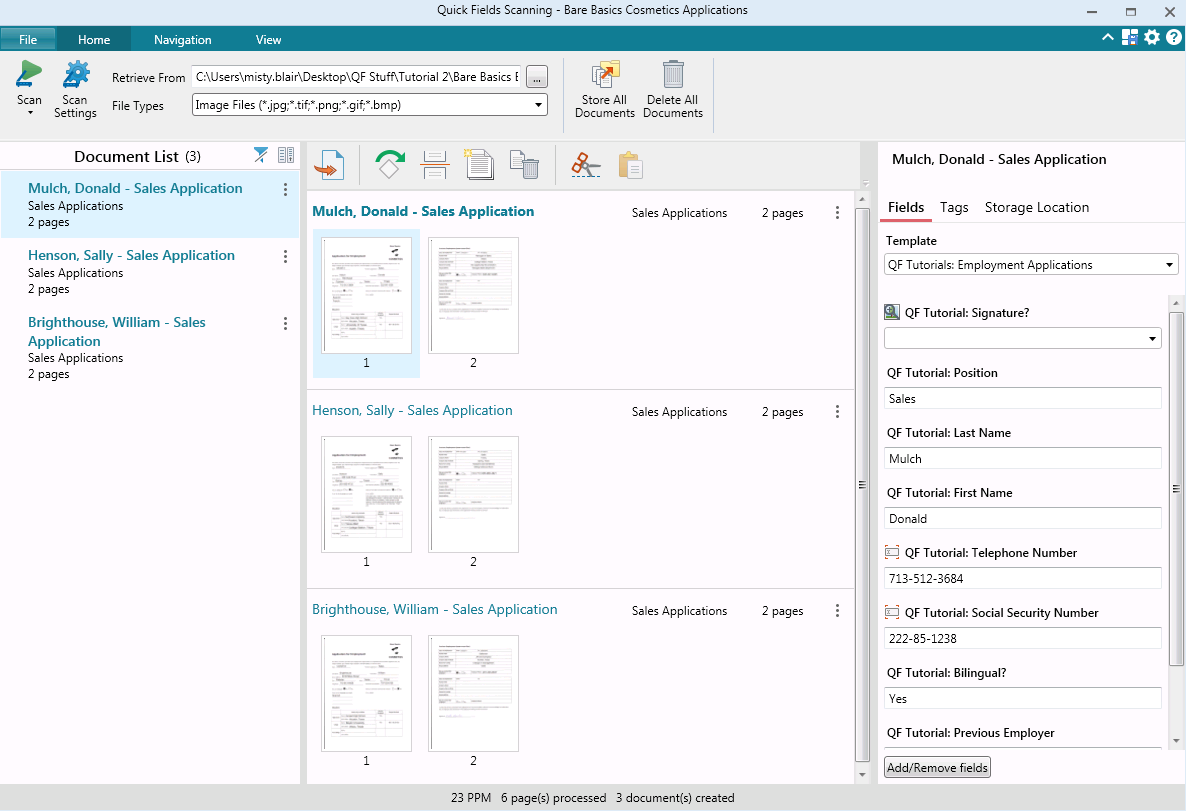
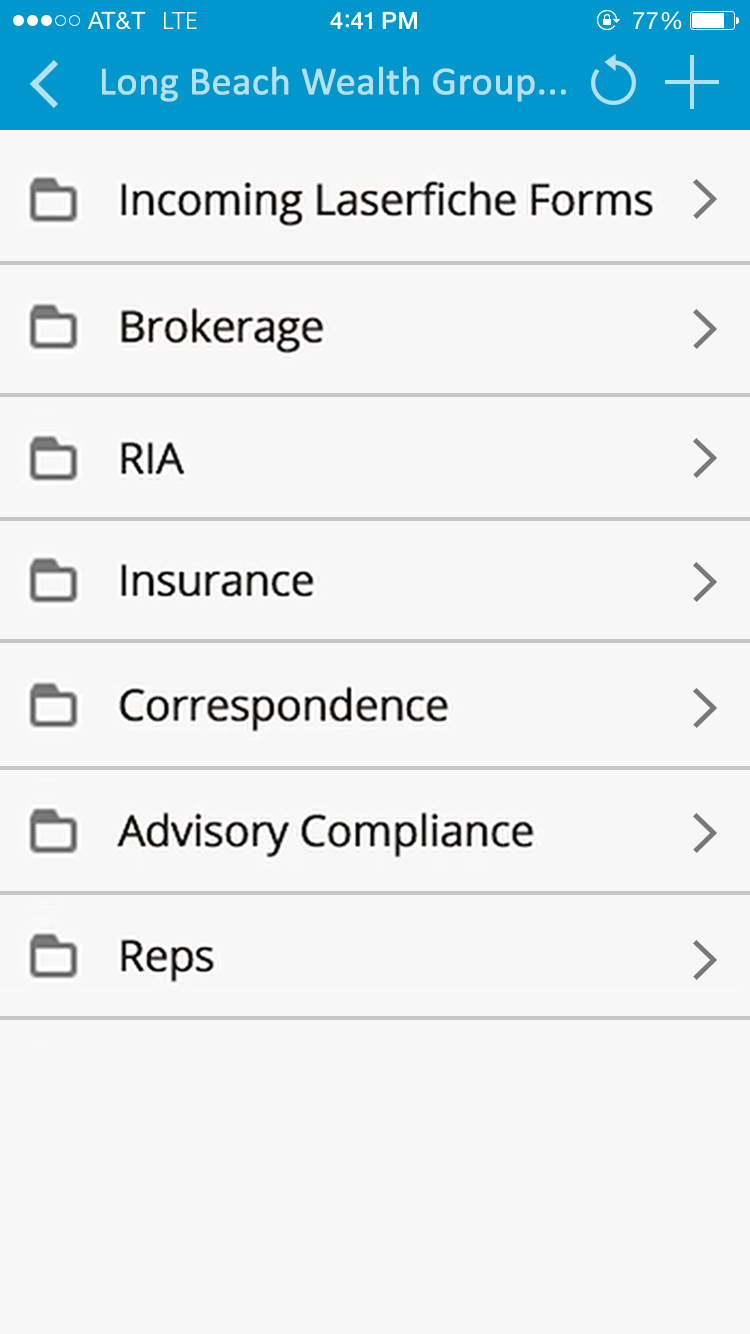
Screenshot of Laserfiche Records ManagementScreenshot of Change of Major/Minor Request created with Laserfiche FormsScreenshot of Student Information Sheet created with Laserfiche FormsScreenshot of Laserfiche Quick Fields ScanningScreenshot of Laserfiche Quick Fields ScanningScreenshot of Laserfiche Mobile Repository

Revver Screenshots

Screenshot of Home Page with Favorite documents, to-do lists, recent documents, and navigation barScreenshot of Folder and documents in Revver, with the in-app Previewer and Document tools on the right.Screenshot of Document requests for requesting specific documents and storing to a precise locationScreenshot of Workflow Engine for powering simple tasks or entire document processesScreenshot of A Dashboard in Revver Reports showing an example of invoices received during the yearScreenshot of Customizable security policies for users. Revver also includes 2FA, access controls, and automatic retention and disposal policies.