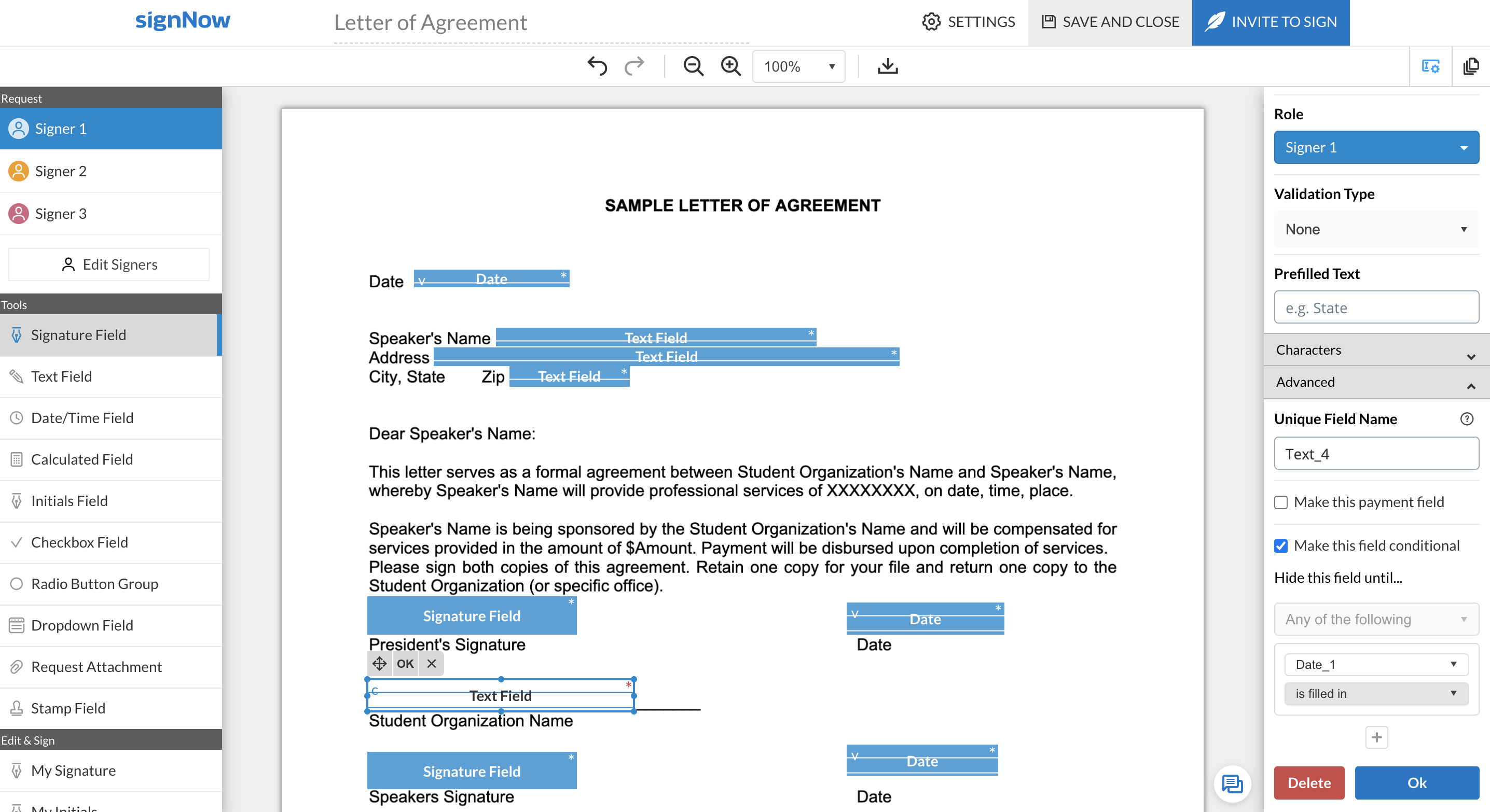
signNow is an eSignature solution with mobile apps for iOS and Android. signNow can be integrated into popular platforms and offers SaaS, public cloud, and private cloud deployment options with the same underlying API. This enables customers to leverage the power and usability of the signNow eSignature platform, while meeting their particular security and compliance requirements.
$1.50
one-time fee per signature invite
SS&C Blue Prism
Score 8.9 out of 10
N/A
SS&C Blue Prism provides a combination of technologies that offer intelligent automation to deliver transformational business value.
N/A
Pricing
airSlate SignNow
SS&C Blue Prism
Editions & Modules
Site License
$1.50
one-time fee per signature invite
Business
$20
per month
Business Premium
$30
per month
Enterprise
$50
per month
No answers on this topic
Offerings
Pricing Offerings
airSlate SignNow
SS&C Blue Prism
Free Trial
Yes
No
Free/Freemium Version
No
No
Premium Consulting/Integration Services
No
No
Entry-level Setup Fee
-$8 per user/month
No setup fee
Additional Details
All subscriptions include unlimited number of users. Up to a 60% discount available for annual pricing.
In addition to SignNow, I've seen or used DocuSign, Adobe Sign, and DropBox. DocuSign is the most famous, but I found it a bit complicated to use at first. Adobe Sign is also good, but I felt it was more "heavy", with more stuff than we really need. I found Drobox to be very …
We were a former user of DocuSign. We decided to switch, mainly due to DocuSign being a prohibitively high price and SignNow offer very similar features for a more affordable price.
I chose airSlate SignNow over DocuSign due to its user-friendly interface, cost-effectiveness, and swift implementation. SignNow's intuitive design simplifies the e-signature process, ensuring a seamless experience. Additionally, its competitive pricing model aligns with my …
I chose airSlate SignNow over DocuSign primarily due to the superior ease of use and a more intuitive user interface (UI). airSlate SignNow's UI stood out with its simplicity and well-thought-out design, making the entire process of signing and managing documents much more …
SignNow is more user-friendly and inviting. The platform is also cleaner and clearer and easier to understand. At the time that we made the switch to SignNow, it provided more functionality and the ability to have a more personalized experience when using the product than …
We looked at several different offerings such as HelloSign and DocuSign, but SignNow offered the same basic options for a lot less money. It was easy to implement and very user friendly. We didn't need a lot of bells and whistles which the other guys offered which honestly just …
SignNow doesn't offer 3 x free documents to be signed monthly, and requires a subscription vs a pay-per-use, which is where Secured Signing shines. Secured Signing also has video verification and additional security measures that SignNow doesn't have. However, I find SignNow to …
The most cost-effective platform for our size and needs. Some had barriers such as needing to download an application or not a household name, and thus, needed some more "pointing out" and following up with. SignNow also has a great, Incognito Alerts setting where you can …
Have stuck with SignNow over the last few years for the price and covering of basic functionality. Does what it needs to do on a daily basis. DocuSign is super pricey (they charge on a cost per send model, which baffles me). SignNow is unlimited. HelloSign was also a good cheap …
I have only used the Adobe program a couple of times, but it seemed like it was harder to use. I might give it another chance at some point in the future, but right now, it feels a little bit like it is new and isn't quite ready for prime-time.
The biggest difference between DocuSign and SignNow is the price! SignNow is so very affordable as compared to DocuSign which was the initial draw. I do not have any loyalty to another software just because it may be popular or widely used by others, I'm looking for a …
I currently use eSign Genie because it offers per use pricing options. However, I find the interface to be more confusing. It is more confusing for me and more confusing for the recipient signing documents.
DocuSign has benefits as well but the pricing is prohibitive for what I need on a day to day basis. SignNow gets the job done at a price I can afford. Its value proposition is good and I have very few issues with it.
We were comparing the two and in the end, we liked the ability to use the kiosk mode provided by SignNow and the pricing structure seemed more reasonable.
I liked EchoSign when I had signed up. I moved to SignNow (which was CudaSign when I signed up) and paid a lot less. It was inexpensive enough at the time where I could overlook the bad design since AdobeSign (then EchoSign) had a great interface. Fields were easier top place …
When compared to Docusign, I find that SignNow does as well of a job. I have used both software and have never had any issues with either. I have no problem recommending one or the other to friends or family. Both are great products and I will continue to use either when …
When reviewing programs for use I found for the price and ease of use SignNow was by far the best choice. I used the trial period for both products and involved persons of all levels and at the end of the day found that SignNow was the right choice for our business use.
It easily tailor to the use case we had that is to effectively automate email communication, while it had other options that allows us to integrate more use cases in future. While the other options did allow us to manage but the results were ineffective and there was no scope …
It offers the same user experience as other RPA solutions such as Automation Anywhere and UiPath, but with the added benefit of being able to leverage the cloud for scalability and manageability. Blue Prism Cloud works in conjunction with existing IT infrastructure, allowing …
Better User Interface.Better customer service.Easier to learn and use. But has greater risk compliances. Less preloaded automation. Less editing features and a big no while working on big projects. Fluidmesh is better in pricing and better management of multiple projects but I …
Blue Prism has played a very crucial role in understanding the analytics of the firm and the customers to know a better understanding of their requirements and to be delivered.
Both are great tools and each has pros and cons. They used to rectify the cons in the subsequent release. While getting an RPA software into our firm we did a benchmark between Blue Prism and AA to see which will suit well for us. It was neck to neck in most of the automation …
I use all the three tools and I felt the blue prism is best suitable for back end automation and performing the tasks robust and in a proper manner. It has all the features involved and all the purchased licenses are same with the features available to all the users and making …
UiPath is a good tool but open source so has a bit of limitation (but not much). We'd rate both the products at par almost but Blue Prism is more popular and famous as of now so our team took that into consideration before making the final decision about the purchase.
We implemented Blue Prism RPA for a highly complex process which required a complex set up. Since then, it has been working excellently with high accuracy.
Blue Prism RPA tool is best for any kind of user. You need not be a hardcore programmer to work on automation through Blue Prism. The core architecture is very simple and it is easy to build and maintain the infrastructure required for Blue Prism. Blue prism portal is very well …
In our company, we are using many RPA tools. For most of our medium projects we are using Blue Prism, as other tools are frequently crashing. One of the best features is that the robots can be unattended. Blue Prism has a high rate of reliability when compared to other tools, …
Estágio de desenvovimento RPA (Robotic Process Automation)
Chose SS&C Blue Prism
We chose BluePrism for the well-defined hierarchy. The values of the company were in agreement with ours. The negotiation was good, and we were convinced that the tool would meet our demands satisfactorily.
It’s more robust for enterprise usage; UIPath had an awful demo when we talked to them. Automation anywhere focuses on desktop automation with its recorder capabilities. Work Fusion focuses on intelligent use cases as opposed to automating the commonly used manual processes. …
UiPath is a more visually appealing, middle of the range, free alternative to Blue Prism. It's, in my opinion, easier to pick up, obviously due to a person being able to download it for free and try it out, and also because of it's excellent online academy. However, Blue Prism …
SignNow is particularly useful for simple documents, forms and contracts where there the fields are pretty standards- names, signature block, title. It would be helpful to have features that allow substitution of certain fill in the blanks such that allow you to use the same template but first have a dialog to integrate language for a person, corporation, partnership or LLP. I'm a lawyer and having the ability to assemble variation of this nature into one template would be helpful. Also (and it may do this) the ability to change the actual form/document within the a template would be useful.
Blue Prism Intelligent RPA is well suited for the processes which are rules-based in nature. This software works well with web based application integrations. It's very easy to capture the object details and code the workflow with ease. The record functionally will do the trick most of the time and will save a lot of effort in coding the workflow. Work needs to continue in the surface automation part. It works with surface automation but there are chances of failure sometimes and we feel like the control of automation is very fragile.
When using shared templates, the option to rename the document is at the bottom of the signatures page. I would like that to be visible sooner as some of my team misses it and sends documents to clients with the templated name instead of the correct name because they forgot to scroll down far enough to see it.
CC'ed contacts used to show suggestions as you typed the email if you've sent that person a document before, but that functionality no longer shows on our account. I'd like to see that brought back.
It would be nice if we could add folders to our documents page so that we could sort sent and signed documents into individual client folders. The search feature works fine, but folders would help clean up the view for my team.
Object handling can be improved more and instead of going through each and every object to find its functionality it is hard and only the experienced BP tool user can understand.
The identification of the elements can be improved much more with having useful details in place instead of only using the Indexes for the elements.
In the environment variables pane, they can add some grouping facility to divide the variables in the environment variables section.
Can improve the calculation stage for doing string operations using the VB commands instead of using code and inbuilt native functions to save time.
We love SignNow. SignNow has allowed our business to function more efficiently and effectively. It has also allowed us to streamline our onboarding process and allow us to have everything electronic and use less paper. We are also able to reach and hire people all over the world. Employees and candidates are able to access and sign important and time sensitive documents quickly. The system is user friendly and straightforward.
I gave it a 9 because the system is very easy to use, even for those who are not very familiar with digital signatures. It is all very intuitive, you can send, sign and track documents without any complications. I only didn't give it a 10 because sometimes it gets stuck when the file is large (very rare but it happens) or there are a lot of people to sign, and then you have to keep resending it and also, as I mentioned, the dedicated support would be interesting in case of emergency. Dei 9 porque o sistema é bem fácil de usar, mesmo pra quem não é muito familiarizado com essas coisas de assinatura digital. É tudo bem intuitivo, dá pra enviar, assinar e acompanhar os docs sem complicação. Só não dei 10 porque às vezes ele dá umas travadas quando o arquivo é pesado (muito dificil mais acontece) ou tem muita gente pra assinar, e aí precisa ficar reenviando e também como comentei do suporte dedicado que seria interessante em caso de urgência
A very user-friendly workflow creation process. A dashboard to provide a full visibility of the workflow and processes. We're able to easily monitor ongoing, pending, stopped, error workflows and act swiftly when there was a red flag. Also implemented workflow approval process where task require multi-level approval for proper ISO documentation.
SignNow is always available when I need it. It seems that most updates occur outside of business hours so I have full functionality when I need it most between the hours of 8am-6pm EST. There has only been I time when I experience application errors when I need to use the system but it did not last long and the issue was resolved within a few hours.
I only used SignNow support when setting up. I uploaded a bunch of documents in the wrong place and needed assistance in moving them. Unfortunately they were not able to move the documents and I needed to upload into a different place. This is where I feel the system itself could benefit from some flexibility for their customers.
Support is good and now with time online support in other forums is becoming available as well. Blue Prism support in itself is also good. Documents and blogs can help to find the solution. Since it's relatively new, sometimes if I'm stuck it can take time to find the solution or connect to their team.
It was nice to be shown the basics of the system and be able to see or understand the specific functions our company would need to use, such as the template creation, document grouping and document group templates. Being taught on how to use these functions, made learning them much easier.
Make sure you know exactly what you need before implementation and be sure to ask how to use the most important functions of the system that you will be using.
SignNow doesn't offer 3 x free documents to be signed monthly, and requires a subscription vs a pay-per-use, which is where Secured Signing shines. Secured Signing also has video verification and additional security measures that SignNow doesn't have. However, I find SignNow to be easier to use than Secured Signing.
It offers the same user experience as other RPA solutions such as Automation Anywhere and UiPath, but with the added benefit of being able to leverage the cloud for scalability and manageability. Blue Prism Cloud works in conjunction with existing IT infrastructure, allowing users to continue running their current IT operations while automating processes.
Compared to Automation Anywhere and UiPath, Blue Prism Cloud has several distinct advantages. Firstly, it provides pre-built templates for commonly used tasks, enabling businesses to scale faster with increased agility. Secondly, its hybrid deployment model allows users to select either private or public clouds - providing improved scalability and flexibility.
Saved a considerable amount of time ( More than 5000 Hours of manual work so far )
Saved considerable amount of money as well ( If their costing improve, this matrix will improve largely for all organizations )
It requires very less coding so instead of hiring new people trained in a specific tool we were able to manage this with the existing workforce with a few weekend classes.